
Force Admin Color Scheme
Active Installs
500+
Last Updated
April 17, 2025
First Released
March 11, 2016
Download History (Last one month)
Contributors
Though it is typically an individually configurable aspect of WordPress, there are times when forcing a single admin color scheme upon all users of a site can be warranted, such as to:
- Provide a unique backend color scheme for multiple sites used by the same set of users to reinforce the difference between the sites.
- Clearly denote backend differences between a production and staging/test instance of a site. Especially given that in this situation with the same plugins active and often the same data present, it can be easy to get mixed up about what site you’re actually on.
- Force a site brand-appropriate color scheme.
- Crush the expression of individuality under your iron fist.
Additionally, the plugin removes the “Admin Color Scheme” profile setting from users who don’t have the capability to set the admin color scheme globally since being able to set its value gives them the false impression that it may actually apply.
Links: Plugin Homepage | Plugin Directory Page | GitHub | Author Homepage
Hooks
The plugin is further customizable via one filter. Typically, code making use of filters should ideally be put into a mu-plugin or site-specific plugin (which is beyond the scope of this readme to explain).
c2c_force_admin_color_scheme (filter)
The ‘c2c_force_admin_color_scheme’ filter allows you to set or override the forced admin color scheme. Use of the constant (“) takes priority over the filtered value, but the filtered value takes priority over the value set via the admin.
Arguments:
- $color (string): The name of the admin color scheme. If an empty string is returned, then the plugin will behave as if no forced admin color scheme has been defined.
Example:
/**
 * Sets a forced admin color scheme based on user. Admins get one color scheme, whereas everyone else gets another.
 *
 * @param string $color The current forced admin color scheme. Empty string indicates no forced admin color scheme.
 * @return string
 */
function my_c2c_force_admin_color_scheme( $color ) {
    return current_user_can( 'manage_options' ) ? 'sunrise' : 'coffee';
}
add_filter( 'c2c_force_admin_color_scheme', 'my_c2c_force_admin_color_scheme' );
- Install via the built-in WordPress plugin installer. Or install the plugin code inside the plugins directory for your site (typically
/wp-content/plugins/). - Activate the plugin through the ‘Plugins’ admin menu in WordPress
- As an admin, edit your own profile (Users -> Your Profile) and choose the Admin Color Scheme you want to apply to all users by setting the color scheme for yourself.
- Check the “Force this admin color scheme on all users?” checkbox and then save the update to your profile.
- Optional: Use the
c2c_force_admin_color_schemefilter in custom code to programmatically set the forced admin color scheme with greater control. - Optional: Define the
C2C_FORCE_ADMIN_COLOR_SCHEMEconstant somewhere (such aswp-config.php) if you’d prefer to configure the color that way. Configuring the color in this manner takes precedence over the color as configured via an admin’s profile. Also, if the constant is used, the plugin prevents the setting of admin color schemes entirely from within user profiles, including by admins.
Screenshot Gallery
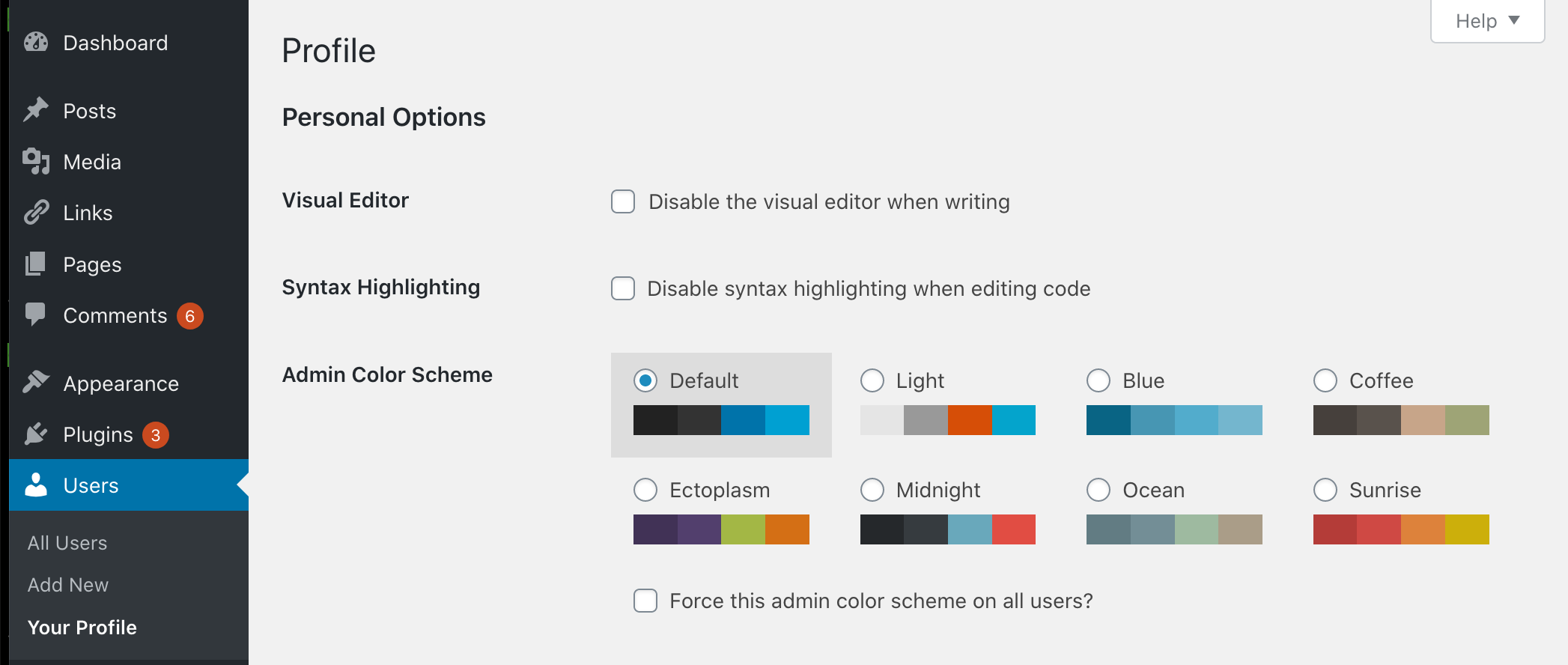


Have you followed all of the installation instructions? You must configure the forced admin color scheme by setting the color scheme for yourself while also checking the “Force this admin color scheme?” checkbox.
You can simply deactivate the plugin. Though bear in mind that if you later reactivate the plugin, the forced color scheme at the time the plugin was deactivated (if there was one) may be reinstated (depending on if the constant, hooked filter, and/or plugin setting are still present).
To keep the plugin active, you can pursue the following steps (whichever may apply to you):
* If the forced color scheme is being set via the constant or code making use of the filter hook, then the code relating to either of those cases must be commented out or disabled.
* If the “Force this admin color scheme?” setting was used, then update an administrative profile to uncheck the checkbox and save.
Yes, but only via custom coding by making use of the c2c_force_admin_color_scheme filter. See the documentation for the filter for an example.
The plugin will recognize that the chosen admin color scheme is no longer valid and will act as if one isn’t set. In such a case, users would then see their individually chosen admin color schemes. If the custom admin color scheme becomes available again (before a new existing color scheme is selected as the new scheme to be forced), then the plugin will reinstate it as the forced admin color scheme.
Just to be clear, if an admin color scheme is being forced, then non-admininistrative users won’t see the admin color scheme picker at all.
The plugin does not disable the admin color scheme picker for administrative users even if a value is directly configured in code (via the constant or the filter) so that the admin color schemes can still be seen and previewed in case an admin user wants to evaluate alternatives.
Yes. The tests are not packaged in the release .zip file or included in plugins.svn.wordpress.org, but can be found in the plugin’s GitHub repository.
Changelog
2.1 (2025-02-15)
Highlights:
This minor release fixes a bug that prevented a forced color scheme from being set or unset if one was being forced via the constant, adds clarifying help text, prevents markup from containing unintended markup, removes unit tests from release packaging, updates compatibility through WP 6.8+, and a few more minor changes.
Details:
- Fix: Allow saving a forced admin color scheme even if constant is set (the constant will still take precedence unless invalid)
- New: Add help text under the checkbox, if checked, to clarify that unchecking it will unset the forced color scheme
- New: Add
get_color_scheme_via_setting()to get the forced admin color scheme saved as a plugin setting - Change: Prevent translations from containing unintended markup
- Hardening: Sanitize submitted color scheme name
- Change: Prevent unwarranted PHPCS complaint
- Change: Add FAQ entry regarding allowing users to choose admin colors schemes again
- Change: Change word used in output string
- Change: Add missing inline comment for translators
- Change: Note compatibility through WP 6.8+
- Change: Note compatibility through PHP 8.3+
- Change: Update copyright date (2025)
- New: Add
.gitignorefile - Change: Remove development and testing-related files from release packaging
- Change: Tweak formatting in
README.md - Change: Fix some typos in inline documentation
- Unit tests:
- Hardening: Prevent direct web access to
bootstrap.php - Allow tests to run against current versions of WordPress
- New: Add
composer.jsonfor PHPUnit Polyfill dependency - Change: Explicitly define return type for overridden methods
- Change: In bootstrap, store path to plugin directory in a constant
- Change: Prevent PHP warnings due to missing core-related generated files
- Hardening: Prevent direct web access to
- Change: Add more potential TODO items and reformat some existing entries
2.0.3 (2021-10-14)
- Change: Use ‘translators’ instead of ‘translator’ as prefix for translator comments
- Change: Note compatibility through WP 5.8+
- Change: Tweak installation instruction
- Unit tests:
- Change: Restructure unit test directories
- Change: Move
phpunit/intotests/ - Change: Move
phpunit/binintotests/
- Change: Move
- Change: Remove ‘test-‘ prefix from unit test file
- Change: In bootstrap, store path to plugin file constant
- Change: In bootstrap, add backcompat for PHPUnit pre-v6.0
- Change: Restructure unit test directories
2.0.2 (2021-04-11)
- Change: Note compatibility through WP 5.7+
- Change: Update copyright date (2021)
Full changelog is available in CHANGELOG.md.
" width="120" height="120">
