
Feeds for YouTube (YouTube video, channel, and gallery plugin)
Active Installs
100,000+
Last Updated
June 10, 2026
First Released
December 9, 2019
Download History (Last one month)
Contributors
Display customizable YouTube channel feeds on your website. Feed YouTube channel content automatically to your website in a powerful and customizable gallery.
YouTube Feed Features
- Completely Customizable YouTube feeds – by default inherits your theme’s styles
- Completely responsive and mobile optimized – your feeds look great on any screen size
- Light and low overhead – minimal bloat and optimized requests to YouTube
- Multiple layouts – display videos from any YouTube channel in a list, gallery, or grid layout
- Multiple feeds from different YouTube channels on multiple pages or widgets
- Lightning fast – post caching and minimized YouTube API requests means that your feed loads lightning fast
- Infinitely load more of your videos with the ‘Load More’ button
- Built-in easy to use YouTube Feed Widget
- Fully internationalized and translatable into any language
- Includes a header at the top of your feed
- Enter your own custom CSS or JavaScript for even deeper customization
For simple step-by-step directions on how to set up the Feeds for YouTube plugin please refer to our setup guide.
Benefits
- Increase social engagement between you and your subscribers
- Save time by using the plugin to generate dynamic, search engine crawlable content on your website
- Get more subscribers by displaying your videos directly on your site
- Display your channel content your way to perfectly match your website’s style
- The plugin is updated regularly with new features, bug-fixes and API changes
- Support is quick, effective, and always happy to help
- We’re dedicated to providing the most customizable, robust and well supported YouTube gallery plugin in the world!
Performance Optimized
While other YouTube plugins load a low-performing iframe when your page loads to show YouTube videos, Feeds for YouTube uses the YouTube API to retrieve and display your videos. This means your YouTube videos are loaded lightning fast and won’t slow down your visitor’s experience with your website. But we don’t stop there. Our YouTube plugin also waits until a site visitor interacts with your YouTube feed before adding the video player to the page. This results in visitors loving your site and encouraging them to stick around longer.
Feedback or Support
Customer support is a huge deal to us. We pride ourselves on always providing quick, effective, and courteous support to all of our users. If you’re having an issue with our plugin then just let us know and we’ll be there to help as soon as possible. You can either open a ticket on the support forum on WordPress.org, or directly on our website.
If you like the plugin then please consider leaving a review, as it really helps to support the plugin. If you have an issue then please allow us to help you fix it before leaving a review. Just let us know what the problem is and we’ll get back to you right away.
Pro Version
For even more feed types and display options, consider upgrading to our Pro version which includes some awesome additional features to help you display your content in even more powerful ways:
- Integrate the YouTube Live API to show live streaming videos on your site.
- Display a YouTube gallery in a carousel slider
- Allow filtering of videos using keywords in the description or title
- Fully functional search endpoint for display videos from a search result
- Combine multiple feeds into one
- Customizable actions when video completes like displaying a link to a product page for example, or displaying thumbnails of your other videos.
- Download video data into a custom post type to allow visitors to browse and view videos on your website.
How to use the “Feeds for YouTube” plugin
One of our main priorities has always been to make our plugins as easy as possible to setup and use. Once you’ve installed the “Feeds for YouTube” plugin there are only a few steps to get up and running:
- 1) Follow the simple steps after clicking “Add New”.
- 2) Once you’ve connected an account or added an API key, build your feed with our customizer
- 3) Then simply copy and paste the
[youtube-feed feed=1]shortcode onto any page, post, or widget where you want your feed to be displayed.
That’s it! You can return to the settings page to edit any feed.
For full step-by-step setup directions with screenshots, see here.
Who’s behind this plugin?
We’re Smash Balloon; a fun-loving WordPress plugin development company birthed into existence in early 2013. We specialize in creating social media plugins (for Facebook, Instagram, Twitter, and YouTube) that are not only intuitive and simple to use, but also designed to integrate seamlessly into your website and allow you to display your social media content in powerful and unique ways. Over 1 million awesome people have decided to actively use our free plugins, which is an incredible honor that we don’t take lightly. This compels us to try to provide the quickest and most effective customer support that we can, blowing users away with the best customer service they’ve ever experienced.
To find out more about the team, see here.
- Install the plugin either via the WordPress plugin directory, or by uploading the files to your web server (in the /wp-content/plugins/ directory).
- Activate the plugin through the ‘Plugins’ menu in WordPress.
- Navigate to the ‘Feeds for YouTube’ settings page to configure your YouTube gallery.
- Use the shortcode [youtube-feed feed=1] in your page, post or widget to display your YouTube feed.
- You can display multiple feeds with different configurations by specifying the necessary parameters directly in the shortcode: [youtube-feed feed=2].
For simple step-by-step directions on how to set up the plugin please refer to our setup guide.
Setting up the plugin
The Feeds for YouTube plugin is brand new and so we’re currently working on improving our documentation for it. If you have an issue or question please submit a support ticket and we’ll get back to you as soon as we can.
1) Once you’ve installed the “Feeds for YouTube” plugin click on the “Feeds for YouTube” item in your WordPress menu
2) Click on the large blue YouTube login button to get your Access Token and Refresh Token. Note; if you have your own Developer Project set up then you can enter your API key by enabling the checkbox below the YouTube login button.
3) Authorize the plugin to read data about your videos and channel.
4) YouTube sends back your Access Token and Refresh Token which are then automatically saved by the plugin. This information is required in order to connect to the API.
5) Enter a channel name to display videos from.
6) Continue to the feed customizer page to customize your feed.
7) Once you’ve customized your feed, embed it using the “Embed” button found at the top of the customizer.
8) Alternatively, copy the [youtube-feed feed=1] shortcode and paste it into any page, post or widget where you want the YouTube feed to appear.
9) You can use the default WordPress ‘Text’ widget to display your feed in a sidebar or other widget area.
11) View your website to see your feed(s) in all their glory!
Screenshot Gallery


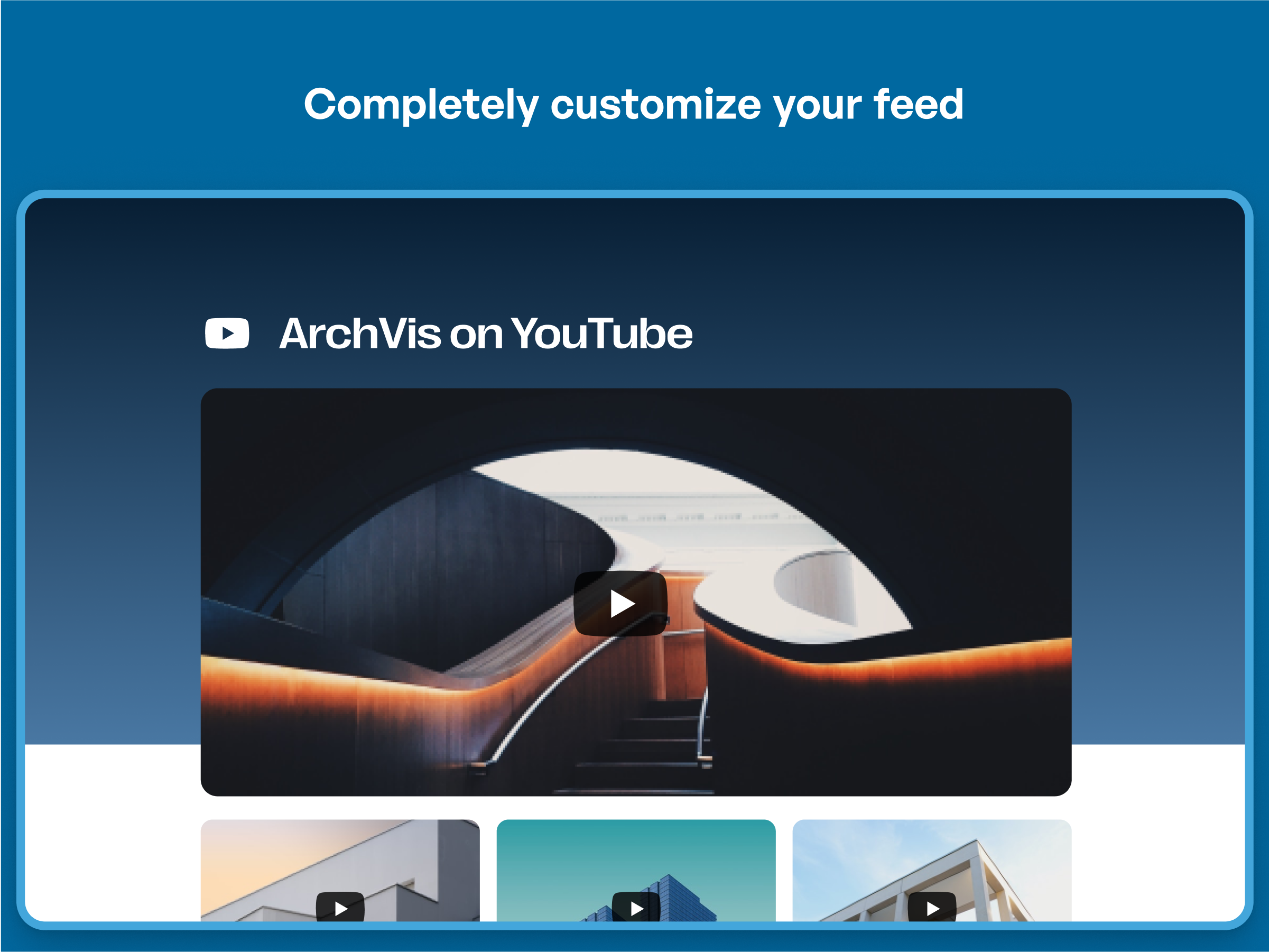
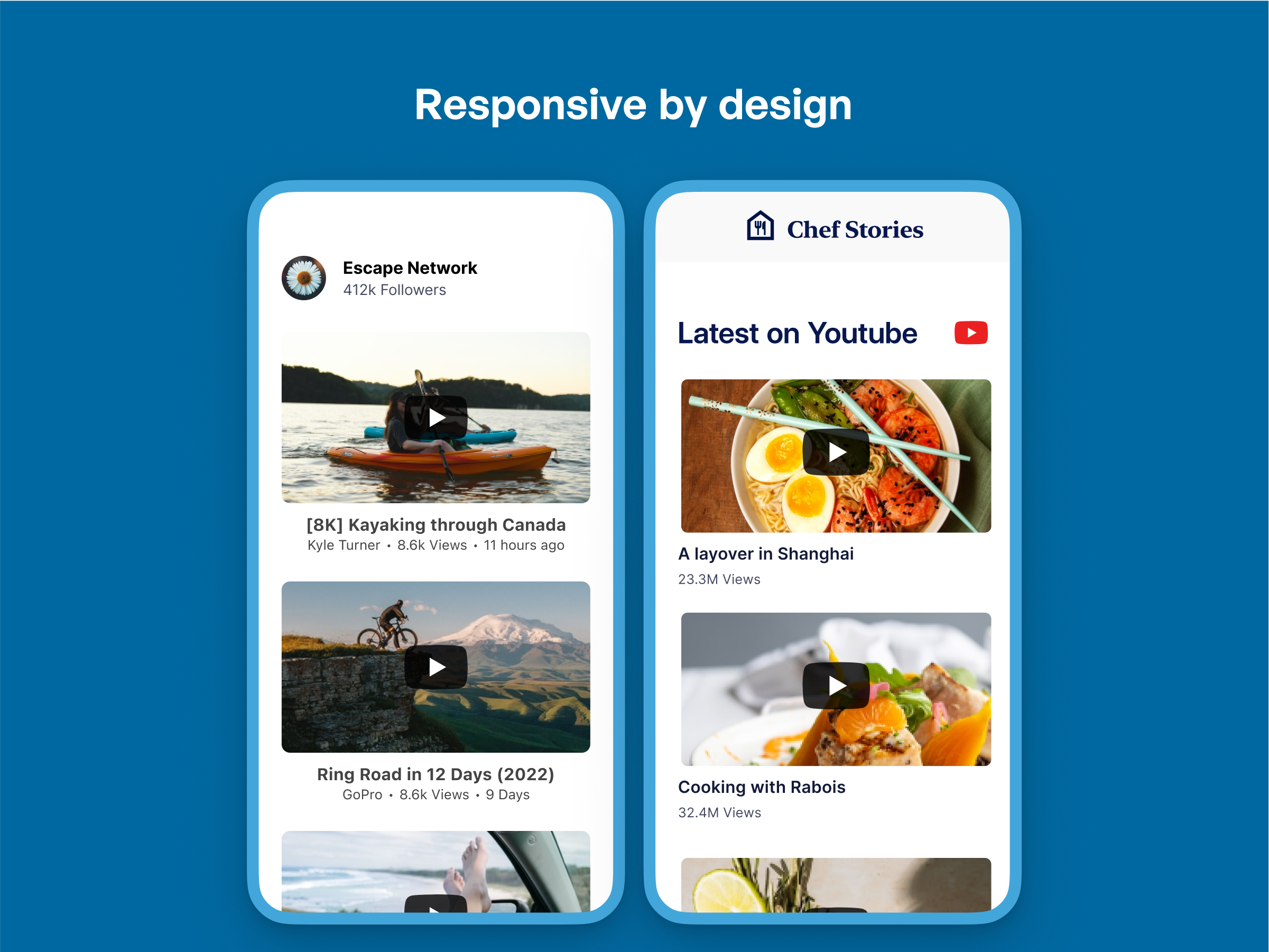
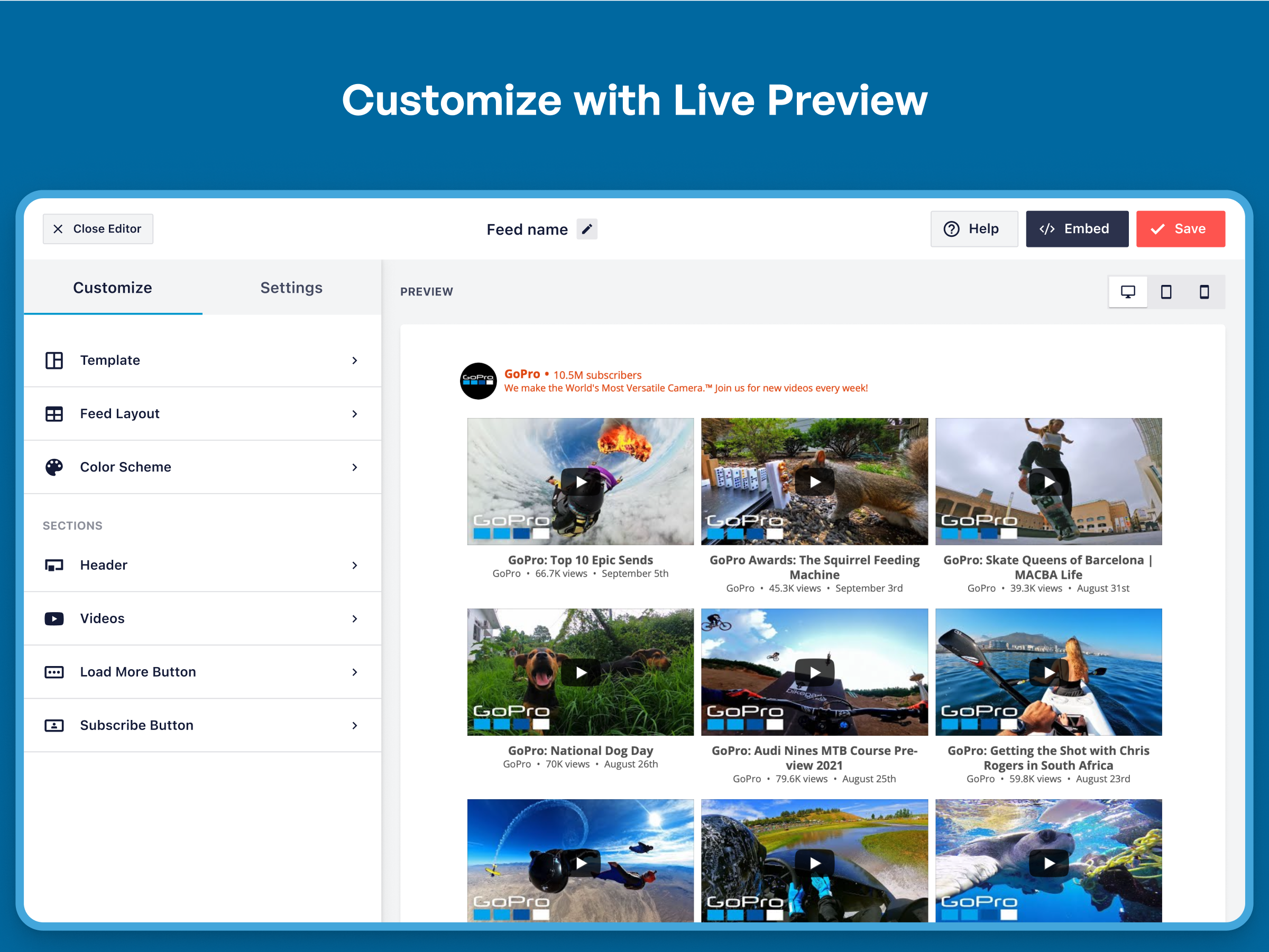
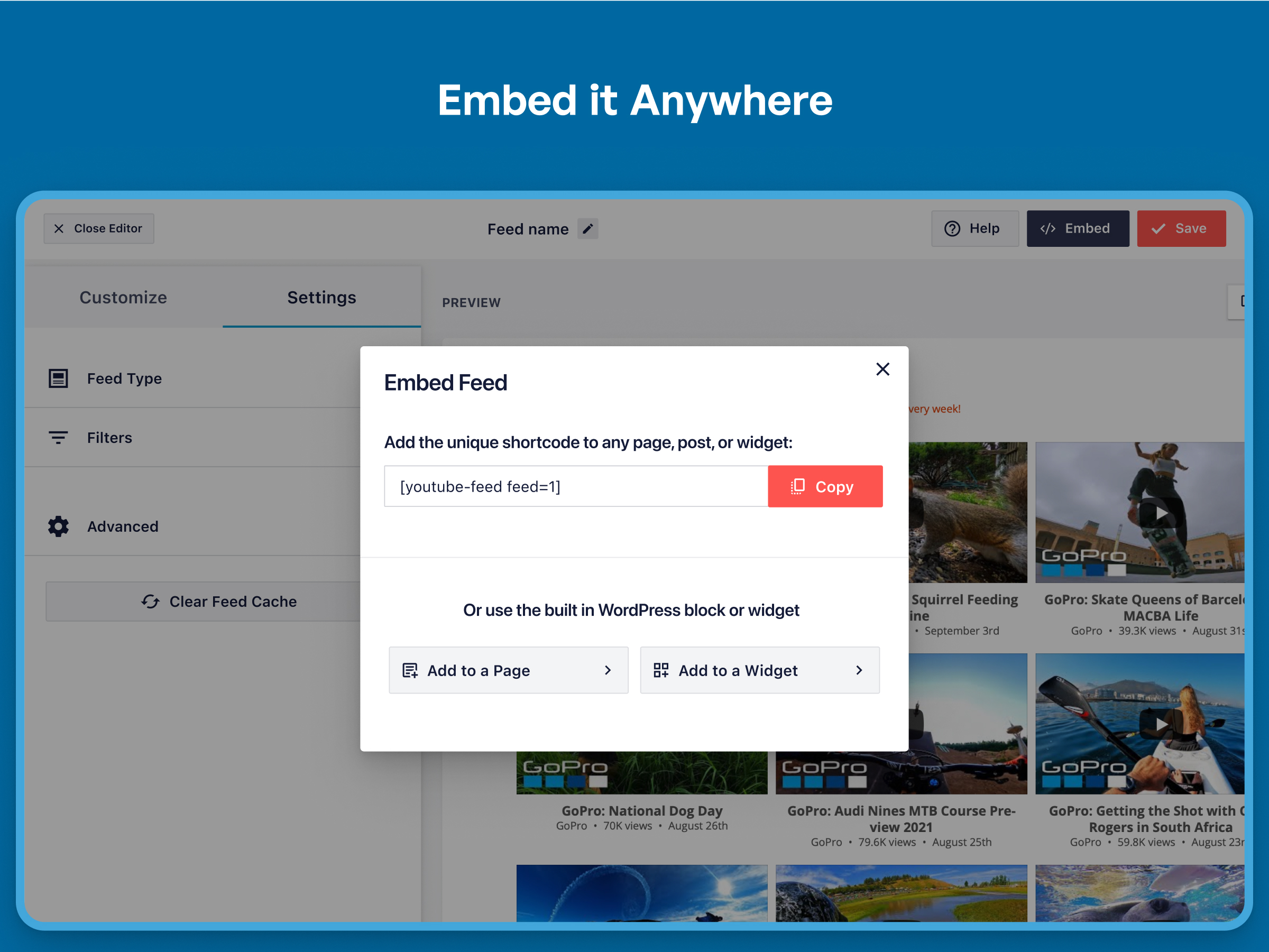
Yep. You can display multiple feeds by creating them with the customizer and adding the feed ID to a shortcode.
You can embed a gallery directly into a template file by using the WordPress do_shortcode function: <?php echo do_shortcode('[youtube-feed feed=1]'); ?>.
The Feeds for YouTube plugin should work in compatibility with most, if not all, caching plugins, but you may need to tweak the settings in order to allow the feed to update successfully and display your latest posts. If you are experiencing problems with your feed not updating then try disabling either ‘Page Caching’ or ‘Object Caching’ in W3 Total Cache (or any other similar caching plugin) to see whether that fixes the problem and the feed displays and updates successfully.
Yep, just use the following setting: Feeds for YouTube > Customize > Video Experience > When does video play? You can then set the video to play when clicked or to autoplay.
This free plugin has several layout options built into it. Use the settings in the following location to display your videos in a list, grid, or gallery layout: Feeds for YouTube > Customize > Layout. You can also change the spacing/padding between the videos by using the “Spacing between videos” setting in this same section.
Yep, you can choose to display between 1-50 videos in your feed by using the following setting: Feeds for YouTube > Customize > Layout > Number of Videos. The plugin also contains a “Load More” button to allow you to infinitely load more videos into your feed.
Yes. All feed layouts are completely mobile responsive. Using the plugin’s gallery layout will automatically scroll visitors to the video player to view the video when the video thumbnail is clicked.
Yes. The plugin will cache all of the posts collected from the API. Your YouTube videos and information about your channel can then be retrieved and used for future page loads.
You can display videos from any YouTube channel using the unique YouTube channel ID. This can be found by viewing the channel page on YouTube and looking at the end of the URL. ex: https://www.youtube.com/channel/UC1a2b3c4D5F6g7i8j9k. You can also use the channel nickname or enter the YouTube handle when creating a feed.
The plugin has a few features to minimize the impact it has on page load time. For example, iframes for playing YouTube videos are not loaded until the feed is interacted with by a visitor. Thumbnails of your YouTube videos are the smallest resolution necessary relative to the size of the feed. Also, these video thumbnails are not loaded until the rest of the content on the page is loaded.
By default, the plugin retrieves new videos for your YouTube gallery once every hour. You can reduce this to as little as 15 minutes if needed. You can even set your feed to update using WordPress cron in the background so the caching process is not relying on the page with your YouTube feed being visited.
Changelog
2.7.0
- New: Added a modern Gutenberg block for the YouTube feed. Existing feeds using the legacy block continue to render without reconfiguration.
- New: WPConsent integration for GDPR cookie consent compliance, including a GDPR step in the onboarding wizard.
- New: Added a Help widget for in-app access to documentation and support.
- Tweak: Compatibility with WP 7.
- Tweak: Corrected typos and grammar in plugin UI strings.
- Fix: Feed blocks now render a live preview correctly inside the WP 7.0+ iframed block editor.
- Fix: Setup wizard tooltips now display correctly in the iframed block editor.
- Fix: Legacy Elementor widgets are hidden from the element search, and the widget title is now translatable.
- Fix: Block preview now uses a limited query to prevent unintended data exposure.
2.6.6
- Fix: Additional plugin hardening.
2.6.5
- Fix: Elementor CSS no longer double-prefixes, preventing 301 redirects on preview URLs.
- Fix: Cron update no longer triggers a PHP 8.x fatal when a source video has been deleted or set private.
2.6.4
- Fix: Additional plugin hardening.
2.6.3
- Tweak: Added optional deactivation feedback survey to help us improve the plugin.
2.6.2
- Fix: Additional plugin hardening.
2.6.1
- Tweak: Improved SEO by changing Load More, Close, and Cancel buttons to div elements
- Fix: Resolved translation loading issue (_load_textdomain_just_in_time warning)
- Fix: Resolved security vulnerabilities reported by Patchstack and Wordfence
2.4.0
- New: Added support for a new GDPR consent plugin (WPConsent)[https://wpconsent.com/?utm_campaign=youtube-free-readme&utm_source=changelog&utm_medium=wpconsentannouncement]
- New: Added support for GDPR Cookie Compliance by Moove Agency and Real Cookie Banner GDPR plugins.
2.3.1
- Fix: Fixed an issue with our GDPR features and the wrong videos being linked to.
2.3
- New – Added an onboarding wizard to make setting up your first feed even easier!
- Tweak – Added easy installers for our latest Smash Balloon Products. Try ClickSocial, Reviews Feed, and TikTok Feeds today!
- Fix – PHP warning related to _load_textdomain_just_in_time are now resolved
- Fix – Fixed an issue making it difficult for users to close the lightbox in some situations
- Fix – Improved compatibility with the latest versions of Divi and Elementor. Use our related integrations to easily add your feeds to your site!
2.2.4
- Tweak: Added support for our new Feed Analytics product. Get insights as to how your feeds are being used by site visitors.
2.2.3
- Fix: Plugin hardening.
- Tweak: Improved translation support for multiple languages.
- Tweak: Added support for Borlabs 3.0 and our GDPR features.
2.2.2
- Fix: Plugin hardening.
- Fix: Fixed missing CSS file that would affect Elementor users.
2.2.1
- Fix: Fixed an issue with the feed type selection that was causing confusion.
2.1.4
- Fix: Plugin hardening.
2.1.3
- Fix: Fixed an issue causing the next update schedule time found on the settings page to be inaccurate.
2.1.2
- Fix: Plugin hardening.
- Fix: Removed unused files in the “templates” folder.
- Fix: Fixed a deprecation notice in PHP 8.1+ “strpos(): Passing null to parameter #1 ($haystack) of type string is deprecated”
- Fix: Custom text that included single quotes would show with slashes on the front-end of the feed.
2.1
- New: Create a new feed using a YouTube handle instead of needing the channel ID.
- Fix: Emoji in video descriptions would break our backup feed system when an older version of MySQL was in use.
- Fix: Fixed PHP deprecation warning “Passing null to parameter” for PHP 8.2+
2.0.7
- Fix: Fixed a broken link in the admin area.
- Fix: Removed a CSS property causing a 404 error in some circumstances.
2.0.6
- Tweak: Connecting your YouTube account will now take you to connect.smashballoon.com first to improve the reliability of this process.
- Fix: Fixed a separate rare PHP error “Uncaught Error: Class ‘Smashballoon\Customizer\Container’ not found”.
2.0.5
- Fix: Fixed a conflict with the All in One SEO plugin causing menu tabs to not work properly.
- Fix: Fixed rare PHP error “Uncaught Error: Class ‘Smashballoon\Customizer\Container’ not found”.
2.0.4
- Fix: Fixed a compatibility issue with the Complianz Cookie Consent plugin integration.
- Fix: Clicking the link to the page that explains creating custom templates would not work.
2.0.3
- Fix: Removed DotEnv code that was causing a conflict in some rare circumstances.
- Fix: When using two or more feeds on one page and the “AJAX theme loading fix” setting, an empty lightbox related element would display at the bottom of the page.
2.0.2
- Fix: Fixed a conflict with the All in One SEO plugin causing menu tabs to not work properly.
2.0.1
- Tweak: Improved the user experience to avoid confusion over connecting an account when creating a new feed.
- Fix: Fixed deprecation warnings when using PHP 8.0+.
- Fix: Added any API key saved in settings to the system info for easy support debugging.
- Fix: Activating the Pro version would trigger an error if the free version of YouTube Feeds was also active.
2.0
- Important: Minimum supported WordPress version has been raised from 3.5 to 4.1.
- New: Our biggest update ever! We’ve completely redesigned the plugin settings from head to toe to make it easier to create, manage, and customize your YouTube feeds.
- New: All your feeds are now displayed in one place on the “All Feeds” page. This shows a list of any existing (legacy) feeds and any new ones that you create.
- New: Easily edit individual feed settings for new feeds instead of cumbersome shortcode options.
- New: It’s now much easier to create feeds. Just click “Add New”, select your feed type, connect your account, and you’re done!
- New: Brand new feed customizer. We’ve completely redesigned feed customization from the ground up, reorganizing the settings to make them easier to find.
- New: Live Feed Preview. You can now see changes you make to your feeds in real time, right in the settings page. Easily preview them on desktop, tablet, and mobile sizes.
- New: Color Scheme option. It’s now easier than ever to change colors across your feed without needing to adjust individual color settings. Just set a color scheme to effortlessly change colors across your entire feed.
- New: You can now change the number of columns in your feed across desktop and mobile.
- New: Easily import and export feed settings to make it simple to move feeds across sites.
- New: Added a new custom text header option, so you can now add custom text to the header for your feed.
1.4.5
- Fix: The play button was still visible in the lightbox during video playback after a user had granted GDPR cookie consent.
- Fix: SSL is now always verified when making API requests to YouTube’s API.
- Fix: After enabling background caching, the plugin was not showing when the feed would be updated next.
1.4.4
- New: Added a shortcode setting “allowcookies” that, when set to “true”, will allow YouTube cookies needed for custom end screens configured on youtube.com.
- Tweak: Changed menu name from “Feeds for YouTube” to “YouTube Feed”.
- Tweak: An alert bubble is added to the Feeds for YouTube menu item when there are new notifications available.
- Fix: Custom JavaScript setting would not allow HTML to be saved.
- Fix: Fixed two PHP errors that would occur when posts were being stored using the “page” storing method.
- Fix: A timestamp was added to errors in the error log to help determine when they occurred.
1.4.3
- Fix: Fixed a compatibility issue with the Complianz GDPR plugin.
- Fix: Incorrect description of the ‘check for new posts’ setting in the admin area.
- Fix: The feed finder tool was displaying duplicated results of some feeds.
1.4.2
- Tested with WordPress 5.8 update.
- Tweak: Added “play” icon to main player for the gallery layout.
- Fix: Fixed an issue with GDPR Cookie Consent by Web Toffee integration.
- Fix: Setting the height and width of a feed using a shortcode would not work without including the unit of measure.
1.4.1
- Fix: Fixed several issues with GDPR Cookie Consent by Web Toffee integration.
1.4
- New: The locations of the YouTube feeds on your site will now be logged and listed on a single page for easier management. After this feature has been active for awhile, a “Feed Finder” link will appear next to the Feed Type setting on the plugin Settings page which allows you to see a list of all feeds on your site along with their locations.
- Fix: Pro version of the Web Toffee GDPR Cookie Consent plugin was not being detected.
- Fix: Updated jQuery methods for compatibility with WordPress 5.7.
1.3
- New: Integrations with popular GDPR cookie consent solutions added. Visit the YouTube Feed settings page, Customize tab, GDPR section for more information.
- Fix: Date that video was published would not always match what was shown on YouTube.com.
1.2.4
- Tweak: Minor update to item.php template to accommodate dynamic title attribute in lightbox.
- Tweak: Added support for improved notices on the plugin settings page.
- Fix: Connecting an account that didn’t have an associated YouTube channel would result in nothing happening. Now an empty channel is connected that can be used to create feeds.
- Fix: Iframe player now uses the video title as the iframe element title attribute.
1.2.3
- New: Added setting to use WordPress cron to clear feed caches on an interval. If your feeds are not updating automatically, try enabling the setting found on the “Customize” tab “Cron Clear Cache”.
- Tweak: Added notice explaining the account connection and what it can and can’t be used for when connecting an account.
- Tweak: Removed refresh token from being required for a manual connection.
- Fix: Improved performance of API requests for creating feeds.
1.2.2
- Tweak: More details are provided for API errors such as an API key not working after being created.
- Tweak: If an API key has not been entered, an account reconnection is required if trying to display videos from a previously unused channel and more than an hour has passed since the last account connection.
- Tweak: Play icon changed to YouTube logo to comply with their terms of service.
- Fix: Prevented a Fatal PHP error caused by retrieving YouTube videos without using an API key and either entering a non-existing YouTube channel ID or having allow_url_fopen disabled on the server.
- Fix: Non-latin characters were displaying incorrectly in titles and descriptions when a feed was using backup data.
- Fix: Thumbnails were not resizing properly when the browser was resized.
1.2.1
- Tweak: Video thumbnails are cropped to a 9:16 aspect ratio to remove black bars at the top and bottom of the images.
- Tweak: Improved workarounds for video player issues caused by having iframes from other sources on the same page.
1.2
- New: Display video players in 9:16 ratio. To use 3:4 ratio go to: Feeds for YouTube > Customize > Video Experience.
- New: Added a “Feeds for YouTube” Gutenberg block to use in the block editor, allowing you to easily add a feed to posts and pages.
- Tweak: Hide admin notices from other plugins when using the Feeds for YouTube settings pages.
- Fix: Video player would sometimes not work when the iframe JS API was available earlier than the feeds were created.
1.1.1
- Tested with upcoming WordPress 5.4 update.
- New: Added setting for using custom templates for feed HTML.
- Tweak: Added CSS to help feeds work better with certain themes.
- Tweak: Used a higher resolution image file if optimum resolution was not available from the API.
- Fix: “include=” shortcode setting would cause play icon to never show.
- Fix: Fast response from player API would cause the players to load along with the page when not necessary.
- Fix: Background caching was not updating YouTube feed caches.
1.1
- New: Several improvements to the lightbox for grid feeds were made including a video index indicator, navigation arrows moved to the outside of the video, and a close button.
- New: Added YouTube play button icon that displays on top of video thumbnails. Disable this on the “Customize” tab.
- New: Added workaround for occasional issue caused by multiple elements of the page using the YouTube Player API.
- Tweak: Fixed typo in HTML element with the class “sby_thumbail_hover”. Now “sby_thumbnail_hover”.
- Tweak: Updated admin PHP code.
- Tweak: Updated JavaScript code.
- Tweak: Updated language files and several strings to use text domain “feeds-for-youtube” instead of “youtube-feed”.
1.0.3
- Tweak: Changed tooltip and notes regarding how to display a feed from a certain channel.
- Fix: YouTube iframe JavaScript file was being loaded with HTTP. Changed to HTTPS.
- Fix: Prevented error if allow_url_fopen set to false in php.ini by changing how YouTube RSS feeds are retrieved from YouTube.
- Fix: Unable to view YouTube account details if more than one account connected.
1.0.2
- New: Changed the method used to update feeds to reduce API requests.
- Tweak: More posts cached in the wp_posts table when an API request is made.
- Tweak: YouTube channel data cached to reduce API requests.
- Fix: Error when deactivating and reactivating the plugin with background caching enabled.
1.0.1
- Fix: Optimized API calls to YouTube to reduce requests.
- Fix: Minor bug fixes.
1.0
- Launched the Feeds for YouTube plugin!
" width="120" height="120">
Available Versions
| Version | Download | Type |
|---|---|---|
| 2.7.0 | Download | Stable |
| 2.6.6 | Download | Stable |
| 2.6.5 | Download | Stable |
| 2.6.4 | Download | Stable |
| 2.6.3 | Download | Stable |
| 2.6.2 | Download | Stable |
| 2.6.1 | Download | Stable |
| 2.4.0 | Download | Stable |
| 2.3.1 | Download | Stable |
| 2.3 | Download | Stable |
| 2.2.4 | Download | Stable |
| 2.2.3 | Download | Stable |
| 2.2.2 | Download | Stable |
| 2.2.1 | Download | Stable |
| 2.2 | Download | Stable |
| 2.1.4 | Download | Stable |
| 2.1.3 | Download | Stable |
| 2.1.2 | Download | Stable |
| 2.1.1 | Download | Stable |
| 2.1 | Download | Stable |
| 2.0.7 | Download | Stable |
| 2.0.6 | Download | Stable |
| 2.0.5 | Download | Stable |
| 2.0.4 | Download | Stable |
| 2.0.3 | Download | Stable |
| 2.0.2 | Download | Stable |
| 2.0.1 | Download | Stable |
| 2.0 | Download | Stable |
| 1.4.5 | Download | Stable |
| 1.4.4 | Download | Stable |
| 1.4.3 | Download | Stable |
| 1.4.2 | Download | Stable |
| 1.4 | Download | Stable |
| 1.3 | Download | Stable |
| 1.2.4 | Download | Stable |
| 1.2.3 | Download | Stable |
| 1.2.2 | Download | Stable |
| 1.2.1 | Download | Stable |
| 1.2 | Download | Stable |
| 1.1.1 | Download | Stable |
| 1.1 | Download | Stable |
| 1.0.3 | Download | Stable |
| 1.0.2 | Download | Stable |
| 1.0.1 | Download | Stable |
| 1.0 | Download | Stable |
| Development | Download | Trunk |
