
Events Manager – Zoom Integration
Active Installs
600+
Last Updated
September 24, 2026
First Released
June 30, 2020
Download History (Last one month)
Integrate Events Manager with Zoom and start creating webinars and meetings directly from your WordPress dashboard, as well as displaying these in calendars and handling bookings (including payments).
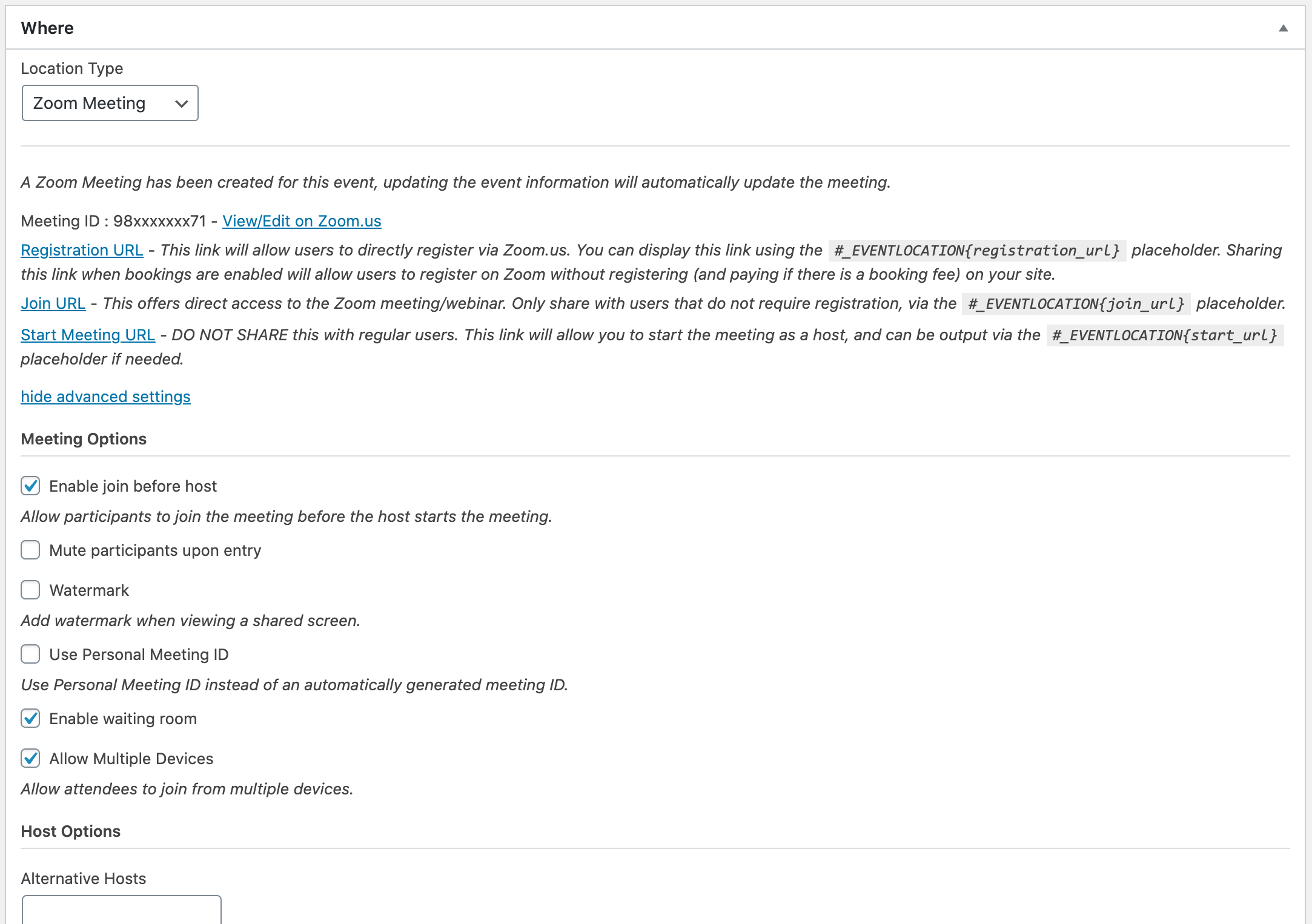
Seamless integration with both Events Manager and Zoom. Install and set up, create an event, choose a Zoom Meeting/Webinar as your location type, enable bookings, and you’re good to go!
Features
- Create Webinars and Meetings while creating an event.
- Support for recurring events, each event has its own webinar/meeting.
- Adjust all your webinar/meeting settings directly from your event editor.
- Enabling bookings on your events will automatically register users to that webinar/meeting.
- Send users unique URLs
- Integrated placeholders and search attributes for Events Manager, including:
- Filter event types by Webinar, Meeting or Rooms
- Conditional placeholders to display specific content for meetings/webinars/rooms.
- Display meeting information via Placeholders
- Provide unique Join URLs to users who’ve booked in custom email templates.
- Select a Zoom Room for an event (scheduling features not available in Zoom API).
Additionally, this plugin integrates automatically, at no extra cost, with Events Manager Pro including:
- Accept online and offline payments for webinars/meetings!
- Allow one person to book multiple individual attendees using our custom attendee booking forms, each with unique Join URLs!
- Custom booking forms integrate with Zoom fields and custom questions.
- Checkout-flow using our Multiple Bookings Mode
How it works
This integration creates a connection between Events Manager and your Zoom account. When creating events and you select a Zoom Webinar or Meeting as your location type, a new meeting/webinar will be created with the same name/time as your event.
Bookings are handled by Events Manager when a booking is made and approved (either automatically or manually), a registration will be made to the related meeting/webinar. Since bookings are handled by Events Manager, you can also make use of all the Pro features such as accepting payments for your event and asking custom questions.
You can alternatively link directly to your meetings and disable bookings via Events Manager entirely.
Visit our documentation pages for more information on setup.
Events Manager for Zoom works like any standard WordPress plugin, and requires little configuration to connect with Zoom. If you get stuck, visit our documentation and support forums.
Whenever installing or upgrading any plugin, or even WordPress itself, we always recommended you back up your database first!
Installing
- Please ensure you’ve installed Events Manager beforehand.
- If installing, go to Plugins > Add New in the admin area, and search for “Events Manager for Zoom”.
- Click install, once installed, activate and you’re done!
Setup
Once installed, you will need to create an OAuth app on Zoom.us, add this information to your settings page, and connect your WordPress site with Zoom. For more information on this, please see our Zoom Documentation
No FAQ provided.
Changelog
1.6.1 (dev)
- added fix for showing ical location in confirmation emails to zoom meeting/webinar including actual private Join URL instead of public reg form (unavaialble for multi-attendee urls, requires Pro 3.1.5)
1.6
- fixed booking deletion not cancelling a booking on Zoom itself
- fixed connection issues due to API changes to the Zoom OAuth process
- added default webinar and meeting location types activation if not already enabled
- added notification email for EM 6.4 when registrations don’t work as expected
- fixed compatibility issues with EM 6.2 booking meta (atomic tickets) update
- fixed zoom registration issues when no first or last name supplied
1.5
- added support for downloading dev versions via EM
- added support for ical LOCATION property (requires EM 5.12.1)
1.4
- fixed #_BOOKINGZOOMJOINLINK not showing a join URL if approval type is set to ‘no registration required’ on Zoom
- fixed booking approval issues in MB mode and “no registration required” for Zoom meeting/webinar
- fixed duplicate zoom.com confirmation emails getting sent,
- added extra explanations to email and registration settings
- added meta box for zoom join link info and synchornizer in case of error on booking edit/view page
1.3
- fixed some PHP warnings
- fixed start_url placeholder not working in email templates (requires EM 5.9.11)
1.2
- fixed changing webinars to “no registration” causing save errors if bookings enabled with a custom booking form
- fixed errors when publishing zoom meetings/webinars with a global dial-in country selected
- fixed booking approval errors with custom Pro forms containing country field
- changed start url placeholder for meetings/webinars to display only to users with event edit rights
- added deletion of linked Zoom Meeting/Webinar when switching to another event location type,
- changed admin text to specifically name webinar or meeting in context,
- added detection of deleted Zoom Meeting/Webinar
- added deletion support for linked Zoom Meeting/Webinar when switching to another event location type (requires Events Manager 5.9.8.3 or higher)
- changed admin text to specifically name webinar or meeting in context
- added detection of deleted Zoom Meeting/Webinar
- added importing of bookings to meeting/webinar if event already has bookings
- created rate limit error messages and contingencies
- added recurring event support so that individual recurrences will have their own meeting/webinar
- changed data storage location to $data property in Event_Location object rather than directly in the EM_Event
- moved meeting/webinar passcode storage out of settings array into its own meta field to allow recurring event support
- added deletion of meeting/webinar when event is deleted, event location is changed or if recurring events recreate/reschedule events
- added export of bookings to meeting/webinar for events already containing bookings being changed into a zoom event location
- added placeholder docs for the help page
1.1
- Deprecated use of $post in get_post() functions
- Added sanitization for incoming post variable in zoom rooms
1.0
- First Release
