
Easy Actions Scheduler Cleaner
Active Installs
900+
Last Updated
August 18, 2026
First Released
September 28, 2025
Download History (Last one month)
Easy Actions Scheduler Cleaner helps you clean up your Actions Scheduler database tables. Over time, these tables can accumulate thousands or even millions of records from completed, failed, canceled, and past-due actions that are no longer needed, as well as extensive logs that can take up significant database space.
This plugin provides two cleanup modes plus email notifications:
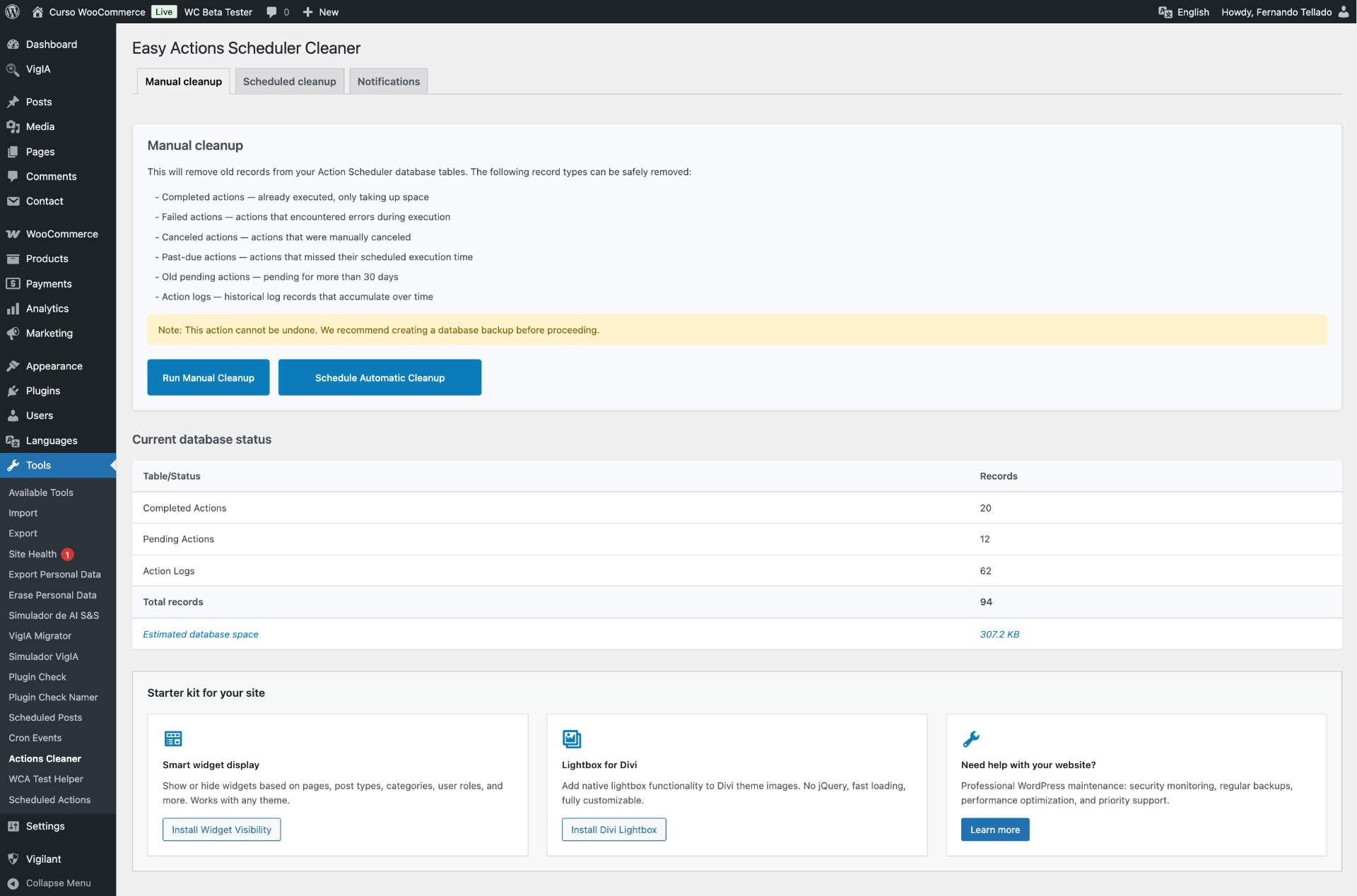
Manual cleanup
Run a one-time cleanup that removes all unnecessary records at once:
- Delete completed actions – Actions that have already been executed successfully
- Delete failed actions – Actions that encountered errors during execution
- Delete canceled actions – Actions that were manually canceled
- Delete past-due actions – Actions that missed their scheduled execution time
- Delete old pending actions – Pending actions older than 30 days
- Delete action logs – Historical log records that accumulate over time
Scheduled cleanup
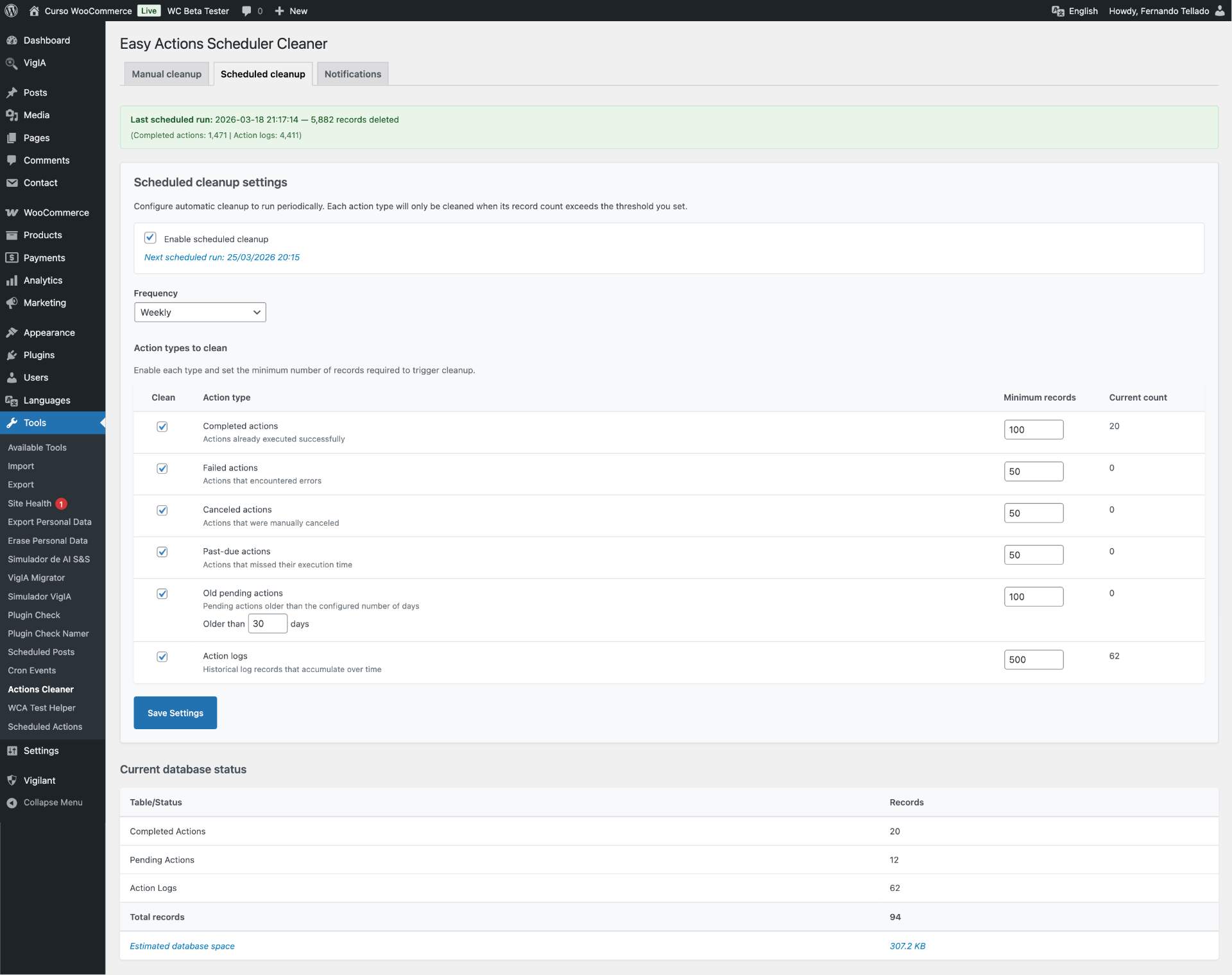
Configure automatic cleanup to run on a schedule with smart thresholds:
- Flexible frequency – Daily, weekly, biweekly, or monthly
- Per-type configuration – Enable/disable cleanup for each action type independently
- Threshold system – Only clean when records exceed your configured minimum (e.g., clean completed actions only when there are more than 100)
- Configurable pending age – Set custom age for old pending actions (7 to 365 days)
- Last run reporting – See results from the last scheduled cleanup
- Background processing (NEW in 1.3) – The scheduled cleanup now runs as a self-rescheduling Action Scheduler job, so it never times out on large sites with millions of records
Email notifications
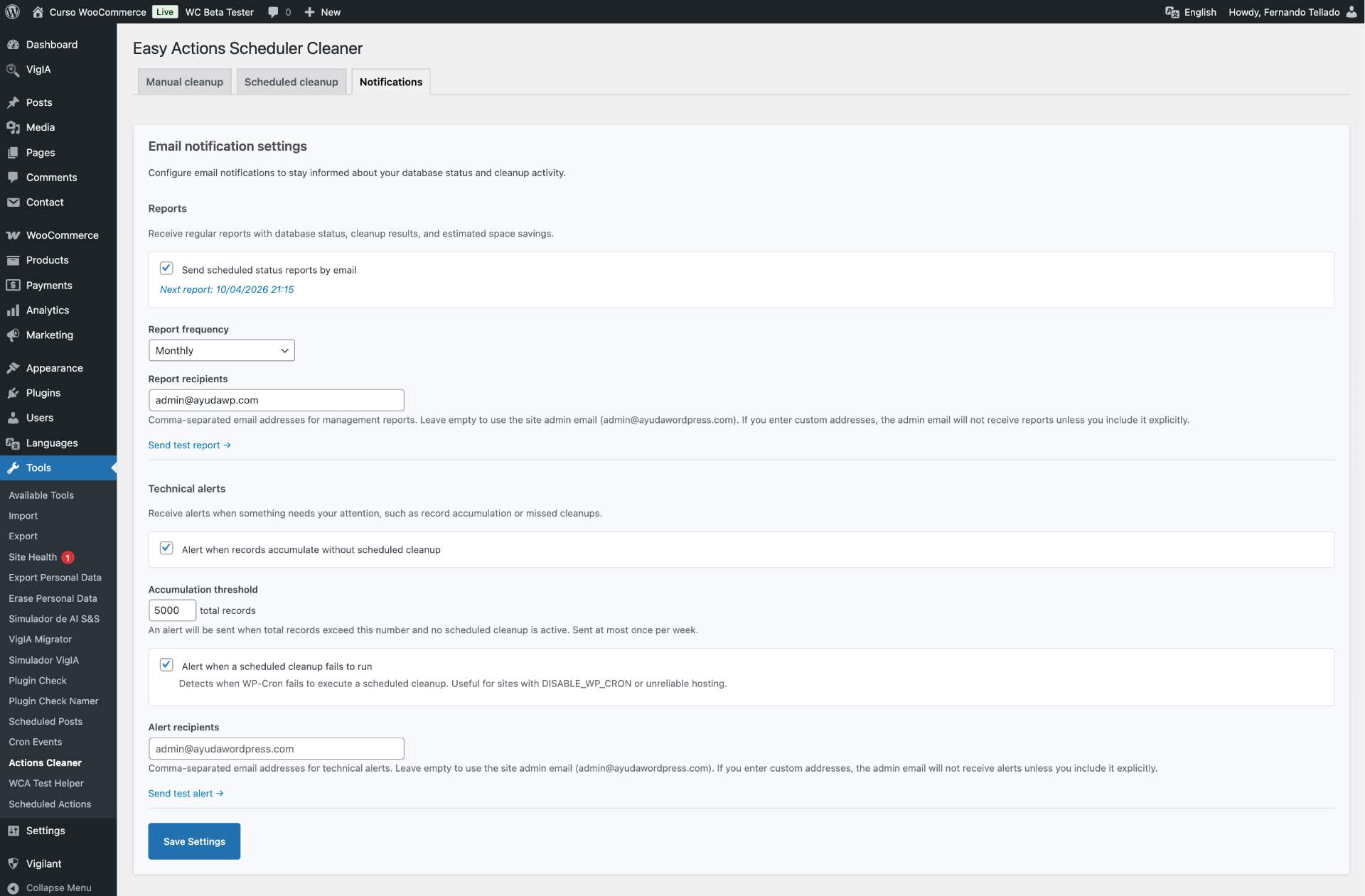
Stay informed about your database status with configurable email notifications:
- Periodic reports – Receive daily, weekly, or monthly reports with database status, cleanup results, and estimated space savings
- Accumulation alerts – Get notified when records pile up without an active scheduled cleanup
- Missed cleanup alerts – Detect when WP-Cron fails to execute a scheduled cleanup
- Separate recipient lists – Configure different email addresses for management reports and technical alerts
- HTML formatted emails – Clean, readable email reports
- Test emails – Send test report or alert emails directly from the settings page to verify delivery
Key features
- Two cleanup modes – Manual one-time cleanup or scheduled automatic cleanup
- Smart thresholds – Scheduled cleanup only runs when record counts justify it
- Database space estimation – See how much space your Action Scheduler tables are using
- Email notifications – Periodic reports, accumulation alerts, and missed cleanup warnings
- Batch processing – Handles large datasets efficiently (10,000 records per batch)
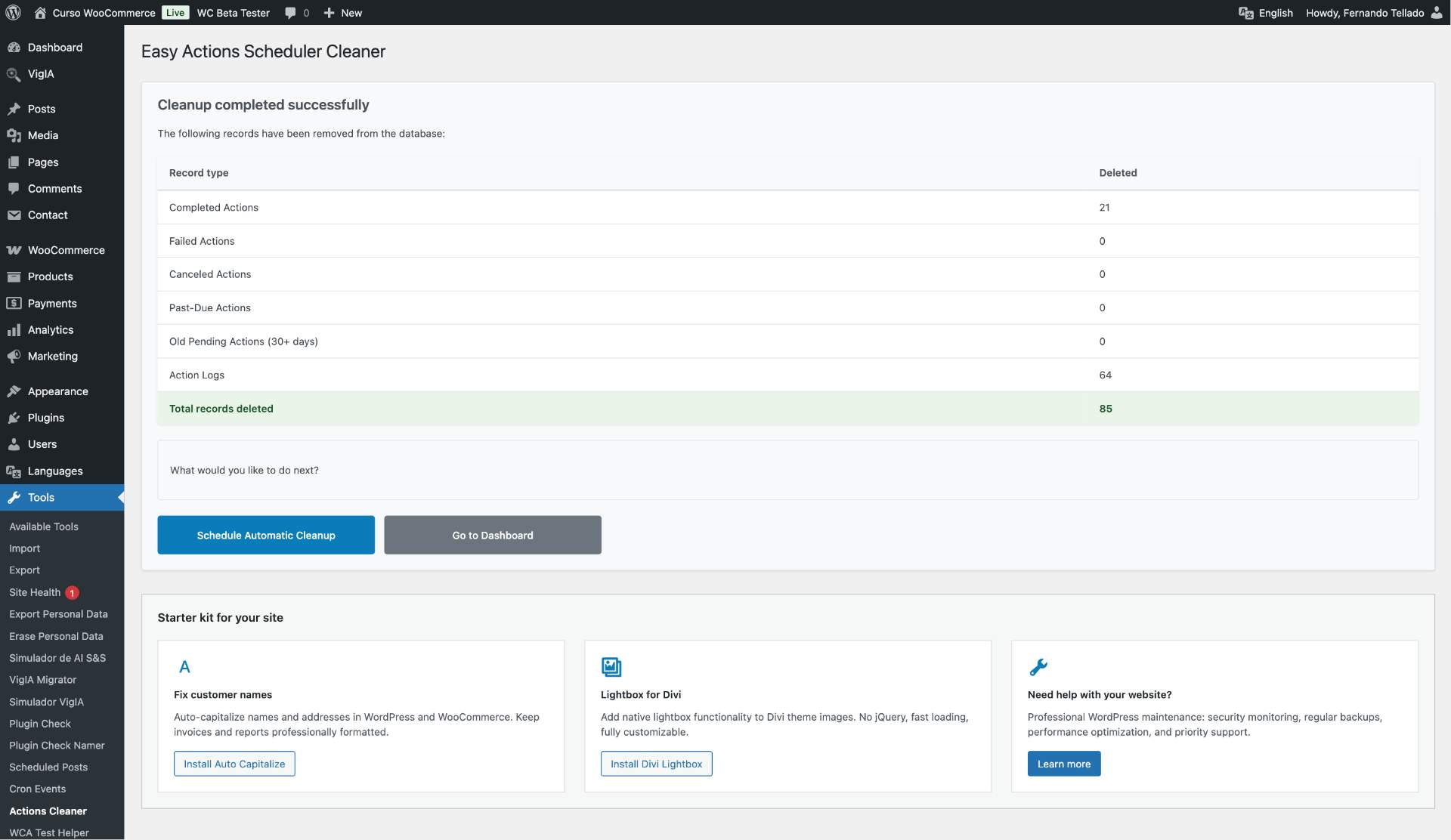
- Detailed reporting – Shows exactly how many records were deleted by type and estimated space freed
- Orphaned data cleanup – Also removes related orphaned groups
- Complete logs cleanup – Removes all action logs that accumulate over time
- WooCommerce integration – Seamlessly works with WooCommerce’s Action Scheduler
Why use this plugin?
The Actions Scheduler tool used by WooCommerce and many other WordPress plugins can accumulate millions of database records over time, which can:
- Slow down your website performance
- Increase database size unnecessarily
- Make database backups larger and slower
- Impact Actions Scheduler’s own performance
The action logs table (actionscheduler_logs) is particularly problematic as it records detailed information about every action execution and can grow exponentially on busy sites.
Works with Action Scheduler 4.0 and WooCommerce 11.0
Action Scheduler 4.0 (bundled with WooCommerce 11.0) now removes failed actions automatically after three months, on top of the completed-action cleanup it already did. This plugin still does more, and on your terms: it cleans on demand and immediately, and it also clears past-due actions, old pending actions, every action log, and orphaned groups that Action Scheduler leaves behind.
Important notes
- Cleanup is irreversible – Always backup your database before use
- Scheduled cleanup respects thresholds – Only cleans when record counts exceed your minimums
- You choose the mode – Use manual for one-time cleanup or scheduled for ongoing maintenance
Perfect for
- E-commerce sites with large Action Scheduler tables
- Sites with millions of action log records
- Database maintenance and optimization
- Before major WooCommerce updates
- Preparing for site migrations
- Regular automated maintenance
Privacy Policy
This plugin does not collect, store, or transmit any user data externally. Email notifications are sent using WordPress’s built-in wp_mail() function through your server’s mail configuration. All data processing happens locally on your server.
Technical Details
Minimum requirements
- WordPress 6.0 or higher
- WooCommerce 3.0 or higher (optional)
- PHP 7.4 or higher
- MySQL 5.6 or MariaDB 10.1
Database tables affected
wp_actionscheduler_actions– Main actions tablewp_actionscheduler_groups– Groups table (orphaned records only)wp_actionscheduler_logs– Logs table (all records)
Batch processing
The plugin processes deletions in batches of 10,000 records to prevent timeouts and reduce server load during cleanup operations.
WP-Cron
Scheduled cleanup and email notifications rely on WP-Cron. If your site uses an external cron job (DISABLE_WP_CRON), make sure your system cron is properly configured to trigger WP-Cron. The missed cleanup alert can help detect WP-Cron issues.
For developers
The plugin exposes three filters for fine-tuning the cleanup behavior. Add them to a mu-plugin or your theme’s functions.php:
easc_large_site_threshold (default: 500000)
Number of total records (actions + logs) that triggers the “consider enabling scheduled cleanup” admin notice.
easc_batch_size (default: 10000, context: 'scheduled')
Rows deleted per DELETE LIMIT query. Lower if your database struggles, raise if you have headroom. Currently applies to the scheduled cleanup only.
easc_cleanup_step_time_budget (default: 25)
Seconds each background step is allowed to run before rescheduling itself. Should be lower than your hosting’s PHP max_execution_time.
Example:
add_filter( 'easc_large_site_threshold', fn() => 100000 );<h3>Support</h3>
Need private support or custom development?
Do you need one-on-one help, priority troubleshooting, or a custom feature, integration, or tweak built specifically for your site? I offer private support and custom development. Just contact me and tell me what you need.
Need help or have suggestions?
Love the plugin? Please leave us a 5-star review and help spread the word!
About AyudaWP
We are specialists in WordPress security, SEO, and performance optimization plugins. We create tools that solve real problems for WordPress site owners while maintaining the highest coding standards and accessibility requirements.
- Upload the plugin files to the
/wp-content/plugins/easy-actions-scheduler-cleaner-ayudawpdirectory, or install the plugin through the WordPress plugins screen directly. - Activate the plugin through the ‘Plugins’ screen in WordPress.
- The plugin will automatically redirect you to Tools > Actions Cleaner.
- Choose between manual cleanup, scheduled cleanup, or notifications tabs.
- For manual: Review the information and click “Run Manual Cleanup”.
- For scheduled: Enable scheduled cleanup, configure frequency and thresholds, and save.
- For notifications: Enable periodic reports and/or technical alerts to stay informed.
Yes, but like any database operation, you should always backup your database first. The plugin only removes historical records that are no longer needed.
No. The plugin only removes completed, failed, canceled, past-due, and old pending actions, plus action logs. It preserves all active and recent pending actions that WooCommerce still needs.
Scheduled cleanup uses WP-Cron to run at your chosen frequency (daily, weekly, biweekly, or monthly). Each action type has a threshold: cleanup only happens when the record count exceeds that minimum. For example, if you set completed actions threshold to 100, they will only be cleaned when there are 100 or more completed actions.
Thresholds prevent unnecessary cleanup runs. If your site only has 20 completed actions and the threshold is 100, those 20 records will be left alone until they accumulate past the threshold. This is especially useful for low-traffic sites.
You can configure three types of notifications: periodic reports (daily/weekly/monthly summaries), accumulation alerts (when records pile up without scheduled cleanup), and missed cleanup alerts (when WP-Cron fails). Report emails and alert emails can be sent to different recipients. You can also send test emails from the settings page to verify everything is working correctly.
Yes. The Notifications tab has separate recipient fields for management reports and technical alerts. By default both use the site admin email, but you can customize each independently.
Yes. You can run a manual cleanup first to clear everything, then enable scheduled cleanup to keep things clean going forward.
No, cleanup is irreversible. That’s why we strongly recommend creating a database backup before using it.
No. Action logs are purely historical records used for debugging and monitoring. Deleting them does not affect store functionality but can significantly reduce database size.
The plugin queries MySQL’s information_schema.tables to get the actual disk usage (data + indexes) of the Action Scheduler tables. The “space freed” value compares table sizes before and after cleanup.
This plugin works with the standard Action Scheduler that comes with WooCommerce and many other WordPress plugins. Compatibility with Action Scheduler Pro plugin has not been tested.
Yes. Action Scheduler 4.0 adds automatic removal of failed actions older than three months. This plugin still cleans on demand and immediately, with no three-month wait, and it also removes past-due actions, old pending actions, all action logs, and orphaned groups, which Action Scheduler does not clean for you. You also get configurable thresholds, database space estimation, and email reports and alerts.
No. The plugin and Action Scheduler’s built-in cleanup are independent and safe to run together. Deleting a row the other process would also delete is harmless. If you prefer Action Scheduler to purge failed actions on its own schedule, just leave the “failed” type disabled in the plugin’s scheduled cleanup.
Changelog
1.3.1
- Tested up to WordPress 7.1
- Tested up to WooCommerce 11.0
- Minimum WordPress version raised to 6.0
1.3.0
- New: Background processing for scheduled cleanup – runs as a self-rescheduling Action Scheduler job, so it never times out on sites with millions of records
- New: Time-budgeted batches (default 25s per step, filterable via
easc_cleanup_step_time_budget) prevent PHP execution timeouts on large tables - New:
easc_batch_sizefilter for developers who need to tune batch size per context - New: Smart admin notice for large sites without scheduled cleanup – suggests enabling it when more than 500.000 records are detected (threshold filterable via
easc_large_site_threshold) - Improved: More recommended plugins in settings page
- Improved: Synchronous fallback path is preserved when Action Scheduler hooks are not available
For older changelog entries, please check the changelog.txt file
