
Dynamic Pricing and Discount Rules
Active Installs
1,000+
Last Updated
July 6, 2026
First Released
December 29, 2020
Download History (Last one month)
Contributors
The Dynamic Pricing for WooCommerce plugin provides you the option to set up separate discount rules for both the product and cart details. Using this plugin, you can create bulk pricing based on the quantity range and increase your sales to its next level.
Also, you can choose the products for applying discount rules depending on the product details like the product category and selling price.
Features of WooCommerce Dynamic Pricing Plugin
- User-friendly UX design that lets you quickly define the discount rules.
- Users can easily enable or disable the discount rules.
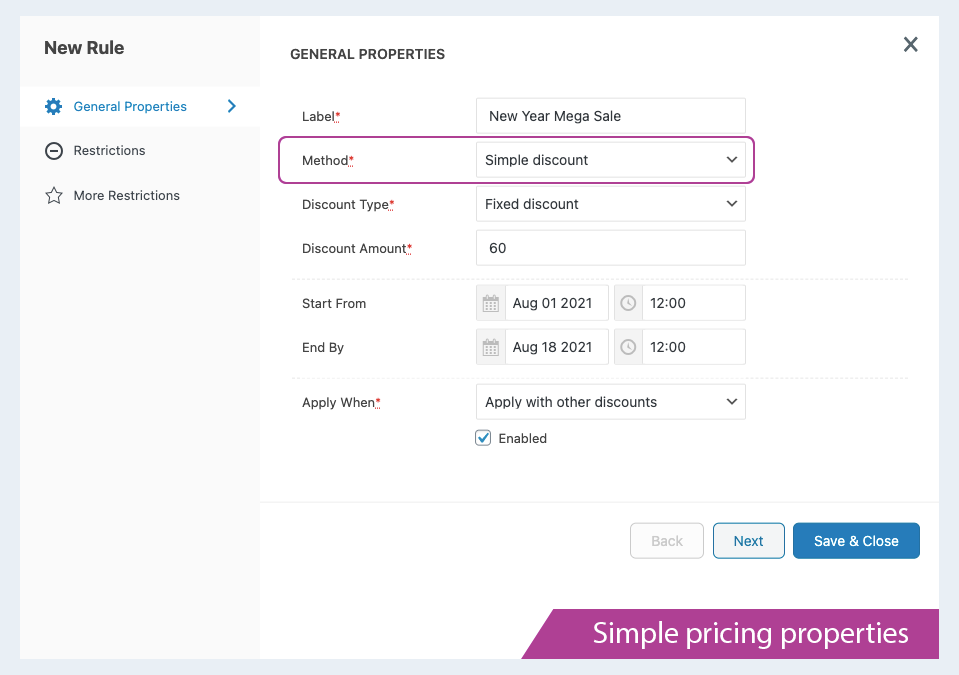
- Option to set discount rules separately for the product and cart pricing.
- Percentage or fixed discount.
- Easy to duplicate a WooCommerce discount rule that is already created.
- Discount Rules can be made for both simple and variable products.
- Option to reset all the changes made with a single click.
- Set discount rules as per the conditions you set.
- Apply the discount rule with other applicable rules, or discard other rules and apply the discount rule.
Set Discount rules based on:
👉 Date & Time
Give a discount to the shoppers when they purchase on a specific time interval or on a particular day that you set.
👉 Cart Details
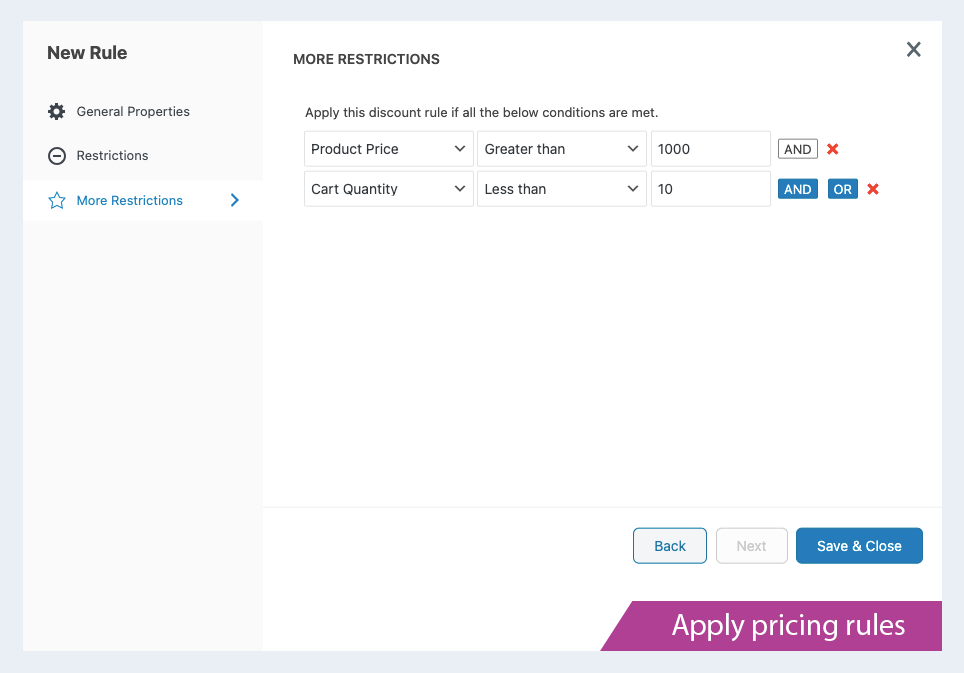
Offer a special discount price to the shoppers based on their cart details like cart quantity, number of products in the cart, the total amount of the cart, etc.
So, you can provide an additional discount to the shoppers when the shopper is having a required number of items or when the cart total is above a specified amount.
👉 User Roles
Give a special discount to the users based on their roles like subscribers, contributors, and much more.
👉 Products & Product Categories
Give a discount when the shopper purchases a particular product or any products from a selected category.
👉 Product Sale Price
Offer an additional discount based on the sale price of the WooCommerce products.
👉 Quantity Range
Set discount rules based on the quantity range of each product.
👉 Fixed/Percentage Discount
The Plugin provides both the fixed/percentage discount. You can choose any of them as per your preference.
👉 Examples of Setting Discount Rules
- Get 20% off while purchasing products from the electronics category.
- Get a 10% additional discount for our subscribers.
- Shop this Christmas to get a discount of up to 50%.
- Special offer on men’s fashion. The offer ends at today 9:00 PM.
- Lowest Prices Ever! Up To 60% off on the purchase of Nike sport shoes.
- Get a 10% additional discount for shoppers whose cart contains more than three products.
- Get a 30% off while purchasing above $100.
Join Themehigh Community to get help from similar people.
Why ThemeHigh
Frequent updates are made to improve the plugin with a talented group of developers. Moreover, the dedicated support team will help you set up and customize your dream store with all available features and hooks.
🏆 2 Million+ Customers
🏆 Quickest Turn-around Support
🏆 Most Lightweight Plugins
- Other WordPress Plugins by the ThemeHigh team.
- Follow ThemeHigh on Facebook, LinkedIn, Twitter & YouTube.
Minimum Requirements
- WooCommerce 4.0 or greater
- WordPress 5.2 or greater
Automatic installation
- Log in to your WordPress dashboard.
- Navigate to the Plugins menu, and click “Add New”.
- Search and locate ‘Discount and Dynamic Pricing’ plugin.
- Click ‘Install Now’, and WordPress will take it from there.
Manual installation
Manual installation method requires downloading the ‘Discount and Dynamic Pricing’ plugin and uploading it to your web server via your FTP application. The WordPress codex contains instructions on how to do this here.
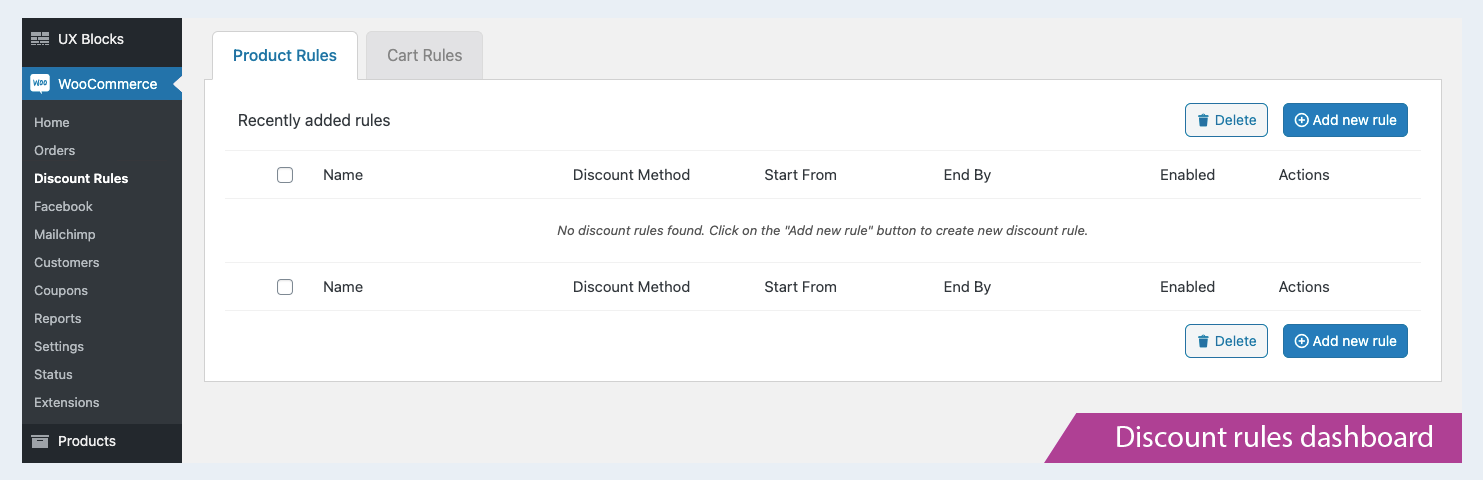
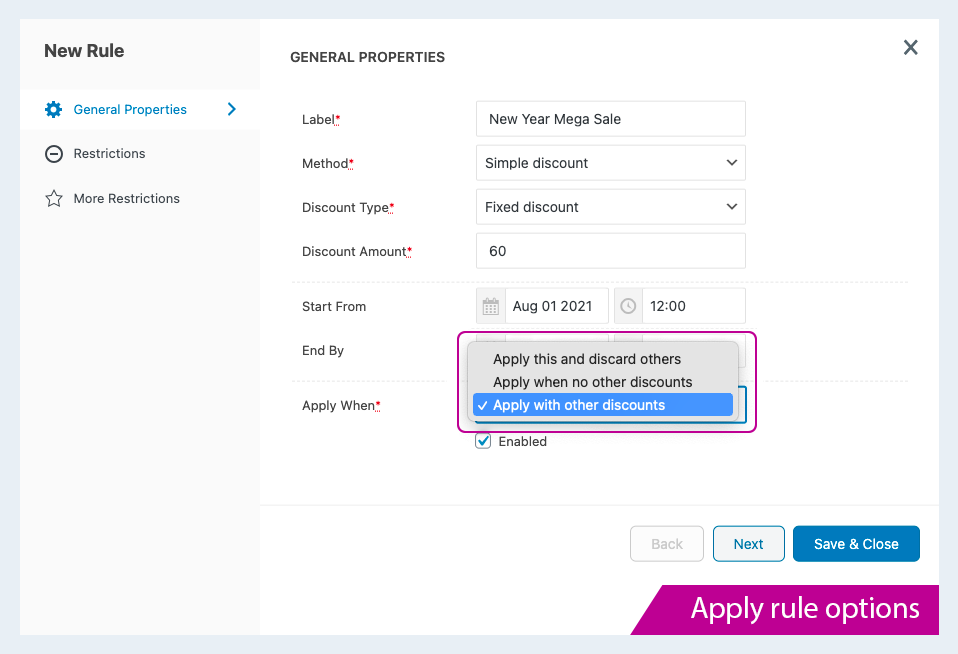
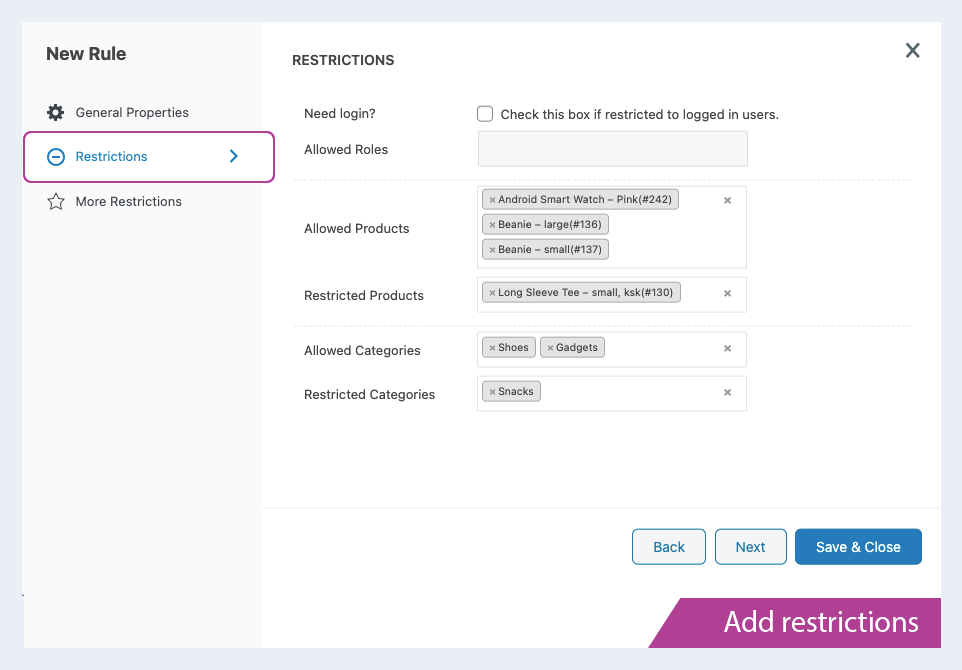
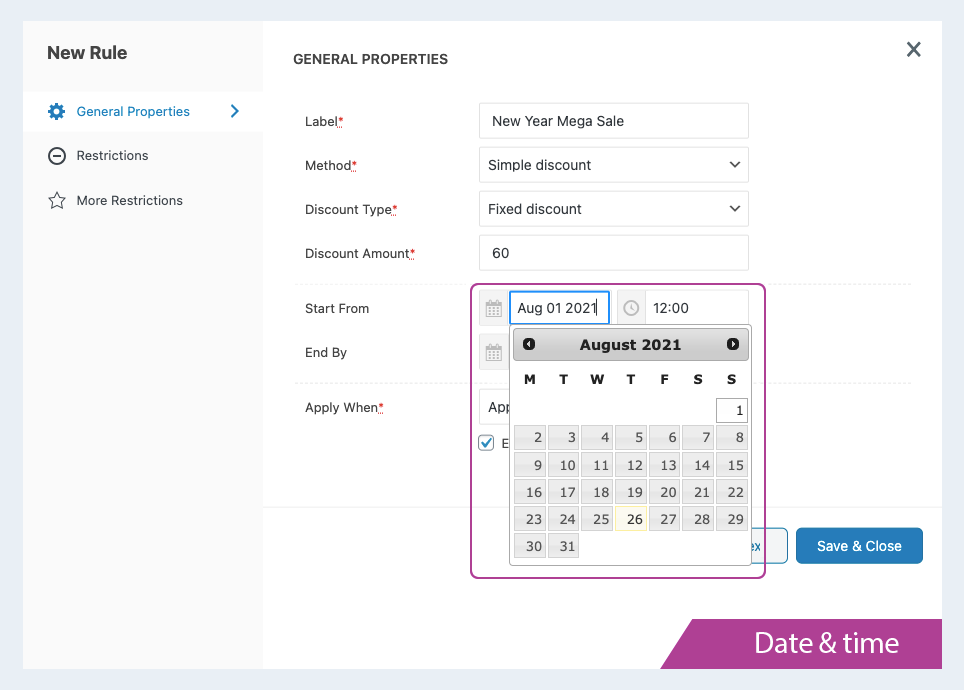
Navigate to Dashboard > WooCommerce > Discount Rules.
From here, you can add and manage the discount rules by using all the given conditions.
You can add as many discount rules as you need. There is no limit defined.
Discount and Dynamic Pricing plugin is completely responsive to WordPress.
Yes, you can set discount rules based on shopper’s cart details like cart total quantity, cart item count, and cart total amount.
Yes, you can apply the discount rule to all products in your store. Choose the products and product categories from Product Pricing > Apply Product.
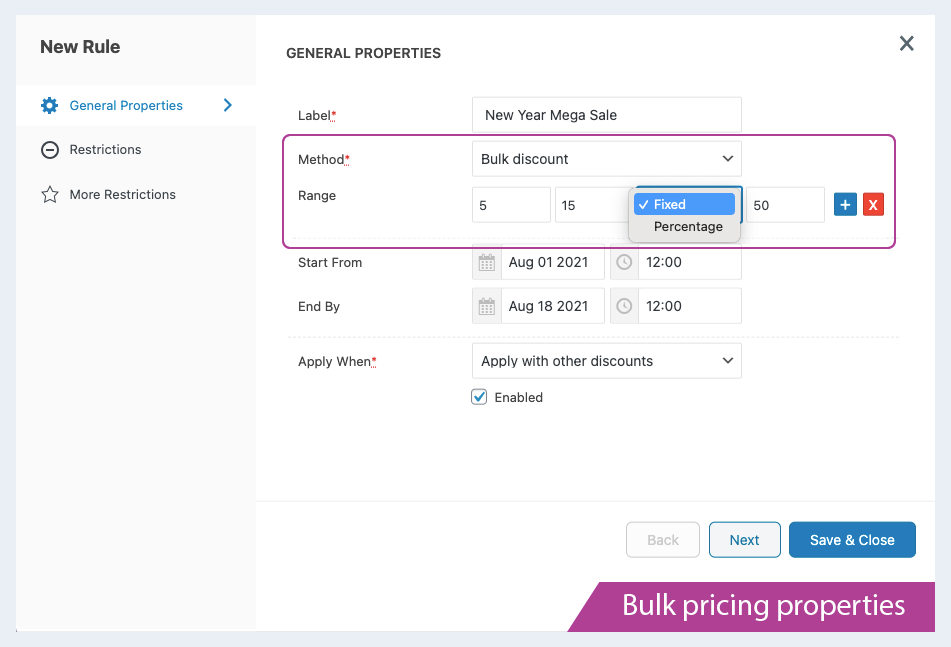
To apply bulk discounts,
1. Navigate to WooCommerce > Discount rules.
2. From the Product Rules tab, click on the Add new rule button.
3. From the popup that appears, choose the method as a Bulk discount. Enter the minimum and maximum quantity required for bulk discount.Also, mention along with the discount amount you wish to provide.
4. Once all the details are added, save the changes made.
To apply for cart discounts,
1. Navigate to WooCommerce > Discount rules.
2. From the Cart Rules tab, click on the Add new rule button. A popup will appear.
3. Provide the corresponding details for the discount rule
4. Once completed, save the changes made.
Changelog
2.3.2
- Added WooCommerce 10.8 compatibility.
- Added WordPress 7.0 compatibility.
2.3.1
- Fixed non-ASCII character issues in field edit/delete actions.
- Added option to strikeout sale price on shop/product pages.
- Added WooCommerce 10.6 compatibility.
- Added WordPress 6.9 compatibility.
2.3.0
- Fixed CSRF vulnerability reported by lucky_buddy via Patchstack.
- Added WooCommerce 9.8 compatibility.
- Added WordPress 6.8 compatibility.
2.2.9
- Added WooCommerce 9.4 compatibility.
- Added WordPress 6.7 compatibility.
2.2.8
- Added WooCommerce 9.1 compatibility.
- Added WordPress 6.6 compatibility.
2.2.7
- Added WooCommerce 8.9 compatibility.
2.2.6
- Added WooCommerce 8.7 compatibility.
- Added WordPress 6.5 compatibility.
2.2.5
- Added WooCommerce 8.3 compatibility.
- Added WordPress 6.4 compatibility.
2.2.4
- Added WooCommerce 8.0 compatibility.
- Added WordPress 6.3 compatibility.
2.2.3
- Fixed the issue of cart rule when a user logged in from checkout page.
- Added WooCommerce 7.8 compatibility.
- Added compatibility with HPOS(High-Performance order storage).
2.2.2
- Added WooCommerce 7.5 compatibility.
- Added WordPress 6.2 compatibility.
2.2.1
- Added WooCommerce 7.0 compatibility.
- Fixed the warning issue with the Query Monitor plugin.
2.2.0
- Fixed the issue when applying discount rules for specific categories.
- Added WooCommerce 6.9 compatibility.
- Added WordPress 6.1 compatibility.
- Added strikeout price settings.
- Added Advanced settings tab.
- Added an option to display bulk discount details as a table on the product page.
2.1.2
- Fixed the conflicts while adding multiple discount rules.
- Fixed the issue of showing negative prices on the cart.
- Improved the validations for the price fields on the discount rule form.
- Added WooCommerce 6.7 compatibility.
2.1.1
- Fixed the minicart product price issue.
- Fixed the cart striking price issue.
- Fixed the listing of products in the edit rule screen.
- Added WooCommerce 6.6.0 compatibility.
2.1.0
- Added WooCommerce 6.5.1 compatibility.
- Added WordPress version 6.0 compatibility.
- Added a filter to modify the striking of regular and sale prices on the cart page.
- Added compatibility with WPML and Loco Translate Plugin.
- Added POT file.
2.0.3
- Added WooCommerce version 6.0.0 compatibility.
2.0.2
- Added WooCommerce version 5.9.0 compatibility.
2.0.1
- Added WordPress 5.8 compatibility.
- Added WooCommerce version 5.7.1 compatibility.
2.0.0
- Settings page design improved.
1.0.0
- Initial Release
- Create discount rules for products.
- Create discount rules for cart.
- Apply discount rules based on user roles.
- Apply discount rules based on product, category.
- Apply discount rules based on cart totals, cart quantity.
" width="120" height="120">
Available Versions
| Version | Download | Type |
|---|---|---|
| 2.3.2 | Download | Stable |
| 2.3.1 | Download | Stable |
| 2.3.0 | Download | Stable |
| 2.2.9 | Download | Stable |
| 2.2.8 | Download | Stable |
| 2.2.7 | Download | Stable |
| 2.2.6 | Download | Stable |
| 2.2.5 | Download | Stable |
| 2.2.4 | Download | Stable |
| 2.2.3 | Download | Stable |
| 2.2.2 | Download | Stable |
| 2.2.1 | Download | Stable |
| 2.2.0 | Download | Stable |
| 2.1.2 | Download | Stable |
| 2.1.1 | Download | Stable |
| 2.1.0 | Download | Stable |
| 2.0.3 | Download | Stable |
| 2.0.2 | Download | Stable |
| 2.0.1 | Download | Stable |
| 2.0.0 | Download | Stable |
| 1.0.0 | Download | Stable |
| Development | Download | Trunk |
