
WP All Import – Import Add-On for ACF
Active Installs
40,000+
Last Updated
January 30, 2026
First Released
October 24, 2024
Download History (Last one month)
Contributors
The ACF Add-On for WP All Import makes it easy to bulk import data from any CSV or XML file into your ACF fields in WordPress in less than 10 minutes.
The left side shows all of the ACF fields that you can import to and the right side displays the data from your XML/CSV file.
Simply Drag & Drop the data from your XML or CSV into the ACF fields to import them.
The importer is so intuitive that it is almost like manually adding custom post type data in the Advanced Custom Fields plugin.
ACF CSV imports? ACF XML imports? They are EASY with WP All Import.
Why you should use the ACF Add-On for WP All Import
- Supports files in any format and structure. There are no requirements for the data in your file to be organized in a certain way. CSV imports into Advanced Custom Fields is easy, no matter the structure of your file.
- Import all basic fields such as text, numbers, range, email address URL, and password. Support for all other ACF fields in the Pro version of the ACF add-on.
- Imports files of practically unlimited size by automatically splitting them into chunks. WP All Import is limited solely by your server settings.
ACF WP All Import Pro Edition
The ACF Add-On for WP All Import is fully compatible with the free version of WP All Import.
However, the Pro version of WP All Import and the ACF add-on includes premium support and adds the following features:
- Support for every ACF Field – Import ACF data from CSV, Excel, or XML into Flexible Content, Relationships, Dates, Image Galleries, Google Maps, and more.
- Import ACF Repeater fields.
- Image and Gallery support – Easily import gallery images from your computer, another server, or anywhere else.
- Import files from a URL – Download and import files from external websites, even if they are password protected with HTTP authentication.
- Cron Job/Recurring Imports – WP All Import Pro can periodically check a file for updates, and add, edit, delete, and update any custom post type.
- Custom PHP Functions – Pass your data through custom functions by using [my_function({data[1]})] in your import template. WP All Import will pass the value of {data[1]} through my_function and use whatever it returns.
- Access to premium technical support.
Upgrade to the Pro version of WP All Import now.
You need the ACF add-on if you need to:
- Import hundreds and thousands of posts in a few minutes.
- You want to save your precious time and avoid doing manual data entry.
ACF CSV Imports
CSV is a common file format that’s editable by major spreadsheet software. It allows you to easily add and edit ACF data and change column names.
When importing ACF data from CSV files, you should use UTF-8 encoding (which is very standard) if you are having any trouble with CSV imports containing special characters. But other than that, there are no special requirements.
This add-on is the best option for ACF CSV import tasks – our importer is extremely flexible when doing ACF imports because you don’t need to edit your CSV files to import the data to Advanced Custom Fields. WP All Import can import ANY CSV file to ACF. You don’t need to layout your data in a specific way, and you don’t need your CSV to have specific column names. WP All Import’s drag & drop interface provides you with a visual way to map the columns in your CSV file to the appropriate fields in Advanced Custom Fields.
Developers: Create Your Own Add-On
This Add-On was created using the Rapid Add-On API for WP All Import. We’ve made it really easy to write your own Add-On.
Don’t have time? We’ll help you find someone to write it for you.
Read more about getting an Add-On made for your plugin or theme.
Related Plugins
Export any WordPress data to XML/CSV
Import any XML or CSV File to WordPress
Export Products to CSV/XML for WooCommerce
Custom Product Tabs for WooCommerce WP All Import Add-on
Export Orders to CSV/XML for WooCommerce
Export WordPress Users to CSV/XML
Support
You can submit the support form on our website or email us at support@wpallimport.com. While we try to assist users of our free version, please note that support is not guaranteed and will depend on our capacity. For premium support, purchase WP All Import Pro.
First, install WP All Import.
Then install the ACF add-on.
To install the ACF add-on, either: –
- Upload the plugin from the Plugins page in WordPress
- Unzip acf-import-add-on-for-wp-all-import.zip and upload the contents to /wp-content/plugins/, and then activate the plugin from the Plugins page in WordPress
The ACF add-on section will appear in the Step 3 of WP All Import.
Screenshot Gallery
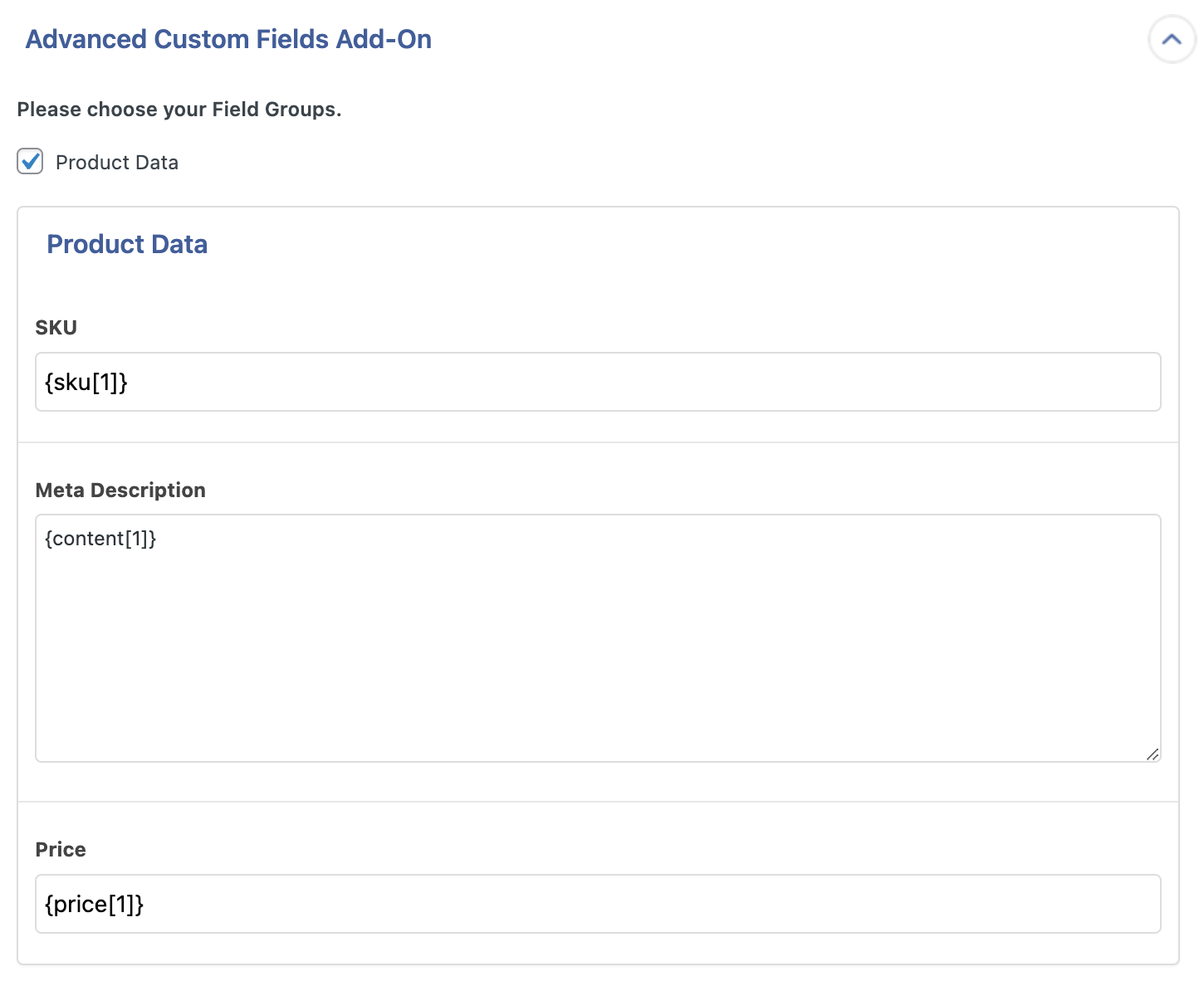
The Add-on supports all ACF fields including Repeaters, Flexible Content, Relationships, Dates, Image Galleries, Google Maps, and more, and displays them in a separate panel that is easy to navigate.
To import Advanced Custom Fields (ACF), you must have the ACF Import Add-On active on your site, along with WP All Import. If you’re using the ACF Import Pro Add-On, you must have the free ACF Import Add-On and WP All Import Pro active along with it.
Changelog
1.0.7
- bug fix: resolve WPDB taxonomy field error
1.0.6
- bug fix: ensure ACF field names are fully sanitized to avoid JS errors
- bug fix: avoid notice if current screen isn’t set during preview
1.0.5
- improvement: add support for Woo Order HPOS fields
1.0.4
- API: add ‘pmai_only_show_acf_groups_for_target_post_type’ filter
1.0.3
- bug fix: resolve PHP notices
1.0.2
- bug fix: resolve naming conflict
1.0.1
- bug fix: ensure values are properly passed to wpdb prepare
1.0.0
- Initial release on WP.org.
" width="120" height="120">
