
Multicollab: Content Team Collaboration and Editorial Workflow
Active Installs
300+
Last Updated
May 26, 2026
First Released
October 21, 2020
Download History (Last one month)
Contributors
Power up your editorial workflow
In a content editorial workflow, reviewing and providing feedback should be reasonably easy parts of the process.
While external collaboration tools like Google Docs are an option, online collaboration within the WordPress dashboard isn’t well set up by default.
Copy-pasting between Google Docs and WordPress can get frustrating and time-consuming. Also, being unable to leave direct comments on a post’s draft during the editorial process is a deal-breaker.
So, what should WordPress-focused content teams do to improve their collaborative output?
We bring to you – Multicollab: a WordPress collaboration plugin for inline comments and team feedback in the block editor, without switching to external documents. You can share editorial feedback directly in WordPress, including commenting, tagging, replying, and more.
The Multicollab WordPress plugin is a versatile WordPress collaboration plugin designed to streamline editorial collaboration and content feedback. It allows WordPress content creators to collaborate on articles, blog posts, and other editorial content directly within WordPress.
Install Multicollab, and you’ll instantly unlock collaboration functionality you’re familiar with from applications such as Google Docs in just a few simple clicks!
Multicollab brings Google Docs–style commenting into the WordPress editor.
This plugin adds inline commenting functionality to Gutenberg directly, making commenting a single click of a button away. Users can add comments on text as well as Media.
This an easy-to-use plugin—the best one I’m aware of—for those who have an editorial process. My wife is a blogger and I’m her editor. We’ve only begun taking advantage of it but I wanted to offer a positive shout out.
– Mario T. Lanza – Sr. Web Developer
Content collaboration in Gutenberg made simple
Whether your editorial workflow consists of just two people or fifty, gathering feedback and recommending changes to WordPress content has always meant you need to take that content elsewhere, such as Google Docs or any other editing suite.
This complicates your way of work unnecessarily, makes collaboration difficult, and can even lead to severe errors going live because things fall through the cracks between applications.
It’s also inefficient and wastes a lot of your editorial time!
Multicollab solves it once and for all.
Offering a seamless editorial workflow for teams, Multicollab is one of the best editorial collaboration tools in WordPress. With a focused collaboration feature set for the block editor, the plugin helps keep feedback and review organized inside WordPress.
Installing the plugin enables the following key editorial features instantly:
- Inline Commenting – Users can add comments on text and Media blocks to mark their feedback.
- Team Collaboration – Invite editorial users to collaborate and comment by mentioning them, ensuring quick email notifications and seamless engagement in the conversation.
- Reports and Activities – Track progress across all pages and posts with easy filtering to view by user, content categories, and time stamps.
- Email Notifications – Instant email notifications make collaborations with your team easier and foster intra-group connectivity.
Multicollab offers a comprehensive editorial content management system, enabling users to oversee content production and ensure high-quality output. Whether you’re seeking a WordPress workflow plugin or a team collaboration plugin in WordPress, Multicollab provides the tools needed to enhance productivity and streamline the content creation process.
Awesome plugin! This is exactly what I was looking for. This plugin works flawlessly. Great job.
– Ivan Ružević – WordPress Team Lead
Built specifically for Gutenberg
Multicollab was designed to work with Gutenberg natively, so there’s no need to change your workflow! Fully compatible with Gutenberg versions 14.2 to 16.7, it works right out of the box!
The Arrival of Gutenberg Phase 3: A Comprehensive Overview
Need support? You’ve got it!
Multicollab is built to work effortlessly the minute you install it, with zero setup time: just add it, and start commenting on your pages or posts within Gutenberg within seconds.
If you do have specific questions about the plugin, our extensive support centre documentation is available here and should help you in most cases.
If you do need more help or have a specific question, we’re always happy to support!
Simply open a ticket directly on the WordPress.org forum here, and we’ll get back to you within as short a time as possible.
The plug-in is awesome! It works fantastically.
– Charudatta Mondale Co-Founder at QuickDraft LLP
We just introduced a brand new Lite Plan! Priced at $249/year, the Lite plan offers the following features:
- Inline Commenting
- Team Collaboration
- Custom Permissions
- Attach a document to comment
- Multilingual
- Reports and Activity
- Email Notifications
- Email Support
We are excited to see smaller teams reinvent their WordPress editorial collaboration with WordPress.
The free WordPress.org build of Multicollab focuses on inline commenting, permissions, activity reporting, and email notifications in the block editor.
Paid plans on multicollab.com add a broader feature set (for example advanced workflows, integrations, and priority support). See the site for current plan details and demos.
The team behind Multicollab is Multidots — a full-service WordPress development agency and WordPress VIP Gold Agency Partner.
External services
The plugin relies on the following third-party services. For each, we summarize what is sent, why it is needed, and link to the provider’s terms and privacy documentation (reviewers: please verify that these pages remain current).
1. IP-API (ip-api.com)
When an administrator uses the free user setup wizard, the plugin may call the IP-API JSON geolocation API with the current visitor’s public IP address (or a test IP when the request appears to come from localhost) to obtain an approximate country name for the wizard UI. The request is made with wp_remote_get to the ip-api.com endpoint documented by that service. The free API tier uses HTTP; commercial use and HTTPS access are subject to IP-API’s own licensing.
2. Gravatar (Automattic)
In the admin dashboard, activity views, and similar screens, the plugin may display user avatars using WordPress core get_avatar_url() (and related avatar helpers). Depending on the user’s email and site settings, the browser may load images from the Gravatar service operated by Automattic.
3. Multicollab (www.multicollab.com)
The plugin connects to Multicollab’s website and JSON REST API to deliver in-dashboard experiences that cannot be fully bundled in the plugin ZIP: for example getting-started content, an optional promotional banner payload, onboarding and help videos (including poster images) loaded from multicollab.com URLs, and (where applicable) contact or free-signup data submitted to Multicollab’s EDD-related endpoints. These requests are initiated from wp-admin. Data transmitted is limited to what those endpoints require for the described features.
⚠️ Important: Maintenance Update
Due to limited resources, we are no longer maintaining the free version of this plugin. For an updated, fully supported version with the latest features—including advanced workflows, integrations, and priority support—please check out our premium plugin on our official website: Multicollab .
No installation instructions provided.
Screenshot Gallery



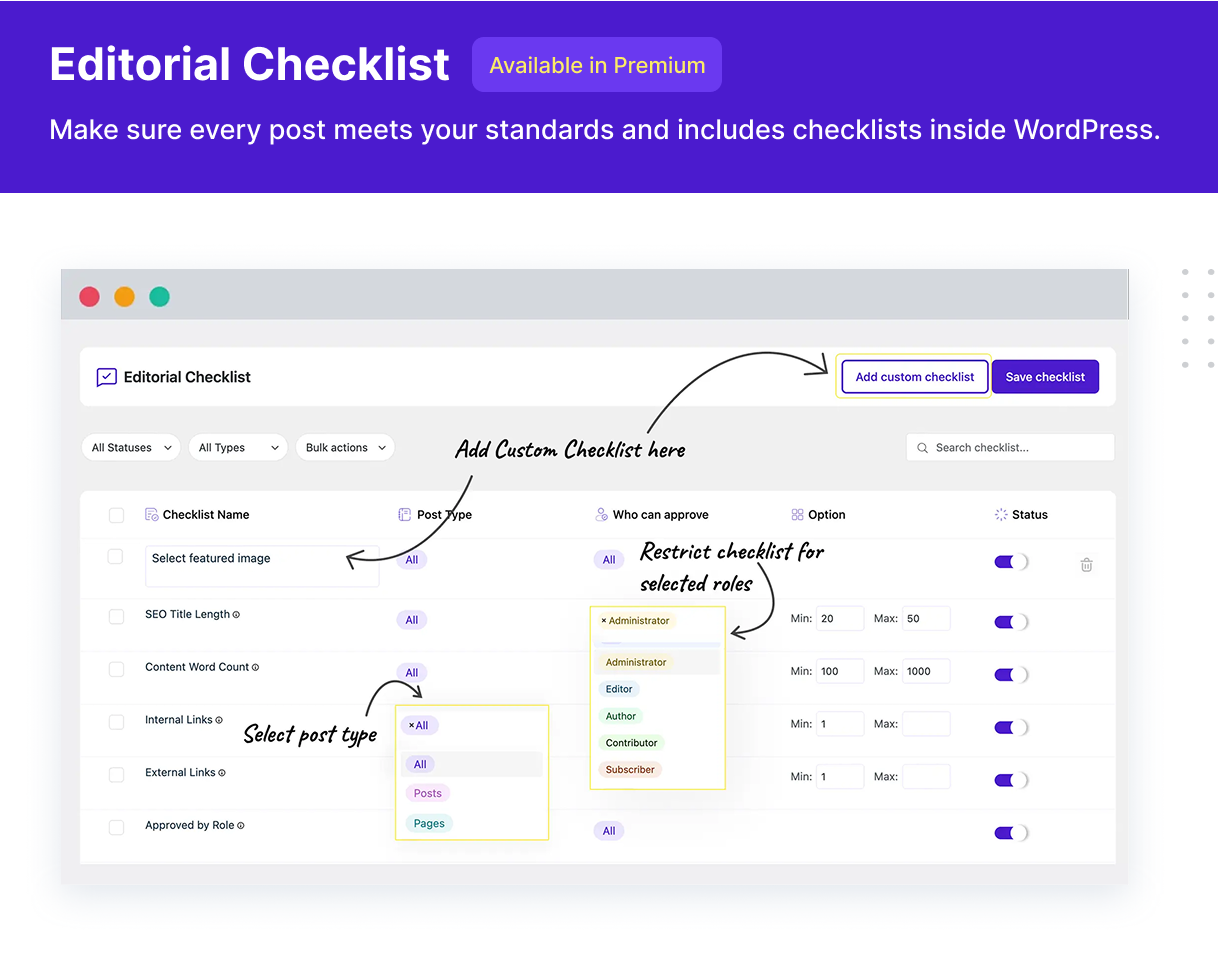
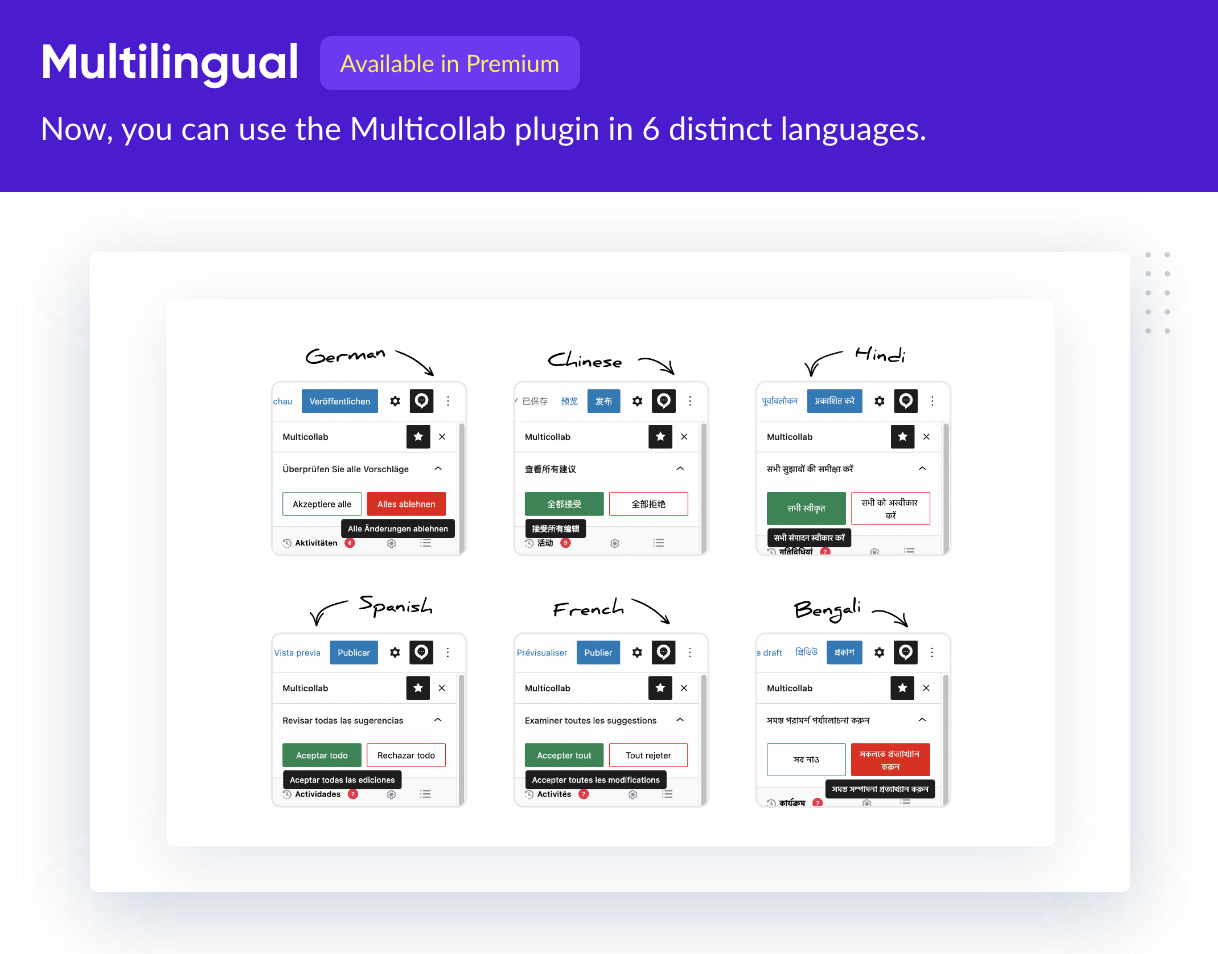
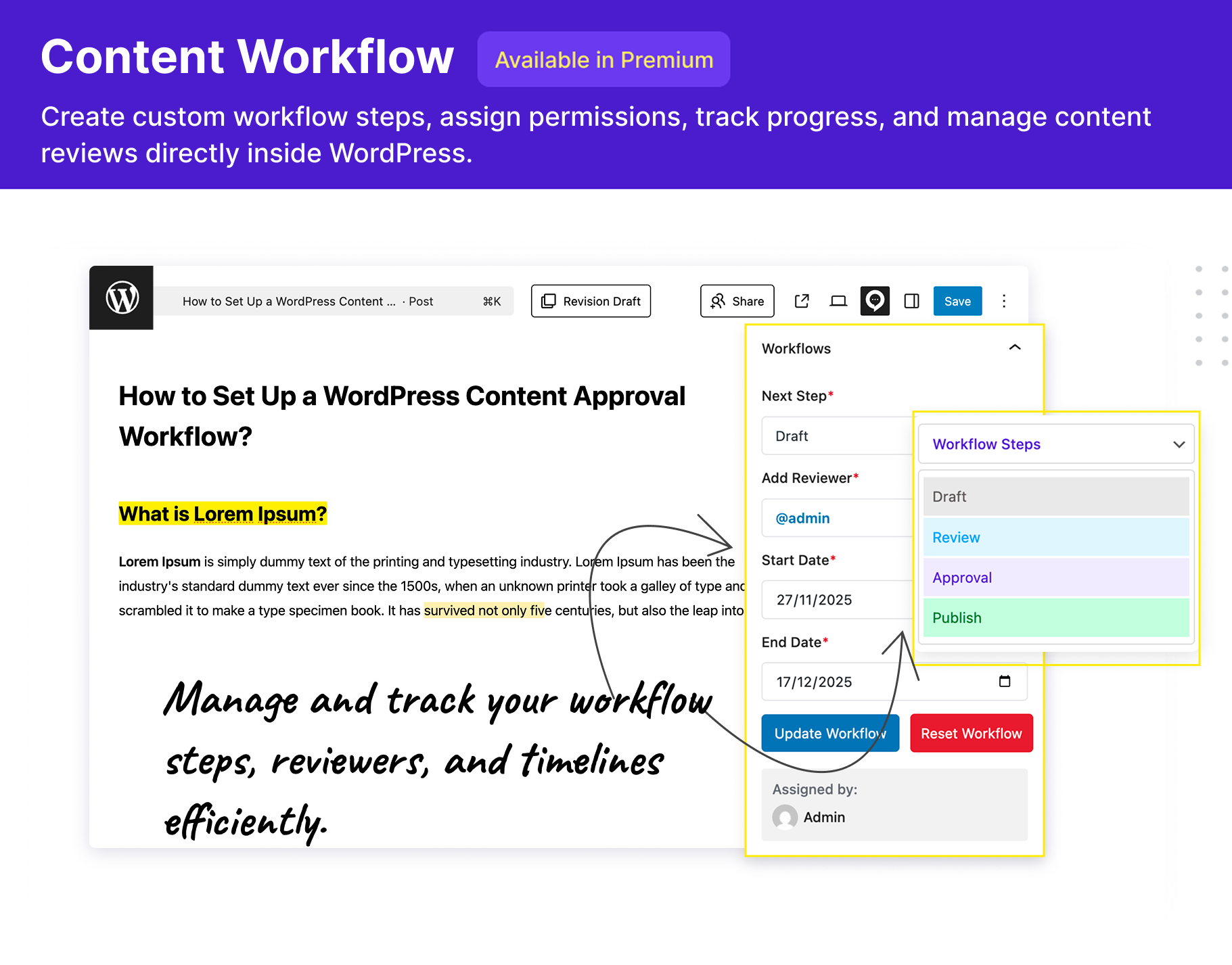
Multicollab is an excellent team collaboration plugin in WordPress for content teams of all sizes: whether it is just two people or a team of hundreds, Multicollab helps you gather feedback and discuss drafts directly in the block editor. Here is a resource kit for you.
This plugin may connect to ip-api.com (wizard geolocation by IP), Gravatar (avatars via core WordPress APIs), and www.multicollab.com (REST API payloads and help media). See the External services section in this readme for what is transmitted, why, and links to each provider’s terms and privacy policy.
Our publisher clients who’ve made the switch to Multicollab from Google Docs have witnessed remarkable enhancements in their content creation and publishing efficiency. Multicollab eliminates the need for tedious tasks such as copying and pasting content between Google Docs and WordPress and capitalizes on features like reusable content blocks, rich content formatting, and other advantages offered by WordPress’s native content editor. Here’s a video showcasing how Multicollab can potentially 2x your publishing speed.
If you are creating and publishing content with WordPress, you will love all these benefits of using Multicollab. It is a great Plugin for editorial collaboration and enabling collaborative editing in WordPress.
Multicollab offers all the benefits of Google Docs, without the downside.
Yes! Multicollab is a wordpress approval workflow plugin built to work perfectly with Gutenberg versions 14.2 to 16.7 and is consistently being updated to work with the latest versions of Gutenberg as they roll out.
Building Blocks of Collaboration in Gutenberg Phase 3 (Roadmap Extended)
Building Blocks of Collaboration in Gutenberg Phase 3 (Roadmap Extended)
Unfortunately, the WordPress Classic Editor isn’t as versatile as Gutenberg and isn’t as good at handling collaboration and editing. That means that Multicollab doesn’t work on the classic editor – we recommend switching to Gutenberg instead and experiencing Multicollab’s collaboration mode in WordPress.
We’re constantly working to improve Multicollab and make it more widely available. The plugin is fully compatible with Gutenberg versions 14.2 to 16.7, WordPress versions 6.2 and above, and PHP versions 7.0 or 8.3.
Multicollab works seamlessly with Google Chrome, Firefox, Edge, and Safari. We’re constantly working to add more features, so if your browser isn’t compatible, let us know!
Yes, you can! Multicollab works perfectly in posts and pages of all types, enabling you to implement an editorial workflow and collaborative editing.
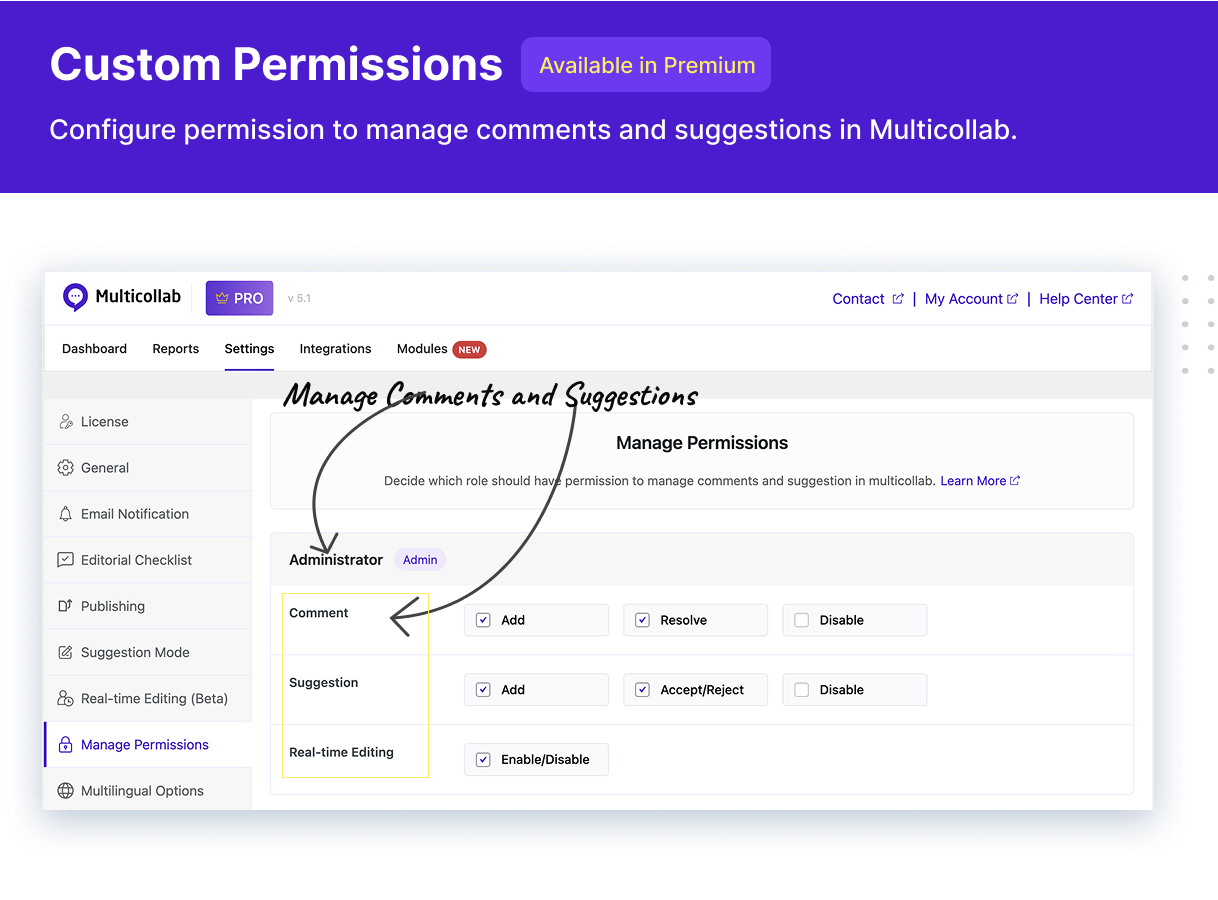
By default, all Super Admin, Administrator, and Editor roles can view, edit, delete, reply, and resolve comments on any posts and page.
Authors and Contributors can only add, edit, delete, reply, and resolve their posts’ comments. For complete control over users’ permissions, consider upgrading to Multicollab Premium.
Commenting: You can comment on any text or media content, the entire block, or even the content (text and media) of reusable and custom blocks. You can comment on types of native Gutenberg blocks. To view the accepted blocks for comments, please review the below link: Commenting Feature: Compatibility & Limitation.
Suggestions: You can use the suggestion feature only on specific blocks at this moment. Check this for compatibility and limitation of the suggestion feature.
Available with our premium plan, users can either accept or reject all suggestions in a go.
Have you had a look at our documentation?
We’ve covered a lot of common questions in our repository available freely here.
If you’d still like help, simply open up a ticket on WordPress.org directly here and we’ll get back to you as quickly as possible!
Changelog
5.3 – 14.04.2026
- [Enhancement] Maintaince Release.
- [Documentation] Add readme.txt “External services” section with terms and privacy links for IP-API, Gravatar, and Multicollab.
5.2 – 15.12.2025
[Enhancement] – Fully compatible with WordPress 6.9.
[Bug Fixes] – Resolved Spectra plugin conflict causing overlap between Comment Mode notifications and Spectra components.
[Bug Fixes] – Improved performance on setups with multiple active plugins where loading comments resulted in significant lag.
[Bug Fixes] – Addressed multiple design issues in the Activity Center for a cleaner and consistent UI.
[Bug Fixes] – Resolved issue where user mentions were partially hidden when replying from the Activity Center in single-comment mode.
[Bug Fixes] – Fixed commenting issue where adding a comment triggered console errors and prevented proper loading of the board.
5.1 – 08.10.2025
- [Enhancement] – Improved Dashboard for a more intuitive and user-friendly interface.
- [Bug Fixes] – Applied minor fixes to improve sidebar stability.
5.0 – 17.07.2025
- [New] Introduce interactive guiding tour.
- [New] Fixed bugs related to multiple text comment handling.
- [Bug Fixes] Fixed minor bugs
4.10 – 19.05.2025
- [Enhancement] Enhanced compatibility with popular Learning Management Systems (LMS)
- [Enhancement] Fully tested and verified with WordPress 6.8.
- [Enhancement] Now fully compatible with PHP 8.3.
- [Enhancement] Significant improvements in loading and editing large posts, especially with inline comments.
4.9 – 24.03.2025
- [New] Multicollab is now fully compatible with Gutenberg API 3.
- [Enhancement] Optimized performance for faster and smoother collaboration.
- [Bug Fixes] Fixed minor bugs related to the plugin’s interactions with Gutenberg blocks, providing a smoother editing experience.
4.8.1 – 07.01.2025
- [Bug Fixes] – Addressed minor issues to enhance overall stability and user experience.
- [Enhancements] – Improved the deactivation popup code for better usability and performance.
- [New] – Added compatibility with Oxygen Builder for seamless integration.
4.8 – 04.12.2024
- [Enhancements] Significantly improved the performance for faster loading and smoother interaction.
- [Enhancements] Streamlined script and style loading for better performance.
- [Enhancements] Enhanced compatibility with the latest WordPress.
4.7 – 23.08.2024
- [Enhancements] Fully compatible with PHP 8.2, ensuring smooth operation with the latest PHP version.
- [Bug Fix] Improved UI design and resolved layout issues for a more streamlined user experience.
4.6 – 23.07.2024
- [Enhancements] Compatibility with WordPress 6.6.
- [Enhancements] Upgraded React packages.
- [Bug Fix] Minor fixes for @mention copy/paste features.
4.5 – 21.05.2024
- [Bug Fix] Fixed design issue: Background color of the activity center box is removed when the board is not in focus.
- [Enhancement] Improved compatibility: Comment shortcode now works seamlessly with the insert-special-character plugin.
4.4.1 – 25.04.2024
- [Enhancement] Compatible with WordPress 6.5.
4.4 – 04.04.2024
- [Enhancement] Comments are automatically saved upon addition for a seamless workflow.
- [Enhancement] Users can now hide comments using keyboard shortcuts — For Windows alt + Shift + J && For Mac ⌥ Option + Shift + J.
- [Enhancement] Multicollab now seamlessly integrates with WP Forms and the MemberPress plugin.
- [Enhancement] Eliminated the functionality of real-time co-editing and guest collaboration.
4.3 – 14.02.2024
- [Enhancement] Users can now add comments on ACF blocks and the block’s text.
- [Enhancement] Whole block comments now work seamlessly with reusable blocks.
- [Enhancement] Ensure compatibility with the Multicollab plugin and Gutenberg-built WooCommerce Product Pages.
- [Enhancement] Redesigned onboarding workflow.
- [Enhancement] Multiple users can simultaneously work on the same block.
4.2 – 02.01.2024
- [New] Users can comment on entire gallery blocks.
- [New] Users can add comments to Gutenberg widget category blocks (Latest Comment, RSS, Archives, Calendar).
- [Enhancement] Collaborator details are now displayed on the dashboard activity.
- [Enhancement] Users can set their default tab when opening a WordPress page.
- [Enhancement] Admins can view real-time collaboration permissions in the permission settings tab.
- [Enhancement] Multicollab now supports the Publish Press block.
- [Enhancement] Multicollab is compatible with Getwid blocks.
- [Enhancement] Fixed ACF block issues with Multicollab.
4.1 – 30.11.2023
- [New] — Undo & Redo compatible with all default Gutenberg blocks.
- [Enhancement] — Improvement in Real-time editing of content requests.
- [Enhancement] — Multicollab is now compatible with php8.1
- [New] — Users can copy the link of the post and page and share it with Guest users.
- [Enhancement] — Improvement in Email notification
- [Enhancement] — The user can show collaborator details from the activity panel
- [Enhancement] — @mention will work with copy and past comments.
4.0 – 18.10.2023
- [New] Real-time co-editing allows multiple users to collaborate simultaneously.
- [Enhancement] Improvement in API requests
- [Bug Fix] Full Block comment UI
3.7 – 04.09.2023
- [Enhancement] Improvement in Guest collaboration user experience.
- [Enhancement] Compatible with WordPress 6.3.
3.6 – 20.07.2023
- [New] Email Notifications — Get an email notification for mentions, replies, and other activities.
- [New] Advanced Dashboard — More reports on sitewide commenting features.
- [New] Comments on text and media — Ability to comment on any media while editing new posts or pages.
- [New] You can invite anyone as a Guest to collaborate on the page or post content.
3.5 – 12.06.2023
- [Enhancement] Maintenance Release.
3.4 – 16.05.2023
- [Enhancement] Maintenance Release.
3.3 – 16.02.2023
- [Enhancement] Maintenance Release.
3.2 – 03.01.2023
- [New] Onboarding Tour when activating the plugin.
- [Bug Fix] Activity panel and board position issue fixed.
- [Bug Fix] Minor Fixes for notification.
3.1 – 16.11.2022
- [Enhancement] Maintenance Release.
3.0 – 17.10.2022
- [Enhancement] Improved @mention user experience and performance.
- [Enhancement] Improved performance and design enhancement for floating add comment and suggestion buttons.
- [Enhancement] Updated add comment button design.
- [Bug Fix] Compatible with PHPCS and PHP8.
2.0.4.5 – 26.08.2022
- [Enhancement] User can add comments using a keyboard shortcut — For Windows ctrl + alt + m && For Mac ⌘ Cmd + ⌥ Option + m
- [Enhancement] Optimize code for @mention Feature.
- [Bug Fix] PHP8 compatibilities warnings
2.0.4.4 – 29.07.2022
- [Enhancement] Improvement on General Settings – User can enable/disable editorial comment column on post/page list.
- [Enhancement] Maintenance Release.
2.0.4.3 – 27.05.2022
- [Bug Fix] Compatible with WordPress 6.0.
- [Enhancement] Fixed minor issues related to @mention.
2.0.4.2 – 13.05.2022
- [Enhancement] Maintenance Release.
2.0.4.1 – 04.04.2022
- [Enhancement] Admin can set permission for info board from the settings panel.
- [Enhancement] Optimize AJAX request.
- [Bug Fix] Minor fixes related to the comment board and formatting.
2.0.4 – 07.03.2022
- [Enhancement] Security Release.
2.0.3 – 07.02.2022
- [Enhancement] Performances improvements.
- [Enhancement] Compatible with Table Block.
- [Enhancement] UI improvement on comment board.
- [Bug Fix] Github issue #45 Multicolab breaks when used with plugin HTML Editor Syntax Highlighter is fixed.
- [Bug Fix] Github issue #40 WP-CLI plugin activation breaks due to redirect are fixed.
- [Bug Fix] Compatible with WordPress 5.9.x.
- [Bug Fix] Compatible with PHP 8.0
2.0.2 – 10.12.2021
- [Enhancement] Maintenance Release.
2.0 – 26.10.2021
- [Enhancement] Show comment icon in the main toolbar.
- [Enhancement] User-friendly Board design.
- [New Feature] View Summary of comments in Activity Centre.
- [New Feature] Mention and Assign self in Comment.
1.3.8 – 12.08.2021
- [Enhancement] Maintenance Release.
- [Enhancement] Fixed minor issues related to email notification.
1.3.7 – 2.08.2021
- [Enhancement] Maintenance Release.
- [Enhancement] Fixed minor issues related to activity and settings panel.
- [Enhancement] Made few enhancements for compatibility with Safari and Firefox browsers.
- [Bug Fix] Compatible with WordPress 5.8.x.
1.3.6 – 24.06.2021
- [Bug Fix] Maintenance Release and Made few enhancements.
1.3.5 – 08.06.2021
- [Bug Fix] This Github issue #24 Block editor has encountered an unexpected error is fixed.
- [Bug Fix] This Github issue #23 Can’t use the Enter Key to add a new paragraph is fixed.
- [Enhancement] Maintaince Release.
1.3.4 – 03.06.2021
- [Enhancement] Made few enhancements for compatibility with Safari Browser.
1.3.3 – 02.06.2021
- [New Feature] Generate a link to a particular comment and share it with other team members.
- [New Feature] Team members can see recently edited time on the comments and activity center.
- [New Feature] Restricted multiple comments on the same word.
- [Enhancement] If there is no comment on Page/Post, then Gutenberg editor will be center aligned.
- [Bug Fix] This Github issue #6 related to Gutenberg Comments Panel always visible is fixed.
- [Bug Fix] Copy & Paste issue with @mention in a comment is fixed.
- [Bug Fix] Issue related to “Link to a comment box from activity center” on a tablet device is fixed.
- [Bug Fix] Fixed issues related to comment formatting.
- [Bug Fix] Old Comments not showing up on some Pages issue fixed.
- [Bug Fix] Issue related to Deleted comments visibility in the activity center is fixed.
- [Bug Fix] Compatible with WordPress 5.7.x.
- [Bug Fix] Other minor fixes.
1.3.2 – 23.04.2021
- [Bug Fix] Compatible with WordPress 5.7.1
- [Bug Fix] Resolved jQuery issue and normal bugs
1.3.1 – 22.04.2021
- [Bug Fix] SEO Plugins and excerpts section, content copy and paste issue are resolved
1.3.0 – 19.04.2021
- [Enhancement] New Design and Placement of Activity Center.
- [New Feature] Threaded comments in the activity center.
- [New Feature] Ability to Reply, Resolve, Edit, and Delete comment or thread from the activity center.
- [Enhancement] New Settings tab in the sidebar for post-specific comment settings.
- [Bug Fix] Copy/paste content in the comment box is fixed.
- [Bug Fix] Firefox @mention multiple user issues are resolved.
- [Bug Fix] Responsive device usability updated.
- [Enhancement] Several performances, stability, and design improvements.
1.2.0 – 19.03.2021
- [New Feature] When you delete a WordPress user, you can assign the deleted user’s comments to other WordPress users.
- [Bug Fix] Edit and Delete operation from the activity center were not working for a few users.
- [Bug Fix] Do not allow whitespace on edit reply.
- [Bug Fix] Few issues related to @mention Editor in the comment.
- [Bug Fix] When you copy and paste a web page URL in reply, the comment was not working as expected.
- [Bug Fix] This Github issue related to the “register_rest_route” warning error on the WordPress dashboard fixed.
- [Bug Fix] When the “Hide All Comments” option is selected, and you click on any comment from the activity center, it didn’t bring the related comment.
- [Bug Fix] Fixed compatibility issues related to small screen resolution like 1024×768.
- [Bug Fix] This Github issue related to ‘custom meta fields’ is fixed.
- [Enhancement] Made few enhancements for compatibility with Safari Browser.
- [Bug Fix] Compatible with WordPress 5.7.x
1.1.0 – 24.02.2021
- [New Feature] Mention Team Members in Comment and invite them to collaborate by @mentioned user name
- [New Feature] Assign comments thread to team members
- [New Feature] See all Page & Post comments activities in the activity center
- [New Feature] Send email to @mentioned users in the comment.New – Send email to all users involved in the current thread.
- [New Feature] Send an email to the assigned user.
- [New Feature] Check open comments on each page and posts in your posts list.
- [New Feature] Admin settings panel.
- [New Feature] Send email notification to admin if notification enabled.
- [New Feature] All major browser supports (Chrome, EDGE, Firefox) Note: Safari browser is not compatible with this plugin)
- [Bug Fix] Compatible with WordPress version 5.3.6 to 5.6.2
- [Bug Fix] Few other fixes and improvements.
- [Bug Fix] Improve performance of the plugin
- [Bug Fix] Checked WordPress Accessibility
- [Bug Fix] Checked Standard WordPress security
1.0.4 – 18.12.2020
- [Bug Fix] Compatible with WordPress 5.6.
- [Enhancement] Characters limited for the “Comment Resolved Email” Subject.
- [Bug Fix] HTML tags filter issue for Authors and Contributors in Multisite.
- [Bug Fix] Few other fixes and improvements.
1.0.3 – 14.12.2020
- [Enhancement] New Activity centre icon
- [Enhancement] Removed Hide icon from the top bar and put it inside the Activity centre with ” Show Comment / Hide Comment”
- [Bug Fix] Compatible with WordPress 5.6.x
1.0.2 – 09.12.2020
- [Bug Fix] Avatars are removed from comments if disabled from WordPress settings.
- [Bug Fix] Removed link from Comment Activity area.
1.0.1 – 05.11.2020
- No comments popup removed
1.0.0
- Initial Release
" width="120" height="120">
Available Versions
| Version | Download | Type |
|---|---|---|
| 5.3 | Download | Stable |
| 5.2 | Download | Stable |
| 5.1 | Download | Stable |
| 5.0 | Download | Stable |
| 4.10 | Download | Stable |
| 4.9 | Download | Stable |
| 4.8.1 | Download | Stable |
| 4.8 | Download | Stable |
| 4.7 | Download | Stable |
| 4.6 | Download | Stable |
| 4.5 | Download | Stable |
| 4.4.1 | Download | Stable |
| 4.4 | Download | Stable |
| 4.3 | Download | Stable |
| 4.2 | Download | Stable |
| 4.1 | Download | Stable |
| 4.0 | Download | Stable |
| 3.7 | Download | Stable |
| 3.6 | Download | Stable |
| 3.5 | Download | Stable |
| 3.4 | Download | Stable |
| 3.3 | Download | Stable |
| 3.2 | Download | Stable |
| 3.1 | Download | Stable |
| 3.0 | Download | Stable |
| 2.0.4.5 | Download | Stable |
| 2.0.4.4 | Download | Stable |
| 2.0.4.3 | Download | Stable |
| 2.0.4.2 | Download | Stable |
| 2.0.4.1 | Download | Stable |
| 2.0.4 | Download | Stable |
| 2.0.3 | Download | Stable |
| 2.0.2 | Download | Stable |
| 2.0.1 | Download | Stable |
| 2.0 | Download | Stable |
| 1.3.8 | Download | Stable |
| 1.3.7 | Download | Stable |
| 1.3.6 | Download | Stable |
| 1.3.5 | Download | Stable |
| 1.3.4 | Download | Stable |
| 1.3.3 | Download | Stable |
| 1.3.2 | Download | Stable |
| 1.3.1 | Download | Stable |
| 1.3.0 | Download | Stable |
| 1.2.0 | Download | Stable |
| 1.1.0 | Download | Stable |
| 1.0.4 | Download | Stable |
| 1.0.3 | Download | Stable |
| 1.0.2 | Download | Stable |
| 1.0.1 | Download | Stable |
| 1.0.0 | Download | Stable |
| Development | Download | Trunk |
