
Comment Probation
Active Installs
40+
Last Updated
May 31, 2012
First Released
May 31, 2012
Download History (Last one month)
Contributors
Comment Probation allows you to put a comment author on “probation.”
If you allow comments to automatically appear from authors who already have an approved comment,
this plugin gives you a bit more control. It lets you approve a comment but place the author
under probation, meaning that any future comments from that author will need to be moderated again.
When approving a comment, you’re given the option to “Approve” the comment, or “Approve with Probation.”
If a comment ended up in moderation because the author is on probation, “approving” the comment will
remove the author from the probation list.
This plugin only works if you’ve enabled the setting “Comment author must have a previously approved comment”
on the Discussion Settings Screen.
Screenshot Gallery
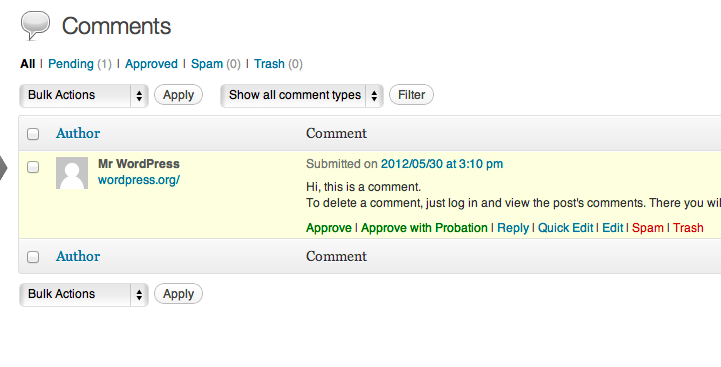
Why am I not seeing “probation” links when moderating comments?
This plugin only works if you’ve enabled the setting “Comment author must have a previously approved comment”
on the Discussion Settings Screen.
Changelog
No changelog available.
" width="120" height="120">
No previous versions available.
