
Custom Login Page Customizer
Active Installs
50,000+
Last Updated
January 16, 2026
First Released
April 17, 2018
Download History (Last one month)
Contributors
Custom Login Page Customizer transforms your default WordPress login page into a branded, professional experience that matches your website. Perfect for agencies, freelancers, and businesses who want to impress clients and users from their very first interaction.
Why Customize Your Login Page?
Your login page is often the first thing clients and team members see. A branded login page:
- Builds trust – Professional appearance increases user confidence
- Reinforces your brand – Consistent branding across every touchpoint
- Impresses clients – White-label your WordPress sites for a polished look
- Takes seconds – No coding required, instant live preview
Key Features
Live Customizer Preview – See every change instantly before saving. No guesswork, no refreshing.
Ready-Made Templates – Choose from 9 professionally designed login page templates including modern gradients, glassmorphism, dark themes, and split-screen layouts.
Complete Logo Control – Upload your custom logo, adjust dimensions, or use text-based branding. Link your logo to any URL.
Background Customization – Add custom background images, solid colors, or gradients to create stunning login pages.
Form Styling – Customize every aspect of your login form including width, padding, borders, border radius, field colors, and button styles.
Button & Link Styling – Match your brand colors with customizable button backgrounds, hover states, shadows, and link colors.
Custom CSS – Advanced users can add custom CSS for pixel-perfect control.
Multi-Column Layouts – Create split-screen login pages with customizable column widths and alignments.
Registration & Password Forms – Customize the registration form and lost password form to match your login page styling.
Perfect For
- Web Agencies – White-label client sites with branded login pages
- Freelancers – Deliver polished, professional WordPress sites
- Membership Sites – Create welcoming login experiences for members
- Corporate Intranets – Reinforce company branding for employee portals
- WooCommerce Stores – Brand your customer account login pages
- Multisite Networks – Customize login pages across your network
How It Works
- Install and activate the plugin
- Go to Appearance Customize Custom Login Page Customizer
- Customize your login page with live preview
- Click Publish – done!
Detailed Customization Options
Logo Section
– Custom logo image upload
– Logo width and height control
– Logo URL customization
– Text-only or image-only options
– Logo text color and hover color
Background Section
– Custom background image
– Background color picker
– Form column background options
Form Section
– Form width and height
– Form background color and image
– Padding and border controls
– Border radius for rounded corners
– Field width, margin, and styling
– Label text customization
– Field background and text colors
Button Section
– Background color and hover color
– Border color and hover border color
– Button shadow and text shadow
– Submit button text customization
Links Section
– Link color and hover color
– Show/hide navigation links
– Show/hide “Remember Me” checkbox
Documentation & Support
Need help? Visit our support forum for assistance.
About Colorlib
This plugin is developed by Colorlib, creators of popular free WordPress themes downloaded by millions. We are committed to building high-quality, user-friendly WordPress plugins.
If you enjoy Custom Login Page Customizer, please leave a 5-star review. Your feedback helps us improve!
- Download the plugin (.zip file) on your hard drive.
- Unzip the zip file contents.
- Upload the
colorlib-login-customizerfolder to the/wp-content/plugins/directory. - Activate the plugin through the ‘Plugins’ menu in WordPress.
- Go to Appearance Customize Custom Login Page Customizer to start customizing.
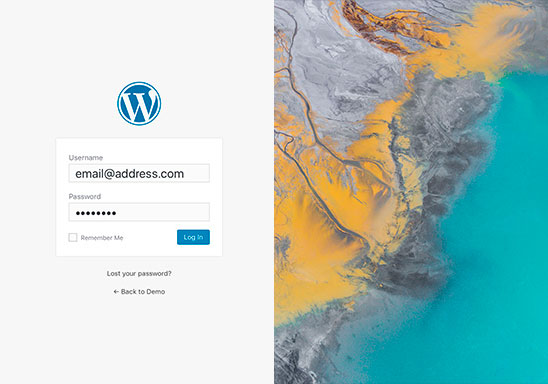
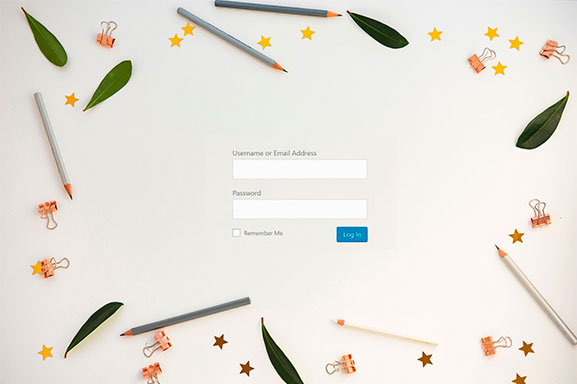
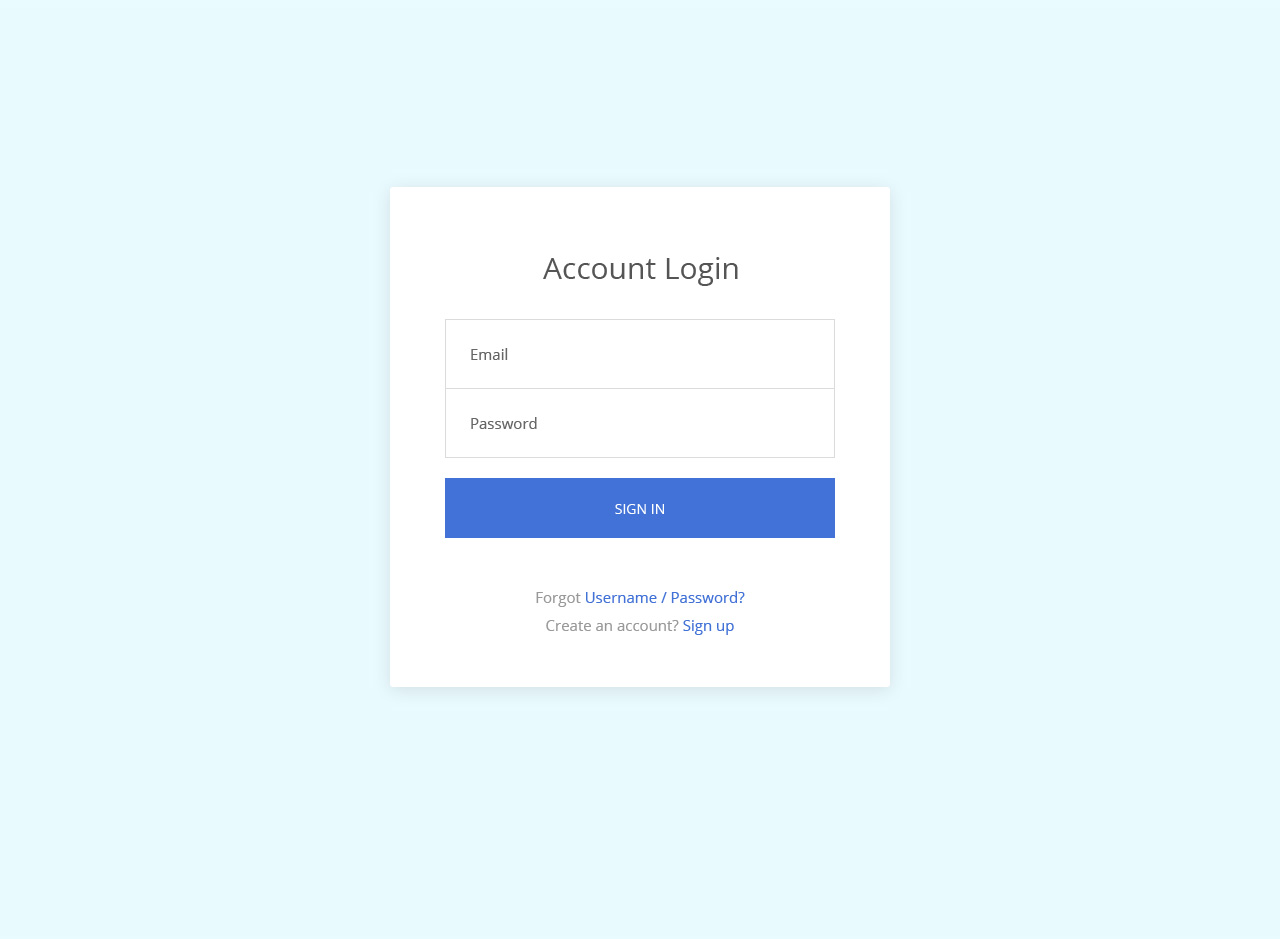
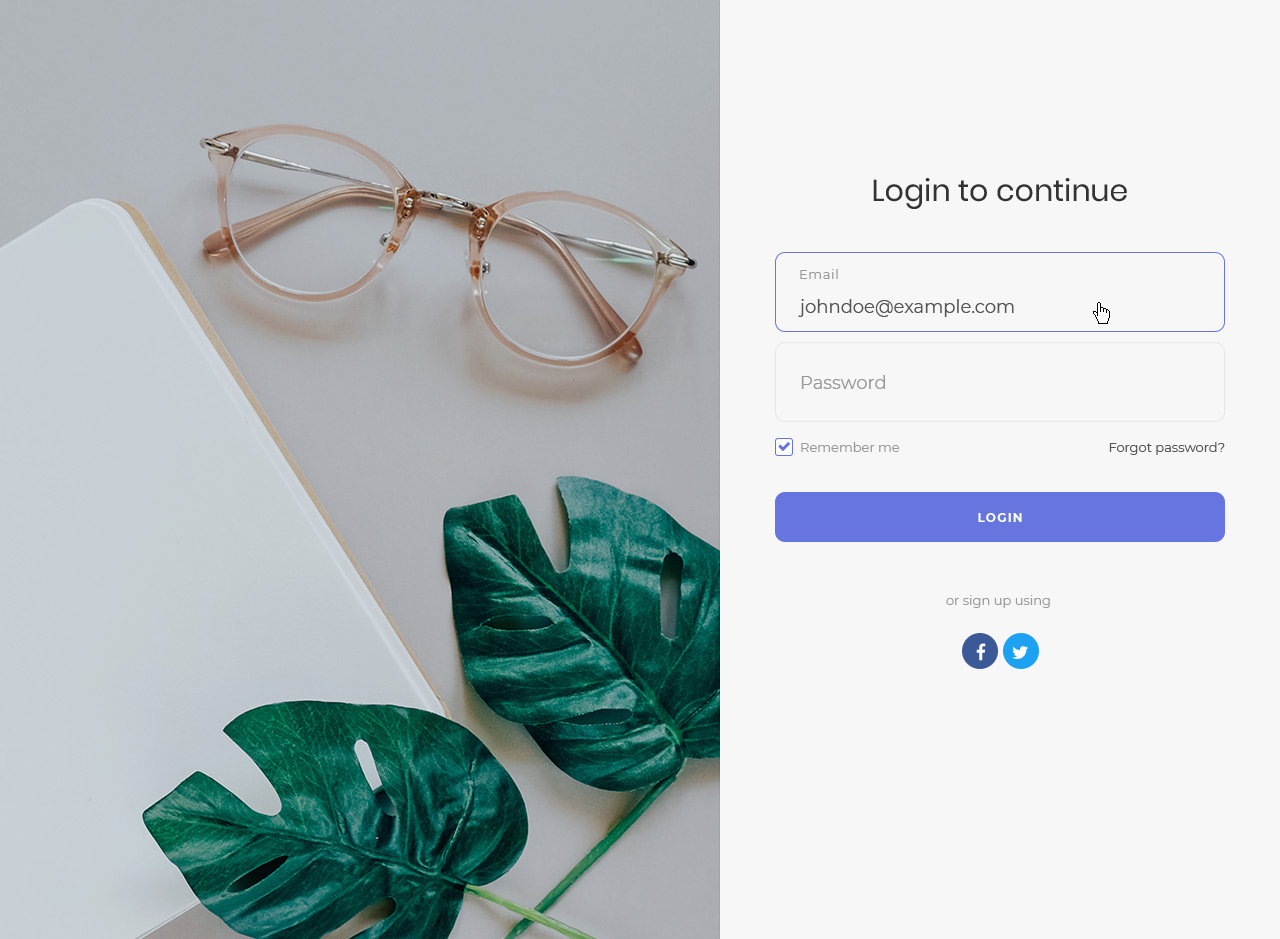
After activating the plugin, go to Appearance Customize in your WordPress admin. You’ll see a new section called “Custom Login Page Customizer” where you can customize your login page with live preview.
Yes! Custom Login Page Customizer works independently of your theme. It only modifies the WordPress login page (wp-login.php), so it’s compatible with any WordPress theme.
Absolutely. Go to the Logo section in the customizer to upload your custom logo. You can also adjust the logo width, height, and link URL. You can choose to display just the image, just text, or both.
In the customizer, navigate to the Background section. You can upload a custom background image or set a solid background color. There are also options for the form column background if you’re using a multi-column layout.
Yes, Custom Login Page Customizer is compatible with security plugins that change the login URL, including All In One WP Security, WPS Hide Login, and similar plugins. Your customizations will appear on your custom login URL.
Yes! The plugin includes options to customize the registration form and lost password form. Your styling will be applied consistently across all login-related pages.
Yes, Custom Login Page Customizer works with WordPress Multisite. You can customize the login page for your entire network or individual sites depending on your configuration.
No. All your customizations are saved in the WordPress database, separate from the plugin files. Your settings will be preserved through plugin updates.
Yes, there’s a Custom CSS section where you can add your own CSS code for advanced styling. This is perfect for fine-tuning specific elements or adding custom effects.
You can reset individual settings by clearing the values in the customizer. To completely reset all settings, you can deactivate and delete the plugin, then reinstall it.
No. Custom Login Page Customizer only loads its styles and scripts on the WordPress login page. It has zero impact on your website’s front-end performance.
Yes, Custom Login Page Customizer is fully translation ready and includes a POT file for translators. It’s already translated into several languages.
Yes! This plugin is perfect for agencies and freelancers who want to white-label WordPress login pages for clients. Remove the WordPress branding and add your client’s logo and brand colors.
Custom Login Page Customizer requires PHP 8.0 or higher. This ensures optimal performance and security. If you’re running an older PHP version, please contact your hosting provider to upgrade.
For support, please visit the WordPress.org support forum. We actively monitor and respond to support requests.
Changelog
2.1.0
- New: Added 5 new professionally designed login page templates:
- Gradient Sunset – Modern vibrant purple-pink gradient with rounded form
- Dark Professional – Sleek dark theme for corporate/professional sites
- Glassmorphism – Trendy glass effect with blur and transparency
- Geometric Bold – Two-column layout with bold amber geometric CSS shapes
- Minimal Clean – Ultra-minimal design with maximum whitespace
- Fix: Password field width now matches username field width consistently
- Fix: Password visibility toggle (eye icon) properly centered in input field
- Enhancement: All new templates use CSS-only effects (no additional images required)
- Enhancement: Templates work consistently in both Customizer preview and live login page
2.0.0
- BREAKING CHANGE: Minimum PHP version is now 8.0 (was 5.6)
- BREAKING CHANGE: Minimum WordPress version is now 6.0 (was 4.6)
- Security: Fixed XSS vulnerabilities in login template output
- Security: Added proper escaping for all user-generated content
- Security: Added CSS sanitization to prevent injection attacks
- Security: Added capability checks for customizer preview
- Enhancement: Added strict type declarations throughout codebase
- Enhancement: Modernized PHP code with PHP 8.0+ features
- Enhancement: Added proper uninstall cleanup to remove all plugin data
- Enhancement: Added input validation and sanitization functions
- Enhancement: Updated CI/CD to test PHP 8.0, 8.1, 8.2, 8.3
- Fix: JavaScript typo ‘show-image-ony’ corrected to ‘show-image-only’
- Fix: Removed unused constant COLORLIB_LOGIN_CUSTOMIZER_SITE
- Compatibility: Hide Astra theme style guide overlay on login page to prevent visual conflicts
- Enhancement: Added sanitize_callback to all Customizer settings for proper input validation
- Enhancement: Replaced custom toggle control with standard WordPress checkbox
- Enhancement: Replaced custom color picker with WordPress built-in WP_Customize_Color_Control
- Enhancement: Replaced custom range slider with native HTML5 range input
- Performance: Removed jQuery minicolors dependency (~39KB savings)
- Code: Added Composer for dependency management
- Code: Updated PHPCS ruleset for modern WordPress standards
1.3.4 – 05.06.2025
Fixed: Textdomain fix for wordpress 6.8+ ( #179 )
1.3.3 – 03.02.2025
Fixed: Textdomain fix for wordpress 6.7+ ( #179 )
Fixed: Deprecated: Hook login_headertitle ( #178 )
1.3.2 – 27.03.2024
Fixed: Php 8 deprecations ( #169 )
Fixed: “Remember me” label not aligned properly for users display( #166 )
Fixed: Form alignment options switched( #165 )
Fixed: The live preview doesn’t show “Register” link ( #163 )
Fixed: Updated deprecated jquery & updated minicolors js library ( #159 )
Fixed: Added plugin name in “Rate us” notice. ( #149 )
Fixed: Show image only on tempalte no.4 does not display the logo image. ( #135 )
Fixed: Background color that will not apply on half page form templates ( #136 )
Fixed: Vertical scrollable login, reset and register forms ( #131 )
Fixed: Bigger logos on mobile/small tablet devices stretching the login page. ( #43 )
1.3.1 – 08.02.2022
Fixed: Form placement ( https://wordpress.org/support/topic/the-login-area-doesnt-center-fix-not-working/ )
1.3.00 – 10.05.2021
Added : Background image link ( https://github.com/ColorlibHQ/colorlib-login-customizer/issues/115 )
= 1.2.99 – 08.04.2021=
Fixed: An issue where the link color hover pallete would not display properly (https://github.com/ColorlibHQ/colorlib-login-customizer/issues/139)
Fixed: An issue where the logo would be outside of the login box on a selected template ( https://github.com/ColorlibHQ/colorlib-login-customizer/issues/134)
1.2.98
- Compatibility with jQuery 3.0
1.2.97
- Hide logo settings if hide logo is toggled on
- Add option to use both image logo and text
1.2.96
- Compatibility fix with All In One WP Security plugin
- Customizer toggle bug fix
- Review dismiss fix
1.2.95
- Review request bug fix
- Review save bug fix
1.2.94
- Minor responsive fixes
1.2.93
- Removed news dashboard widget
1.2.92
- Update for possibility to add links inside certain form texts
1.2.91
- Added possibility to add links inside certain form texts
- Updated deprecated filter login_headertitle
- Added option to change login page title
1.2.9
- Update toggles design
1.2.8
- Responsive view fixes
- Updated plugin headers
1.2.7
- Added options to edit register form
- Added options to edit lost password form
1.2.6
- Customizer CSS editor full height
- Apply login form settings to registration form
- Removed duplicate control for logo text
1.2.5
- Remove uninstall feedback
1.2.4
- Fixed https://github.com/ColorlibHQ/colorlib-login-customizer/issues/30
- Fixed https://github.com/ColorlibHQ/colorlib-login-customizer/issues/41
- Added https://github.com/ColorlibHQ/colorlib-login-customizer/issues/27
1.2.3
- Fixed
Logo Urlsetting - Added
Logo Titlesetting
1.2.2
- Added the possibility to change the
Remember MeandLog Intexts
1.2.1
- Minor tweaks & version bump
1.2.0
- Implemented everything from here: https://github.com/puikinsh/colorlib-login-customizer/milestone/1?closed=1
1.1
- Changed templates functionality
- Added new layout options
- Fixed live preview editing
- Fixed minor bugs
1.0
- Initial release
" width="120" height="120">
Available Versions
| Version | Download | Type |
|---|---|---|
| 2.1.0 | Download | Stable |
| 1.3.4 | Download | Stable |
| 1.3.3 | Download | Stable |
| 1.3.2 | Download | Stable |
| 1.3.1 | Download | Stable |
| 1.3.0 | Download | Stable |
| 1.2.99 | Download | Stable |
| 1.2.98 | Download | Stable |
| 1.2.97 | Download | Stable |
| 1.2.96 | Download | Stable |
| 1.2.95 | Download | Stable |
| 1.2.94 | Download | Stable |
| 1.2.93 | Download | Stable |
| 1.2.92 | Download | Stable |
| 1.2.91 | Download | Stable |
| 1.2.9 | Download | Stable |
| 1.2.8 | Download | Stable |
| 1.2.7 | Download | Stable |
| 1.2.6 | Download | Stable |
| 1.2.5 | Download | Stable |
| 1.2.4 | Download | Stable |
| 1.2.3 | Download | Stable |
| 1.2.2 | Download | Stable |
| 1.2.1 | Download | Stable |
| 1.2.0 | Download | Stable |
| 1.1.0 | Download | Stable |
| Development | Download | Trunk |
