
Carousel Upsells and Related Product for Woocommerce
Active Installs
1,000+
Last Updated
November 10, 2021
First Released
September 27, 2019
Download History (Last one month)
Contributors
The plugin replaces the standard related and upsells products on carousel slider using a script glide.js that does not depend on the jquery, which much faster than its analogues.
Simply activate the plugin and a carousel of related products will already appear in your store. Among other things, you can separately configure related products and recommended(Upsells) products.
The design of the product cards will match the design of your template, but it should be noted that some templates have their own custom carousels of recommended or related products.
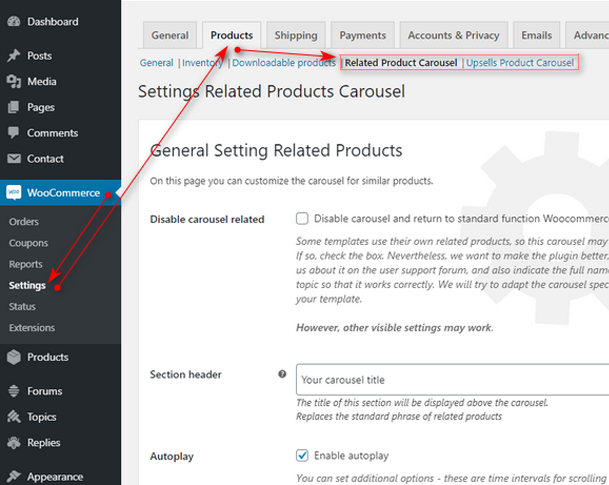
Settings plugin
- Woocommerce → Settings → Products → Related Product Carousel
- Woocommerce → Settings → Products → Upsells Product Carousel
Features:
- Replaces the standard output of related products and recommended(upsells) products with a carousel
- No dependence on the jquery, loading is very fast
- You can change the titles of the standard sections
- You can enable or disable autoplay
- You can change the time interval for scrolling the carousel
- You can specify the number of products in the carousel
- You can specify the number of visible products (specify the grid)
- You can specify the number of displayed products on mobile devices and tablets
- Standard accompanying and recommended products not displayed if their number is less than the indicated visible products in the carousel. That is, a carousel is not created. Only high-quality optimization.
- You can disable the carousel and control other functions – section header, number of displayed products, number of columns
New advanced settings
- Hint on a mobile device (see. Screenshots)
- Styling a mobile hint (see. Screenshots)
- Central mode with cropping (see. Screenshots)
- Central mode on mobile device only
- Choosing a carousel transition animation
- Setting duration of the transition animation
- Setting the distance between products
- The choice of navigation icons (see. Screenshots)
- Setting the color of navigation
All new options have tips right in the admin panel. You can always fine-tune the carousel.
Plugin Benefits
The most important advantage of the “Carousel Upsells and Related Product for Woocommerce” plugin is that it uses a javascript library of glide.js and has no jQuery dependencies. The main JS file of the plugin weighs only ~ 23kb, and in compressed form only ~ 7kb. Compared to similar carousel-slides, such as Slick Slider (88kb, and in compressed 44kb), Swiper Slide (more than 100kb) or OWL carousel (89kb, and in compressed 44kb) is many times smaller and I will remind glide.js without jQuery dependencies. With all this, glide.js has Touch Swipe mode, which allows the finger (touch on the element) to move the carousel in the right direction.
As a result, this carousel works faster and directly instantly loads your goods in the carousel. By the way, remember to optimize your images, now owners of online stores fight for each kb as search engines love fast sites.
Required Plugins
Great thanks
- Thanks for the wonderful javascript carousel Glide.js Jędrzej Chałubek
- Thanks for the help Сampusboy
- Thanks for the help KAGG Design
- Thanks for helping the developer Artem Abramovich
- For help Telegram chat “WordPress & WooCommerce” and all participants
- For the best documentation in Russian by WordPress Site wp-kama.ru
Donate link:
Translations
If you wish to help translate this plugin, you are most welcome!
To contribute, please visit translate.wordpress.org
This section describes how to install the plugin and get it working.
Install From WordPress Admin Panel:
- Login to your WordPress Admin Area
- Go to Plugins -> Add New
- Type “Woocommerce Glide.js Carousel Upsells and Related Product” into the Search and hit Enter.
- Find this plugin Click “install now”
- Activate The Plugin
Manual Installation:
- Download the plugin from WordPress.org repository
- On your WordPress admin dashboard, go to ‘Plugins -> Add New -> Upload Plugin’
- Upload the downloaded plugin file (carousel-upsells-and-related-product-for-woocommerce.0.4.6.zip) and click ‘Install Now’
- Activate ‘Woocommerce Glide.js Carousel Upsells and Related Product’ from your Plugins page.
Screenshot Gallery


If the carousel doesn’t work, check the caching plugins first. Reducing the size of the JS code is a fairly common reason why carousels stop working.
For example, if you are using the Autoptimize plugin, you can test the functionality of our carousel plugin without the Autoptimize plugin running. In this case, it is not necessary to deactivate the Autoptimize plugin, it is enough to add the prefix ?ao_noptimize=1 in the root of the URL. In case the carousel starts working, just add an exception to the Autoptimize plugin. This is how it looks.
If you are using WP Rocket then the problem is fixed in the same way as in the case of Autoptimize. Check out this post.
Please create a topic in the forum support. I will try to provide assistance as quickly as possible. The plugin is sophisticated, let’s make it better together. Just waiting for your recommendations and suggestions
Changelog
0.4.6
- Fixed an error in navigation arrows
0.4.5
- Tested WP ver 5.8
0.4.4
- Tested WP ver
- Added a description for solving problems with caching plugins
0.4.3
- Tested WP ver
0.4.2
- Updating details
0.4.1
- Plugin tested with WordPress version 5.5+
0.4.0
- Fixed carousel display in some themes
0.3.9
- Added a new function – initializing JS after loading the whole page
0.3.8
- Plugin tested with WordPress version 5.4+
0.3.7
- Added translation string for mobile tooltip
0.3.6
- Update CSS
0.3.5
- Fixed a bug when choosing a navigation arrow in related products
- Added new settings for themes that apply filters and functions
0.3.4
- Fixed links for installed WordPress in a subfolder
0.3.3
- Update CSS
0.3.2
- Update style setting
0.3.1
- Fixed string translation
0.3.0
- Last testing of new hooks and plugin update
- New option – Tooltip on mobile device
- New option – Styling a mobile tooltip
- New option – Center mode with cropping
- New option – Central mode only on mobile device
- New option – Select carousel transition animation
- New option – Set transition animation duration
- New option – Setting the distance between products
- New option – Select navigation icons
- New option – Adjust the color of navigation
- Added tooltips in admin panel
- Added demo windows with carousels
0.2.9
- Last testing of new hooks and plugin update
0.2.8
- Fix error notice
0.2.7
- Fix error update hook
0.2.6
- Test update hook
0.2.5
- Test WordPress 5.3
- Add notice
- New lines in localization
0.2.4
- Test new version WooCommerce
0.2.3
- Update CSS
0.2.2
- Update CSS
0.2.1
- Fix error
0.2.0
- Fix error
0.1.9
- Fix error text-domain
0.1.8
- Fix modal error
0.1.7
- New interface
- New POT file
- Update CSS
- Update JS
- Added a new feature – turn off the carousel
0.1.6
- Update JS
0.1.5
- Update CSS
0.1.4
- Update CSS
0.1.3
- Update CSS
0.1.2
- Fix error nav slider
- Add hover effect in navigation
0.1.1
- Presentation of the settings of the first version of the plugin
0.1.0
- Release
Available Versions
| Version | Download | Type |
|---|---|---|
| 0.4.6 | Download | Stable |
| 0.4.5 | Download | Stable |
| 0.4.4 | Download | Stable |
| 0.4.3 | Download | Stable |
| 0.4.2 | Download | Stable |
| 0.4.1 | Download | Stable |
| 0.4.0 | Download | Stable |
| 0.3.9 | Download | Stable |
| 0.3.8 | Download | Stable |
| 0.3.7 | Download | Stable |
| 0.3.6 | Download | Stable |
| 0.3.5 | Download | Stable |
| 0.3.4 | Download | Stable |
| 0.3.3 | Download | Stable |
| 0.3.2 | Download | Stable |
| 0.3.1 | Download | Stable |
| 0.3.0 | Download | Stable |
| 0.2.9 | Download | Stable |
| 0.2.8 | Download | Stable |
| 0.2.7 | Download | Stable |
| 0.2.6 | Download | Stable |
| 0.2.5 | Download | Stable |
| 0.2.4 | Download | Stable |
| 0.2.3 | Download | Stable |
| 0.2.2 | Download | Stable |
| 0.2.1 | Download | Stable |
| 0.2.0 | Download | Stable |
| 0.1.9 | Download | Stable |
| 0.1.8 | Download | Stable |
| 0.1.7 | Download | Stable |
| 0.1.6 | Download | Stable |
| 0.1.5 | Download | Stable |
| 0.1.4 | Download | Stable |
| 0.1.3 | Download | Stable |
| 0.1.2 | Download | Stable |
| 0.1.1 | Download | Stable |
| 0.1.0 | Download | Stable |
| Development | Download | Trunk |


