
BuildsByLuke SEO Flight Recorder – Noindex, Meta & Schema Change Alerts
Active Installs
0+
Last Updated
August 27, 2026
First Released
August 10, 2026
Download History (Last one month)
Contributors
Your SEO can break silently. Nothing tells you.
A plugin update wipes your product schema. A settings collision flips a page to noindex. Your canonical quietly starts pointing somewhere else. Your sitemap begins returning errors. The site looks fine. The dashboard says nothing. Google notices — sometimes weeks before you do, and Google Search Console reports what its crawler decided, days later, without ever telling you what on your site changed or what changed it.
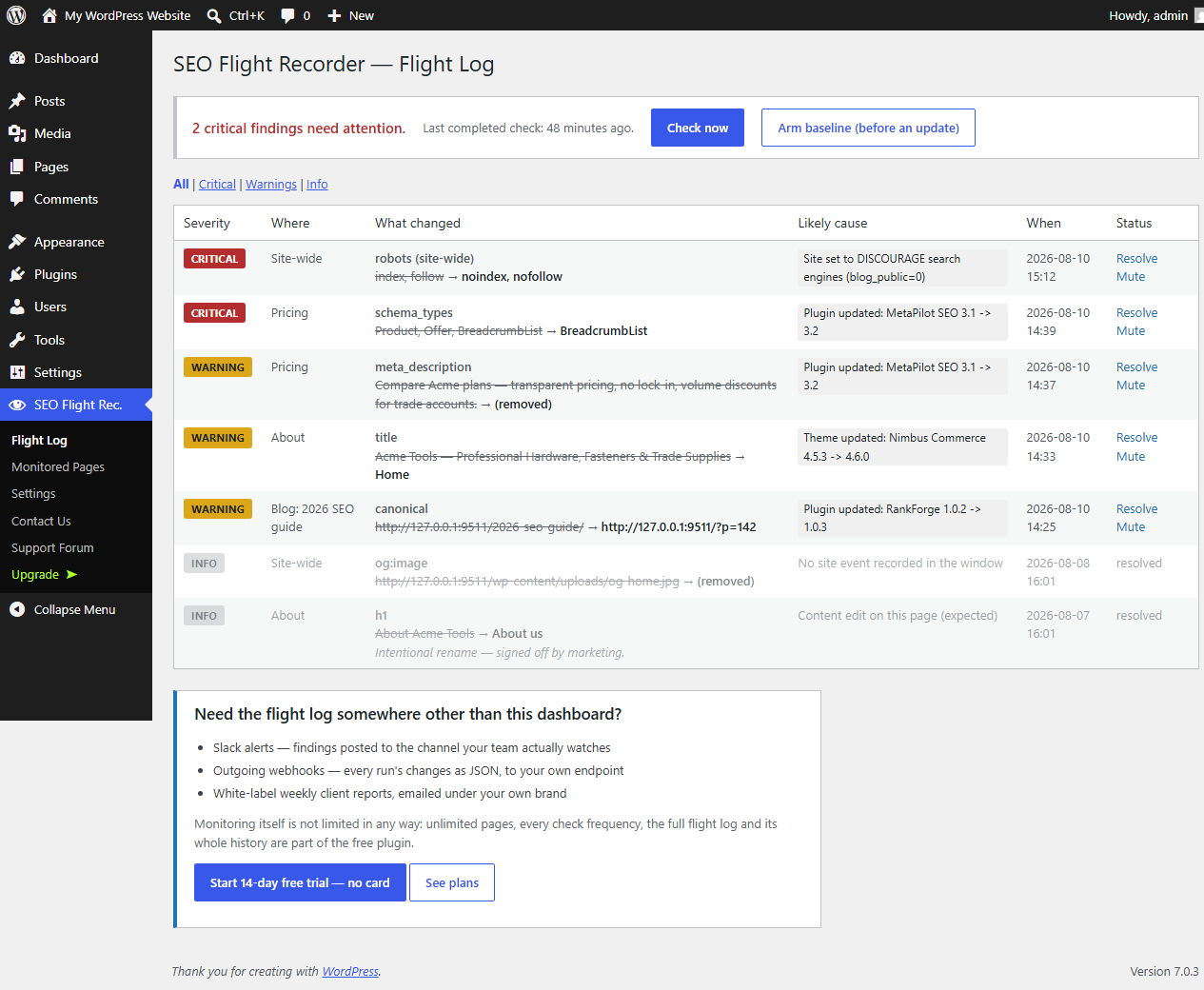
BuildsByLuke SEO Flight Recorder is the black box for your site’s SEO. It records the SEO-critical output of the pages you care about, re-checks them on a schedule and immediately after anything on the site changes, and writes every difference to a flight log — with the site events that immediately preceded it, so the culprit has a name.
What it records, per monitored page
- Title and meta description
- Meta robots — with a tripwire for
noindexappearing where it shouldn’t - Canonical URL (value changes, not just presence)
- Schema/structured data types (JSON-LD, including nested @graph) — a vanished
ProductorFAQPagetype is a critical finding - Open Graph and Twitter card tags
- First H1 and H1 count
- HTTP status and redirect target
What it watches site-wide
- robots.txt — content drift, and a critical alarm if it starts blocking all crawlers
- XML sitemap — reachability, validity, and URL-count drops
- The “Discourage search engines” switch (
blog_public) — the classic staging-to-production catastrophe, caught even when page checks can’t run
The part only a plugin can do: naming the culprit
External SEO crawlers poll from outside. This plugin lives inside WordPress, so it sees the moment a plugin/theme/core update finishes, a plugin is activated or deactivated, the theme is switched, or an SEO-relevant setting changes — and runs a check ~90 seconds later. When output changed, the log entry carries the events that just happened: “meta_description removed — right after: Plugin updated: Example SEO Suite 4.2”.
It also knows when you edited the page yourself, and files those changes as expected content edits instead of alarms. (A change that endangers indexability — like noindex appearing — stays critical even then.)
Alerts that respect your dashboard
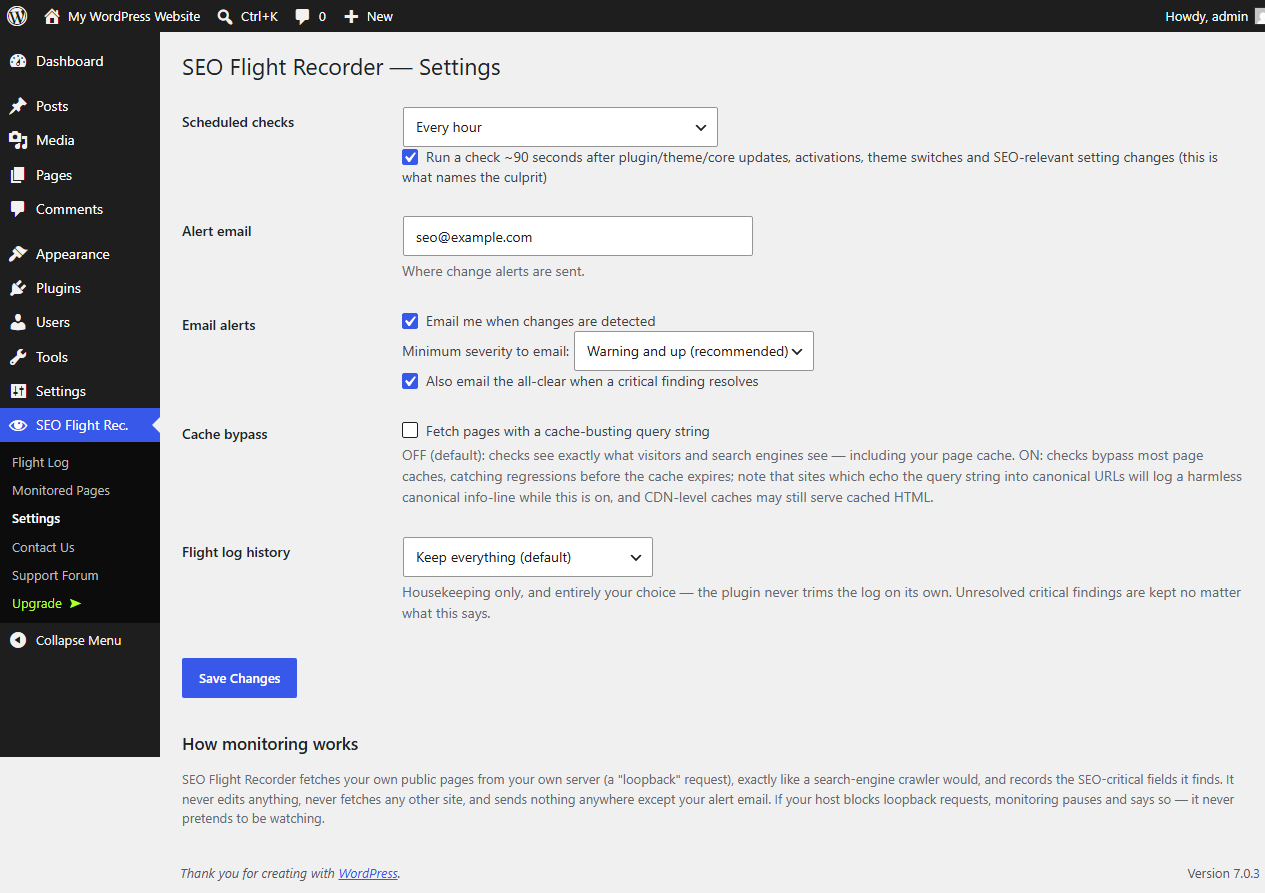
Changes above your chosen severity arrive by email, once per check, with plain-language descriptions. When a critical finding stops being detected, it is marked resolved and you can get the all-clear. No site-wide nags, no dashboard takeovers — one dashboard widget with the headline, and everything else lives in the plugin’s own pages.
Everything here is in the free plugin, uncapped
There is no page limit, no check-frequency tier, no history limit and no feature switched off pending payment.
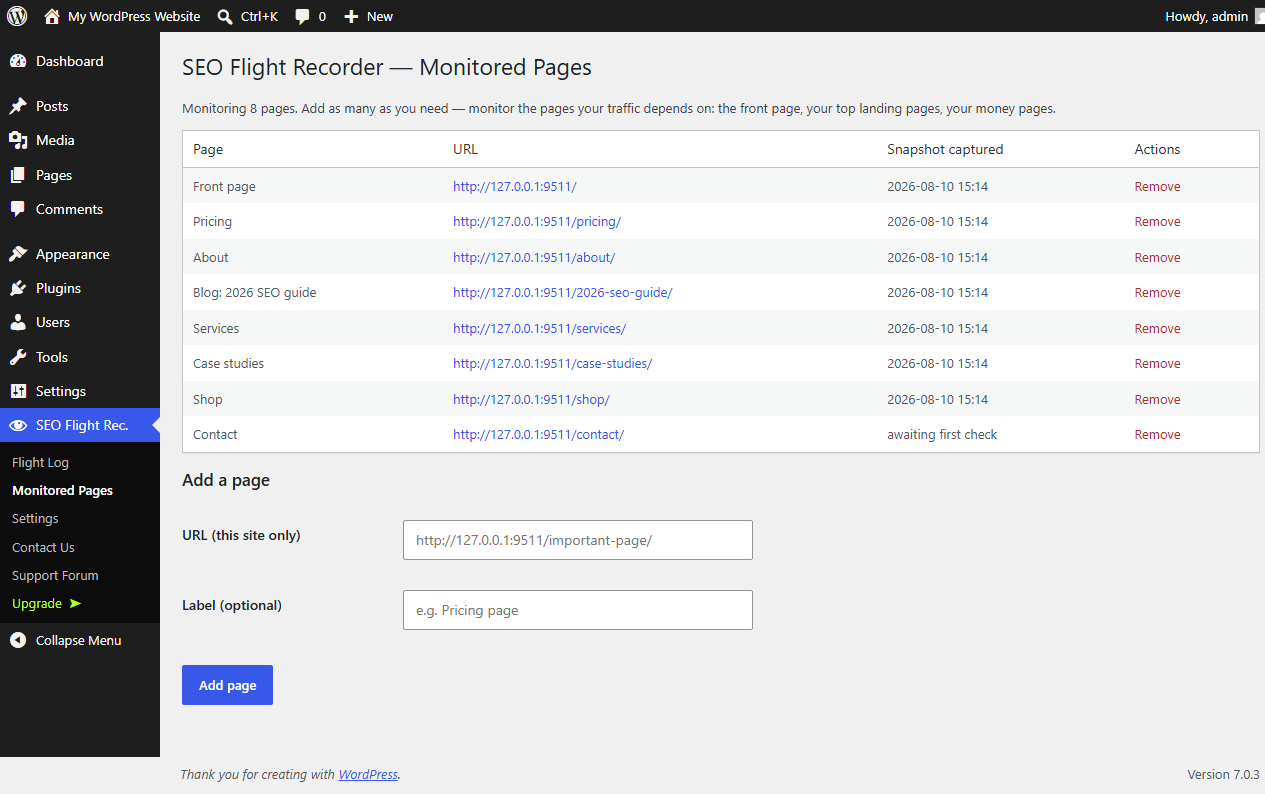
- Monitor as many pages as you like — the front page is added for you; add the rest
- Choose your own cadence — hourly, twice daily, daily, or scheduled checks off entirely
- The automatic post-update check that names the culprit, plus manual “Check now”
- Armed baselines — snapshot every monitored page before you run updates, then compare afterwards and see exactly what the update changed
- The complete flight log, kept forever by default; trimming old entries is an option you choose, not a limit imposed on you (unresolved critical findings are never trimmed)
- Severity filters, resolve/mute with notes — an audit record of every decision
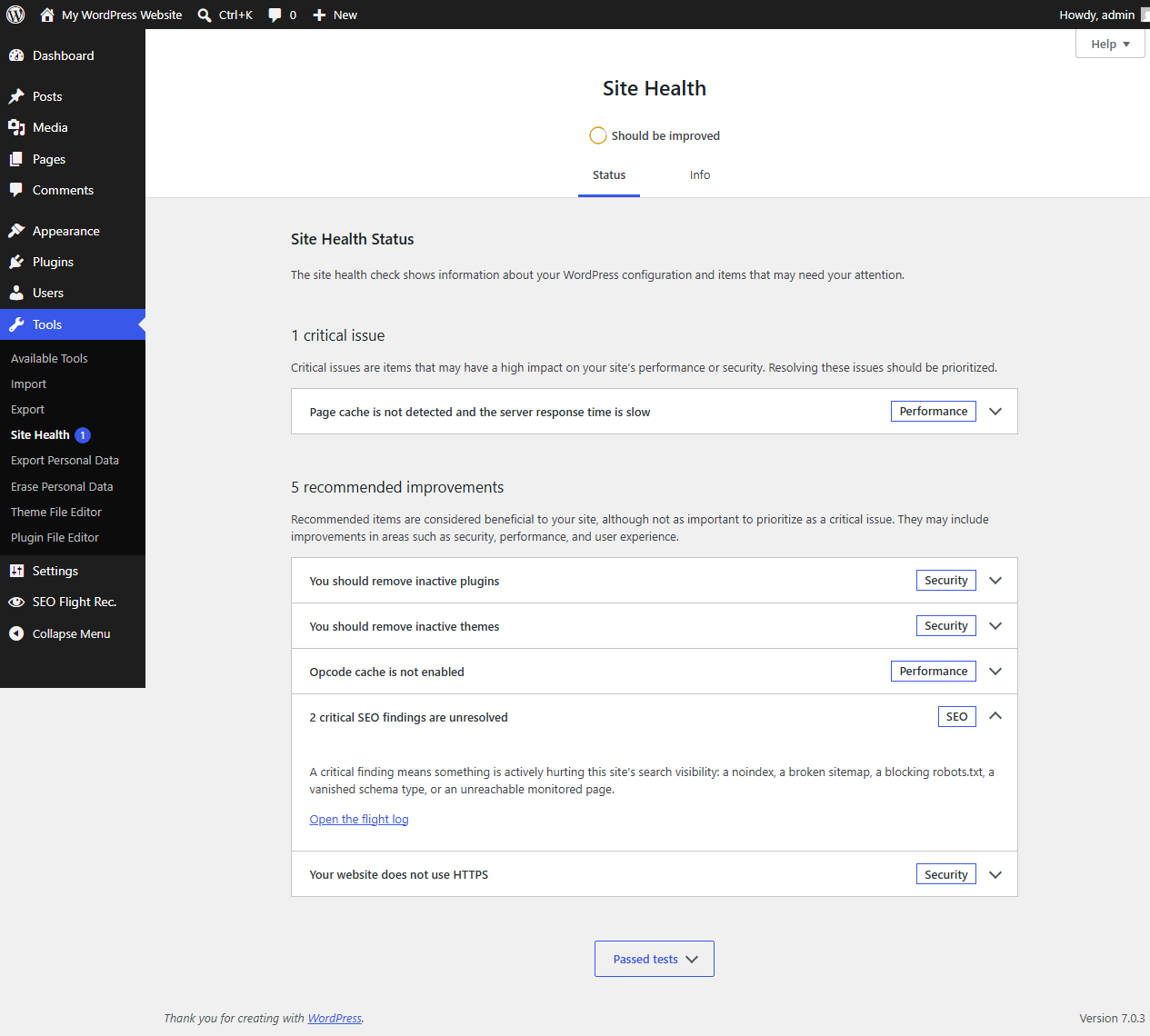
- Site Health integration and a dashboard widget
- WP-CLI:
wp seo-flight-recorder check/status, including--format=json - REST:
GET /wp-json/sfrec/v1/statusfor scripts and dashboards, with the samemanage_optionspermission the admin screens use - An honest loopback self-check: if your host blocks self-requests, the plugin says “monitoring impaired” everywhere — it never pretends to be watching
BuildsByLuke SEO Flight Recorder Pro
Pro adds no monitoring — monitoring is complete and unlimited above. What it adds is delivery: ways to get the flight log out of this dashboard and in front of people.
- Slack alerts — findings posted into the channel your team actually watches
- Outgoing webhooks — each run’s changes as JSON, POSTed to an endpoint you enter yourself
- A weekly white-label client report — emailed under your own brand, with this plugin’s name nowhere in it
Details and pricing. Sold and licensed through Freemius (see “External services”).
What this plugin is not
It does not edit your SEO output, does not generate meta tags or schema (your SEO plugin does that), does not crawl other websites, and does not promise rankings. It is a recorder: it proves what your pages said, when they changed, and what changed them.
External services
The monitoring itself contacts nothing external. Checks fetch this site’s own public URLs from your own server (loopback requests, like WordPress’s own Site Health checks) with the user agent “SEOFlightRecorder”. Redirects are not followed by the HTTP layer: the plugin resolves each hop itself and re-checks the destination against your site address before requesting it, so a monitored URL that redirects off-site is recorded as a change and stopped there rather than followed. Records stay in your database. Nothing about your site is transmitted anywhere, and no third-party crawler, API, or CDN is involved.
Freemius (freemius.com), who sell and license the Pro version
Freemius is contacted in four situations. Every one of them is something you click. It is never contacted in the background.
- If you opt in on the activation screen (or start a trial / activate a licence). Sent to api.freemius.com: your site URL, your WordPress and PHP versions, and the email address of the account you activate with. Skipping the opt-in is a first-class choice and the plugin is fully functional without it.
- If you open the “Upgrade” page under the plugin’s menu. Your own server (not your browser) asks api.freemius.com for current plan prices, sending your site URL. The page itself loads no third-party scripts — everything it renders is served from this plugin’s own folder. The payment SDK’s bundled pricing script used to inject Google Analytics and a remote checkout script into wp-admin on that page; this build removes both, along with the SDK’s remaining remote references (all modifications are listed under “Source code” below).
- If you open the “Contact Us” page, which is Freemius’s hosted support form (wp.freemius.com). The link carries your site URL and your WordPress login URL so the form knows which site you are writing about.
- If you click a plan to buy, you go to Freemius’s hosted checkout (checkout.freemius.com). It receives your site URL, site name, WordPress and PHP versions, and your WordPress administrator email address (pre-filled, sent whether or not you complete the purchase). Freemius is the merchant of record. Their checkout page loads its own third-party scripts (at the time of writing: Stripe, PayPal, Google Tag Manager, and Freemius’s own assets); we do not control that list. If you never click a plan, none of it loads.
Terms: https://freemius.com/terms/ — Privacy: https://freemius.com/privacy/
Installing, activating, skipping the opt-in, monitoring, using every screen, deactivating (the SDK’s deactivation-feedback dialog is switched off in this build, so deactivation is one click and sends nothing), WordPress’s update cycle and all scheduled tasks complete without contacting Freemius at all. Free updates come from WordPress.org like any other plugin.
In the Pro version, Slack and webhook alerts POST run summaries only to endpoint URLs you enter yourself in the plugin’s settings; nothing is sent until you configure one.
Source code
This plugin’s own PHP is unminified and readable in the plugin folder.
The one exception to “unminified” is the third-party payment SDK in vendor/freemius/, which ships pre-minified. Those files are the Freemius WordPress SDK, published under the GPL, and their unminified source and build tooling are public:
- Freemius WordPress SDK: https://github.com/Freemius/wordpress-sdk
- The pricing screen bundled at
vendor/freemius/assets/js/pricing/freemius-pricing.js: https://github.com/Freemius/pricing-page
This plugin ships four deliberate modifications to that SDK, all in assets/js/pricing/freemius-pricing.js, all removing remote references from wp-admin. Three are marked with a “SEO Flight Recorder:” comment at the patch site; the loader-image swap (3.) is a one-string replacement:
- The
appendScripts()method is emptied. Upstream it injectshttps://www.google-analytics.com/analytics.jsandhttps://checkout.freemius.com/checkout.jsinto wp-admin when the pricing screen renders. - The Google Analytics pageview tracker is stubbed out. Upstream it reports pricing-page views to Freemius’s Analytics property whenever a GA object is already present in wp-admin, stamping them with the Freemius user id.
- The remote loading spinner (
img.freemius.com/blue-loader.gif) is replaced with an inline data-URI equivalent. - Testimonial photos (Gravatar/remote) are forced to the bundled placeholder image, so the pricing page renders without any remote image requests.
Known limitations (honesty section)
- Loopback-blocked hosts. If your server cannot fetch its own pages (Basic Auth, aggressive firewall, some local setups), page checks cannot run. The plugin detects this, shows “monitoring impaired” on its dashboard, in Site Health and by email — and never reports a false all-clear.
- Off-site redirects. A monitored URL that redirects to a different host is recorded and reported as a critical change, but not followed — the plugin’s requests never leave your own server. Its SEO fields are therefore read from the redirect response, not from the page it points at.
- Page caches and CDNs. By default, checks see exactly what visitors and crawlers see — including your page cache. The optional cache-bypass mode defeats most page caches; CDN-level caches may still serve cached HTML until they expire, which can delay detection accordingly.
- Client-side-injected tags. Fields injected by JavaScript after page load (for example schema added via Google Tag Manager) are not visible to server-side fetches and are not monitored. Server-rendered output — how WordPress SEO plugins emit their tags — is what this plugin records.
- Very large page lists. Checks are batched with a wall-clock budget and chained across WP-Cron ticks, so monitoring a long list of pages takes several ticks to complete rather than failing. On a site with sparse traffic and no real cron, that simply means checks finish later.
No installation instructions provided.
Search Console tells you what Google’s crawler eventually decided, on its own schedule — often days or weeks later — and it doesn’t watch social tags or canonical values, doesn’t run the moment an update finishes, and never names the plugin that caused it. This plugin tells you what your HTML said, within your chosen check window (or ~90 seconds after an update), with the likely cause attached. They complement each other; only one of them is on your side of the fence.
As many as you want, as often as hourly. Neither is limited, and neither depends on paying for anything.
No. Checks run in the background via WP-Cron, fetch your pages with a strict time budget per batch, and store compact snapshots. Nothing runs on your visitors’ page loads, and nothing is added to your front end.
No, and that’s deliberate. It is strictly read-only: it records, diffs, and alerts. You (or your SEO plugin) stay in charge of what your pages say. A recorder you can trust must never be a hand on the controls.
A snapshot you take deliberately, rather than on a schedule. Before running a batch of updates, click “Arm baseline” — every monitored page is captured as it is right now. Run your updates, then click “Compare against armed baseline” and anything that moved is written to the flight log. It is the same recorder, pointed at a moment you chose.
noindex appearing on a monitored page, the site being switched to “Discourage search engines”, a canonical moving to a different domain or disappearing, a schema type vanishing, a monitored page starting to return errors or redirect off-site, robots.txt blocking all crawlers, a broken or invalid sitemap, and an emptied title. Warnings cover meaningful-but-possibly-intended changes (title/description edits, Open Graph changes, H1 changes, sitemap shrinkage). Changes you made yourself by editing the page are logged as informational.
It keeps a short log of site events — plugin/theme/core updates, activations, deactivations, theme switches, SEO-relevant setting changes, and edits to monitored pages. When a check finds a difference, the events since the previous clean check are attached to the log entry. It is honest about uncertainty: entries say “site events immediately before this change”, and when nothing happened in the window, it says so.
Yes — with all of them, and with none of them. It monitors the rendered output of your pages regardless of what generates it. It is not an SEO plugin and does not compete with yours; it verifies that whatever your SEO stack promised is actually what your pages serve.
Everything the plugin created: its three tables (pages, snapshots, changes), its options, transients, and scheduled tasks. Deactivating (without uninstalling) keeps your flight log.
Changelog
1.0.2
- Checks no longer follow a redirect that leaves this site. A monitored URL that starts redirecting off-site is still recorded and still reported as a critical change — the plugin now stops at the redirect instead of requesting the other host, so its requests never leave your own server.
1.0.1
- Renamed to BuildsByLuke SEO Flight Recorder.
- Removed every limit from the free plugin: monitored pages are now unlimited, and the flight log keeps its full history by default.
- Check frequency is now yours to choose — hourly, twice daily, daily, or off — on the Settings screen.
- Armed baselines (snapshot before updating, compare afterwards) are now part of the free plugin.
- The
sfrec/v1/statusREST endpoint is now part of the free plugin, alongside the existing WP-CLI commands. - Flight log history is now a housekeeping choice on the Settings screen (keep everything by default) instead of a fixed cut-off.
- Pro is now strictly outbound delivery: Slack alerts, outgoing webhooks and the weekly white-label client report.
1.0.0
- Initial release: per-page SEO output snapshots and diffing (title, meta description, robots/noindex, canonical, JSON-LD schema types, Open Graph, Twitter cards, H1, HTTP status/redirects), site-wide robots.txt and sitemap watch, blog_public tripwire, post-update culprit attribution with expected-change intelligence, scheduled + post-update checks, email alerts with all-clear, flight log with resolve/mute audit notes, Site Health tests, dashboard widget, WP-CLI with JSON output, loopback self-check with honest impaired state.
" width="120" height="120">
