
Block Visibility — Conditional Visibility Control for the Block Editor
Active Installs
40,000+
Last Updated
September 18, 2026
First Released
August 11, 2020
Download History (Last one month)
Contributors
Easily create dynamic content in WordPress that will increase conversions, enhance the user experience, and improve your workflow.
With this no-code solution, control which blocks are visible on your website and who can see them. Schedule content to show or hide at a specific time. Display exclusive promotions to your customers or members. Restrict blocks to specific user roles, screen sizes, query strings, WooCommerce products, EDD downloads, ACF fields, WP Fusion tags, and more.
Block Visibility is built exclusively for the WordPress Editor (Gutenberg) and is designed to work with any WordPress block. This includes blocks natively provided by WordPress, third-party blocks, and even block-based widgets.
Create Conditional Blocks in Seconds!
Work directly in the WordPress Editor with blocks you’re already familiar with. There is no external editor or new interface to learn. In seconds, you can transform static blocks into conditional and personalized content.
It takes just 3 simple steps:
- Create your content using any WordPress block.
- Select the desired visibility conditions.
- Save the page/post and marvel at the results!
Packed With Features
Visibility Controls determine whether a block should be visible to users on the front end of your website. Features include:
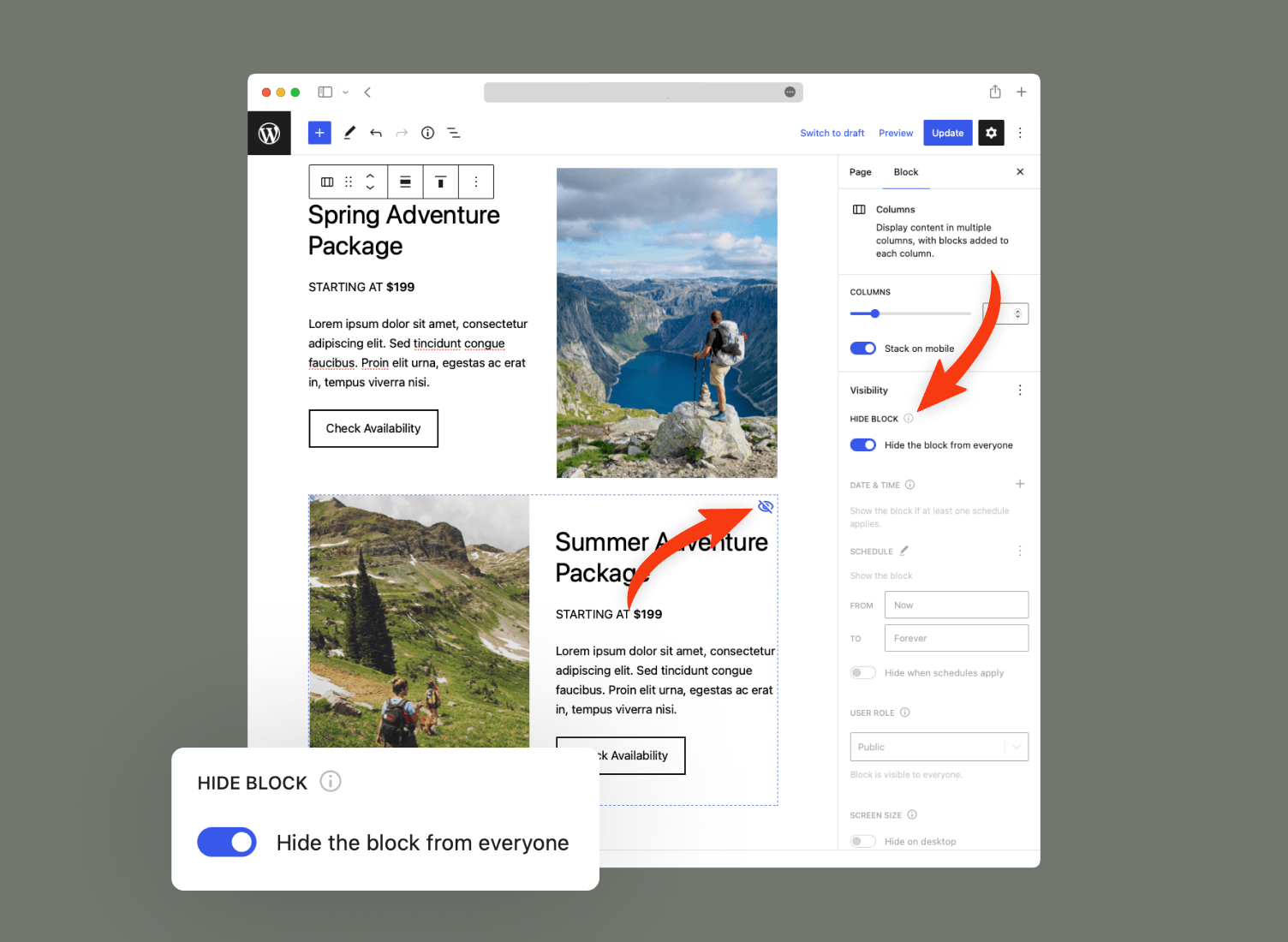
- Hide blocks from all users.
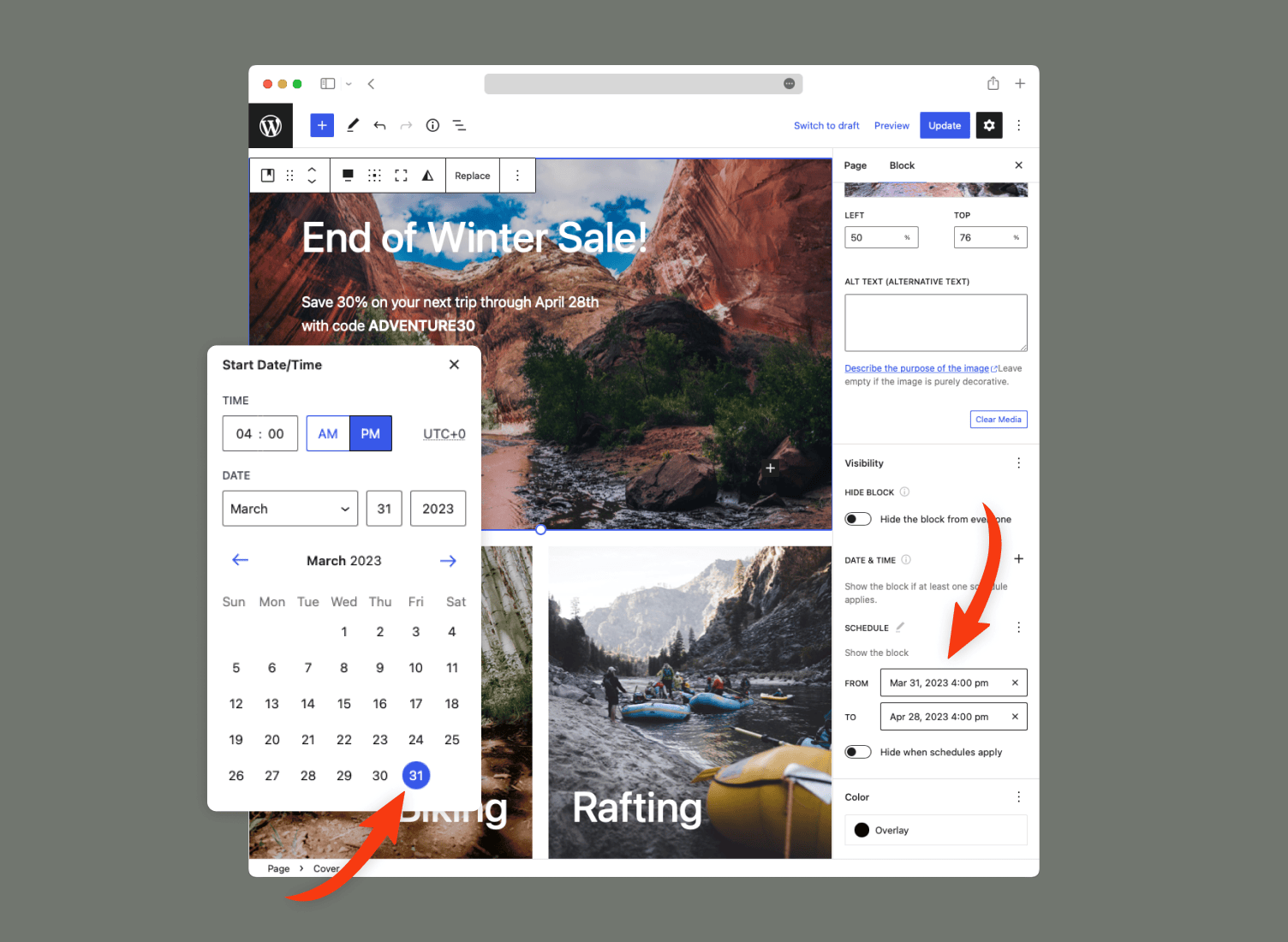
- Schedule when content should be visible using a start and end date/time.
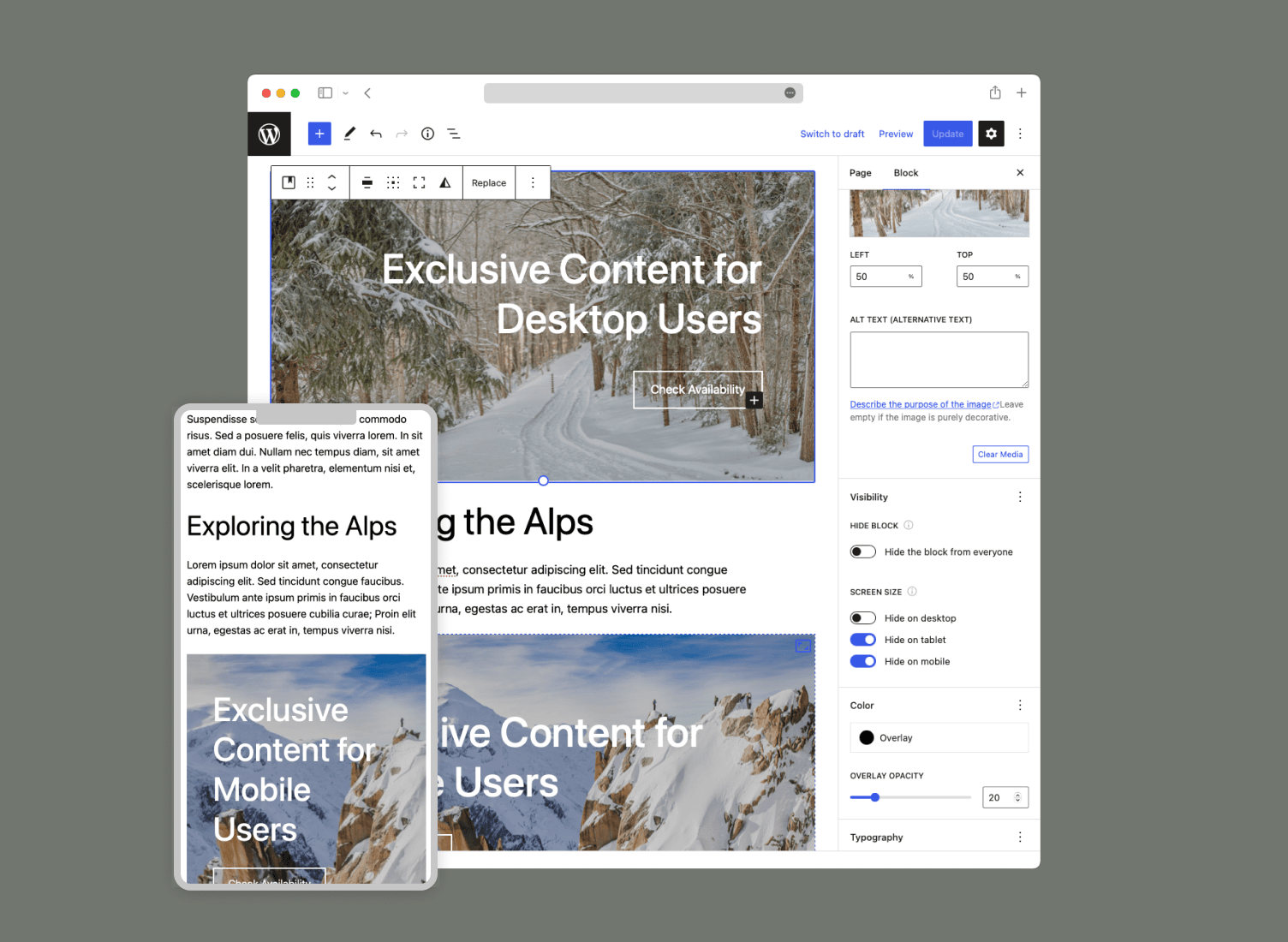
- Conditionally display blocks based on screen size (Desktop, Tablet, Mobile, and more)
- Only show blocks to logged-in users.
- Only show blocks to logged-out users.
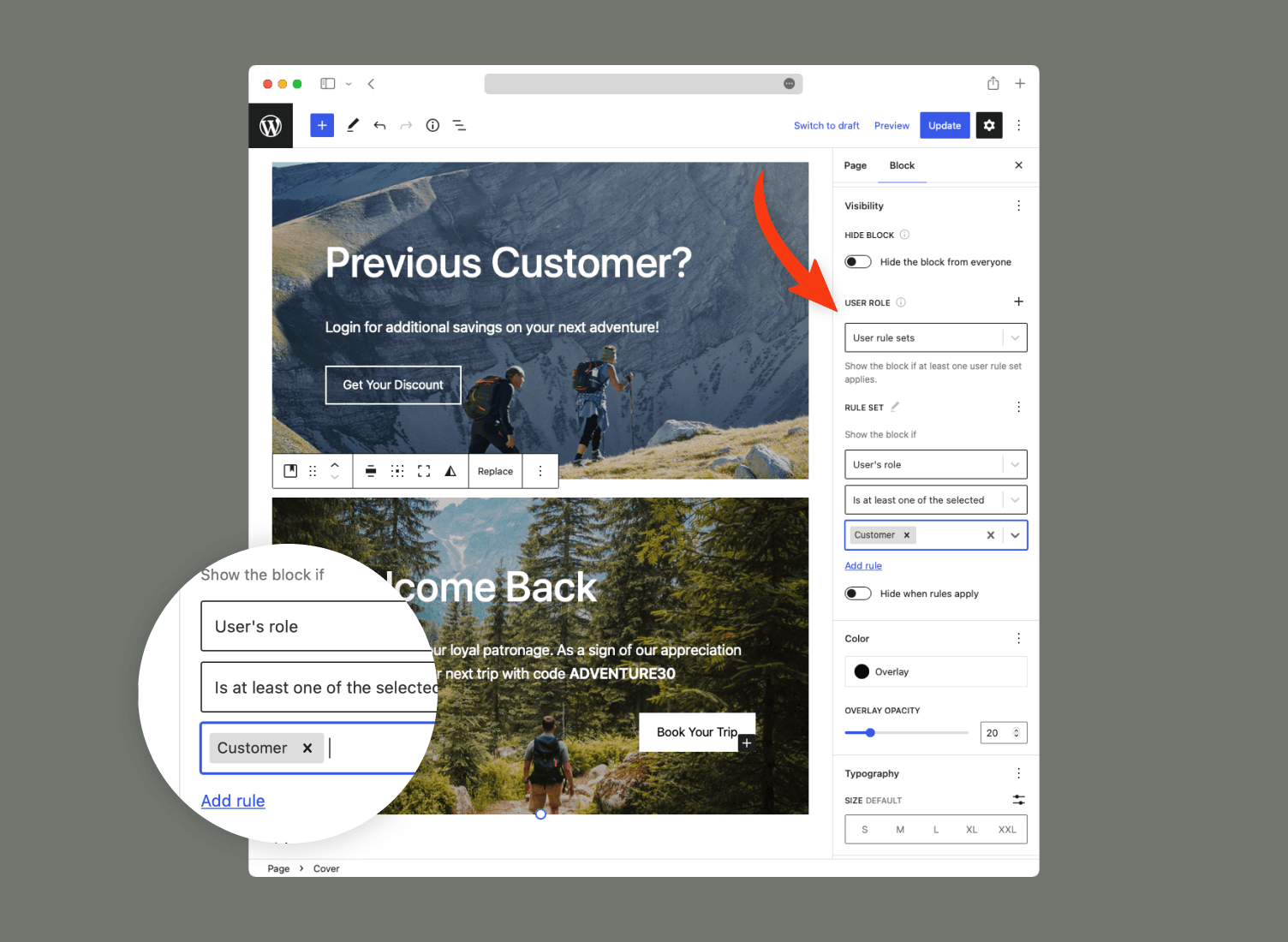
- Only show blocks to users with specific roles (Administrator, Subscriber, Customer, Member, etc.)
- Only show blocks to specific users. Great for personalization.
- Show or hide dynamic blocks based on URL query strings. Great for marketing campaigns!
- Show or hide blocks based on their location and “attributes” of their location (post type, taxonomy, archive, etc.)
- Display blocks based on a website visitor’s referral source (domain/URL).
- Support for all post and user metadata (custom fields).
- Display blocks based on HTML cookies.
- WooCommerce: Show or hide blocks based on products, cart contents, customer purchase history, and more.
- Advanced Custom Fields (ACF): Control the visibility of block content based on ACF fields.
- Easy Digital Downloads: Show or hide blocks based on downloads, cart contents, customer purchase history, and more.
- WP Fusion: Combine Block Visibility with the power of WP Fusion to conditionally show or hide content based on data from your favorite CRM or marketing automation platform.
PLUS: Powerful Settings allow you to customize Block Visibility to your needs or those of your clients.
- Visibility Presets allow you to control multiple blocks at once.
- Globally disable any visibility control.
- Restrict visibility controls to specific block types.
- Set permissions so only certain users have access to visibility conditions.
- Configure up to 4 different breakpoints to optimize the screen size controls.
- Disable contextual indicators and other plugin utilities.
- Customize the contextual indicator color to enhance theme compatibility.
- Enable Full Control Mode 🚀 (See the FAQs).
- Remove all plugin settings on uninstall.
Why Do I Need This?
While there are countless applications for conditional blocks, here are a few examples to get you started:
- Use as a content management tool. Hide new blocks while working on them, but keep the page published.
- Temporarily hide seasonal content on your website rather than having to delete it.
- Schedule time-sensitive promotional content or event information to display automatically.
- Show or hide specific content on desktops, tablets, or mobile devices.
- Restrict content so it’s only visible to your customers, members, or subscribers.
- Display messaging to logged-out users, encouraging them to subscribe to your blog.
- Create unique marketing campaigns using query string parameters to display personalized messaging (See it in action)
- Conditionally display elements in the Site Editor using advanced visibility logic.
- Increase visitor engagement and conversions with dynamic content and personalization.
Why Choose Block Visibility?
1. Easy to Use
Block Visibility is the easiest way to create conditional blocks in WordPress. All with no code and just a few clicks!
2. A Balance of Power and Simplicity
Block Visibility is for you whether you’re building a sophisticated time-based promotional campaign for your customers or need to hide a few blocks on mobile. Don’t need certain functionality? Toggle it off in the plugin settings.
3. Helpful Support and Continuous Development
Block Visibility is designed, developed, and supported by Nick Diego with contributions from the broader Block Visibility community. Have an idea for additional block logic? Let us know in the plugin support forum.
For an unbiased review, the plugin was featured on WordPress Tavern.
Plays nice with others
Block Visibility is designed to work with any block and is tested with these top block libraries and plugins.
Compatibility + Direct Integration
Stay Connected
Stay up-to-date on Block Visibility using the links below. The plugin is also being developed transparently on GitHub, so give it a star and follow along! 😉
- You have a couple of options:
- Go to Plugins → Add New and search for “Block Visibility.” Once found, click “Install.”
- Download Block Visibility from WordPress.org and make sure the folder is zipped. Then upload via Plugins → Add New → Upload.
- Activate the plugin through the ‘Plugins’ menu in WordPress.
- From the ‘Plugins’ page, head directly to the plugin ‘Settings’ page.
- Start applying conditional visibility controls to all blocks!
Screenshot Gallery
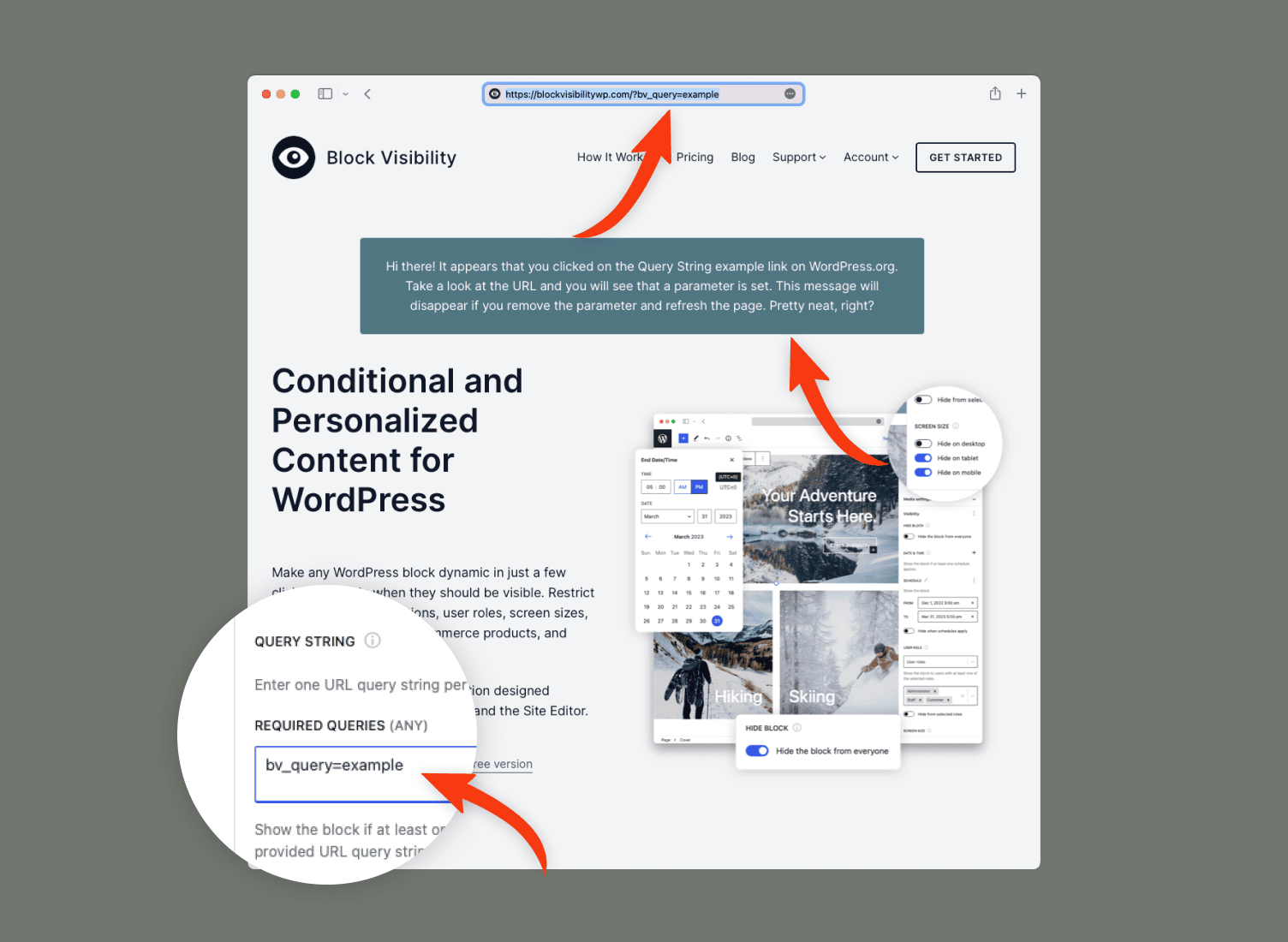
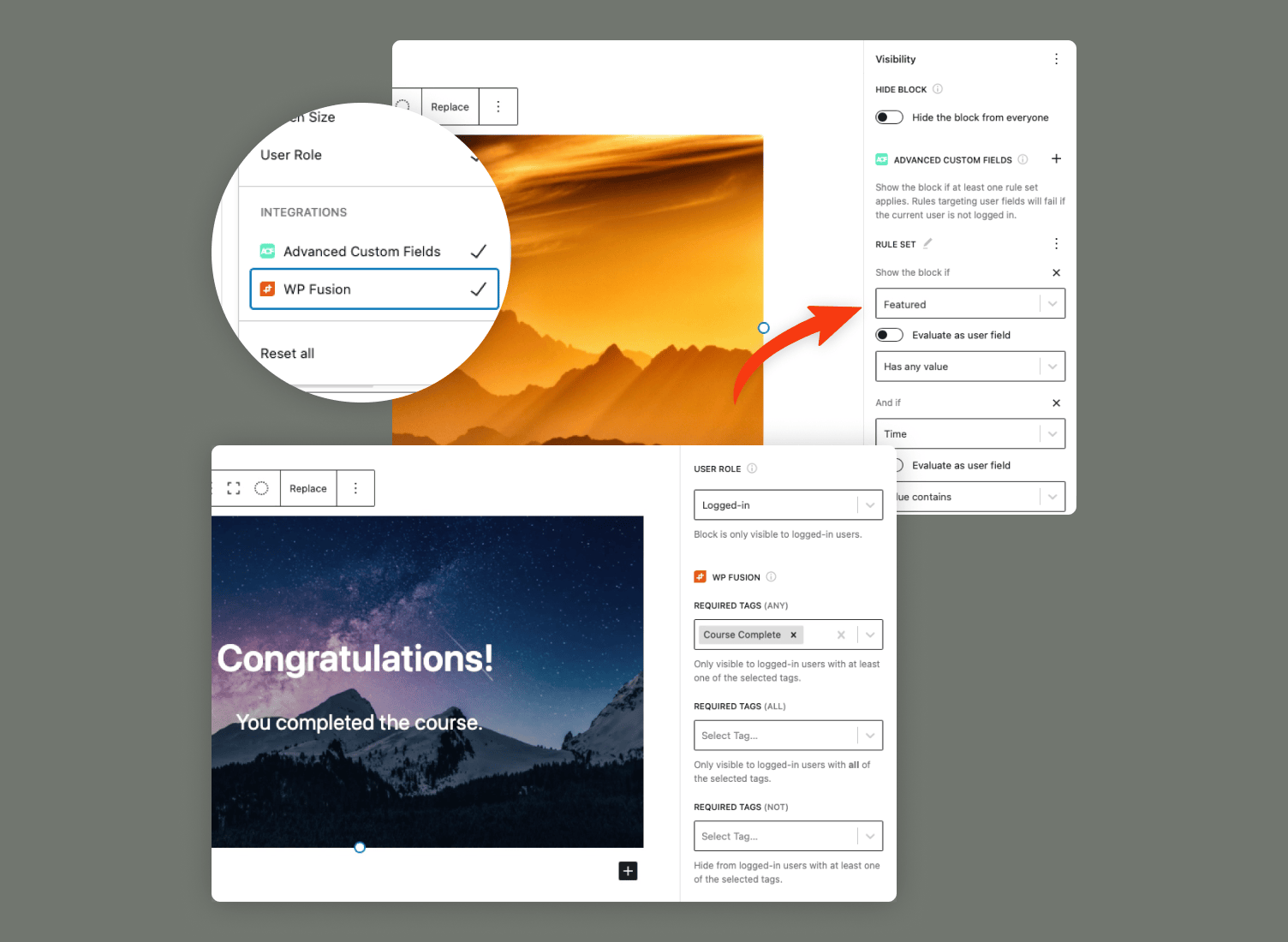
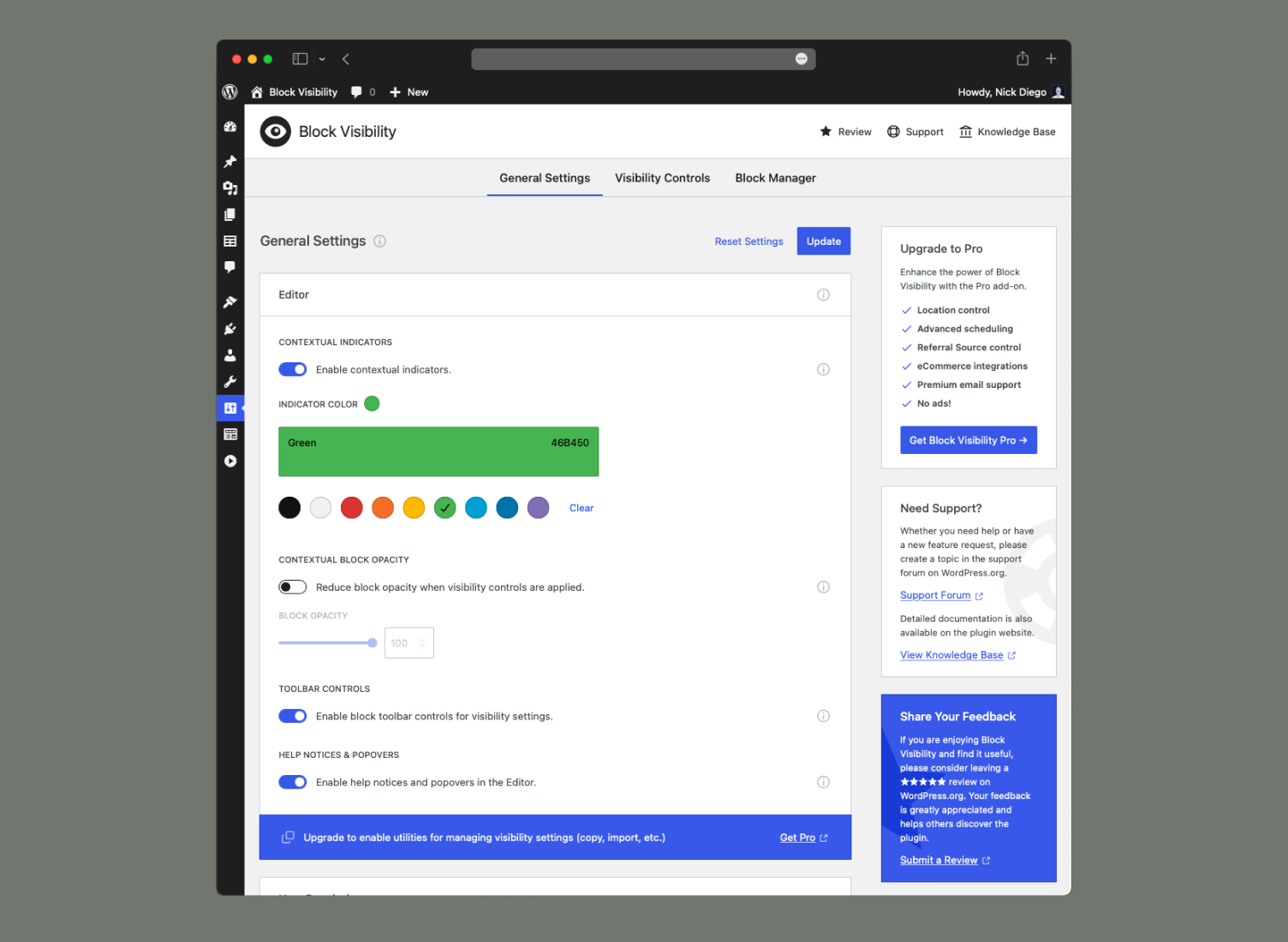
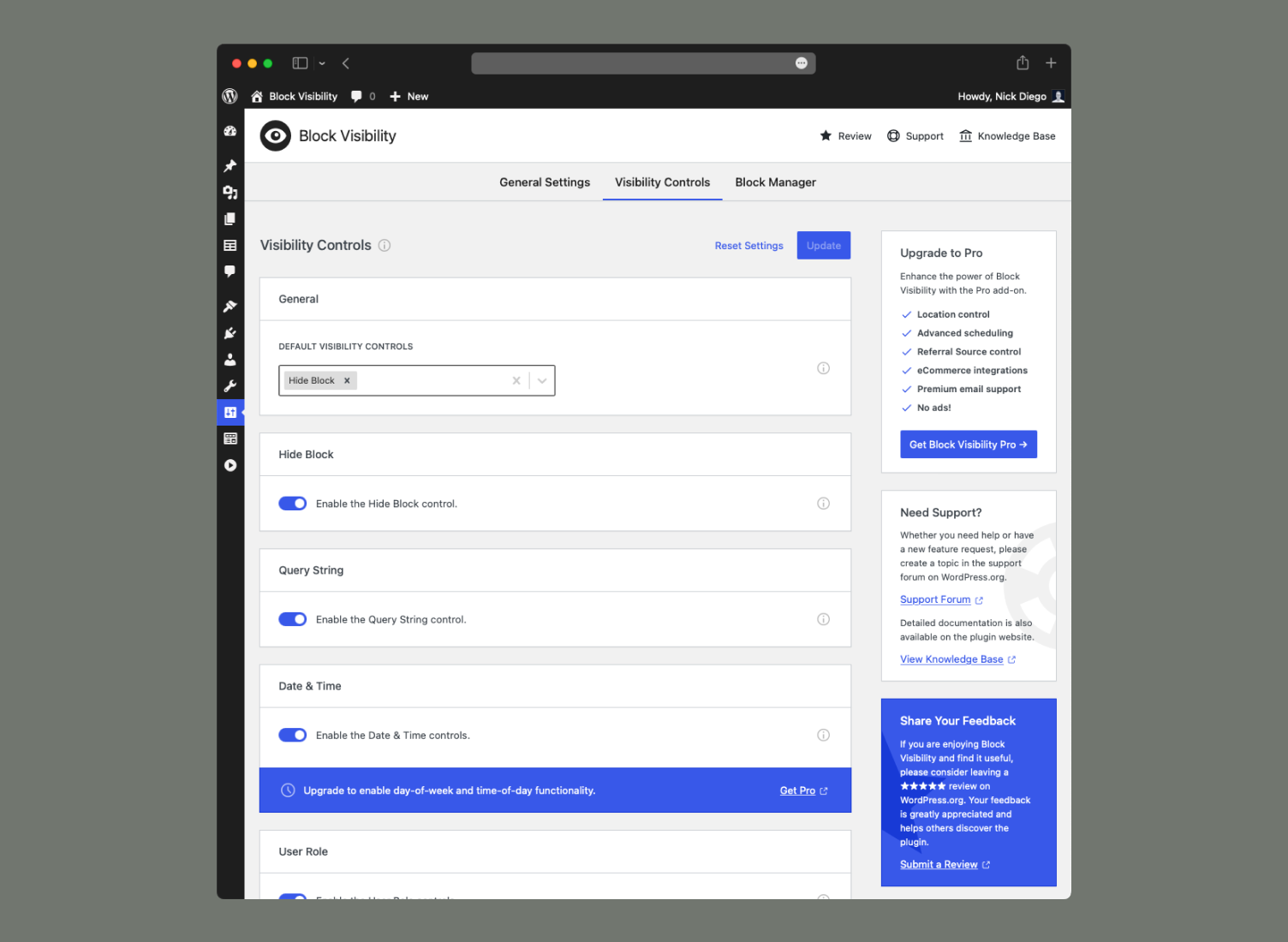
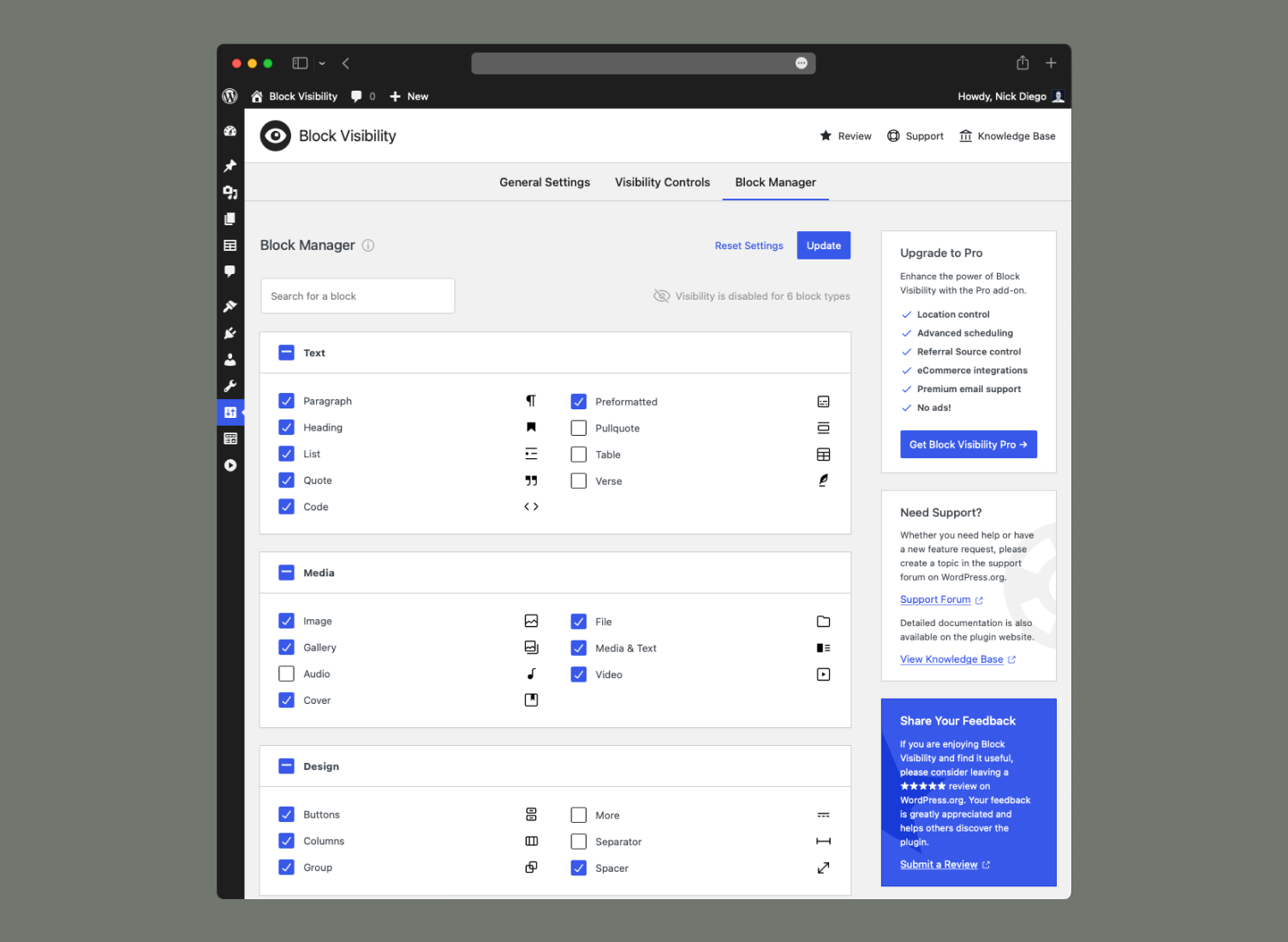
Block Visibility is a powerful yet simple plugin that gives marketing agencies, bloggers, eCommerce websites, and small business owners the power to conditionally show or hide blocks on their websites. The need to hide Gutenberg blocks varies. Whether you need to restrict content to specific users like members or launch a promotional campaign at a particular time with block scheduling, the applications are endless.
If you need dynamic content control on your WordPress website, you need Block Visibility.
Yes! However, not all block types are enabled by default. Controls are only provided to blocks that can be added directly to a page/post by the block inserter. Therefore, some specialized blocks, such as child blocks, are not included by default. An example is the individual Column block that is part of the larger Columns block.
That said, you can enable Full Control Mode in the plugin settings. This setting removes all restrictions and adds conditional visibility controls to every block. You probably will not need Full Control Mode in most cases, but it is there if you do!
Furthermore, while this plugin is designed to be compatible with all blocks, the WordPress ecosystem is ever-expanding. If you find a conflict with a specific block, please let us know in the plugin support forum, and we will investigate. We are committed to bringing visibility block controls to every Gutenberg block.
Yup, this plugin is not theme-specific. You just need to run the latest WordPress version and use a theme that supports the block Editor. This plugin provides zero functionality to the Classic Editor.
Yes, and if you have a specific idea of what you would like to see, please submit a feature request in the plugin support forum on WordPress.org.
As of version 1.4.0, Block Visibility is supported in the Site Editor, which is available when using a block theme. We are committed to ensuring 100% compatibility with all Full Site Editing features. Please let us know in the plugin support forum if you find bugs or compatibility issues.
No. Block Visibility is designed specifically for the WordPress block Editor and, therefore, does not work on pages that the Elementor editor or another page builder controls. So long as you edit native WordPress “block” content, Block Visibility will work.
Visibility is controlled primarily on the server, so if a block should be hidden based on the set block controls, it will not even be rendered. This functionality ensures the plugin does not load any additional resources on the front end of your site, thereby optimizing performance.
The one exception to this is the Screen Size block controls. Visibility by screen size requires the use of CSS. This CSS is loaded to the front end of your site if, and only if, these controls are enabled. You can opt to disable this CSS and add the necessary styles yourself. Visit the plugin Knowledge Base to learn more.
Changelog
3.8.1 – 2026-09-18
Fixed
- Fixed the Location hierarchy rules (“Is parent” and “Parent of”) not detecting child posts of hierarchical custom post types.
3.8.0 – 2026-09-14
Changed
- Updated “Tested up to” to WordPress 7.1.
- Updated “Requires at least” to WordPress 6.6.
- Updated the WooCommerce icon to the current Woo logo. Thanks @bacoords!
- Updated all npm and Composer dependencies, including @wordpress/scripts 35, and rebuilt the plugin with the current build tooling.
Fixed
- Fixed all stylelint issues in the SCSS source. No visual changes.
3.7.1 – 2024-12-08
Fixed
- [WooCommerce] Fixed bug where the “Time Since Order” rule was no calculating the correct number of days.
3.7.0 – 2024-11-08
Changed
- Updated “Tested up to” to WordPress 6.7.
- Updated “Requires at least” to WordPress 6.5.
- Remove typographic widows from descriptions.
3.6.1 – 2024-09-06
Fixed
- [ACF] Fixed bug where ACF fields were not being displayed following the v3.6.0 update.
3.6.0 – 2024-09-05
Added
- [Location] Added ability to show/hide blocks in archive templates based on taxonomy attributes (Hierarchy, Relative Hierarchy, and Supports).
- [Location] Added ability to show/hide blocks if the current post has an excerpt.
Changed
- Front-end classes are now implemented using the HTML API.
- Updated the
render_blockcallback function to only fetch plugin settings if a block has visibility conditions set. - Updated deprecated Button component variant and size properties.
- Updated popover placement and offsets.
- Updated general component styling to match Core.
- Updated React Select component to match Select controls in Core.
- Refactored the main plugin class.
- Refactored the setting tabs.
- Refactored the link utility and updated all plugin links.
- Removed control filters deprecated in v2.5.1.
- Removed all usage of
get_file_data().
Fixed
- Fixed backward compatibility error due to the unified extensibility APIs in WordPress 6.6.
- Fixed Widget Editor notice in WordPress 6.6+.
- Fixed spacing in the Day of Week control.
- Fixed Firefox content overflow issue with the React Select component.
3.5.0 – 2024-07-20
Changed
- Updated “Tested up to” to WordPress 6.6.
- Updated “Requires at least” to WordPress 6.4.
- Updated the
PluginMoreMenuItemslot usage to support unified slots in 6.6 and ensure backward compatibility.
Fixed
- [Date & Time] Fixed style bug in the day-of-week controls.
- Fixed the
useCommandimport now that 6.4 is the minimum version.
3.4.0 – 2024-04-01
Added
- [Date & Time] Added the ability to set seasonal (year-agnostic) schedules.
Changed
- Updated Playground blueprint with improved demo content.
- Updated “Tested up to” to WordPress 6.5.
- Updated “Requires at least” to WordPress 6.3.
- To use conditional opacity, you now must also have conditional indicators active.
- Set rewrites to false for the
visibility_presetpost type. - Updated the deprecated
__experimentalGetSettingsfunction with the stable__getSettingsversion. - [WooCommerce] When retrieving orders, both processing and completed orders are now included.
Fixed
- Fixed enqueue styles console errors by enqueuing the conditional indicator stylesheet using
enqueue_block_assets.
3.3.0 – 2024-01-18
Added
- [ACF] Added the ability to conditionally display blocks based on fields in options pages.
- Added support for help descriptions and labels in rule fields.
Changed
- [Screen Size] Breakpoint defaults are now displayed as placeholders in the plugin settings.
- Improve the placement of the controls dropdown in the Visibility panel to match Core.
Removed
- [ACF] Removed deprecated rule handling that was introduced in v1.8.0 (2021)
Fixed
- [ACF] Fixed the broken rule set UI when cleared.
- [Screen Size] Fixed fatal error caused by deleting a breakpoint and saving an empty value.
3.2.0 – 2024-01-03
Added
- [Location] Added ability to show/hide a block if the current user is the author of the current post or page.
Changed
- Bumped the “Tested up to” version to WordPress 6.4.
3.1.2 – 2023-10-14
Fixed
- Fixed issue where the Visibility panel would display when data fetching was still in process, causing other errors.
- Fixed issue where the Visibility panel would not display if the User Permissions setting was enabled and the user was an Admin.
- Fixed incorrect error handling when data cannot be fetched.
3.1.1 – 2023-09-21
Fixed
- Fixed missing folders when the plugin was synced to WordPress.org.
3.1.0 – 2023-09-21
Added
- [WooCommerce] Added the WooCommerce control. (#83)
- [Easy Digital Downloads] Added the Easy Digital Downloads control. (#87)
- Added a Command Palette command for “Manage Visibility Presets”. Requires WordPress 6.3+ or the latest version of Gutenberg. (#84)
- Added a Block Visibility Pro deprecation notice when Pro is installed and active.
Changed
- Increased the minimum WordPress version to 6.2 and the minimum version of PHP to 7.0.
- Moved all Block Visibility Pro features to the base plugin.
- Refactored away from
getEntityRecord(#77). - [Metadata] Improved support for metadata in array or object format. (#86)
Fixed
- Fixed typo on
hide_on_restricted_usersvariable (#64).
3.0.4 – 2023-07-14
Fixed
- [Location] Fixed bug that prevented the Relative Hierarchy rule from working. The value field was set to multi-select when it should be a single selection.
3.0.3 – 2023-06-04
Changed
- Updated the
blockVisibility.contextualIndicatorClassesfilter to include more variables, which allows for more customization.
Fixed
- [Query String] Fixed bug when using 0 as the value of a query parameter would cause unexpected results.
3.0.2 – 2023-04-16
Removed
- Removed visibility control defaults so the Visibility panel starts empty. This simplifies the interface and reduces confusion around Visibility Presets for users that have no need for this functionality.
Fixed
- Fixed bug that caused error when Visibility Presets were enabled on a block but no actual presets existed.
- Fixed missing text domain in string.
3.0.1 – 2023-03-25
Fixed
- Fixed bug that caused translations to stop working in the Editor after the 3.0.0 release.
3.0.0 – 2023-03-23
Added
- Added the Browser & Device control.
- Added the Cookie control.
- Added the Location control.
- Added the Metadata control.
- Added the Referral Source control.
- Added the URL Path control.
- Added the Visibility Preset control.
- Added Day of Week and Time of Day functionality to the Date & Time control.
- Added control set utility support.
- Added local visibility control support.
- Added the
ControlSetControls-andControlSetControlsIntegrations-slots for adding visibility control editor UI elements. - Added the
PluginSettingsslot for adding additional plugin settings. - Added the
VisibilityControls,VisibilityControlsGeneral, andVisibilityControlsIntegrationsslots for adding additional visibility control settings. - Added the
blockVisibility.globallyRestrictedBlockTypesandblockVisibility.widgetAreaRestrictedBlockTypesfilters to restrict visibility controls on specific block types.
Changed
- Plugin scripts are now enqueued with
enqueue_block_editor_assets, and previous workarounds have been removed. - Deprecated the
ControlSetControlsBottom-slot, useControlSetControlsIntegrations-instead. - Deprecated the
VisibilityControlsIntegrationsBottomslot, useVisibilityControlsIntegrationsinstead.
Removed
- Removed Pro upgrade link on the plugins admin page.
- Removed Pro upsells from settings pages.
- Removed block-level contextual indicator filters.
- Removed the
blockVisibility.addControlSetModalsandblockVisibility.addControlSetOptionsfilters. - Removed the
ControlSetControlsTop-andControlSetControlsMiddle-slots. - Removed the
PluginSettingsEditorTopandPluginSettingsEditorTopslots. - Removed the
PluginSettingsTop,PluginSettingsMiddle, andPluginSettingsBottomslots. - Removed the
VisibilityControlsTop,VisibilityControlsMiddle, andVisibilityControlsBottomslots. - Removed the
VisibilityControlsIntegrationsTopandVisibilityControlsIntegrationsBottomslots. - Removed the
RuleSetOptionsTop,RuleSetOptionsMiddle,RuleSetOptionsBottom, andRuleSetMoreSettingsToolsslots. - [Date & Time] Removed the
block_visibility_frontend_test_date_time_schedulefilter. - [Date & Time] Removed the
VisibilityControlsDateTimeTopandVisibilityControlsDateTimeBottomslots. - [Date & Time] Removed the
DateTimeScheduleToolbar-andDateTimeScheduleControlsTop-, andDateTimeScheduleControlsBottom-slots. - [Date & Time] Removed the
ScheduleOptionsTools,ScheduleOptionsMiddle, andScheduleOptionsBottomslots. - [Screen Size] Removed the
ScreenSizeControlsslot. - [User Role] Removed the
VisibilityByRoleControlsslot.
2.6.0 – 2023-02-13
Added
- [ACF] Added support for “greater than”, “greater than or equal”, “less than”, and “less than or equal” operators for numeric and date/time fields.
- [ACF] Added field type help message.
Changed
- [ACF] Improved support for numeric and date/time fields.
- [ACF] Improved support for “choice” fields.
- Improved help message support in rule set fields.
Removed
- [ACF] Removed frontend tests that were deprecated in v1.9.0.
Fixed
- [ACF] Fix information popover position.
- Fixed translations not working on the plugin settings page. Thanks @webaxones for discovering this issue and also for translating the plugin into French!
- Fixed incorrect JSDoc tags throughout the plugin.
2.5.4 – 2023-02-05
Changed
- Improve Kadence Blocks support by only displaying the Visibility panel on the Advanced tab. (Requires Kadence Block 3.0+)
- Explicitly set the InspectorControls group to “settings” for new tabbed interface in WordPress 6.2.
Fixed
- Fixed bug in contextual indicators that would incorrectly add visibility classes to blocks.
2.5.3 – 2023-01-24
Fixed
- Fixed bug in contextual indicators that would override custom block classes added by third-party plugins. (#61)
2.5.2 – 2023-01-03
Fixed
- Fixed bug in data fetching method used to return simplified variables in plugin settings.
2.5.1 – 2023-01-03
Changed
- Consolidated controls filters into a single filter.
- Renamed and consolidated contextual indicator filters.
Fixed
- Fixed conditional opacity CSS for text-only blocks. (#54)
- Fixed data fetching method to only return simplified variables in plugin settings.
- Fixed incorrect translation strings.
- Fixed styling on control reset button to match Core tools panels.
2.5.0 – 2022-12-05
Upgrade Notice
Block Visibility now requires WordPress 6.0+ with version 2.5.0 and users of the Pro add-on will need to upgrade to Pro 1.6.0 to take advantage of these latest enhancements. There have also been updates to the way visibility defaults work. Check out the release article for more information.
Added
- [Screen Size] Added filter for specifying blocks that are incompatible with the control.
- Added loading indicator in Editor visibility panel while settings and variables are being fetched.
- Added support for uncategorized block types in the Block Manager.
- Added back the ability to enable or disable help notices and popovers in the Editor.
- Added subtle upsell messaging in the plugin settings dashboard.
- Added Pro compatibility warning notice for versions 1.5.3 and lower.
Changed
- Block Visibility now requires WordPress 6.0 or greater.
- [User Role] Fetch users directly rather than rely on the Block Visibility variables endpoint.
- Redesigned the Editor UI to match the WordPress 6.1 design system.
- Redesigned the Block Manager.
- Consolidated all external plugin links into single directory.
- Optimized all custom SVG icons including those used in contextual indicators. Indicator stylesheet is now 50% smaller.
Removed
- Removed visibility panel and toolbar controls on Custom HTML blocks in the block-based Widget Area due to incompatibility. Visibility controls are still available for the Custom HTML block in the post/page Editor as well as the Site Editor.
- Removed unnecessary custom icons.
- Removed support url from variables endpoint.
Fixed
- [Advanced Custom Fields] Fixed bug where numeric ACF fields were not being evaluated correctly. (#50)
- [Screen Size] Fixed bug where using the Screen Size control and the
meow-gallery/galleryblock. Added better error handling to avoid a similar issue in other third-party blocks. - Fixed bug where resetting settings on a specific tab would reset all plugin settings.
2.4.6 – 2022-11-02
Fixed
- Fixed bug where contextual indicator styles caused issues with Cover blocks when a custom indicator color was chosen in WordPress 6.1.
- Fixed bug where contextual indicator styles caused issues with hover states in the Site Editor when a custom indicator color was chosen in WordPress 6.1.
2.4.5 – 2022-11-02
Fixed
- Fixed bug where text blocks became nearly impossible to edit when visibility controls were applied in WordPress 6.1.
- Fixed bug where block contextual opacity was applied incorrectly to Cover blocks with overlay enabled.
2.4.4 – 2022-10-08
Changed
- Simplify REST API requests on the plugin settings page to increase performance and attempt to fix edge case fetch errors.
2.4.3 – 2022-08-02
Fixed
- Fixed incorrect filter attribute in WP Fusion visibility test.
2.4.2 – 2022-05-09
Fixed
- Fixed bug in classic themes that caused Screen Size inline styles to not load as expected.
2.4.1 – 2022-05-09
Changed
- The Screen Size CSS classes are now added via PHP allowing the control to be used in dynamic blocks.
Fixed
- Fixed bug where Screen Size inline styles would be printed multiple times.
2.4.0 – 2022-04-10
Added
- Added contextual block opacity settings.
- Added information icons to all visibility controls with links to Knowledge Base.
- Added cookie contextual indicator for Cookie control in Block Visibility Pro.
Changed
- Removed tip/information modals from Editor. Information icons now direct users to the corresponding Knowledge Base pages.
Fixed
- Fix indicator color styling in settings.
2.3.1 – 2022-02-28
Fixed
- Fixed issue with block-based widgets where widget markup would still be rendered even if the block content was not. ([#26])(https://github.com/ndiego/block-visibility/issues/26))
- Fixed React Select input styling.
- Fixed styles that were bleeding into the Editor.
- Fixed linting errors.
2.3.0 – 2021-12-14
Added
- Added advanced User Role controls (User Rule Sets).
- Allow Block Visibility Pro settings to disable local visibility controls.
Changed
- Moved the default visibility control settings from the “General Settings” tab to the “Visibility Controls” tab.
- The additional contextual indicator settings are now disabled when indicators are disabled.
- Rule sets now support a custom rule label.
- Temporarily remove the “Editor Notices” Block Editor setting since it’s no longer relevant. This setting will be evaluated and potentially reintroduced in v2.4.
- Updated plugin compatibility to WordPress 5.9.
Fixed
- Fixed issue where Visibility Presets would appear in available control defaults with Block Visibility Pro is enabled.
- Fixed minor styling issues found in WordPress 5.9 testing.
2.2.0 – 2021-10-29
Added
- Added the ability to duplicate schedules and rule sets.
- Added support for Visibility Presets in Block Visibility Pro.
Changed
- Visibility controls and tools (reset controls, help, etc.) have been separated into two different dropdown menus to reduce menu length.
- Managing visibility controls can now be done using the “eye” icon whereas tools are managed using the vertical dots icon.
- Minor changes to labeling have been done throughout the plugin to improve clarity.
Removed
- Removed all legacy visibility controls deprecated in version 1.6.0.
- Removed control reset confirmation modal for a smoother user experience.
- Removed redundant help/reminder text to simplify the user interface.
2.1.2 – 2021-10-06
Changed
- Updated incompatibility notice for the Screen Size control to include HTML blocks and directed users to a workaround.
Fixed
- Fixed bug in the Date & Time control where timezones with +30 minute offsets were not handled properly. Thanks @ashleyzwp for discovering this issue and opening a support ticket!
- Fixed bug in Query String control that caused a test failure when multiple strings using the same query parameter were used. Thanks Lucian for discovering this issue and opening a support ticket!
- Fixed conflict with Sensei (and potentially other third-party plugins) caused by the render_block filter returning
nullwhen a block is hidden. An empty string is now returned instead. Thanks Ted for discovering this issue and opening a support ticket! - Fixed bug caused by admin scripts being enqueued during DOING_AJAX. Thanks Ted for discovering this issue and opening a support ticket!
2.1.1 – 2021-09-14
Added
- Added contextual indicator support for the Metadata control in Block Visibility Pro.
Changed
- Continued extensibility improvements of the control set toolbar menu.
- Updated plugin logo on settings page.
Fixed
- Fixed incorrect languages .pot file.
- Fixed bug in rule set configuration.
2.1.0 – 2021-09-09
Added
- Added the ability to reset plugin settings and restore defaults from within the admin.
- The Advanced Custom Fields control can now display blocks based on user fields.
Changed
- Moved the create_date_time function to its own utility file. This allows for its use across the plugin and Block Visibility Pro.
- Refactored rule and rule set functionality to provide for greater extensibility.
- Improve extensibility of the control set toolbar menu for future Pro add-on functionality.
Removed
- Removed erroneous integration-checks.php file.
Fixed
- Fixed bug where not all users would be fetched in the User Role control. Thanks @lenehanj for discovering this issue and opening a support ticket!
- Fixed styling on multi-select components.
- Fixed z-index on contextual indicators that was causing some unwanted overlapping.
2.0.0 – 2021-07-27
Added
- Added the ability to restrict visibility by specific users as part of the User Role control.
- Added the ability to customize the color of the contextual indicators.
- Added a “block not compatible” messaging to the Legacy Widget block in WordPress 5.8, since the block does not support custom attributes.
- Added Block Visibility Pro ad to settings pages to inform users about the Pro add-on.
- Added a direct link to the plugin Knowledge Base in the plugin settings masthead.
Changed
- Changed how the WP Fusion control logic works to be more intuitive. Now all tag conditions need to be true for the block to be visible. In v1.9.1 and lower, the conditions operated independently. Thanks @marlonsabala for bringing this to our attention!
- Changed the contextual indicator styling (again) to improve the UI/UX. Color now defaults to the set
--wp-admin-theme-colorand indicators have been moved to the ::after pseudo element for improved block compatibility. - Changed the control toolbar styling to match the upcoming dimensions panel UI in Gutenberg.
Removed
- Removed custom icon font for contextual indicators. Reverting back to SVG icons now that we have a more optimize approach.
- Removed the “Getting Started” tab in the plugin settings and directed all help links to the Block Visibility website and WordPress.org support forum.
- Removed the review and support popup on the plugin settings pages.
Fixed
- Fixed error introduced in WordPress 5.8 on the block-based Widgets screen by removing the wp-edit-post dependency from the plugin.
- Fixed spelling errors in plugin settings. Thanks @paaljoachim!
- Fixed display logic in the Date & Time control when a single schedule was disabled, but others were enabled.
- Fixed display logic in the ACF control when a single rule set was disabled, but others were enabled.
1.9.1 – 2021-06-18
Added
- Added preliminary support for Block Visibility (and Pro) on the new block-based Widgets screen, the new Widget pane in the customizer, and the experimental Navigation screens added by Gutenberg.
Fixed
- Fixed bug where a Block Editor critical error would sporadically occur for certain admin users when switching from Fullscreen in the Block Editor. Thanks @gsarig for discovering this issue and opening a support ticket!
- Fixed PHP error that would occasionally occur when a previously set ACF field was deleted from the user’s website.
- Fixed bug where contextual indicator style sheet was loading on incorrect admin pages.
1.9.0 – 2021-06-07
Added
- Added support for Block Visibility Pro.
- Added rule set functionality to the ACF control. This allows you to create OR conditions within the ACF control.
- Added “rule set” and “rule” architecture.
- Added notice regarding compatibility issues with the Screen Size control and the Shortcode Block, plus links to a workaround in the Knowledge Base.
- Added additional Slots for integrating new visibility controls.
Changed
- Replaced many Popover components in the block editor with Modal components for improved UI.
- Replaced most other Button/Popover components with DropdownMenu components for improved UI.
- The “Remove” schedule button is now an trashcan icon in the Schedule toolbar to be consistent with Block Visibility Pro.
- Plugin settings tabs are now directly navigable based on URL query parameter.
- Controls are now alphabetically ordered in the control selectors.
- Screen size control CSS is now conditionally loaded only when there are actually blocks using these settings.
- Contextual indicators are now powered by a custom icon font to improve performance and decrease file size.
- Minor UI enhancements throughout.
Removed
- Removed the dummy frontend.css file which was used for the screen size control and required an extra file to be loaded. An alternative implementation is now used.
Fixed
- Fixed error were editing the visibility of a duplicated block would also edit the original block. Thanks @mmcginnis for discovering this issue and opening a support ticket!
- Fixed unnecessary re-renders and loss of focus for slotted components by relocating withFilter HOCs outside of all render functions.
- Fixed error in the Date & Time frontend test.
- Fixed labels on the Query String control that were previously not translatable.
- Fixed incorrect links to the plugin Knowledge Base.
1.8.0 – 2021-04-13
Added
- Added the Advanced Custom Field control, the second third-party integration for Block Visibility! 🎉
- Added functionality for multiple Date & Time schedules. 🎉
- Added the ability “invert” the Date & Time control per-block. By default, this control allows you to show the selected block if at least one schedule applies. You can now optionally hide the block if at least one schedule applies!
- Added the ability to set default visibility controls.
- Added the ability to easily reset the visibility controls on each block.
Changed
- Updated control set controls toggle icon to be more consistent with WP core.
- Updated popover styling to be more consistent with WP core.
Removed
- Removed the
enable_schedulingsetting. Users can now easily toggle visibility controls at the block level so this setting is not longer needed. The entire Date & Time control can still be enabled/disabled in the Visibility Control settings. - Removed conditional indicator support for the
startDateTimeandendDateTimeproperties that were deprecated in version 1.4.1. Frontend visibility tests for these properties are still operational, but will likely be removed in version 2.0.
Fixed
- Fixed WP Fusion filters to improve the integration.
1.7.1 – 2021-03-29
Fixed
- Fixed error in the plugin variables REST API route that caused the settings page not to load if WP Debug was enabled. Thanks @gsarig for discovering this issue and opening a support ticket!
1.7.0 – 2021-03-29
Added
- Added the WP Fusion control, the first third-party integration for Block Visibility! 🎉
- Added the Query String control, significantly increasing the marketing capabilities of Block Visibility! 🎉
- Added
react-selectas a project dependency for all multi-select fields.
Changed
- Updated control set UI when multiple controls are enabled to emphasize that all control conditions need to be satisfied for the block to be visible.
- The “Restricted User Roles” setting now uses
react-selectfor a cleaner user interface. - Updated contextual indicator icons. A generic indicator is now displayed when more than 2 controls are enabled.
Fixed
- Fixed issue where blocks that should have been hidden by enabled visibility controls were appearing in REST API requests. This allowed sophisticated users to “see” content that was not intended for them via a public endpoint, i.e.
wp-json/wp/v2/.... This is now fixed. Thanks @tkraftner for reporting this. - Fixed issue where the REST API url was not being fetched correctly in the plugin settings for WP installations that had prefixed, or “relocated”, the REST API. Thanks Mike for reporting this issue.
- Fix minor error due to missing attribute schema.
1.6.0 – 2021-03-21
Added
- New UI allows users to toggle on and off the available visibility controls at the block level, making for a cleaner interface.
- New “control sets” attribute structure which improves the scalability of the plugin and allows nearly unlimited new features/functionality in the future.
Changed
- Updated all visibility frontend tests to respect new “control sets” attribute structure while maintaining backwards compatibility.
- Updated all editor conditional indicators to respect new “control sets” attribute structure while maintaining backwards compatibility.
Removed
- Removed the obtrusive “Customize controls” admin notice in the editor in favor of a dismissible one-time “Quick tips” popup for new users.
- Removed verbose attribute specification in the main plugin class for compatibility with blocks rendered server-side. This is no longer needed.
hide-control-section.jsand corresponding function are no longer needed.
1.5.3 – 2021-03-10
Fixed
- Fixed PHP error triggered by missing hideBlock attribute setting. Thanks @muppix for discovering this issue and opening a support ticket!
1.5.2 – 2021-03-06
Added
- Added a support and review nudge on the plugin settings page in hopefully the least annoying way possible. 😉
- New screenshots and readme updates.
Fixed
- Fixed bug were visibility settings were still displaying for blocks disabled by the Block Manager.
- Fixed conditional indicators not displaying for extra large and extra small screen size controls.
1.5.1 – 2021-02-28
Fixed
- Fixed error where plugin settings were not being fetched from the REST api as expected. This issue impacted websites that had WordPress installed in a subdirectory. Thanks @elenasaygo for discovering this issue and opening a support ticket!
- Fixed logic in the
get_current_user_role()so no errors are thrown when WordPress installed in a subdirectory.
1.5.0 – 2021-02-22
Added
- Screen Size controls allow you to show or hide block based on the width of the screen (Desktop, Tablet, Mobile and more).
- Added universal function for retrieving plugin settings.
Changed
- Minor adjustments to settings layout and styles.
- All documentation links have been updated to reflect website changes.
Removed
- Removed legacy visibility controls in REST API settings class.
Fixed
- Fixed error where scheduling controls were still active on the frontend when disabled in the plugin settings.
1.4.3 – 2021-02-06
Fixed
- Error that occurred when plugin assets were enqueued on incorrect admin pages. Improved logic now dequeues assets on any admin page without the Block Editor. Thanks @gsarig for catching this!
1.4.2 – 2021-01-19
Fixed
- Error that occurred when the plugin was deleted.
- Contextual indicator border not displaying on placeholder blocks (e.g. the Shortcode Block)
1.4.1 – 2021-01-18
Added
- The ability to disabled scheduling at the block level without having to remove the start and end date/times.
- The
blockVisibility“supports” variable to all blocks types that have visibility enabled. This provide a more consistent method for detecting whether a block should have visibility controls or not.
Changed
- The contextual indicator icons have been updated and are now more legible.
- Refactored the scheduling controls.
- Updated the Visibility by Role labels to be more consistent with standard WordPress labeling and nomenclature.
Deprecated
- The
startDateTimeandendDateTimeproperties of theblockVisibilityattribute have been deprecated. All new blocks will use the newschedulingproperty.
Removed
- Visibility block attribute defaults in an effort to declutter block markup when only a few settings are enabled.
Fixed
- Some third-party blocks were not receiving visibility controls when they should have, notably Jetpack blocks, due to the way their block JS is enqueued.
1.4.0 – 2021-01-01
Upgrade Warning
For the long-term maintainability of the Block Visibility plugin, changes to the underlying file structure were needed in version 1.4.0. Therefore, when you upgrade from version 1.3.0 or lower, the plugin will deactivate and you will receive an error message. But don’t worry, simply re-activate Block Visibility and you are good to go.
This is an unfortunate issue that will occur only once. We apologize for any inconvenience that this causes, but trust that this change better positions the plugin for many exciting enhancements in the future!
Added
- Preliminary compatibility with Full Site Editing features
- Hooks and slots to support the upcoming Pro add-on
Changed
- Block Visibility now requires WordPress 5.5+ to take advantage of new core functionality
- The base plugin file is now simply
block-visibility.phpand the setup class has been moved - Redesigned the Block Visibility settings page
- Refactored the methods for fetching plugin setting and variable data on the Block Visibility settings page
Removed
- Component styling that is not longer needed since the version requirement for the plugin is now WordPress 5.5+
1.3.0 – 2020-12-05
Added
- User permissions now give website administrators control over who can use visibility settings
- Custom REST API routes for retrieving plugin data
Changed
- By default, visibility controls are now available to all users that have access to the Block Editor
- Refactored the methods for fetching plugin setting and variable data in the Block Editor
- Restructured much of the plugin with a more consistent file/folder layout
Fixed
- Contextual indicator icon was incorrect when using all visibility controls and the block was disabled
1.2.0 – 2020-11-15
Added
- Added the ability to “hide on selected roles” in the Restrict by User Roles visibility control Thanks to @edwardsh for the feature request!
1.1.0 – 2020-11-05
Added
- Date and time controls for block scheduling
- Contextual indicators for visibility setting to the Block Editor
- A toolbar option for quickly hiding blocks
- Additional plugin settings to dynamically control all the new features
1.0.1 – 2020-08-11
Fixed
- Addressed the PHP warning message that may appear on new installations
1.0.0 – 2020-08-03
- Initial Release
Available Versions
| Version | Download | Type |
|---|---|---|
| 3.8.1 | Download | Stable |
| 3.8.0 | Download | Stable |
| 3.7.1 | Download | Stable |
| 3.7.0 | Download | Stable |
| 3.6.1 | Download | Stable |
| 3.6.0 | Download | Stable |
| 3.5.0 | Download | Stable |
| 3.4.0 | Download | Stable |
| 3.3.0 | Download | Stable |
| 3.2.0 | Download | Stable |
| 3.1.2 | Download | Stable |
| 3.1.1 | Download | Stable |
| 3.1.0 | Download | Stable |
| 3.0.4 | Download | Stable |
| 3.0.3 | Download | Stable |
| 3.0.2 | Download | Stable |
| 3.0.1 | Download | Stable |
| 3.0.0 | Download | Stable |
| 2.6.0 | Download | Stable |
| 2.5.4 | Download | Stable |
| 2.5.3 | Download | Stable |
| 2.5.2 | Download | Stable |
| 2.5.1 | Download | Stable |
| 2.5.0 | Download | Stable |
| 2.4.6 | Download | Stable |
| 2.4.5 | Download | Stable |
| 2.4.4 | Download | Stable |
| 2.4.3 | Download | Stable |
| 2.4.2 | Download | Stable |
| 2.4.1 | Download | Stable |
| 2.4.0 | Download | Stable |
| 2.3.1 | Download | Stable |
| 2.3.0 | Download | Stable |
| 2.2.0 | Download | Stable |
| 2.1.2 | Download | Stable |
| 2.1.1 | Download | Stable |
| 2.1.0 | Download | Stable |
| 2.0.0 | Download | Stable |
| 1.9.1 | Download | Stable |
| 1.9.0 | Download | Stable |
| 1.8.0 | Download | Stable |
| 1.7.1 | Download | Stable |
| 1.7.0 | Download | Stable |
| 1.6.0 | Download | Stable |
| 1.5.3 | Download | Stable |
| 1.5.2 | Download | Stable |
| 1.5.1 | Download | Stable |
| 1.5.0 | Download | Stable |
| 1.4.3 | Download | Stable |
| 1.4.2 | Download | Stable |
| 1.4.1 | Download | Stable |
| 1.4.0 | Download | Stable |
| 1.3.0 | Download | Stable |
| 1.2.0 | Download | Stable |
| 1.1.0 | Download | Stable |
| 1.0.1 | Download | Stable |
| 1.0.0 | Download | Stable |
| Development | Download | Trunk |
