BBQ Firewall – Fast & Powerful Firewall Security
Active Installs
100,000+
Last Updated
April 19, 2026
First Released
March 5, 2010
Download History (Last one month)
Contributors
🔥 Install, activate, and done!
🔥 Powerful protection from WP’s fastest firewall plugin.
BBQ Firewall is a lightweight, blazing-fast firewall plugin that protects your site against a wide range of threats. BBQ checks all incoming traffic and quietly blocks bad requests containing nasty stuff like eval(, base64_, and excessively long request-strings. This is a simple yet solid solution for sites that are unable to use a strong Apache/.htaccess firewall.
🔥 Adds a strong firewall to ANY WordPress site
🔥 Works with all WordPress plugins and themes
Powerful Protection
BBQ protects your site against many threats:
- SQL injection attacks
- Executable file uploads
- Directory traversal attacks
- Unsafe character requests
- Excessively long requests
- PHP remote/file execution
- XSS, XXE, and related attacks
- Protects against bad bots
- Protects against bad referrers
- Protects against bad POST content
- Protects against many other bad requests
🔥 Works great with Blackhole for Bad Bots and Banhammer
Awesome Features
BBQ provides all the best firewall features:
- Rated 5 stars at WordPress.org
- 100% plug-&-play, zero configuration
- 100% focused on security and performance
- Blocks a wide range of malicious URL requests
- Fastest Web Application Firewall (WAF) for WordPress
- Based on the 7G/8G Firewall
- Scans all incoming traffic and blocks bad requests
- Scans all types of requests: GET, POST, PUT, DELETE, etc.
- Protects against known bad bots and referrers
- Works silently behind the scenes to protect your site
- Hassle-free security plugin that’s easy to use
- Thoroughly tested, error-free performance
- Extremely low rate of false positives
- Compatible with other security plugins
- Regularly updated and “future proof”
- Firewall < 10 kilobytes in size
- Lightweight, fast and flexible
🔥 For advanced protection and features, check out BBQ Pro »
Exclusive Pro Features
- Customize firewall via plugin settings
- Easily add or remove firewall patterns
- Easily add Jeff Starr’s AI Block List
- Send Email Alerts for blocked requests
- Quickly enable/disable firewall rules
- Disable firewall for logged-in users
- Block excessively long URI requests
- Protect against XML-RPC exploits
- Block any individual IP address
- Block entire ranges of IP addresses
- Protect against user-ID phishing
- Redirect all blocked requests
- Display a custom “blocked” message
- Set your own response status code
- Complete inline documentation
- Statistics for blocked requests
- Tools to reset options and patterns
- Import and Export firewall patterns
- One-click pattern testing
- Whitelist IP addresses
..plus everything the free version can do and more.
🔥 Learn more and get BBQ Pro »
Privacy
This plugin does not collect or store any user data. It does not set any cookies, and it does not connect to any third-party locations. Thus, this plugin does not affect user privacy in any way.
BBQ Firewall is developed and maintained by Jeff Starr, 15-year WordPress developer and book author.
🔥 BBQ = Block Bad Queries
Support development
I develop and maintain this free plugin with love for the WordPress community. To show support, you can make a donation or purchase one of my books:
- The Tao of WordPress
- Digging into WordPress
- .htaccess made easy
- WordPress Themes In Depth
- Wizard’s SQL Recipes for WordPress
And/or purchase one of my premium WordPress plugins:
- BBQ Pro – Blazing fast WordPress firewall
- Blackhole Pro – Automatically block bad bots
- Banhammer Pro – Monitor traffic and ban the bad guys
- GA Google Analytics Pro – Connect WordPress to Google Analytics
- Head Meta Pro – Ultimate Meta Tags for WordPress
- REST Pro Tools – Awesome tools for managing the WP REST API
- Simple Ajax Chat Pro – Unlimited chat rooms
- USP Pro – Unlimited front-end forms
Links, tweets and likes also appreciated. Thank you! 🙂
Installing BBQ
- Install, activate, done.
Once active, BBQ automatically protects your site against threats. Quietly, behind the scenes. For more control and stronger protection, check out BBQ Pro »
More info on installing WP plugins
Customizing
BBQ Firewall is designed to be super lightweight and fast. Here are some addons that can be used to customize default functionality.
- BBQ Whitelist – Allow patterns that otherwise would be blocked
- BBQ Blacklist – Block patterns that otherwise would be allowed
- BBQ Display Count – Display the total block count on the plugin settings page
- BBQ Customize Features – Block long requests, log blocked patterns, enable POST protection, and customize response headers (e.g., for redirecting blocked requests)
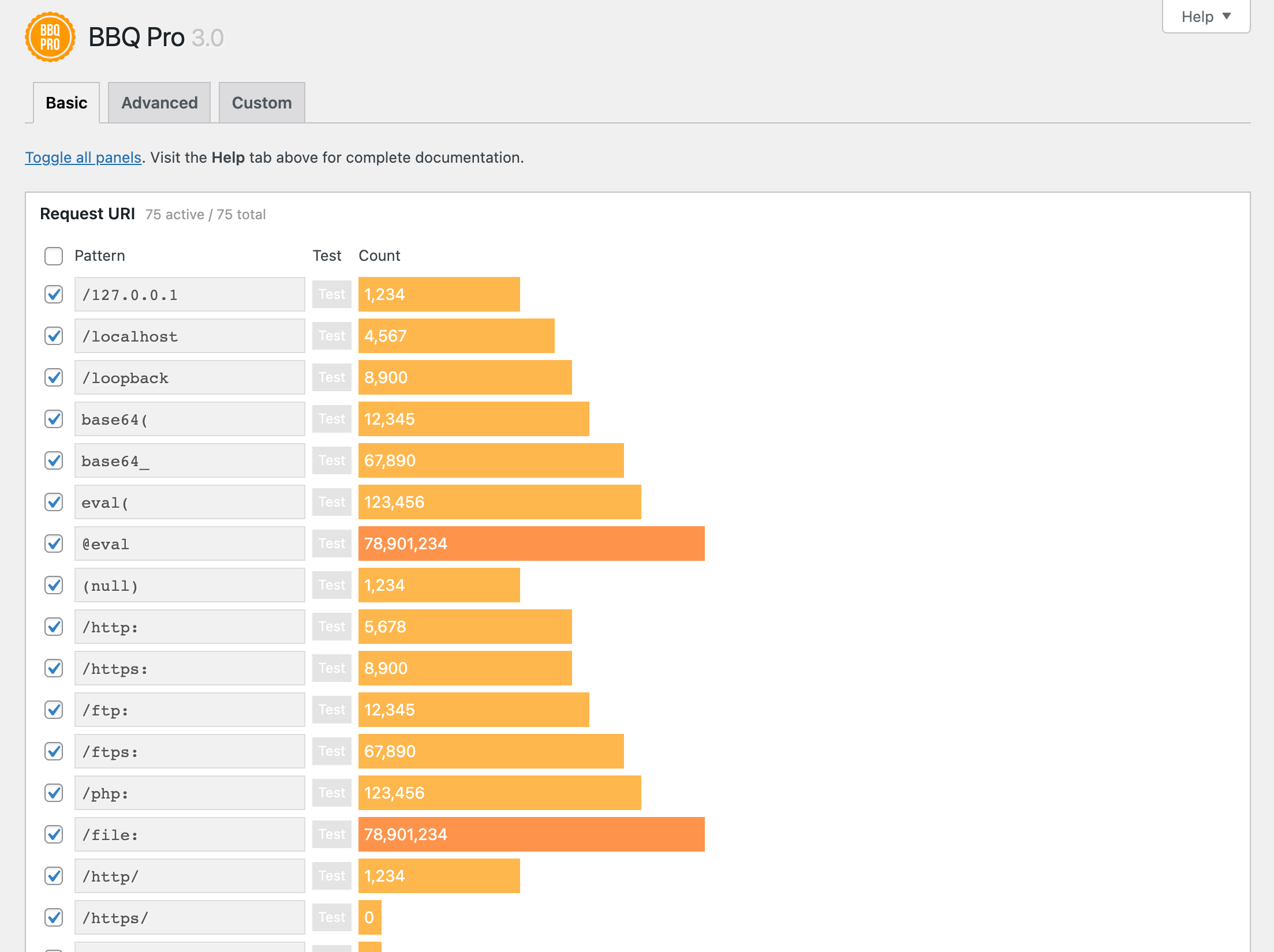
Note that the Pro version of BBQ makes it possible to customize patterns and everything else directly via the plugin settings, with a click. BBQ Pro also displays the current block count for each firewall rule, like this.
Uninstalling
This plugin cleans up after itself. All plugin settings will be removed from the WordPress database when the plugin is deleted via the WP Plugins screen.
Like the plugin?
If you like BBQ, please take a moment to give a 5-star rating. It helps to keep development and support going strong. Thank you!
Visit the plugin settings page and click the “Test Firewall” link.
Yes, three of them:
- BBQ Firewall for blazing-fast firewall security
- Blackhole for Bad Bots to protect your site against bad bots
- Banhammer to monitor and ban any user or IP address
Pro versions with more features available at Plugin Planet.
Nope, just install and relax knowing that BBQ is protecting your site from bad URL requests.
No settings needed for BBQ! Everything is done automatically behind the scenes. Zero configuration required. The free version of BBQ is strictly plug-n-play, set-it-and-forget-it, with no settings to configure whatsoever. Just install, activate, and enjoy better security and robust protection against malicious requests. The Pro version is just as fast and simple to use, but is much more powerful and includes robust settings to customize and fine-tune your firewall.
Does it makes sense to use both? Yes BBQ free and BBQ Pro are both compatible with any plugin written according to WP APIs. And yes, there is benefit to using BBQ with any other security plugin, including Wordfence. They protect against different threats, so using both provides additional protection.
Absolutely not. Unlike other security/firewall plugins, neither BBQ (free version) nor BBQ Pro make any changes to any .htaccess file.
Only two tiny options are stored in the database; one option for the plugin version, and another option that stores an expiration date for the banner ad on the plugin settings page. Everything else happens at runtime. No other options are stored in the database. Also, both options are removed completely when the plugin is uninstalled via the WP Plugins screen.
Yes, BBQ scans any arrays that are included in the URI request. If any matching patterns are found, the request is blocked.
If some PHP scanner is reporting an error or bad string in BBQ, it’s a false positive and safe to ignore. Why? Because the PHP checker is finding the static strings/patterns that BBQ uses to identify and block bad requests. In other words, the PHP scanner is finding a static string thinking it is live code. It’s not. If possible, please take a moment to report this to the developers of your PHP scanner. They should be happy to improve the accuracy and quality of their plugin. More info.
Full question: “Except most of the rules overlapping, is it counter productive (site slowing down for example, potential conflicts, bugs) or is there any risks using 7G/8G Firewall + BBQ at the same time?”
Answer: It’s fine to run both BBQ and 7G/8G Firewall at the same time. Both firewalls are super fast, so they won’t slow things down. In other words the two firewalls play well together. The only downside is that some of the rules will be redundant, but there should be no negative impact on performance. The upside is that you get extra protection when using both, as there are variations in the firewall rules and patterns, etc.
You can use a free addon to display the total number of blocked requests on the BBQ settings page. Here is a guide that explains how to set it up.
Alternately, BBQ can be configured to log the matching pattern for each blocked request. When match-logging is enabled, BBQ will add a log entry in the site’s default error log. To enable match logging, use the free customize plugin.
Note that the Pro version of BBQ displays the current block count for each firewall rule, like this. All automatic, fiddling with code NOT required 🙂
Send any questions or feedback via my contact form.
Changelog
If you like BBQ, please take a moment to give a 5-star rating. It helps to keep development and support going strong. Thank you!
🔥 For stronger firewall protection and powerful features, check out BBQ Pro »
2026/04/19
- Updates plugin settings page
- Improves readme.txt documentation
- Tests on WordPress 7.0
Full changelog @ https://plugin-planet.com/wp/changelog/block-bad-queries.txt
" width="120" height="120">
Available Versions
| Version | Download | Type |
|---|---|---|
| 0 | Download | Stable |
| 1 | Download | Stable |
| 2 | Download | Stable |
| 3 | Download | Stable |
| 4 | Download | Stable |
| 5 | Download | Stable |
| 6 | Download | Stable |
| 7 | Download | Stable |
| 8 | Download | Stable |
| 9 | Download | Stable |
| 10 | Download | Stable |
| 11 | Download | Stable |
| 12 | Download | Stable |
| 13 | Download | Stable |
| 14 | Download | Stable |
| 15 | Download | Stable |
| 16 | Download | Stable |
| 17 | Download | Stable |
| 18 | Download | Stable |
| 19 | Download | Stable |
| 20 | Download | Stable |
| 21 | Download | Stable |
| 22 | Download | Stable |
| 23 | Download | Stable |
| 24 | Download | Stable |
| 25 | Download | Stable |
| 26 | Download | Stable |
| 27 | Download | Stable |
| 28 | Download | Stable |
| 29 | Download | Stable |
| 30 | Download | Stable |
| 31 | Download | Stable |
| 32 | Download | Stable |
| 33 | Download | Stable |
| 34 | Download | Stable |
| 35 | Download | Stable |
| Development | Download | Trunk |