
BackWPup – WordPress Backup & Restore Plugin
Active Installs
400,000+
Last Updated
September 7, 2026
First Released
July 5, 2009
Download History (Last one month)
Contributors
A WordPress site represents real work: content, customers, sales, and reputation. A failed update, a server problem, or a single mistake can take it all offline in seconds. BackWPup exists to make sure that never becomes a disaster.
BackWPup is a complete WordPress backup and restore solution. It automatically backs up your database and files, stores them securely on your server or in the cloud, and helps you restore your site when something goes wrong. Trusted by more than 500,000 WordPress websites and refined over more than a decade, BackWPup helps keep your data protected without adding unnecessary complexity.
BackWPup Free includes everything needed to automate, store, and restore WordPress backups with confidence. BackWPup Pro adds advanced recovery, migration, security, and multisite capabilities for professionals, agencies, and businesses. Starting with version 5.7, BackWPup also supports AI-assisted backup management, making it easier to check backup status, run backups, and troubleshoot issues using natural language.
🚀 Why Choose BackWPup
Reliable backups when you need them most.
A backup is only valuable if it works when something goes wrong. BackWPup creates complete backups of your WordPress files and database, stores them securely, and gives you clear visibility into backup status and history.
Simple to get started. Powerful when you need more.
The guided setup helps you create your first backup in minutes. As your needs grow, BackWPup gives you the flexibility to customize schedules, destinations, retention rules, automation, and multisite workflows.
Built for modern WordPress workflows, BackWPup lets you manage backups through the WordPress dashboard, automate them with WP-CLI, or use AI assistants through MCP (Model Context Protocol).
🛡️ Back Up Your Way
Good protection adapts to how you work. BackWPup is built around three simple decisions: what to back up, when to back it up, and where to keep it.
What to back up. Create a complete backup of your entire WordPress installation: your full database and all your files, including the wp-content folder, themes, plugins, and uploads. Prefer a targeted backup? Back up just your database or just your files. BackWPup also supports WordPress multisite, so an entire network is covered.
When to back up. Set automatic backups to run hourly, daily, weekly, or monthly, so protection keeps pace with how often your site changes. A high-traffic store can back up several times a day; a brochure site can run weekly. Need one right now, before a plugin update or a round of edits? Run a backup on demand in a single click.
Where to store backups. Your backups shouldn’t depend on a single location. BackWPup lets a single backup job store the same backup across multiple destinations at once: keep a copy on your own web space and send copies off-site to the cloud, so you’re protected even if one location becomes unavailable. The free version supports Website Server (local), Dropbox, FTP, Microsoft Azure, Amazon S3 and compatible storage, SugarSync, and Rackspace Cloud Files, and you can combine any of them in the same job. Each destination has its own configuration and retention settings, so you control how many copies are kept where.
Every backup is tracked in one place. With clear logs and backup history, you can easily verify when a backup ran, whether it succeeded, and where it was stored. When something does go wrong, restoring is just as straightforward: review your backups, choose one, and restore your site to a known-good state.
⚡ Improve Your Site’s Reliability and Performance
Did you know that regular backups and database maintenance can improve the performance and reliability of your WordPress site? With BackWPup, you can ensure that your data is always protected and that your site is always running smoothly.
By scheduling regular backups and database maintenance, you can avoid data loss and downtime. BackWPup makes it easy to protect your data and keep your site running at its best.
Even Google recommends regular backups and database maintenance to ensure the reliability and performance of your site. With BackWPup, you can follow best practices and keep your site secure and reliable.
🤖 AI-Assisted Backup Management with BackWPup 5.7
Backups are not just about creating archives. They are about knowing your site is protected before an update, confirming scheduled backups completed successfully, and quickly investigating problems when they occur.
BackWPup 5.7 brings these tasks into the tools many WordPress professionals already use every day. Through MCP (Model Context Protocol), BackWPup connects directly to AI assistants such as Claude Desktop, GitHub Copilot, and OpenAI Codex, allowing you to manage backups using natural language.
Instead of navigating dashboards and logs, you can simply ask questions, run backups, review status, and troubleshoot issues directly from your AI assistant while keeping your backup data securely on your own WordPress site.
⚙️ Built for Modern Technical Workflows: WP-CLI and MCP
BackWPup gives you two powerful ways to manage backups beyond the WordPress dashboard:
- WP-CLI enables command-line automation for deployments, scripts, scheduled maintenance, and repeatable operational tasks.
- MCP (Model Context Protocol) enables AI-assisted backup management through assistants such as Claude Desktop, GitHub Copilot, and OpenAI Codex. Check backup status, run backups, review logs, and troubleshoot issues using natural language.
WP-CLI is ideal for automation. MCP is ideal for visibility, troubleshooting, and day-to-day backup management. Together, they give technical teams the flexibility to work the way they prefer.
💎 BackWPup Pro Features
BackWPup Pro is designed for professionals, agencies, online stores, and businesses that need advanced recovery, migration, security, and multisite capabilities.
BackWPup Pro adds:
- Direct restore from cloud storage: restore directly from supported cloud and server destinations without manually uploading backup archives.
- Additional cloud destinations: including Google Drive, Microsoft OneDrive, Amazon Glacier, and HiDrive.
- Backup encryption and encrypted restores: protect sensitive backup data with an additional layer of security.
- Website migration: move your site to a new domain or hosting provider with automatic URL and database updates.
- Advanced multisite support: manage and protect WordPress multisite networks more efficiently.
- Standalone restore application: recover your website even when WordPress itself is unavailable.
- Premium support: direct access to the BackWPup support team.
Upgrade to Pro if you need faster recovery, stronger security, multisite workflows, website migration capabilities, or business-critical backup protection. Get BackWPup Pro
📚 Support, Documentation, and Additional Resources
- Documentation: step-by-step guides for backups, restores, migration, and AI-assisted management at backwpup.com/docs.
- Community support: free help in the WordPress.org support forum.
- Premium support: BackWPup Pro customers get direct, ticket-based support from our team.
- Product and Pro details: backwpup.com.
Protecting your site with BackWPup? Leave a review on WordPress.org to help other site owners discover it.
ℹ️ Who Are We?
We are WP Media, the company behind WP Rocket, the best performance plugin for WordPress.
Our mission is to improve the web. We are making it faster with WP Rocket, lighter with Imagify and safer with BackWPup.
👋 Get in Touch!
- Website: backwpup.com
- Contact Us: https://backwpup.com/contact/
🔌 Related Plugins
- WP Rocket: The best performance plugin to speed up your WordPress website.
- Imagify: The best image optimization plugin to speed up your website with lighter images.
- Lazy Load: The best Lazy Load script to reduce the number of HTTP requests and improve the website’s loading time.
- Heartbeat Control by WP Rocket: The best plugin to control the WordPress Heartbeat API and reduce CPU usage.
- RocketCDN: The best CDN plugin for WordPress to propel your content at the speed of light, no matter where your users are located in the world.
- Increase Max upload file size: The best plugin to increase the upload file size limit to any value with one click.
License: GPLv2 or later
License URI: http://www.gnu.org/licenses/gpl-2.0.html
- In your WordPress admin, go to Plugins > Add New and search for BackWPup. Click Install Now, then Activate. (You can also upload the plugin ZIP under Plugins > Add New > Upload Plugin.)
- Open BackWPup in your admin menu and follow the guided setup.
- Choose what to back up (your full site, or just files or database), when it should run (hourly, daily, weekly, or monthly), and where to store it (your server and/or a cloud destination).
- Save your job and run your first backup. That’s it: your site is now protected automatically.
FTP Method
- Upload the complete
backwpupfolder to the/wp-content/plugins/directory. - Activate the plugin through the ‘Plugins’ menu in WordPress.
Screenshot Gallery
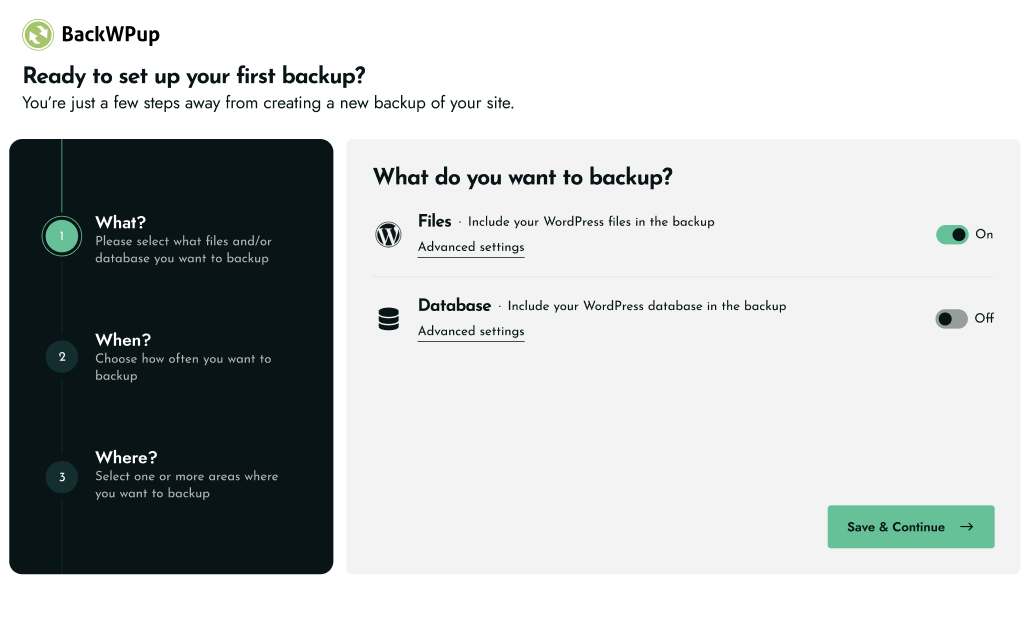
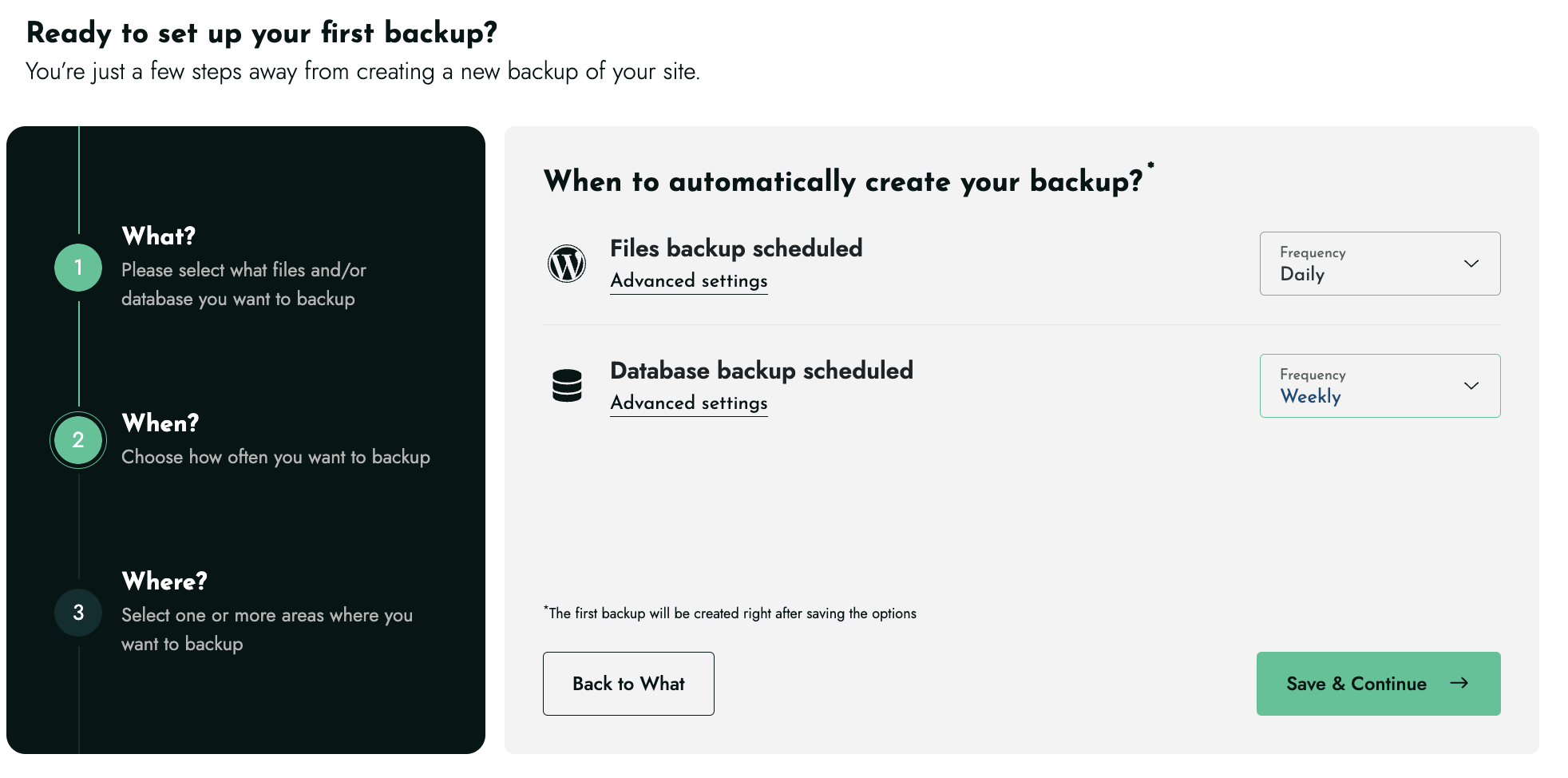
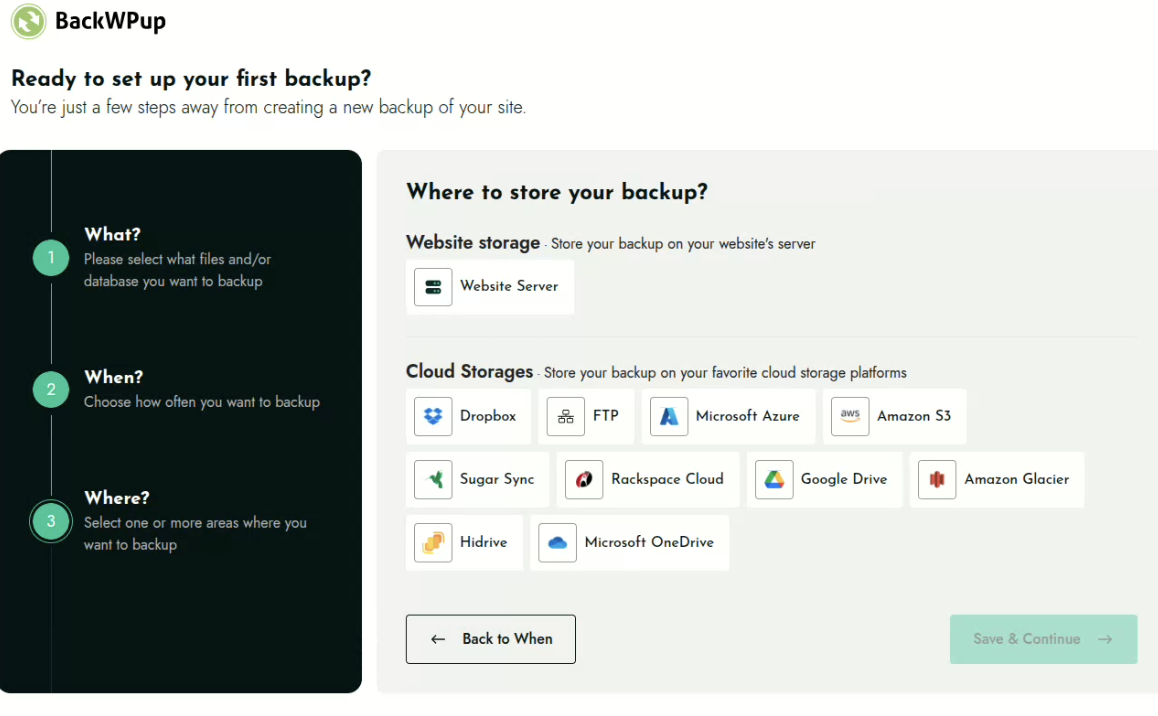
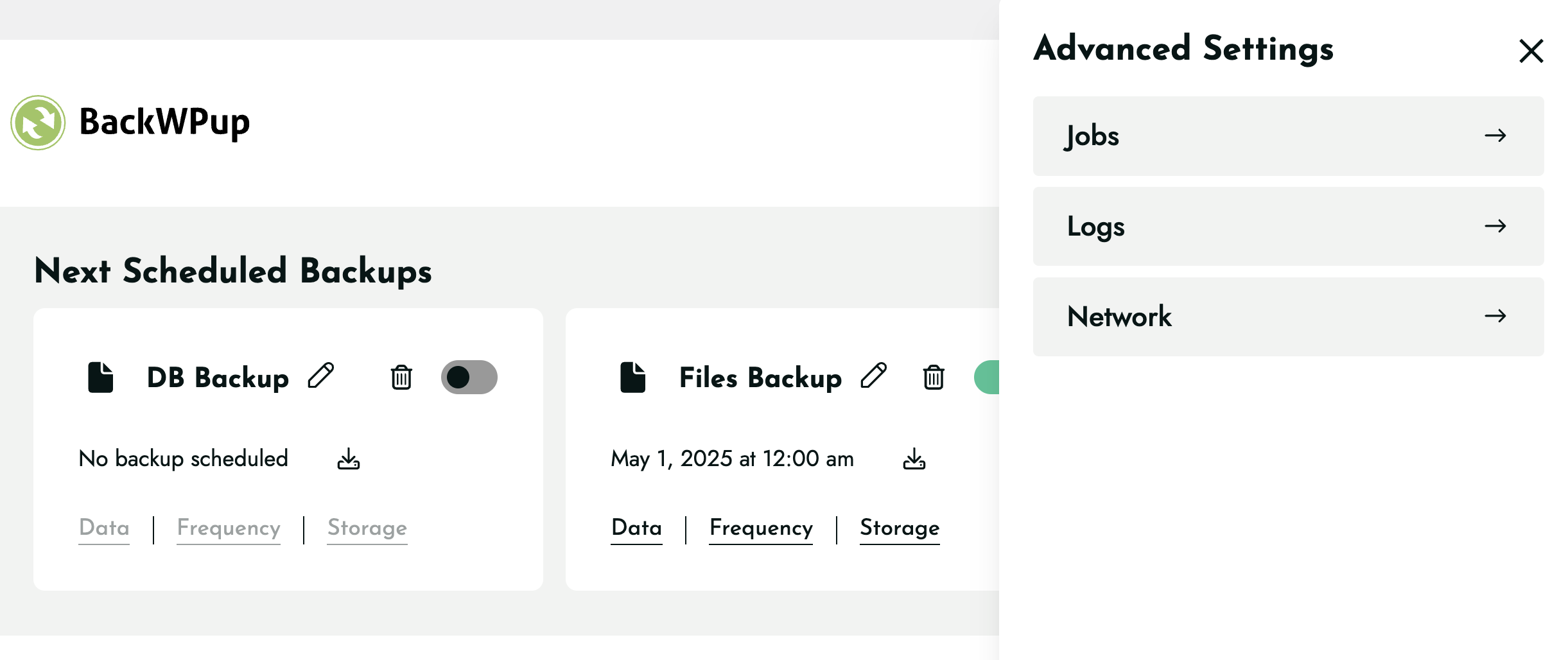
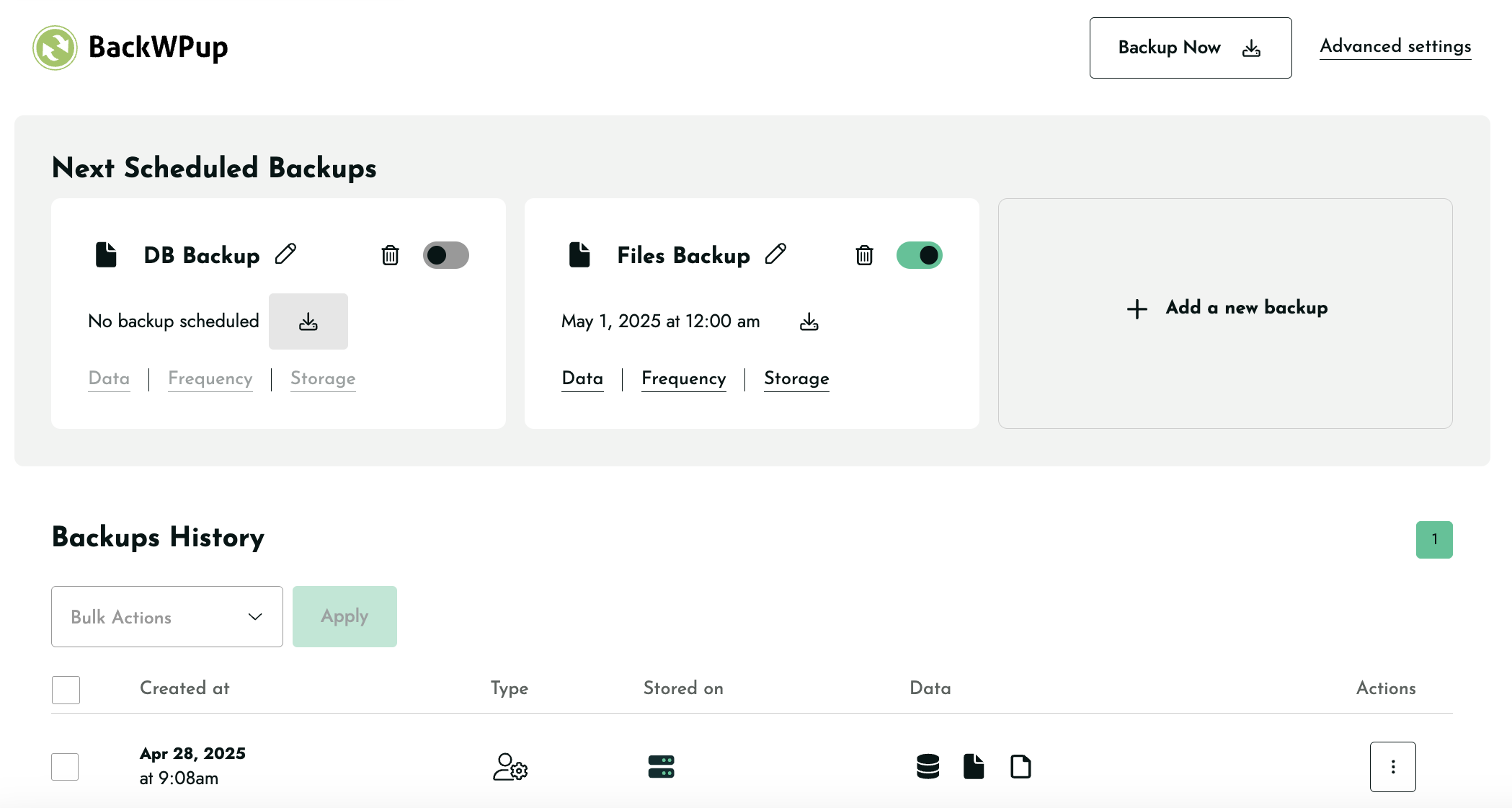
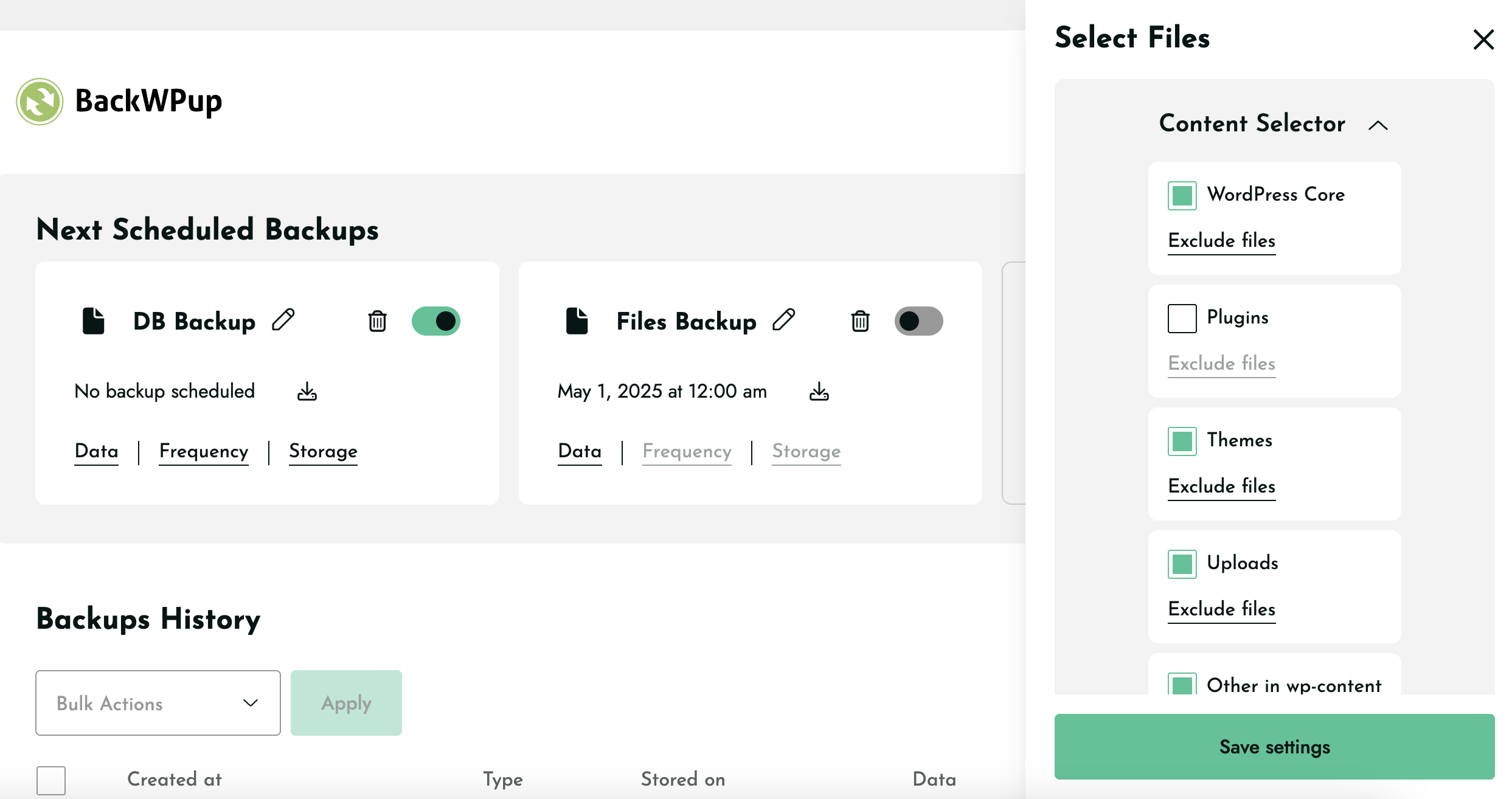
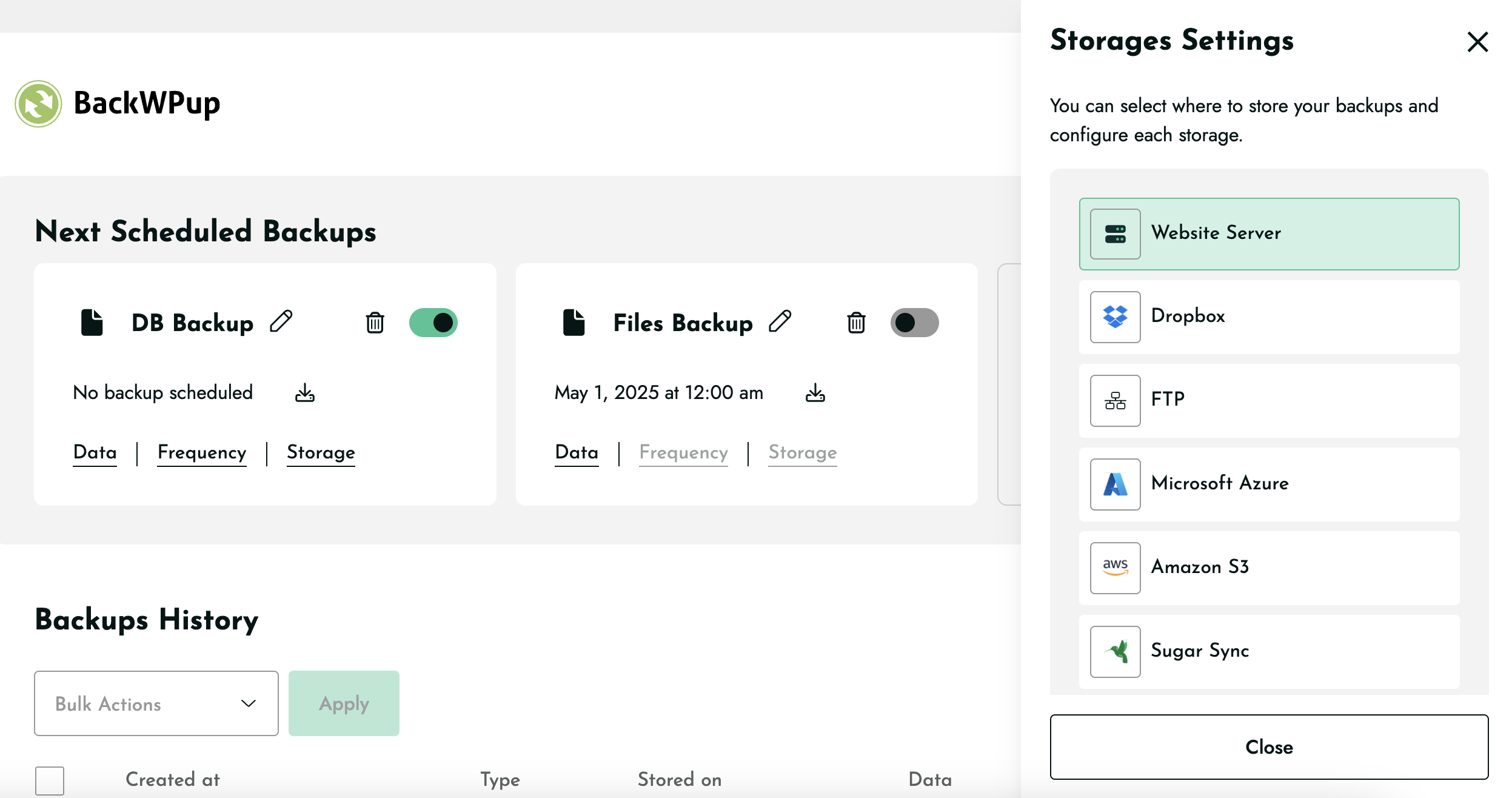
Open BackWPup in your WordPress admin and follow the setup. Choose what to back up, set a schedule, pick a storage destination, and save. You can run a backup immediately with a single click.
Go to your backups in the BackWPup dashboard, select the backup you want, and restore. In the free version you can restore backups you upload manually; BackWPup Pro lets you restore directly from any storage destination, including the cloud.
Yes, BackWPup Free includes full database and file backups, automated scheduling, multiple cloud storage destinations, restore functionality, and support for both WP-CLI and MCP (Model Context Protocol). BackWPup Pro adds direct cloud restores, encryption, website migration, advanced multisite capabilities, the standalone restore application, and premium support.
On your own web space, in the cloud, or both at once. A single backup job can store the same backup across multiple destinations, so you can combine local and cloud storage for extra protection. The free version includes Website Server (local), Dropbox, FTP, Microsoft Azure, Amazon S3 and compatible storage, SugarSync, and Rackspace Cloud Files; Pro adds Google Drive, Microsoft OneDrive, Amazon Glacier, and HiDrive. Each destination has its own settings, including how many backups to retain, and if one storage destination becomes unavailable, your backups stored in other destinations remain available.
Yes, with BackWPup Pro. Migration restores your backup to a new URL and updates the database automatically, so you can move hosts or change domains without a manual rebuild.
Yes. BackWPup supports WP-CLI in both Free and Pro, so you can trigger and automate backups from the command line and in your deployment scripts.
It lets you manage your backups by chatting with an AI assistant like Claude Desktop, GitHub Copilot, or OpenAI Codex, for example, “run a backup before I update my plugins” or “was my last backup successful?” You don’t need to write code. You connect your site once, then manage backups in plain language. It’s available in BackWPup 5.7 and later.
No. Your backups and site data stay on your WordPress install. The assistant connects to your site through a secure, credentialed connection and acts on your behalf, so your site remains the source of truth.
BackWPup is designed to run across a wide range of WordPress hosting environments and supports WordPress multisite. If you run into a host-specific issue, our documentation and support can help.
Changelog
5.7.6
Release date: September 7, 2026
- Security fix: Restricted access to BackWPup debug information to users with Settings access.
- Security fix: Restricted license activation and deactivation to users with Settings access.
- Security fix: Restricted BackWPup redirects to trusted destinations to prevent unsafe off-site redirects.
- Security fix: Fixed a potential Cross-Site Scripting (XSS) vulnerability in backup download error messages.
- Fix: Fixed an issue that could cause duplicate entries in Tar/TarGz backups after an interrupted backup was resumed.
5.7.5
Release date: July 21, 2026
- Security fix: Resolved a Cross-Site Scripting (XSS) vulnerability on the Restore page.
- Fix: Fixed an incorrect backup aborted notice and a page freeze when using the Backup Now button.
- Fix: Fixed an issue affecting the “Don’t show again” admin notice action.
5.7.4
Release date: July 6, 2026
- New feature: Added a security notice that detects stale restore files and allows them to be deleted with one click.
- Enhancement: Restore working directories are now automatically cleaned up after a successful restore.
- Fix: Fixed inconsistent file counts in interrupted and resumed ZIP backups.
- Fix: Resolved a fatal error caused by outdated
.htaccessrules on Apache 2.4.
5.7.3
Release date: June 22, 2026
- Enhancement: Added the backwpup_mcp_server_enabled filter to allow disabling MCP functionality.
- Fix: MCP backup history now reports correct file sizes across all storage destinations.
- Fix: Resolved a WooCommerce compatibility issue that could generate log errors.
- Fix: Resolved PHP 8.1+ compatibility issues affecting MCP operations.
5.7.2
Release date: June 8, 2026
- Fix: Resolved PHP namespace conflicts in bundled vendor libraries to prevent fatal errors caused by dependency collisions with other plugins.
5.7.0
Release date: June 8, 2026
- New feature: Added MCP support, allowing AI assistants to manage backups, run jobs, monitor progress, cancel jobs, and access logs.
5.6.11
Release date: June 1, 2026
- Fix: Addressed a Block Editor List View issue that caused some block names to appear blank.
5.6.10
Release date: May 28, 2026
- Enhancement: Aligned backup history timestamps with WordPress timezone.
- Enhancement: Improved FTP and SFTP failure clarity in backup logs.
- Enhancement: Expanded Dropbox error mapping and failure reason coverage.
- Enhancement: Added backup path visibility in logs.
- Enhancement: Expanded Google Drive error mapping and failure reason coverage.
- Enhancement: Added descriptive empty-state text when no backup is available.
- Enhancement: Expanded OneDrive error mapping and failure reason coverage.
- Enhancement: Expanded Microsoft Azure Blob Storage failure scenario coverage.
- Enhancement: Added explicit feedback when authentication credentials are invalid.
- Enhancement: Improved abort flow behavior and user feedback.
- Enhancement: Improved overall UI and accessibility consistency across the plugin.
- Fix: Fixed backup history pagination issues.
- Fix: Prevented fatal TypeError in WXR export on PHP 8.4 with nullable meta values.
- Fix: Fixed backup download behavior on mobile devices.
- Fix: Fixed incomplete cron cleanup when changing or deleting job schedules.
- Fix: Fixed backup creation flow that could stall on large sites.
- Fix: Prevented WP Super Cache from being unnecessarily disabled during backup jobs.
5.6.9
Release date: April 27, 2026
- Fix: Resolved memory limit errors during some database backups.
- Fix: Prevented restore page from hanging in certain edge cases during archive processing.
- Fix: Corrected failed backup status reporting for SugarSync when quota limits are reached.
- Enhancement: Backup history now includes storage name for failed backups.
- Enhancement: Improved consistency of backup status in logs and history.
- Enhancement: “View log” action is now available for successful backups.
- Enhancement: Improved consistency and alignment of UI elements across the plugin.
- New feature: Added a filter for backup archive types.
- Enhancement: Improved visibility and naming of in-product support tools.
5.6.8
Release date: April 08, 2026
- Fix: Resolved PHP warnings related to zlib.output_compression after headers were sent.
- Fix: Resolved TypeError in job tracking and improved error handling.
- Fix: Resolved issue where custom job names were overwritten when changing data selection.
- Fix: Resolved incorrect redirect when closing admin dialogs.
- Fix: Resolved PHP 8.4 deprecation warnings for nullable parameters.
- Fix: Improved visibility of checkbox borders in Migration Settings dialog.
- New feature: Added failed backup history tracking.
- Enhancement: File exclusion list is now ordered alphabetically for easier navigation.
- Enhancement: Added confirmation warning when deleting multiple backups.
5.6.7
Release date: March 25, 2026
- Security fix: Resolved a Local File Inclusion (LFI) vulnerability in the getblock REST endpoint.
- Fix: Backup limit is now properly respected (“Max backups to retain” setting).
- Fix: Backup process no longer continues after a job is aborted.
- Fix: Resolved storage settings panel rendering blank in some cases.
- Fix: Resolved SugarSync backup download failures and related PHP errors.
- Fix: Fixed restore database connection error display.
- Fix: Resolved UI issues during the database restoration step.
- Fix: Fixed authentication and UI inconsistencies for cloud storage providers (HiDrive, Google Drive, OneDrive).
- Fix: Resolved fatal error during Free version installation related to license handling.
- Fix: Removed EasyCron support.
- New feature: Added SFTP as a storage destination.
- Enhancement: Improved restoration performance (extraction and file copy process).
- Enhancement: Improved HiDrive token expiration handling.
- Enhancement: Improved email validation and sender name parsing for job log emails.
- Enhancement: Added “Select All” option for database tables.
- Enhancement: Improved restore page accessibility within the admin menu.
5.6.6
Release date: March 05, 2026
- Enhancement: Improved WP Audit plugin validation checks.
- Fix: Resolved job options saving issues and UI inconsistencies.
- Fix: Replaced {{%LICENSE_URL%}} in Free version.
- Fix: Fixed blank backup list after bulk deleting all backups from history.
- Security fix: Prevented sensitive license values from being stored in plain text.
- Fix: Gracefully handled disabled putenv() function during backup execution.
5.6.5
Release date: February 05, 2026
- New Feature: Introduced support tool chatbot for user assistance.
5.6.4
Release date: January 20, 2026
- Fix: Plugin update mechanism not working properly for Pro version since 5.6.2
5.6.3
Release date: January 20, 2026
- Fix: Backups stored on Amazon Glacier were not listed correctly.
- Fix: When restoring multiple backups consecutively, the previously selected backup was restored instead of the intended one.
- Fix: No error message was shown when an FTP error occurred during backup or restore.
- Fix: Fatal error occurring on Kinsta-hosted environments.
- Fix: Re-enabled automatic folder protection to prevent backup directories from being publicly accessible.
- Enhancement: Cache is now flushed after database restore to ensure restored data is properly reflected.
- Security: Fixed a security vulnerability (CVE-2025-15041).
5.6.2
Release date: January 07, 2026
- Fix: Improved validation for the “Max backups to retain” setting to prevent incorrect values.
- Pro enhancement: Improved license management and added an in-plugin notification to alert users about license status changes.
5.6.1
Release date: December 11, 2025
- Fix: Legacy backup job links stopped working after upgrading from version 5.6.0.
- Fix: Storage configuration was failing for multiple storage providers (Amazon S3, Amazon Glacier, Azure Storage, Google Cloud Storage, OneDrive, Rackspace).
- Added: Compatibility for legacy backup job link formats to ensure older jobs continue to work without any changes.
5.6.0
Release date: November 25, 2025
- Enhancement: Introduced WP-CLI support for running backups
- Enhancement: Improved Mixpanel event tracking accuracy
- Added support for triggering backups via link
- Fix: Resolved a compatibility issue with Visual Composer
5.5.2
Release date: November 03, 2025
- Security fix: Safe handling of job attributes concatenated into HTML attributes on the admin UI
- Enhancement: Compatibility with Kinsta hosting with backup rate limits
- Enhancement: Better handling of missing PHP cURL extension
- Enhancement: Improved upload of large backups on HiDrive
- Enhancement: Facilitated diagnosis for support with dedicated tooling
- Fix: Consistently displaying the “Help Us Improve BackWPup!” notice
5.5.1
Release date: October 20, 2025
- Security Fix: Missing Authorization to Sensitive Information Exposure
- Fix: HiDrive backup download partially not working.
- Fix: HiDrive backup not working properly due to major storage issue.
- Fix: Compatibility issue with .donotbackup file and open_basedir environments.
- Fix: Minor UX issues when including files in backups.
- Fix: OneDrive allow users to reauthenticate.
5.5.0
Release date: September 16, 2025
- New Feature: Archive format per backup
- New Feature: Archive name per backup
5.4.1 Release date: September 2, 2025
- Fix: Additional Guzzle Dependency conflicts causing errors.
5.4 Release date: August 20, 2025
- New feature: Add extra files or folders for backups
- Fix: Sending unwanted warning email because of .donotbackup file.
- FIx: Showing cursor pointer on non-clickable elements.
- FIx: Backup downloads are not working for FTP storage.
- Fix: Guzzle Dependency conflict causing errors in backups.
- Fix: The Encrypt archive option is disabled after the update.
- Fix: The backup now icon is closer to the date of scheduled backups.
- Fix: No backup is created for any storage when OneDrive is selected during onboarding.
5.3.2
Release date: August 12, 2025
- Bugfix: Log notification emails were not sent for successful backup
- Removed: Remove unused/deprecated codes
- Enhancement: Refactor the plugin admin notice code
- Bugfix: Save button is not clickable on low browsers window height
- Bugfix: Google Drive & OneDrive API fields not fully visible
- Bugfix: Encryption “Save” button not visible below Asymmetric Key
- Bugfix: Decryption key needed for free plugin
- Enhancement: Storage deselect ux issues
5.3.1
Release date: July 22, 2025
- Bugfix: Default archive format resets to Tar format after update to 5.3
- Bugfix: Updating to 5.3 causes Fatal error due to corrupted data
- Bugfix: License activation fails due to service provider issue
- Bugfix: Upload to FTP backup limit issue on 5.3
5.3.0
Release date: July 14, 2025
- New feature: Backup File & Database together in a single job
- Bugfix: New jobs ignore the global archive format and default to .Tar
- Bugfix: SugarSync error message after authenticating
- Bugfix: Google Drive not working correctly during onboarding
- Enhancement: Show only successful backup entries in the backup history
- Enhancement: Long job title spills outside the pop-up
- Enhancement: Configure backup data settings without selecting it
- Enhancement: Fixed Schedule backup title is too long issue
- Enhancement: Added tooltips for schedule backup icons
- Enhancement: Add new backup UI ux issues
- Enhancement: Improvement of cloud storage code
5.2.3
Release date: May 22, 2025
- Bugfix: Fixed fatal error when both Free and Pro versions are activated together.
5.2.2
Release date: May 20, 2025
- New feature: Deselect Website Server as a default storage destination
- Enhancement: Reduce overall plugin size
- Bugfix: Google Drive does not remain selected
- Bugfix: Plugin interface becomes non-functional & not clickable
- Bugfix: Error during backup for Dropbox storage
- Bugfix: Dropbox authentication error
5.2.1
Release date: April 30, 2025
- Bugfix: Fixed fatal error caused by cal_days_in_month() function on 5.2 for unsupported servers.
5.2.0
Release date: April 29, 2025
- New feature: Add “Backup Now” button to each scheduled job
- Enhancement: Monthly frequency to allow users to select the exact day
- Enhancement: Show the Toast messages on specific actions instead of every actions
5.1.3
Release date: April 23,2025
- Added: Filter to show legacy/disabled jobs
- Added: Notice for legacy disabled jobs
- Enhancement: Replaced Files icon (currently WP logo) with a new file icon
- Enhancement: Adding new jobs moves the existing job placement in the interface
- Enhancement: Increased the default timeout for toast messages
- Bugfix: Old jobs auto disabled for users from v5.0.9 & v5.1.0 to v5.1
- Bugfix: Legacy jobs link not triggering the job
- Bugfix: Clicking “Save & Continue” before the page fully loads skips onboarding
- Bugfix: Added WP default admin styles in the Legacy jobs page
- Bugfix: WordPress timezone changes mess up the frequency feature
- Bugfix: The “Backup Now” error when there’s no job available
- Bugfix: Fix a problem with the encryption Save button doing nothing
- Bugfix: Long load time on clicking Data after adding File job exclusion
- Bugfix: Backup job pencil icon grows smaller with long titles
- Bugfix: Conflict with MainWP child plugin
5.1.2
Release date: April 15,2025
- Enhancement: Display the warning message for customers affected by the bug in 5.1 version of the plugin
5.1.1
- Fixed: Backups created before v5 are no longer deactivated when updating the plugin
5.1.0
Release date: April 07,2025
- New feature: Introduce possibility to add more than two backup jobs
- New feature: Add possibility to set a title for each job
- Enhancement: Rework of the ‘Backup Now’ feature
- Enhancemnet: Make ‘Local Storage’ more descriptive
- Enhancement: Rework of the notices inside the plugin
- Enhancement: Introduce cache busting strategy for static assets inside the plugin
- Enhancement: Make sure not to display the non-existing buckets inside the Amazon S3 storage panel
- Enhancement: Update the phrasing for the restore process page to make it easier to understand
- Bugfix: Fix Dropbox authentication bug
- Bugfix: Fix a problem when excluded files were still included in the backup
- Bugfix: Fix a problem with ‘FTP passive mode’
5.0.9
Release date: March 21, 2025
- Fixed: Huge package size
- Fixed: Files and DB jobs are not separated in certain scenario
5.0.8
Release date: March 20, 2025
- New Feature: Allow to choose storage for specific backup job
- Enhancement: Security enhancements related to unserialize function
- Enhancement: Remove unnecessary strings in the scheduled backup jobs blocks
- Enhancement: Improve welcome banner’s UI
- Bugfix: Make sure not to display backups which were removed using UI in the backup history list
5.0.7
Release date: March 13, 2025
- Added: Hourly frequency for backups
- Added: WPM Apply filters library for better code maintainability
- Fixed: PHP Warning & auto reset advanced settings issue
- Fixed: Closing banner cancels the onboarding issue
- Fixed: Correct the title of Next Schedule Backup
- Changed: Onboarding backup success page notice & redirection
- Changed: “Restore Full Backup” string to “Restore Backup”
5.0.6
Release date: March 10, 2025
- Fixed: Archive file format Tar generation code to handle long file names
- Fixed: Clicking on actions should close other opened sections in Backup History
5.0.5
Release date: March 03, 2025
- Added: Dropdown to allow users to select the Backup file format (zip, tar, tar.gz)
- Added: Show different in-app notices to new & existing users
- Fixed: BackWPUp Menu Visible to All User Roles, Including Subscribers
- Fixed: Database & File backup does not remain selected, automatically becomes off
5.0.4
Release date: feb 13, 2025
- Fixed: Layout issue with theme customizer
- Fixed: API error when the number of backups is equal to 0
- Fixed: Php 8.x deprecated notices
- Removed : “Add new” job button from Job listing
- Fixed: Tooltip text cut off
- Removed: Hover style on disabled elements
- Added: Hover tooltip on storage icons
5.0.3
Release date: feb 07, 2025
- Fixed: Backup is running constantly & can’t be stopped.
- Fixed: Authentication issue for Dropbox, FTP & Azure.
- Added: Custom scheduling option.
- Added: Display history of all backups.
- Added: Custom filter to allow zip and tar.gz compression
- Changed: Changed plugin noticed Message.
5.0.2
Release date: feb 04,2025
- Fixed : Error due to unrecognized cron expression
5.0.1
Release date: feb 04, 2025
- Fixed : Css issues with the new UI
Version 5.0
Release date: Feb 04, 2025
- Complete revamp of the plugin UI
- Changed: Updated dependencies
- Moved Jobs, Logs, Network, license & settings under Advance Settings
- Removed: Jobs, Logs, Backups, Add new job, Settings, Restore & About from the plugin menu
4.1.7
Release date: nov 25, 2024
* Changed : Update dependencies :
** guzzlehttp/guzzle to 7.0
** onedrive-php-sdk to 3.2.0
** microsoft-graph to 1.7.0
4.1.6
Release date: oct 15, 2024
- Changed : Show the Restore feature information notice only for free version users
- Changed : The default format is now .tar
- Fixed : Warnings on the backup script on PHP 8.x when tar format is used
4.1.5
Release date: sept 27, 2024
- Added : Restore feature information notice
- Changed : Upgraded WordPress minimum version to 4.9
- Removed : Remove the EasyCron integration and switch it with WPCron.
- Removed : Remove Database Backup file name & compression options from the UI can be edited via filter (backwpup_generate_dump_filename)
- Fixed : Conflict with WP Hotel Booking from ThimPress
- Changed : Add the default exclude files in a filter. (backwpup_file_exclude)
- Fixed : Use wp translation
4.1.4
Release date: jul 22, 2024
- Ehanced: Store the review notice dismiss as an option
- Fixed: Hide the evaluate notice using css
- Removed: Remove the “Compression” option in Settings > Logs
** Disabled by default, can be enabled with a filter (backwpup_gz_logs) - Fixed: Check if the third parties constants are defined before using them
4.1.3
Release date: Jul 05, 2024
- Changed: Upgraded minimum version to PHP 7.4
- Fixed: Evaluate notice doesn’t dismiss
- Removed: General tab on settings page
** Admin bar: enabled by default, can be disabled with a filter (backwpup_is_in_admin_bar)
** Folder sizes: disabled by default, can be enabled with a filter (backwpup_show_folder_size)
** Protect folders: we protect your folders by default can be disabled with a filter (backwpup_protect_folders)
** Plugin data: we delete all plugin data after its delation by default - Fixed: Fix S3 uploads over 5 Gb
4.1.2
Release date: Jun 27, 2024
- Fixed: Open_basedir restriction on some servers
- Added: Notice to ask users their experience with BackWpUp
4.1.1
Release date: Jun 18, 2024
- Changed: AutoExclude the cache plugin folders from the backup
- Fixed: Problems with the sql dump of the database
- Fixed: Update phpseclib library to fix issues in Windows environment.
4.1.0
Release date: Jun 4, 2024
- Changed: Add Restore to the free version
- Fixed: Improved checking of encrypted archives
- Added (pro): decryption and encryption with WP-CLI of archives
- Fixed (pro): Problems with Asymmetric encryption on restarts
4.0.5
Release date: May 21, 2024
- Fixed (pro): Gdrive oAuth authentication flow
4.0.4
Release date: March 12, 2024
- Fixed: Changed directory structure of BackWPup temporary files to prevent unauthorized access of database backup.
4.0.3
Release date: February 22, 2024
- Fixed: Security issue where FTP passwords were stored in the database in plaintext.
4.0.2
Release date: November 22, 2023
- Fixed: Disallow backups or logs directories from being outside of wp-content directory for security purposes
4.0.1
Release date: October 18, 2023
- Changed (pro): Clarified instructions in the “Path to mysqldump file” field
- Changed: Upgraded minimum version to PHP 7.2.5
- Fixed (pro): Restoring a compressed database backup resulted in a “Could not get size of SQL file” error
- Fixed (pro): 500 error in Restore app, due to missing dependencies
- Fixed (pro): Escaped previously unescaped SQL query
- Fixed (pro): Security issue regarding location of restore files
- Fixed (pro): PHP warning when configuring a wizard with the glacier destination
- Fixed: Missing nonce validation on certain AJAX endpoints
- Fixed: Escaping for values on log output
- Fixed: Escaping of sendmail command
- Fixed: Corrected an invalid URL in the documentation link found in the plugin overview
- Fixed: Various deprecation notices on PHP 8.0+
- Fixed: Issue where webp thumbnail images were not excluded despite enabling the “Don’t backup thumbnails from the site’s uploads folder” option
- Fixed: Ensure validation of logfile parameter during job run
4.0.0
Release Date: November 16, 2022
- Added: Support for additional S3 storage classes
- Added: Support for Glacier Instant Retrieval
- Added: Created backwpup_ftp_use_passive_address filter for when FTP is behind NAT
- Added: Support for object lock in S3 by adding Content-MD5 header
- Added (pro): Include unique IV when encrypting archives
- Added (pro): Default character set fetched from alternative database credentials
- Changed: Upgraded minimum version to PHP 7.2
- Changed (pro): Upgraded Google Drive SDK to V3
- Fixed: Better support for PHP 8
- Fixed: PHP warning when backing up to S3 destination
- Fixed: Unable to download from S3 when using predefined region
- Fixed: Unable to download from SugarSync
- Fixed: Backups downloaded twice from MS Azure
- Fixed: wp-config.php backed up twice when parent folder is included in backup
- Fixed: Text fields too long on SugarSync destination settings
- Fixed: Dropbox runs out of memory when more than 50 files in folder
- Fixed (pro): Authentication of OneDrive when HTTP_REFERER not set.
- Fixed (pro): Displayed creation date of OneDrive backups was incorrect
- Fixed (pro): Disabled mysqldump radio button when binary cannot be found
- Fixed (pro): HiDrive does not detect when refresh token expires
- Removed: Unnecessary AWS and Google library files to save on package size.
Version 3.10.0
Release Date: September 1, 2021
- Added: Support for Dropbox short-lived access tokens
- Fixed (pro): Prevent out of memory error on HiDrive backups
- Fixed (pro): Small files uploaded twice to HiDrive
- Fixed (pro): Fatal error on plugin update if $transient is null
- Fixed (pro): Restore of stored functions, procedures, and triggers
- Fixed: Export of stored functions, procedures, and triggers including delimiters
- Fixed: Support emojis and other 4-byte characters in database dump
- Fixed: PHP 8 deprecation notice in XML export
Version 3.9.0
Release Date: June 14, 2021
- Added (pro): Migrate website to another URL
- Added (pro): Validation for database credentials on restore
- Added: PHP notice for outdated PHP versions less than 7.2
- Fixed (pro): License deactivated on settings save
- Fixed (pro): Corrupted path name in Google Drive destination
- Fixed (pro): Unable to download backup from Google Drive
- Fixed: Unable to connect to custom S3 endpoints
- Fixed: Intermittent error selecting restore strategy
- Fixed: Memory leaks when uploading to S3
- Fixed: PHP 7.4 Deprecation notices
- Fixed: PHP 8 compatibility issues
- Fixed: Remove BackWPup user roles on uninstall in multisite
- Fixed: Correctly handle relative upload paths
- Fixed: Display welcome page even after consent dialog clicked
- Fixed: Exclude non backup files from the backups page
- Fixed: Format dates as ISO-formatted dates instead of binary hex in MySQL backup
- Fixed: Don’t pre-fill database credentials when backing up non-WordPress database
- Fixed: Description of replacement patterns for archive name
- Fixed: Added missing destinations to destination list in about page
- Fixed: Made BackWPup banner local
- Removed: Phone home client
- Removed: Remote admin notices
Version 3.8.0
Release Date: September 21, 2020
- Added: OneDrive destination for Pro version
- Added: HiDrive destination for Pro version
- Added: WordPress 5.5 compatibility
- Added: PHP 7.4 compatibility
- Added: Option to keep BackWPUp data after plugin uninstall
- Added: More default excluded folders and files for BackWPUp
- Fixed: Custom S3 destination return error after Amazon library update
- Fixed: PHP Notice: Undefined index: dbdumpdbcharset
- Fixed: Cannot use variables for the xml file name
- Fixed: Deprecated: Non-static method BackWPup_Admin::admin_css() should not be called statically
- Fixed: Prevent click on overlay disable backup download process
- Fixed: BackWPUp redirects even in the CLI environment
Version 3.7.1
Release Date: March 30, 2020
- Fixed: Error Notices CSS is loaded on all pages and overwrite the color of other plugins notices
- Updated: (Pro) License system update for premium version
Version 3.7.0
Release Date: Nov 27, 2019
- Updated: Raise the minimum PHP version required by BWU to 5.6
- Updated: Microsoft Azure Storage Blob PHP Client Library
- Fixed: S3 custom url not used for bucket selection
- Fixed: S3 malformed error message when authentication credentials are wrong
- Fixed: S3 selecting an invalid service raise no error
- Fixed: Rackspace uses old cacert.pem file
- Fixed: Log page not correcty sorted
- Added: Option to enable or disable the phone home client
Version 3.6.10
Release Date: Jul 8, 2019
- Fixed: Azure Supports https on uploading
- Fixed: Auto remove old backup files not working when archive file name have prefix “backwpup”
- Added: Filter to extend list of S3 destinations
- Removed: S3 multipart upload checkbox, now in destination definition
- Updated: Amazon AWS SDK for S3 services, now PHP 5.5+ is needed
- Added: Filter to extend list of Glacier destinations (Pro version)
- Updated: Amazon AWS SDK for Glacier, now PHP 5.5+ is needed (Pro version)
Version 3.6.9
Release Date: May 7, 2019
- Fixed: Google Drive destination automatically remove old backup files
- Fixed: Do not expose destination data within the manifest file
- Fixed: Update Dropbox Tokens
- Fixed: Restore error: MIME returns html instead of event stream
- Fixed: Log files name are predictable because of weak hash
- Fixed: ZipArchive doesn’t fallback to PclZip in Restore
- Fixed: Session already started could cause issues during ajax calls
- Fixed: Wrong vendor include path for PEAR using MS Azure
- Fixed: Decryption Key prompt when any error occur during the first step of a Restore
- Fixed: Phone home client notice and php 5 issue with php short echo tag
- Fixed: mime_content_type function may not exists prevent backup decryption
- Improve: Restore Log and produce report for user feedback
- Changed: License changed to GPLv2+
Version 3.6.8
Release Date: Feb 25, 2019
- Fixed: Typos in settings job page
- Fixed: Rest API admin note language doesn’t change when changing user language
Version 3.6.7
Release Date: Jan 22, 2019
- Fixed: More margin to dashboard footer to avoid save button unclickable
- Fixed: On folder sync destination folder is not created
- Fixed: Encryption option should not be displayed for syncing job
- Fixed: Restore stuck on file restore step because of file permission issue
- Fixed: “Do not delete files while syncing to destination!” not working
- Tweak: Increase PHP Version from 5.3.2 to 5.3.3
- Tweak: Encryption Settings description and ui improvements
- Tweak: On restore error, include
restore.datfile along with the log when user download the restore log file - Tweak: Lock server to execute same task multiple time when one is already in progress
Version 3.6.6
Release Date: Nov 28, 2018
- Fixed: Files could be excluded from the backup because of incorrect string comparison
Version 3.6.5
Release Date: Nov 23, 2018
- Fixed: Admin notice won’t update correctly
Version 3.6.4
Release Date: Nov 22, 2018
- Fixed: Encrypted backup must force users to download the encryption keys
- Fixed: Warning mime type when a backup is going to be downloaded
- Fixed: Admin Notice in free version is sometimes empty
- Fixed: Random restore error about SQL syntax when restoring a database
- Fixed: Exclude restore directories to be copied during a restore phase
- Fixed: Standalone App has no encryption support
- Fixed: Open basedir, backup dir is not within the allowed path
- Fixed: Unable to download backup file because of mime_content_type function missing in some environment
- Tweak: Encryption Settings UI
- Tweak: Minor translations issues
- Tweak: Remove languages files from the free version, the plugin will use translation.wordpress.org
Version 3.6.3
Release Date: Nov 5, 2018
- Fixed: “Failed to restore file”: file restore progress stop working and jump directly to database restore step
- Fixed: Restore progress stuck on “restoring database” with archive backup contains files only
- Fixed: All config.php files are not in backup archive
Version 3.6.2
Release Date: Oct 17, 2018
- Fixed: Not recognized file extensions get an additional underscore in the file name in zip file
- Fixed: Backup archive file have dot folder contains all web root files
- Fixed: Ftp destination downloader repetitively open a new handler for the source file causing corrupted backup
Version 3.6.1
Release Date: Sep 25, 2018
- Fixed: Backup doesn’t handle special characters correctly
- Fixed: Use of function that doesn’t exists prior to 4.9
- Fixed: Class bryter/helpers/csrf/CSRF.php was not loaded
- Fixed: Backup don’t override old database file in web root
- Fixed: Restore Folder backup won’t download the backup file
- Fixed: Function
owns_backup_archivenot exists, the one isis_backup_archive - Fixed: Some settings page and license api manager strings are missing translation
- Fixed: Incompatibility with php 5.3 in destination folder downloader
- Fixed: fatal error on Amazon Glacier because of an undefined function
- Fixed: Ensure extra files are not overwritten
- Fixed: Cannot delete woocommerce_downloadable_product_permissions table
- Fixed: Incompatibility with php 5.3 in the restore process
Version 3.6.0
Release Date: June 14, 2018
- Added: Pro Feature – Encrypt before sending backups to the cloud
- Fixed: Handling of special Amazon S3 regions such as Google Storage
- Fixed: Downloading of large files encountered PHP memory error
- Improved: Delete pro-only scss files in free version
- Fixed: Version constraints of composer dependencies
- Fixed: Localized strings from restore
- Fixed: Deleting FTP backup resulted in error
- Fixed: openssl_encrypt compatibility with PHP 5.3
Version 3.5.1
Release Date: May 23, 2018
- Fixed: call to a member function close() on null
- Fixed: Cannot use object of …
" width="120" height="120">
Available Versions
| Version | Download | Type |
|---|---|---|
| 5.7.6 | Download | Stable |
| 5.7.5 | Download | Stable |
| 5.7.4 | Download | Stable |
| 5.7.3 | Download | Stable |
| 5.7.2 | Download | Stable |
| 5.7.1 | Download | Stable |
| 5.7.0 | Download | Stable |
| 5.6.11 | Download | Stable |
| 5.6.10 | Download | Stable |
| 5.6.9 | Download | Stable |
| 5.6.8 | Download | Stable |
| 5.6.7 | Download | Stable |
| 5.6.6 | Download | Stable |
| 5.6.5 | Download | Stable |
| 5.6.3 | Download | Stable |
| 5.6.2 | Download | Stable |
| 5.6.1 | Download | Stable |
| 5.6.0 | Download | Stable |
| 5.5.2 | Download | Stable |
| 5.5.1 | Download | Stable |
| 5.5.0 | Download | Stable |
| 5.4.1 | Download | Stable |
| 5.4.0 | Download | Stable |
| 5.3.2 | Download | Stable |
| 5.3.1 | Download | Stable |
| 5.3.0 | Download | Stable |
| 5.2.3 | Download | Stable |
| 5.2.2 | Download | Stable |
| 5.2.1 | Download | Stable |
| 5.2.0 | Download | Stable |
| 5.1.3 | Download | Stable |
| 5.1.2 | Download | Stable |
| 5.1.1 | Download | Stable |
| 5.1.0 | Download | Stable |
| 5.0.9 | Download | Stable |
| 5.0.7 | Download | Stable |
| 5.0.6 | Download | Stable |
| 5.0.5 | Download | Stable |
| 5.0.4 | Download | Stable |
| 5.0.3 | Download | Stable |
| 5.0.2 | Download | Stable |
| 5.0.1 | Download | Stable |
| 4.1.7 | Download | Stable |
| 4.1.6 | Download | Stable |
| 4.1.5 | Download | Stable |
| 4.1.4 | Download | Stable |
| 4.1.3 | Download | Stable |
| 4.1.2 | Download | Stable |
| 4.1.1 | Download | Stable |
| 4.1.0 | Download | Stable |
| 4.0.4 | Download | Stable |
| 4.0.3 | Download | Stable |
| 4.0.2 | Download | Stable |
| 4.0.1 | Download | Stable |
| 4.0.0 | Download | Stable |
| 3.10.0 | Download | Stable |
| 3.9.0 | Download | Stable |
| 3.8.0 | Download | Stable |
| 3.7.1 | Download | Stable |
| 3.7.0 | Download | Stable |
| 3.6.10 | Download | Stable |
| 3.6.9 | Download | Stable |
| 3.6.8 | Download | Stable |
| 3.6.7 | Download | Stable |
| 3.6.6 | Download | Stable |
| 3.6.5 | Download | Stable |
| 3.6.4 | Download | Stable |
| 3.6.3 | Download | Stable |
| 3.6.2 | Download | Stable |
| 3.6.1 | Download | Stable |
| 3.6.0 | Download | Stable |
| 3.5.1 | Download | Stable |
| 3.5.0 | Download | Stable |
| 3.4.5 | Download | Stable |
| 3.4.4 | Download | Stable |
| 3.4.3 | Download | Stable |
| 3.4.2 | Download | Stable |
| 3.4.1 | Download | Stable |
| 3.4.0 | Download | Stable |
| 3.3.7 | Download | Stable |
| 3.3.6 | Download | Stable |
| 3.3.4 | Download | Stable |
| 3.3.3 | Download | Stable |
| 3.3.2 | Download | Stable |
| 3.3.1 | Download | Stable |
| 3.3 | Download | Stable |
| 3.2.5 | Download | Stable |
| 3.2.4 | Download | Stable |
| 3.2.3 | Download | Stable |
| 3.2.2 | Download | Stable |
| 3.2.1 | Download | Stable |
| 3.2.0 | Download | Stable |
| 3.1.4 | Download | Stable |
| 3.1.3 | Download | Stable |
| 3.1.2 | Download | Stable |
| 3.1.1 | Download | Stable |
| 3.1 | Download | Stable |
| 3.0.13 | Download | Stable |
| 3.0.12 | Download | Stable |
| 3.0.11 | Download | Stable |
| 3.0.10 | Download | Stable |
| 3.0.9 | Download | Stable |
| 3.0.8 | Download | Stable |
| 3.0.7 | Download | Stable |
| 3.0.6 | Download | Stable |
| 3.0.5 | Download | Stable |
| 3.0.4 | Download | Stable |
| 3.0.3 | Download | Stable |
| 3.0.2 | Download | Stable |
| 3.0.1 | Download | Stable |
| 2.1.17 | Download | Stable |
| 2.1.16 | Download | Stable |
| 2.1.15 | Download | Stable |
| 2.1.14 | Download | Stable |
| 2.1.13 | Download | Stable |
| 2.1.12 | Download | Stable |
| 2.1.11 | Download | Stable |
| 2.1.10 | Download | Stable |
| 2.1.9 | Download | Stable |
| 2.1.8 | Download | Stable |
| 2.1.7 | Download | Stable |
| 2.1.6 | Download | Stable |
| 2.1.5 | Download | Stable |
| 2.1.4 | Download | Stable |
| 2.1.3 | Download | Stable |
| 2.1.2 | Download | Stable |
| 2.1.1 | Download | Stable |
| 2.1.0 | Download | Stable |
| 2.0.3 | Download | Stable |
| 2.0.2 | Download | Stable |
| 2.0.1 | Download | Stable |
| 2.0.0 | Download | Stable |
| 1.7.8 | Download | Stable |
| 1.7.7 | Download | Stable |
| 1.7.6 | Download | Stable |
| 1.7.5 | Download | Stable |
| 1.7.4 | Download | Stable |
| 1.7.3 | Download | Stable |
| 1.7.2 | Download | Stable |
| 1.7.1 | Download | Stable |
| 1.7.0 | Download | Stable |
| 1.6.2 | Download | Stable |
| 1.6.1 | Download | Stable |
| 1.6.0 | Download | Stable |
| 1.5.5 | Download | Stable |
| 1.5.2 | Download | Stable |
| 1.5.1 | Download | Stable |
| 1.5.0 | Download | Stable |
| 1.4.1 | Download | Stable |
| 1.3.6 | Download | Stable |
| 1.3.5 | Download | Stable |
| 1.3.4 | Download | Stable |
| 1.3.3 | Download | Stable |
| 1.3.2 | Download | Stable |
| 1.3.1 | Download | Stable |
| 1.3.0 | Download | Stable |
| 1.2.1 | Download | Stable |
| 1.2.0 | Download | Stable |
| 1.1.1 | Download | Stable |
| 1.1.0 | Download | Stable |
| 1.0.9 | Download | Stable |
| 1.0.8 | Download | Stable |
| 1.0.7 | Download | Stable |
| 1.0.6 | Download | Stable |
| 1.0.5 | Download | Stable |
| 1.0.4 | Download | Stable |
| 1.0.3 | Download | Stable |
| 1.0.2 | Download | Stable |
| 1.0.1 | Download | Stable |
| 1.0.0 | Download | Stable |
| 0.8.1 | Download | Stable |
| 0.8.0 | Download | Stable |
| 0.7.2 | Download | Stable |
| 0.7.0 | Download | Stable |
| 0.6.5 | Download | Stable |
| 0.6.4 | Download | Stable |
| 0.6.3 | Download | Stable |
| 0.6.2 | Download | Stable |
| 0.6.1 | Download | Stable |
| 0.6.0 | Download | Stable |
| 0.5.5 | Download | Stable |
| 0.5.0 | Download | Stable |
| Development | Download | Trunk |
