Custom Library for Elementor – Custom Library for Elementor Templates, Elementor Patterns & Elementor Library
Active Installs
100+
Last Updated
March 27, 2026
First Released
January 22, 2025
Download History (Last one month)
Custom Library for Elementor is a template library and pattern manager that lets Elementor users save, organize, and reuse their own Elementor templates, sections, and patterns — directly inside the editor.
🚀 Take a better look at Custom Library for Elementor
Why Custom Library for Elementor?
No more digging through Elementor’s default template library. With Custom Library, you curate your own collection of design assets—sections, blocks, and full page templates—and access them instantly while editing. Whether you’re a freelancer, agency, or in-house designer, this plugin is built to speed up your workflow and maintain design consistency across projects.
Works perfectly with free Elementor—no Elementor Pro required.
Build Your Own Design System
Think of Custom Library as your personal design system right inside Elementor:
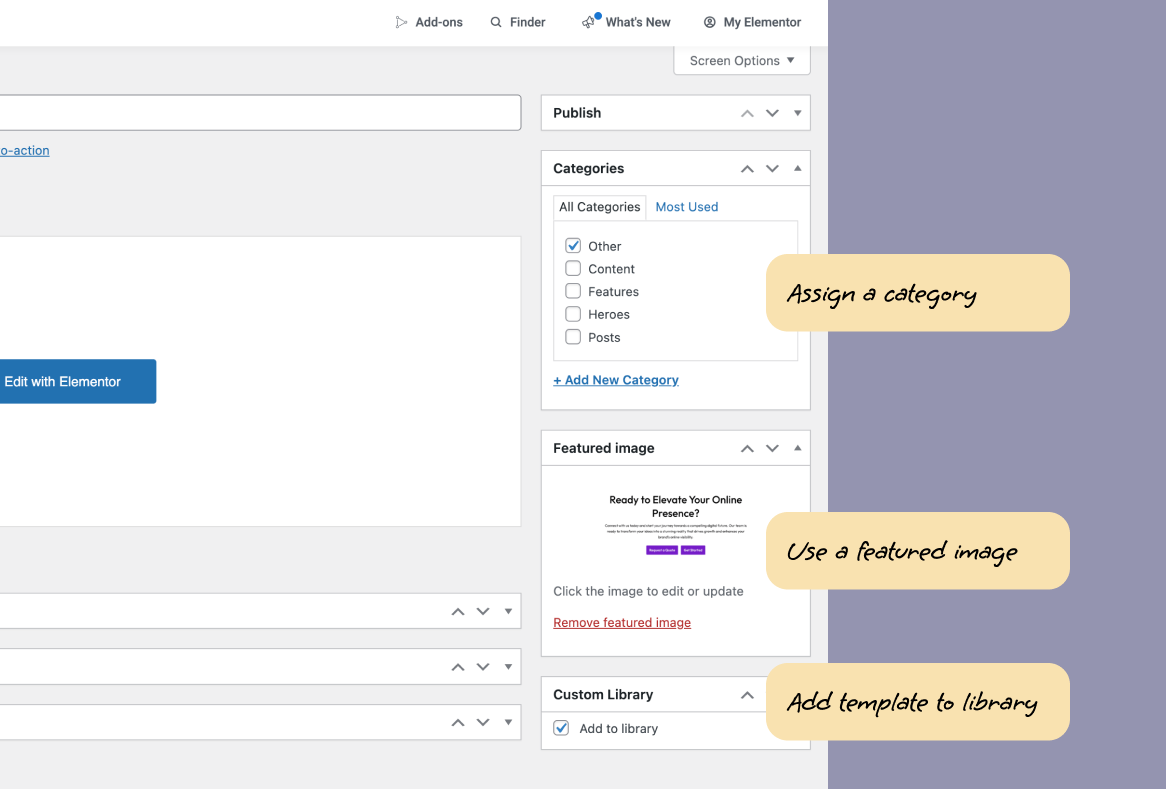
- Save any template or section with one click from your Elementor template list
- Organize with custom categories for quick navigation (Headers, CTAs, Pricing Tables, etc.)
- Visual previews with custom thumbnail images for instant recognition
- Favorite your go-to templates for even faster access
- Search and filter to find exactly what you need in seconds
Stop rebuilding the same sections over and over. Build once, reuse everywhere.
Perfect for Client Handover & Agency Workflows
Agencies love Custom Library because it solves one of the biggest client challenges: maintaining design consistency after handover.
Clients often struggle when adding new pages or sections—they accidentally break layouts, mix fonts, or stray from brand guidelines. Custom Library gives them a pre-curated set of on-brand templates they can confidently reuse without breaking anything.
Benefits for agencies:
– Deliver a professional, easy-to-use template collection with every project
– Reduce post-launch support requests and “fix my page” calls
– Empower clients to expand their site while staying on-brand
– Show clear value and professionalism in your deliverables
Upgrade to Pro for role-based access controls, custom branding, and import/export features perfect for teams.
Free Features
✅ One-Click Template Saving – Add any Elementor template to your library instantly
✅ Custom Categories – Organize templates by type, project, or client
✅ Visual Thumbnails – Upload custom preview images for instant recognition
✅ Favorites System – Star your most-used templates for quick access
✅ Powerful Search – Find templates fast with built-in search
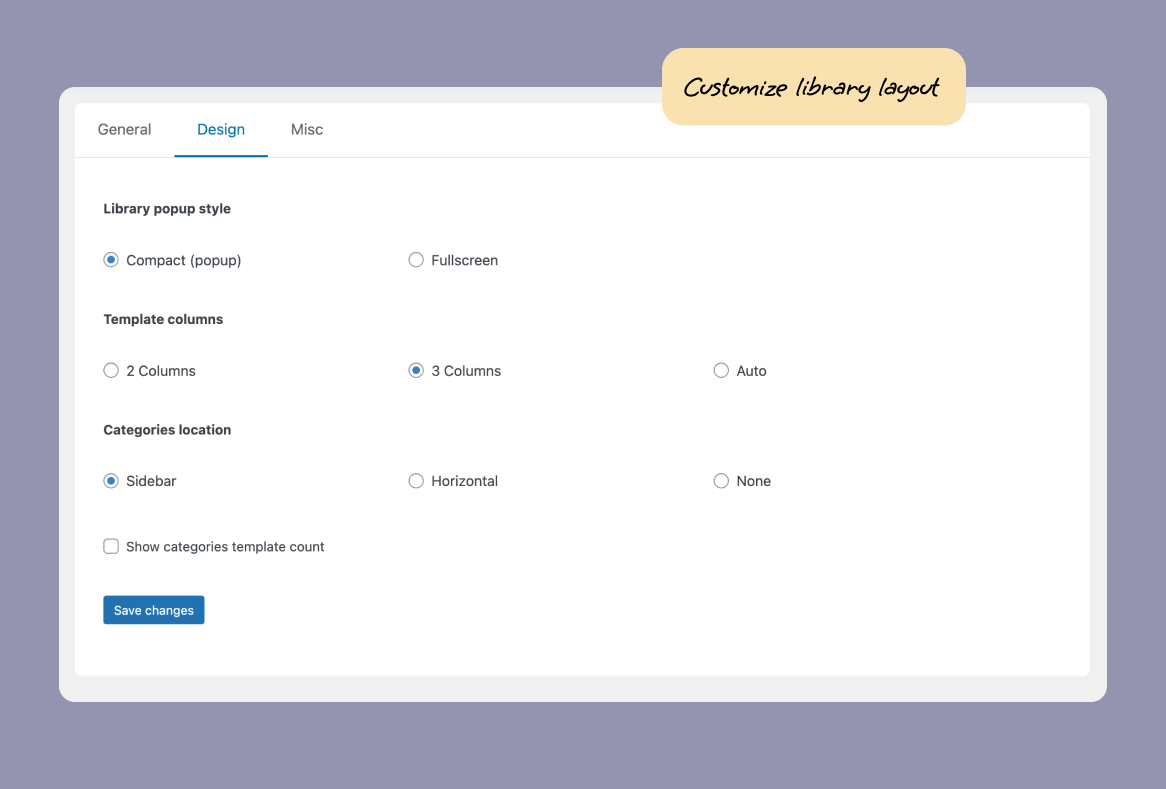
✅ Clean Editor Integration – Access your library via a sleek modal without leaving Elementor
✅ Works with Free Elementor – No Elementor Pro subscription required
✅ SVG Upload Support – Safely upload SVG files with built-in sanitization
✅ Version Rollback – Revert to previous plugin versions if needed
Pro Features – Available with a Limited Time Deal!
🚀 Remote Library – Access your template library from any website
🚀 Template Reports – Track template imports and get a rundown of your popular templates and library usage
🚀 Role-Based Access Controls – Show/hide the library for specific users or roles
🚀 Custom Branding – Change library colors, button styles, and icon to match your brand
🚀 Import/Export Templates – Bulk migrate templates between sites or share with clients
🚀 Custom Trigger Icon – Replace the default library icon with your own branding
🚀 Settings Access Control – Restrict who can modify plugin settings
🚀 White-Label Ready – Perfect for agencies delivering branded client experiences
✨ More Features – We are constantly taking feedback and adding more features for power users like you
From the team at AnalogWP – creators of Style Kits for Elementor, trusted by thousands of designers worldwide.
Automatic Installation (Recommended):
1. Go to Plugins > Add New in your WordPress admin
2. Search for “Custom Library for Elementor”
3. Click Install Now, then Activate
4. Access settings from Custom Library in your WordPress sidebar
Manual Installation:
1. Download the plugin ZIP file
2. Go to Plugins > Add New > Upload Plugin
3. Upload the ZIP file and click Install Now
4. Activate the plugin
Getting Started:
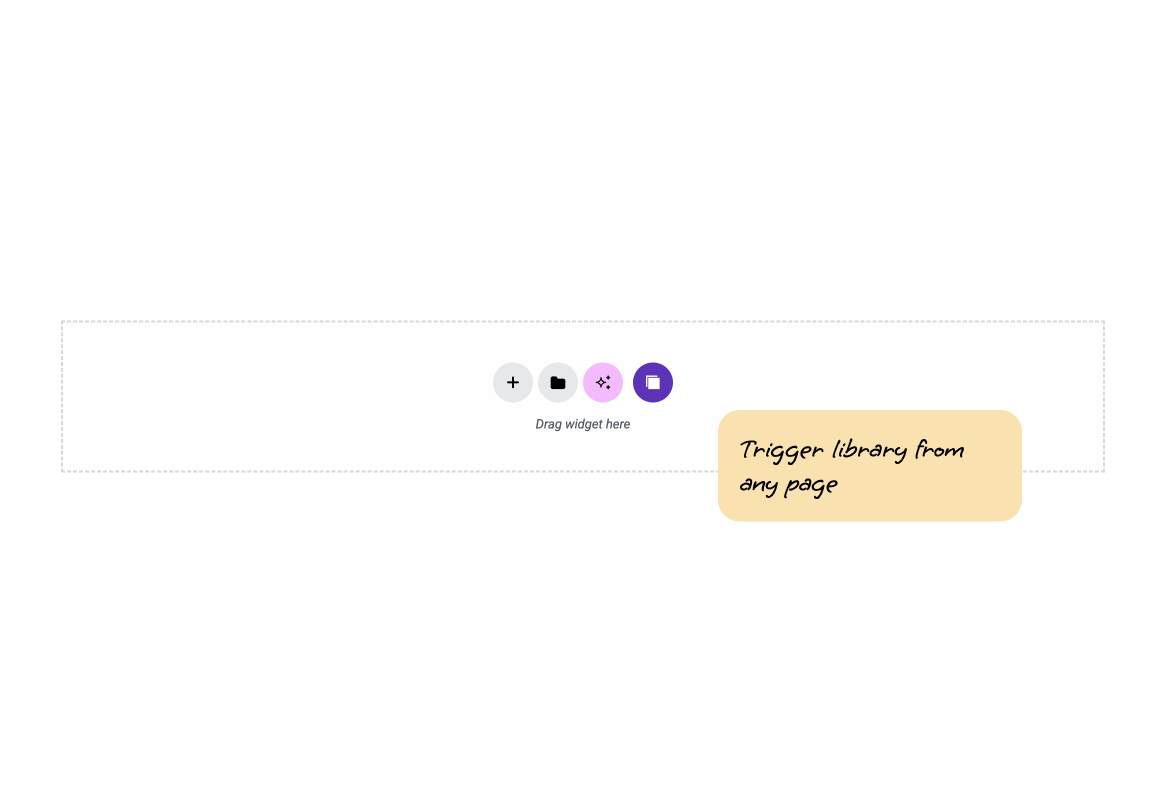
Once activated, go to any Elementor template and toggle “Add to Library” to start building your collection. Access your library from the Elementor editor via the library icon in the top toolbar.
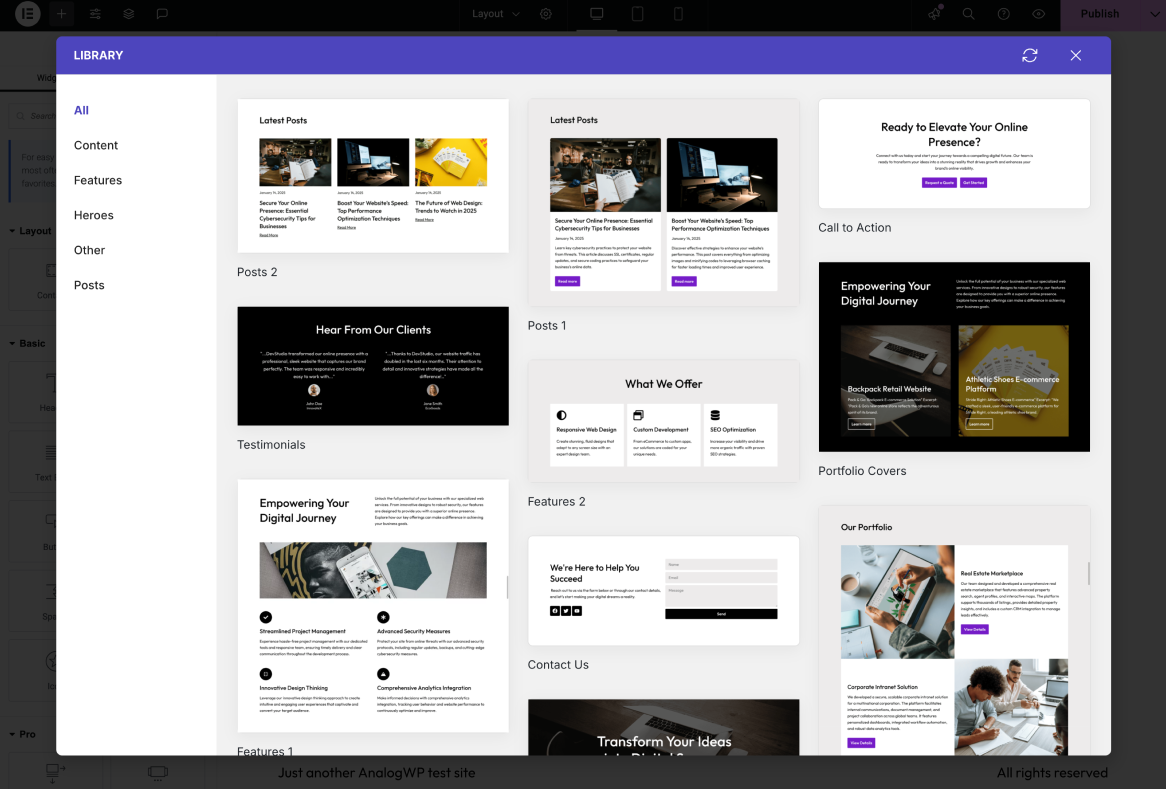
Custom Library for Elementor is a template management plugin that lets you create your own personal design system inside Elementor. Instead of searching through Elementor’s default template library, you can save, organize, and instantly access your own reusable templates, sections, and blocks.
No! Custom Library works perfectly with the free version of Elementor. No Elementor Pro subscription required.
Elementor’s default library shows all templates and blocks, which can be overwhelming. Custom Library lets you:
✓ Create a curated collection of only your templates
✓ Add custom thumbnail previews for visual identification
✓ Organize templates into custom categories
✓ Mark favorites for instant access
✓ Search and filter your own designs
✓ Perfect for client handovers with pre-approved templates
Think of it as your personal design system inside Elementor.
Absolutely! Custom Library is perfect for agencies. Create a curated set of on-brand templates your clients can safely reuse without breaking designs. The Pro version includes role-based access controls and custom branding—ideal for white-label client delivery.
No. Custom Library is designed for you to add your own templates. This ensures your library only contains templates relevant to your projects and brand.
No, Custom Library is specifically built for Elementor and integrates directly into the Elementor editor workflow.
Full documentation is available at analogwp.com/cl-docs.
Visit analogwp.com/custom-library-for-elementor to upgrade. We are offering a great deal at the moment.
Contact us via the support page or use the support forum on WordPress.org.
Changelog
2.5.0
- New: “Save in Custom Library” dropdown menu at Page Save Options menu inside Elementor editor
- New: “Save in Custom Library” action in right-click Context menu inside Elementor editor
- Fix: Onboarding redirect not working
- Improvement: Update language files
- Improvement: Other minor improvements
2.4.0
- Improvement: Enhanced onboarding layout
- Improvement: Updated onboarding options
- Improvement: Updated labels and tooltips for a few options at settings
- Improvement: Update language files
- Improvement: Other minor improvements
2.3.0
- New: Onboarding for new users
- Fix: Library modal showing blank areas when not of full height
- Improvement: Update language files
- Improvement: Other minor improvements
2.2.0
- New: Library Style presets (4 styles to choose from) at settings
- New: Template library Subcategories support at Categories bar
- Fix: White labelling with Plugin/menu label control at settings missing key spots
- Improvement: Hide additional search bar in Vertical sidebar
- Improvement: Move Misc tab options to Tools tab settings
- Improvement: Removed legacy submenu page from Elementor Templates menu
- Improvement: Add Alpha color support at Color control options in Settings
- Improvement: Update language files
- Improvement: Other minor improvements
2.1.0
- New: Template Visibility options at Remote Library Settings
- New: Templates Source selector at Library modal
- New: Search field at Library modal
- Improvement: Move Custom Library menu close to new unified Elementor menu
- Improvement: Update language files
- Improvement: Other minor improvements
2.0.0
- New: New Custom Library Parent Menu at admin Dashboard
- New: Remote Library PROMO tab at settings
- New: Template Reports PROMO tab at settings
- Fix: Missing title in template database selector
- Improvement: Added a an auto redirect at old menu page
- Improvement: Implemented a function to clear caches related to remote templates.
- Improvement: Improved CSS Styling to better calibrate margins, padding and the way remotely related elements appear
- Improvement: Enhanced the import process to trigger actions post template imports
- Improvement: Clearer Settings Descriptions
- Improvement: Compatibility with Elementor 3.34.x
- Improvement: Other minor improvements
1.8.0
- Fix: Library popup modals keeps appearing even after closing
- Improvement: Other minor improvements
1.7.0
- New: Re-wrote Rollback feature
- Improvement: Fix Settings PROMO form
- Improvement: Other minor improvements
1.6.1
- New: Black Friday + Cyber Monday promo deal at settings page
- Improvement: Other minor improvements
1.6.0
- New: Hide Elementor Template Library popup Toggle at Settings
- Improvement: Compatibility with Elementor 3.33.x
- Improvement: Other minor improvements
1.5.0
- New: Rollback feature at Version Control Settings tab
- Fix: Invalid redirect on plugin activation before Freemius consent
- Improvement: Update Debug constant from
ANALOG_DEV_DEBUGtoANALOGWP_DEBUG - Improvement: Compatibility with Elementor 3.32.x and Elementor Pro 3.32.x
- Improvement: Other minor improvements
1.4.0
- New: Tools tab inside Custom Library settings page
- New: Added new option at Tools menu “Update Outdated Templates” to sync outdated templates created in the previous versions of Library
- New: Added Support Request and Addons menu items to Settings page sidebar
- Fix: Users reporting issues in importing Media within Custom Library
- Improvement: Enable unfiltered uploads when importing templates inside editor
- Improvement: Remove submenu links for Contact and Addons under Custom Library settings menu
- Improvement: Compatibility with Elementor 3.30.3 and Elementor Pro 3.30.0
- Improvement: Other minor improvements
1.3.0
- Fix: Template library save not working as expected
- Improvement: Compatibility with Elementor 3.29.2 and Elementor Pro 3.29.2
- Improvement: Other minor improvements
1.2.0
- Fix: Template library icon toggle not working as expected
- Improvement: Compatibility with Elementor 3.28.3 and Elementor Pro 3.28.2
- Improvement: Other minor improvements
1.1.0
- New: Added changes for Custom Library Pro
- New: Promo settings for Custom Library Pro addon
- Improvement: Other major improvements
- Improvement: Compatibility with Elementor 3.28.0 and Elementor Pro 3.28.0
1.0.5
- Improvement: Horizontal category bar should remain sticky on top
- Improvement: Update Freemius SDK configs
- Improvement: Other minor improvements
- Improvement: Compatibility with Elementor 3.27.3 and Elementor Pro 3.27.2
1.0.4
- Improvement: Patch release.
1.0.3
- Fix: No sidebar on empty search results causing unexpected issues
- Improvement: Sync library should check for permanently deleted templates and remove them from CL
- Improvement: Add template syncing on permanent deletion
- Improvement: Improve search field alignment and layout
- Improvement: Other minor improvements.
- Improvement: Compatibility with Elementor 3.27.0 and Elementor Pro 3.27.0
1.0.2
- Fix requested changes by wp.org
1.0.1
- Fix requested changes by wp.org
- Fix library icon color at Elementor Editor
- Fix library sidebar scroll issue
- Fix deprecated warning at
class-base-db.phpfor optional param before required - Improve library favorites active icon color
- Updated Elementor support
1.0.0
- Initial release
" width="120" height="120">
Available Versions
| Version | Download | Type |
|---|---|---|
| 2.5.0 | Download | Stable |
| 2.4.0 | Download | Stable |
| 2.3.0 | Download | Stable |
| 2.2.0 | Download | Stable |
| 2.1.0 | Download | Stable |
| 2.0.0 | Download | Stable |
| 1.8.0 | Download | Stable |
| 1.7.0 | Download | Stable |
| 1.6.1 | Download | Stable |
| 1.6.0 | Download | Stable |
| 1.5.0 | Download | Stable |
| 1.4.0 | Download | Stable |
| 1.3.0 | Download | Stable |
| 1.2.0 | Download | Stable |
| 1.1.0 | Download | Stable |
| 1.0.5 | Download | Stable |
| 1.0.4 | Download | Stable |
| 1.0.3 | Download | Stable |
| Development | Download | Trunk |
