
AI Text to Speech – TTS Plugin For WordPress
Active Installs
80+
Last Updated
May 9, 2026
First Released
March 30, 2024
Download History (Last one month)
A simple plugin that allows you to create an AI generated audio version of your posts, or any other type of content like videos and podcasts, using OpenAI’s Text to Speech API.
When the audio has been generated for a post, an audio player will be displayed automatically at the top of your post, which visitors can listen to.
If you don’t want to create a post, use the admin “AI text-to-speech” generator page instead to generate audio files for other purposes.
This plugin is perfect for bloggers, content creators, businesses, and anyone who wants to generate a realistic audio version of their text and posts.
Key Features
- Powered by OpenAI’s Text to Speech API.
- Easily generate an audio version of your posts on the post editor page.
- Quickly generate an audio version of any text on the “AI text-to-speech generator” admin page.
- Choose between 10 natural-sounding AI voices for your TTS audio.
- Choose between several “voice style” presets to change the tone and style of the generated audio.
- Automatically display an audio player at the top of your posts.
- Supports text to speech generation for over 50 languages.
- Optionally include the post title, author name and post date at the start of the audio.
- View a log of the last 50 audio generation API requests.
Pro Features
- Statistics tracking and analytics reporting.
- Integration with Dropbox to store generated audio files.
- Add custom text before and after the generated audio. This can be done on a global or per post basis.
- Fully replace the content used when generating the audio for a post.
- Specify how certain words should be pronounced with custom pronunciation settings or shortcodes.
- Choose from 20+ additional voice style presets.
- Enter your own custom voice style instructions to change the tone and style of the generated audio.
- Multi-voice feature to allow multiple voices to be used within a post for different pieces of text.
- Choose a default voice to be used when generating audio.
- Automatically generate TTS audio for new posts when they are published.
- Audio player style customisation settings.
Learn more about the PRO version.
Suggestions and Support
If you have any suggestions for additional functionality, need any help, or have found a bug, please create a support ticket.
- Upload the ‘ai-text-to-speech’ plugin to the ‘/wp-content/plugins/’ directory.
- Activate the affiliate plugin through the ‘Plugins’ menu in WordPress.
- Modify additional plugin settings with your OpenAI key. View the “Setup Guide” link for more instructions.
- Go to the post editor, and you will see a new meta box on the sidebar called “AI Text To Speech”.
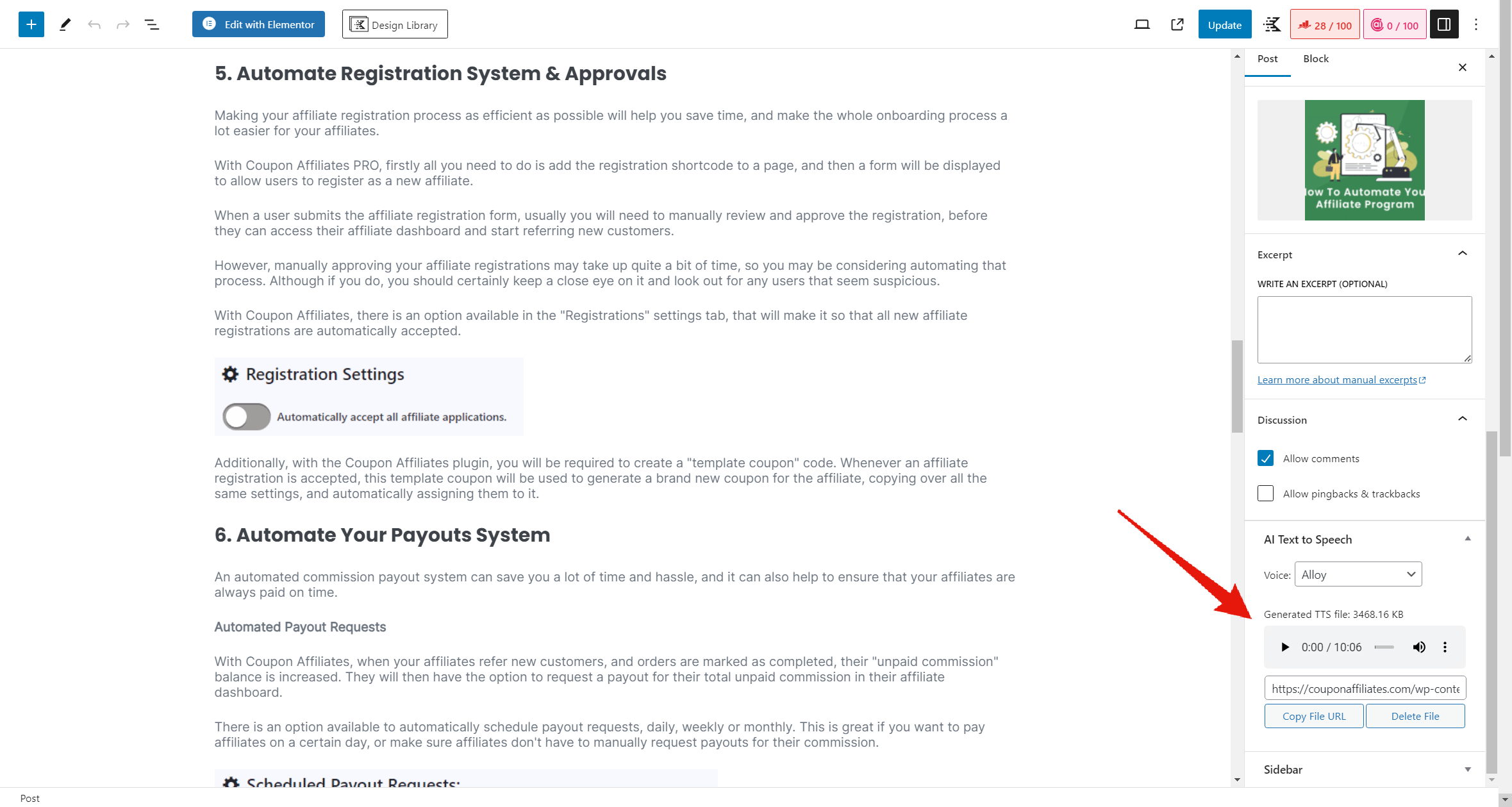

You can get an OpenAI key by signing up for an account at OpenAI.com.
Yes, this AI Text to Speech plugin relys on a 3rd party service “OpenAI.com” to generate the audio, so you will need to sign up for an account and get an API key to use this plugin. You can view the OpenAI terms of service here.
The plugin may also make calls to “publish.twitter.com” in order to retrieve the text/content from certain posts. You can view the Twitter terms of service here.
This plugin is free to use, however it does have a paid “PRO” version which offers some additional features.
The plugin does also depend on the OpenAI API in which their usage costs will apply.
OpenAI Text to Speech currently supports the following languages:
English, Afrikaans, Arabic, Armenian, Azerbaijani, Belarusian, Bosnian, Bulgarian, Catalan, Chinese, Croatian, Czech, Danish, Dutch, Estonian, Finnish, French, Galician, German, Greek, Hebrew, Hindi, Hungarian, Icelandic, Indonesian, Italian, Japanese, Kannada, Kazakh, Korean, Latvian, Lithuanian, Macedonian, Malay, Marathi, Maori, Nepali, Norwegian, Persian, Polish, Portuguese, Romanian, Russian, Serbian, Slovak, Slovenian, Spanish, Swahili, Swedish, Tagalog, Tamil, Thai, Turkish, Ukrainian, Urdu, Vietnamese, and Welsh.
You can generate spoken audio in these languages by providing the input text in the language of your choice.
Yes. If you need any help setting up the affiliate plugin, please free to get in touch and we’ll be happy to help!
You can report feature bugs by creating a support ticket. Please provide as much information as possible to make it easier for us to find a solution for you.
You can report security bugs through the Patchstack Vulnerability Disclosure Program. The Patchstack team help validate, triage and handle any security vulnerabilities. Report a security vulnerability.
Changelog
Version 3.2.0 – 8th May 2026
- New: Added 3 new voices from OpenAI (Marin, Cedar, and Verse).
- New: (PRO) Added options to customise the audio player colors (accent and background).
- Improvement: Redesigned the admin pages within the plugin, and added a new header bar with quick links to the different pages.
- Tweak: Moved the “Custom Voice Style Instructions” field to be always visible on the post editor page.
- Tweak: Reduced memory and database overhead when generating audio for larger posts.
- Tweak: Admin-generated TTS files (from the generator page) now appear on the TTS Files page, and files generated with Dropbox storage are no longer incorrectly removed from the list.
- Fix: Added missing escaping for some strings.
- Fix: Improved long-content chunking to keep OpenAI TTS requests within token limits.
- Fix: Improved TTS generation error messages to show actionable OpenAI API details instead of generic alerts.
- Fix: Changed the generated audio file format to MP3 to prevent inaccurate player duration displays.
- Fix: Fixed undefined variable $post_types on the admin enqueue posts styles function.
- Security: Made a few precautionary code security improvements.
Version 3.1.0 – 18th November 2025
- New: Added a new “TTS Files” page to view and manage all generated TTS audio files in one place.
- Tweak: Added new “Upload new custom file” and “Generate New” buttons to the post meta box when a TTS file is already present.
- Fix: Fixed a JS error on the block editor post page.
- Other: Updated to Freemius SDK 2.13.0
Version 3.0.6 – 14th September 2025
- Fix: Fixed an issue with the AI text-to-speech admin generator page.
Version 3.0.5 – 13th August 2025
- New: Added [ai_tts_player] shortcode for displaying the audio player in a custom area.
- Fix: Fixed an issue with the “Post Types To Enable” setting not working correctly.
- Fix: Fixed an issue with the audio player not displaying on normal pages.
- Other: Updated to Freemius SDK 2.12.1
Version 3.0.4 – 10th April 2025
- Fix: All shortcodes are now removed from the post content when generating audio.
- Fix: Precautionary fix for a potential small security issue.
Version 3.0.3 – 24th March 2025
- Tweak: Fixed the redirect on plugin activation to the settings page.
Version 3.0.2 – 24th March 2025
- Tweak: Fixed the settings page button link on the “AI TTS Generator” page.
Version 3.0.1 – 24th March 2025
- Tweak: Disable the “AI TTS Generator” page if the OpenAI API key is not set.
- Tweak: Disable the “AI TTS Generator” widget on the post editor if the OpenAI API key is not set.
Version 3.0.0 – 24th March 2025
- New: Switched the default API model to the new “gpt-4o-mini-tts” model from OpenAI. You can choose the model in the settings page.
- New: Added a new “AI TTS Generator” page to the admin area that lets you easily generate TTS audio for any text you enter without needing to create a post.
- New: Added a new “Voice Style” option with a variety of styles to choose from when generating audio.
- New: Added a new “custom voice style instructions” option to allow you to specify a custom voice style or other instructions when generating audio.
- New: Added new “Ballad” voice option from OpenAI.
- New: Added a new “Logs” page to track the last 50 api requests and view some details about them.
Version 2.3.1 – 9th February 2025
- Fix: (PRO) Fixed an issue with the audio player not displaying properly with custom styles in some cases.
- Other: Updated to Freemius SDK 2.11.0
Version 2.3.0 – 24th January 2025
- New: Added the 3 new available voice options from OpenAI.
- New: (PRO) Added a new “Default Voice” option to choose which voice is selected by default when generating audio.
- New: (PRO) Added an option to automatically generate TTS audio for new posts when they are published.
- New: (PRO) Added new “multi-voice” feature to allow multiple voices to be used within a post by using the [voice=””] and [/voice] shortcodes.
- New: (PRO) Added new [tts ignore] and [/tts] shortcodes to allow you to ignore certain parts of the post when generating audio.
- New: (PRO) Added new [tts say=””] and [/tts] shortcodes to allow you to specify how certain words should be pronounced directly in the post content.
- Improvement: Made some improvements to the audio generation process to make the flow of the audio more natural.
- Tweak: Added a small pause between paragraphs when generating audio.
- Fix: Fixed the option to show/hide the “estimate cost” text on the post editor when generating audio.
- Fix: Fixed an issue with the user role permissions.
Version 2.2.0 – 17th January 2025
- New: Added option to select which user roles you would like to enable the TTS feature for on the post editor.
- Tweak: Added an option to show or hide the “estimate cost” text on the post editor when generating audio.
- Tweak: Added more detailed error messages when generating audio fails.
- Other: Tested up to WordPress 6.7.1
- Other: Updated to Freemius SDK 2.10.1
Version 2.1.1 – 19th November 2024
- Fix: (PRO) Fixed an issue with the custom pronunciation options sometimes causing an error.
- Fix: Potential fix for timeout error causing issues with generating audio in some cases.
- Other: Tested up to WordPress 6.7.0
Version 2.1.0 – 4th November 2024
- New: (PRO) Added a new custom pronunciation feature. This allows you to specify how certain words should be pronounced.
- Tweak: Made some changes to the settings page layout with new tabs for better organisation.
- Fix: Fixed an error with upgrading from the free version to the PRO version in some cases.
Version 2.0.3 – 16th October 2024
- Fix: Fixed an error on the posts editor page in some cases showing: “Uncaught TypeError: in_array()”
- Fix: When converting tweets to audio, it now removes the picture link/info from the audio.
- Other: Updated to Freemius SDK 2.8.1
Version 2.0.2 – 15th August 2024
- Fix: (PRO) Fixed an issue with the dropbox integration.
Version 2.0.1 – 14th August 2024
- Tweak: Tweak to the spacing under the audio player.
- Tweak: (PRO) The post title now links to the edit post page, in the individual posts list on the statistics page.
- Fix: (PRO) Fixed an issue with the dropbox integration.
Version 2.0.0 – 12th August 2024
- New: Added a PRO version of the plugin.
- New: (PRO) Added statistics tracking and analytics reporting.
- New: (PRO) Added integration with Dropbox to store generated audio files.
- New: (PRO) Added the ability to add custom text before and after the generated audio. This can be done on a global or per post basis.
- New: (PRO) Added the ability to fully replace the content used when generating the audio for a post.
- New: (PRO) Added some audio player style customisation settings.
- Improvement: Made some improvements to the content generation process, to include more pauses in areas where it makes sense.
- Improvement: Made the generation process more reliable for larger posts.
Version 1.0.1 – 19th July 2024
- Tweak: Added some better error handling and error messages on the admin settings page if there is a connection issue with the OpenAI API.
- Tweak: Added an error log to the plugin settings page to help debug any issues.
Version 1.0.0 – 19th January 2024
- Initial release
" width="120" height="120">
Available Versions
| Version | Download | Type |
|---|---|---|
| 3.2.0 | Download | Stable |
| 3.1.0 | Download | Stable |
| 3.0.5 | Download | Stable |
| 3.0.4 | Download | Stable |
| 3.0.3 | Download | Stable |
| 3.0.2 | Download | Stable |
| 3.0.1 | Download | Stable |
| 3.0.0 | Download | Stable |
| 2.3.1 | Download | Stable |
| 2.3.0 | Download | Stable |
| 2.2.0 | Download | Stable |
| 2.1.1 | Download | Stable |
| 2.1.0 | Download | Stable |
| 2.0.3 | Download | Stable |
| 2.0.1 | Download | Stable |
| 2.0.0 | Download | Stable |
| 1.0.1 | Download | Stable |
| 1.0.0 | Download | Stable |
| Development | Download | Trunk |
