
AI Services
Active Installs
100+
Last Updated
May 17, 2026
First Released
October 9, 2024
Download History (Last one month)
Contributors
This WordPress plugin introduces central infrastructure which allows other plugins to make use of AI capabilities. It exposes APIs that can be used in various contexts, whether you need to use AI capabilities in server-side or client-side code. Furthermore, the APIs are agnostic of the AI service – whether that’s Anthropic, Google, or OpenAI, to only name a few, you can use any of them in the same way. You can also register your own implementation of another service, if it is not supported out of the box.
The plugin does intentionally not come with specific AI driven features built-in, except for an AI Playground screen to explore AI capabilities as well as a settings screen to configure AI service credentials. The purpose of this plugin is to facilitate use of AI by other plugins. As such, it is a perfect use-case for plugin dependencies.
Here’s a (non-comprehensive) feature list:
- Abstraction layer and APIs to communicate with any AI service in a uniform way
- APIs are available in both PHP and in JavaScript, as well as via the WordPress REST API and WP-CLI commands
- Currently supports the following AI capabilities (with more on the way!):
- text generation (including text streaming for more immediate feedback to users)
- text chats with history
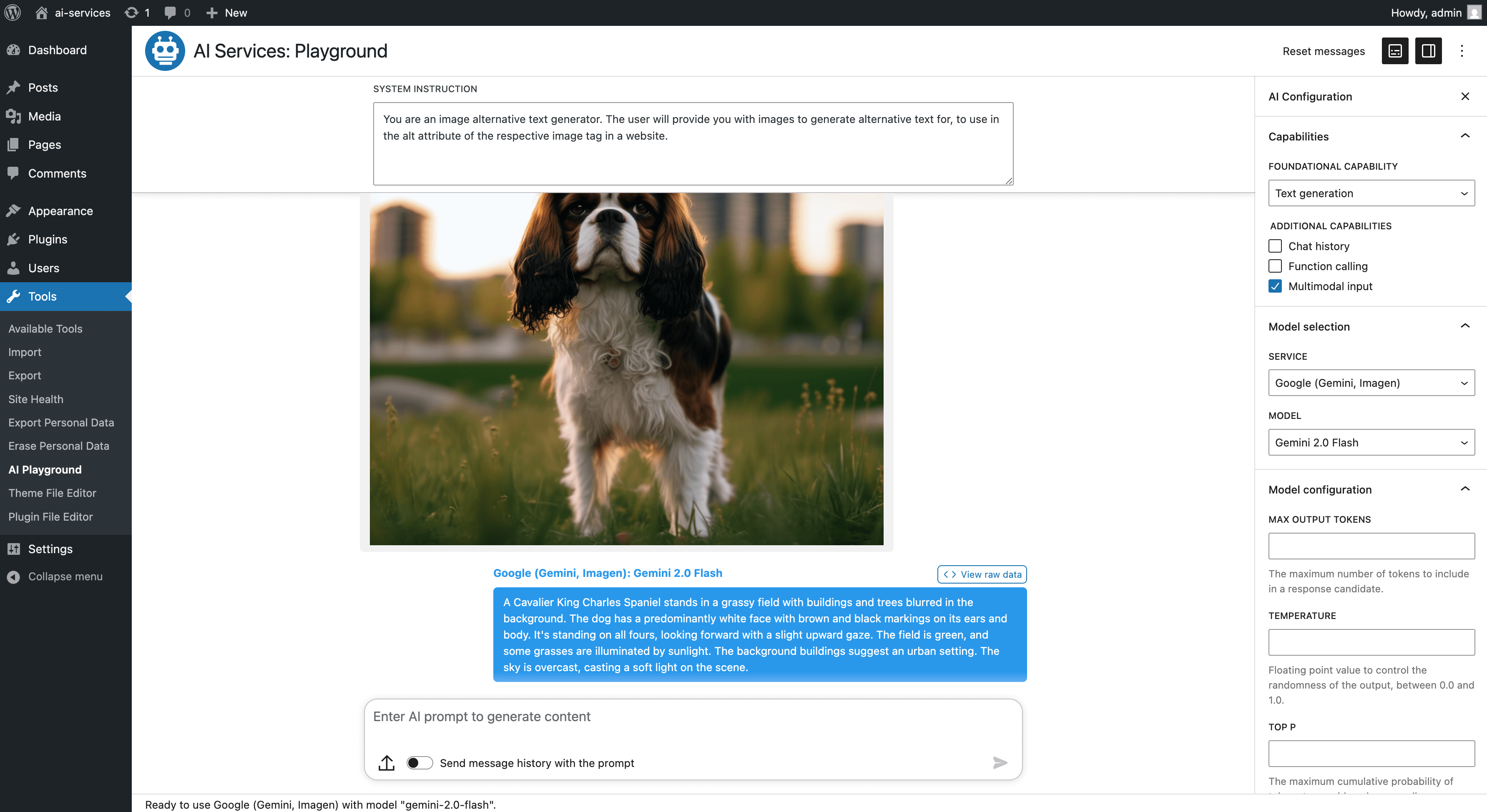
- multimodal input
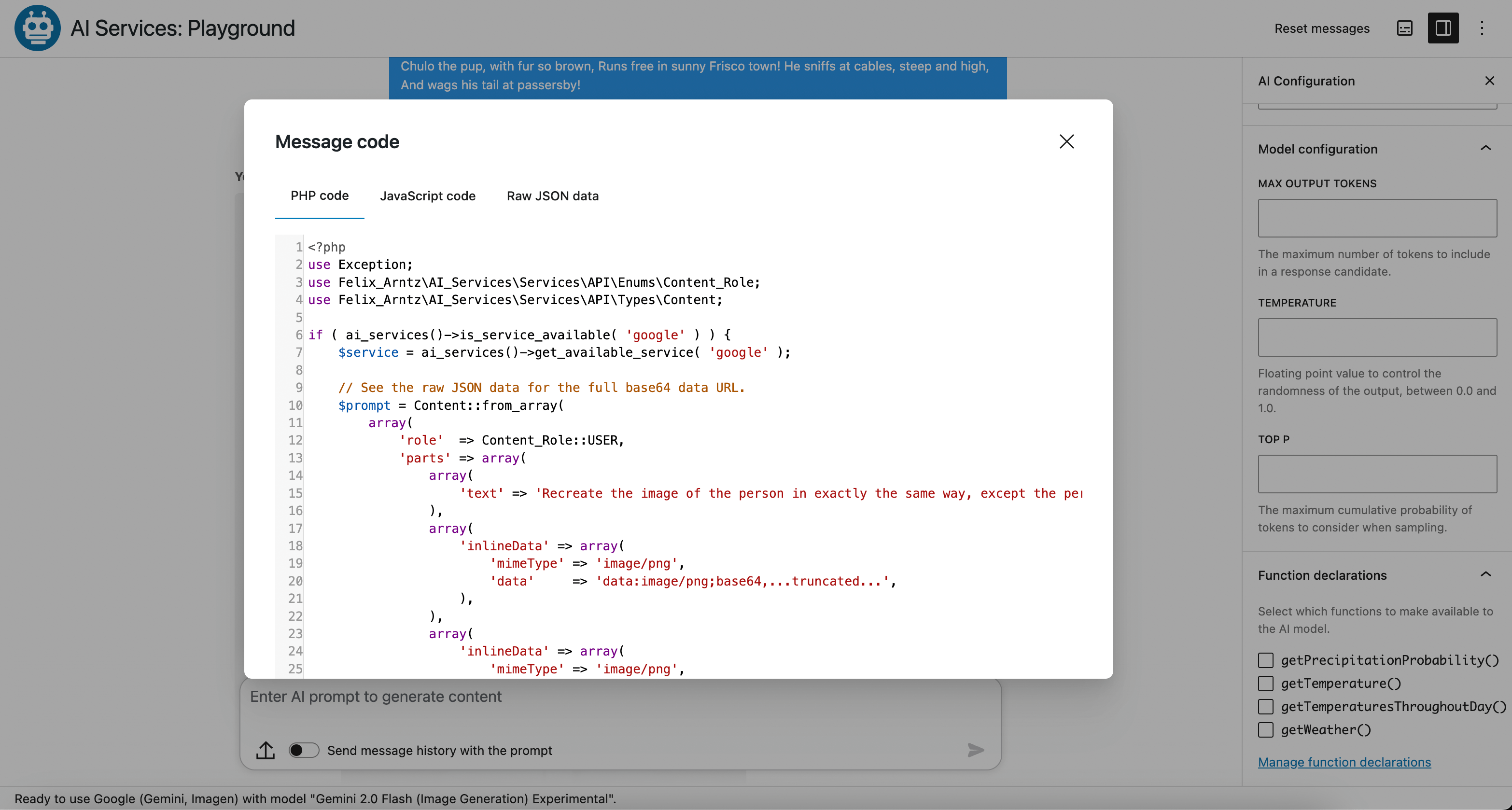
- function calling
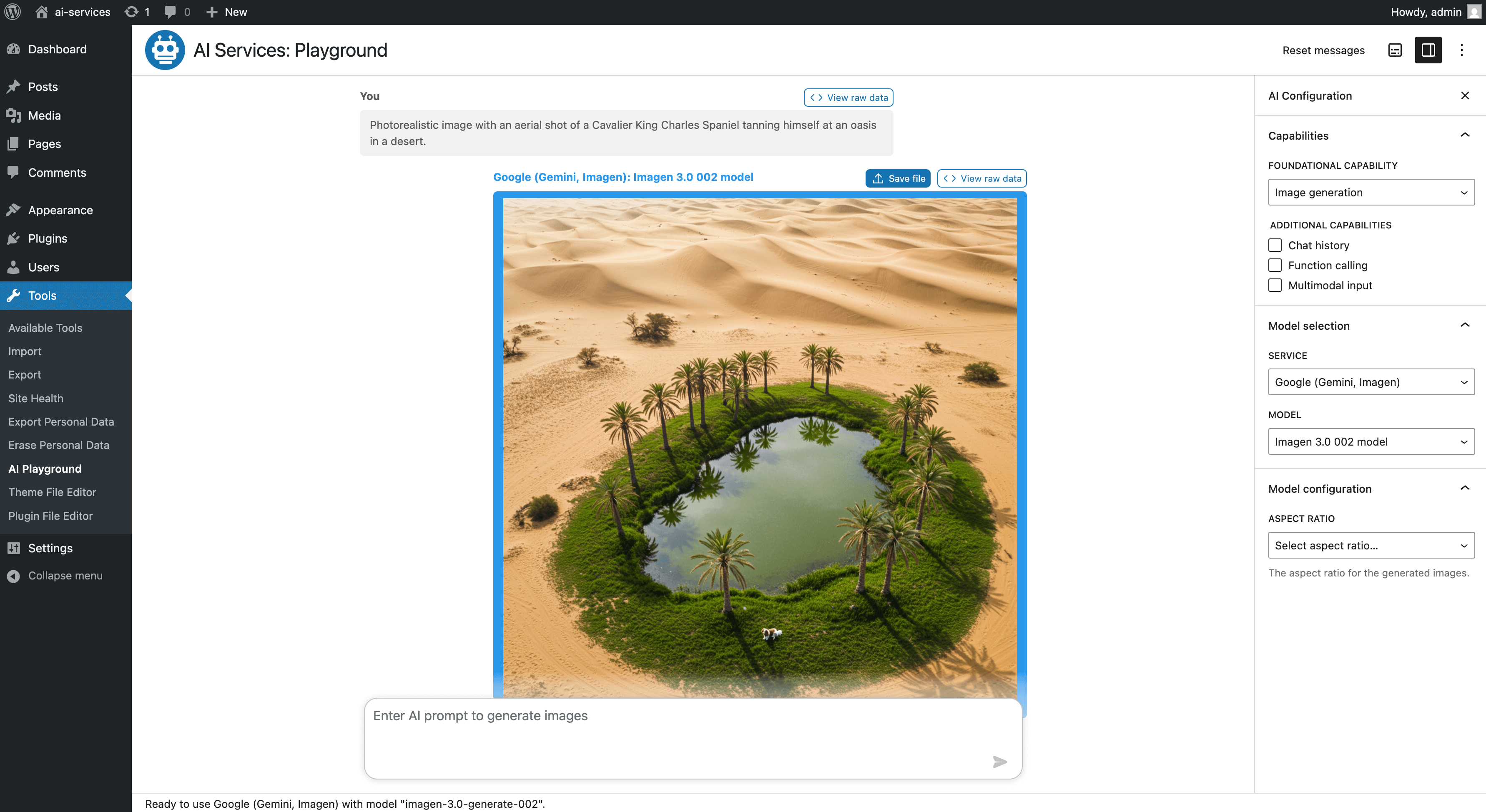
- image generation
- AI Playground administration screen (in the Tools menu) allows exploring the different AI capabilities
- Explore all AI capabilities supported by the plugin via user interface
- Select which AI service and model to use and set a few advanced configuration parameters
- Define your own function declarations used for AI function calling
- Generate images and save them to the WordPress media library
- Exchange the AI service or model on the fly to continue a chat started with one model with another one
- AI Services settings screen to configure services with API credentials
- Built-in AI service implementations
- Anthropic (Claude)
- Google (Gemini, Imagen)
- Mistral
- OpenAI (GPT, Dall-E)
- Perplexity (Sonar)
- xAI (Grok)
- Browser (client-side only; experimental support for Chrome’s built-in AI APIs and Edge’s built-in AI APIs)
- Additional AI service integrations can be registered and will then be available in the same way as built-in ones
Disclaimer: The AI Services plugin is still in its early stages, with a limited feature set and more being added. A crucial part of refining the plugin is shaping the APIs to make them easy to use and cover the different generative AI capabilities that the AI services offer in a uniform way. That’s why your feedback is much appreciated!
Why?
- A centralized AI infrastructure facilitates user choice. Users may prefer certain AI services over other ones, and for many common tasks, either of the popular AI services is suitable. Having a common API regardless of the AI service allows leaving the choice to the user, rather than the plugin author.
- Since the centralized AI infrastructure comes with a common API that works the same for every AI service, it means plugin developers don’t have to spend as much time familiarizing themselves with different services, at least when it comes to simple tasks. For tasks where certain services may have advantages over others, there is still flexibility to focus on a specific AI service.
- It also means no more reinventing the wheel: Since most AI services do not provide PHP SDKs for their APIs, many times this means WordPress plugins that want to leverage AI have to implement their own layer around the service’s API. Not only is that time consuming, it also distracts from working on the actual (AI driven) features that the plugin should offer to its users. In fact this directly facilitates the user choice aspect mentioned, as having APIs for various AI services already provided means you can simply make those available to your plugin users.
- Having central AI infrastructure available unlocks AI capabilities for smaller plugins or features: It may not be worth the investment to implement a whole AI API layer for a simple AI driven feature, but when you already have it available, it can lead to more plugins (and thus more users) benefitting from AI capabilities.
- Last but not least, a central AI infrastructure means users will only have to configure the AI API once, e.g. paste their API keys only in a single WordPress administration screen. Without central AI infrastructure, every plugin has to provide its own UI for pasting API keys, making the process more tedious for site owners the more AI capabilities their site uses.
Integration with third party services
While the plugin APIs allow registering custom AI services, the plugin comes with a few popular AI services built-in. These AI services rely on the respective third party API. Their use is optional and it is up to you to choose which third party service you would like to use or whether you would like to use multiple.
The use of the third party AI services is subject to the respective terms of service. The following third party services are supported out of the box:
- Anthropic (Claude)
- Google (Gemini, Imagen)
- Mistral
- OpenAI (GPT, Dall-E)
- Perplexity (Sonar)
- xAI (Grok)
Code examples for using the API
Generate the answer to a prompt in PHP code:
use Felix_Arntz\AI_Services\Services\API\Enums\AI_Capability;
use Felix_Arntz\AI_Services\Services\API\Helpers;

if ( ai_services()->has_available_services() ) {
    $service = ai_services()->get_available_service();
    try {
        $candidates = $service
            ->get_model(
                array(
                    'feature'      => 'my-test-feature',
                    'capabilities' => array( AI_Capability::TEXT_GENERATION ),
                )
            )
            ->generate_text( 'What can I do with WordPress?' );

        $text = Helpers::get_text_from_contents(
            Helpers::get_candidate_contents( $candidates )
        );

        echo $text;
    } catch ( Exception $e ) {
        // Handle the exception.
    }
}
Generate the answer to a prompt in JavaScript code:
const helpers = aiServices.ai.helpers;
const { hasAvailableServices, getAvailableService } = wp.data.select( 'ai-services/ai' );
if ( hasAvailableServices() ) {
    const service = getAvailableService();
    try {
        const candidates = await service.generateText(
            'What can I do with WordPress?',
            { feature: 'my-test-feature' }
        );

        const text = helpers.getTextFromContents(
                helpers.getCandidateContents( candidates )
            );

        console.log( text );
    } catch ( error ) {
        // Handle the error.
    }
}
Generate the answer to a prompt using WP-CLI:
wp ai-services generate-text "What can I do with WordPress?" --feature=my-test-feature
You can also use a specific AI service, if you have a preference, for example the google service.
Generate the answer to a prompt using a specific AI service, in PHP code:
use Felix_Arntz\AI_Services\Services\API\Enums\AI_Capability;
use Felix_Arntz\AI_Services\Services\API\Helpers;

if ( ai_services()->is_service_available( 'google' ) ) {
    $service = ai_services()->get_available_service( 'google' );
    try {
        $candidates = $service
            ->get_model(
                array(
                    'feature'      => 'my-test-feature',
                    'capabilities' => array( AI_Capability::TEXT_GENERATION ),
                )
            )
            ->generate_text( 'What can I do with WordPress?' );

        $text = Helpers::get_text_from_contents(
            Helpers::get_candidate_contents( $candidates )
        );

        echo $text;
    } catch ( Exception $e ) {
        // Handle the exception.
    }
}
Refer to the plugin documentation for granular examples including explainers.
For complete examples such as entire plugins built on top of the AI Services infrastructure, please see the examples directory on GitHub.
Installation from within WordPress
- Visit Plugins > Add New.
- Search for AI Services.
- Install and activate the AI Services plugin.
Manual installation
- Upload the entire
ai-servicesfolder to the/wp-content/plugins/directory. - Visit Plugins.
- Activate the AI Services plugin.
Usage
Once the plugin is active, you will find a new Settings > AI Services submenu in the WordPress administration menu. In there, you can configure your AI service API keys. After that, you can use the Tools > AI Playground screen to explore the available AI capabilities of the different connected services.
If you have enabled the WordPress assistant chatbot via filter, you should see a small “Need help?” button in the lower right throughout WP Admin after you have configured at least one (valid) API key.
Please refer to the plugin documentation for instructions on how you can actually use the AI capabilities of the plugin in your own projects.
Screenshot Gallery

You can use the ai_services_model_params filter in PHP to customize the model parameters before they are used to retrieve a given AI service model.
This filter is run consistently in any context, regardless of whether the AI model is used via PHP, JavaScript, or WP-CLI.
This can be helpful, for example, if you need to inject custom model configuration parameters or a custom system instruction for a specific feature in a way that it happens dynamically on the server.
Here is an example code snippet which injects a custom system instruction whenever the feature my-movie-expert is used with any google model:
add_filter(
    'ai_services_model_params',
    function ( $params, $service ) {
        if ( 'my-movie-expert' === $params['feature'] && 'google' === $service ) {
            $params['systemInstruction']  = 'You are a movie expert. You can answer questions about movies, actors, directors, and movie references.';
            $params['systemInstruction'] .= ' If the user asks you about anything unrelated to movies, you should politely deny the request.';
            $params['systemInstruction'] .= ' You may use famous movie quotes in your responses to make the conversation more engaging.';
        }
        return $params;
    },
    10,
    2
);
Note that this filter does not allow you to change the feature parameter, as that needs to be controlled by the caller.
There is a simple WordPress Assistant chatbot available as an experimental feature of the plugin, effectively acting as a proof of concept. Since the plugin is purely an infrastructure plugin that other plugins can use to access AI capabilities in WordPress, that chatbot feature is disabled by default.
If you want to test or use the chatbot, you can easily enable it via filter:
add_filter( 'ai_services_chatbot_enabled', '__return_true' );
The wp ai-services generate-text command streams text responses by default. This can help provide more immediate feedback to the user, since chunks with partial response candidates will be available iteratively while the model still processes the remainder of the response.
An exception where it does not stream the response, but returns it all at once is if any function declarations are present.
If you prefer to show the complete text response in one go instead, you can disable streaming in WP-CLI by using the ai_services_wp_cli_use_streaming filter.
add_filter( 'ai_services_wp_cli_use_streaming', '__return_false' );
If you prefer to not expose the sensitive controls over the AI service API keys to the site’s end users, you can programmatically specify the keys by filtering the relevant service’s option value.
For example, to enforce an API key to use for the Google AI service, you could use a code snippet like the following:
add_filter(
    'pre_option_ais_google_api_key',
    function () {
        return 'my-google-api-key';
    }
);
The same approach works for any other services too. Simply use the correct service slug, e.g. openai for the OpenAI integration and anthropic for the Anthropic integration.
Please see the documentation article on customizing the available plugin capabilities.
Most certainly at some point, in some form. But maybe not yet. While generative AI has been around for a few years, in the grand scheme of things we are still only scratching the surface of what’s possible. But most importantly, the lack of standardization makes it difficult to consider built-in AI support in WordPress Core.
WordPress Core rarely adds support for features that rely on third party services. An exception is oEmbed support for many popular services, however via the common oEmbed endpoint that each service implements there is a standard way to have it work correctly without having to individually maintain each integration. Doing so would be a maintenance burden and it would make it almost impossible to stay on top of everything: Imagine one of the services makes a change – not only would this require to manually update the WordPress Core integration, but it would also require to quickly ship a new release ASAP because otherwise the WordPress sites using the service would break. Unfortunately, there is no such standard for how generative AI APIs provided by third party services should work. In other words, if you implement support for a generative AI API in your plugin, that implementation is subject to the same concern, and it applies to the AI Services plugin too. However, by centralizing the implementation in one plugin, the problem surface is greatly reduced. And differently from WordPress Core, it’s more straightforward and more reasonable to ship a quick hotfix for this plugin.
The other reason that integrating generative AI in WordPress Core would be difficult is because (almost all) the services that make those APIs available require paid subscriptions. This is not well aligned with WordPress’s FOSS philosophy. A promising development that may change that situation is the increasing availability of on-device models including browser built-in AI models, such as Chrome built-in AI (which is also supported by the AI Services plugin).
Until the time is right for built-in AI capabilities in WordPress Core, you can use a plugin like this one. While it is for now not a WordPress Core feature plugin, it is built to potentially become one and could be considered a canonical AI plugin for WordPress:
- It is free, and always will be.
- It follows the WordPress Core philosophies.
- It uses WordPress UI components as much as possible.
- It is neutral and does not favor one AI service over another.
For regular support requests, please use the wordpress.org support forums. If you have a technical issue with the plugin where you already have more insight on how to fix it, you can also open an issue on GitHub instead.
If you have ideas to improve the plugin or to solve a bug, feel free to raise an issue or submit a pull request in the GitHub repository for the plugin. Please stick to the contributing guidelines.
You can also contribute to the plugin by translating it. Simply visit translate.wordpress.org to get started.
Changelog
0.7.4
Bug Fixes:
- Fix deprecation warning in WordPress 6.9. (c653f85)
0.7.3
Bug Fixes:
0.7.2
Enhancements:
- Increase default request timeout to 30 seconds to better support heavier AI interactions. (8ee0852)
0.7.1
Enhancements:
- Add support for multimodal input for Chrome and Edge built-in AI. (294c86a)
- Update provider model sorting to be more flexible and future-proof. (584d8f3)
- Rename
ais_load_services_capabilitiesaction toai_services_load_services_capabilities. (1557214)
Bug Fixes:
- Fix missing image generation support for Nano Banana. (fde4e4c)
- Fix sanitization bug for float values in generation config. (f5dc61b)
0.7.0
Features:
- Add support for Mistral AI with text generation, multimodal input, and function calling. (5e6d4fe)
- Add support for Perplexity AI (Sonar models) with text generation, multimodal input, and web search. (b793955)
- Add support for xAI (Grok models) with text generation, multimodal input, function calling, and web search, as well as image generation. (8407c9c)
- Add support for text-to-speech, via new TEXT_TO_SPEECH AI capability and necessary infrastructure in PHP and JavaScript. Props sethrubenstein. (9d3652e, #31)
- Add support for text-to-speech to OpenAI service and its applicable models. (f73341a)
- Add support for multimodal audio output (speech generation) for applicable Google and OpenAI models. (28651c2)
- Add support for web search, supported by Anthropic and Google, usable also via the AI Playground and the WP-CLI command. (62c63bc)
- Introduce
ai_services_skip_api_requestfilter to effectively enable client-side only mode using the browser built-in models, e.g. for unauthenticated visitors. (2224db1)
Enhancements:
- Allow using text-to-speech capabilities in the AI Playground. (daefd02)
- Allow selecting which output modalities to request in the AI Playground (for models which support multimodal output). (3997520)
- Support chat history for built-in browser model, and update to latest API for providing system instruction. (f522a30)
- Support passing videos, including YouTube URLs, to Google API as multimodal input. (c0b913c)
- Implement new base classes and traits for OpenAI compatible generative models, to drastically reduce boilerplate for supporting different services. (9515864)
- Add
ai_services_request_timeoutfilter to centrally customize AI API request timeout. Props EvanHerman. (7a9c302, #38) - Add WordPress Playground
blueprint.jsonfor plugin preview. Props fellyph. (#42) - Enhance settings UI by better visual separation of fields through additional spacing. (e0434a5)
- Show Edge built-in AI model name in AI Playground for browser built-in AI service when using Edge. Props sethrubenstein. (48b8807, #35)
- Refresh model preferences for Anthropic, Google, and OpenAI. (7991312)
- Implement mock AI service for testing. Props swissspidy. (4d3f236, 77e4f96, #32)
- Improve system instruction for experimental built-in chatbot. (135f1a9, 6150a80)
- Drastically simplify implementing a service class by implementing
Abstract_AI_Serviceclass andWith_API_Client_Trait. (2678cfb) - Reduce complexity of implementing API connection drastically via new
Generic_AI_API_Clientclass abstracting functionality commonly shared across different providers. (6930bc0) - Use
With_API_Clientand corresponding trait in generative AI model classes. (a4b8fc6) - Simplify model implementation by introducing traits for the individual model params. (12d725f)
- Introduce
Service_Metadatatype to centralize handling of service metadata and simplify API. (6966934) - Introduce
Model_Metadatatype to centralize handling of model metadata, using the object in the list_models() method. (7ed37e1) - Implement service type awareness (cloud, server, client) via new enums in PHP and JavaScript and integration as part of service metadata. (ad26527)
- Include service capabilities in metadata handling, decoupling it from the service being available and simplifying service implementation. (cb5891f)
- Make model classes aware of their metadata for easier access when working with the model class. (3b3fab4)
- Make service classes and interface aware of the service’s metadata and make service creator callbacks future-proof via new
Service_Registration_Contextclass. (7401650) - Implement new
Modalityenum in PHP and JavaScript. (51169f3) - Decouple concrete model implementations from WordPress specific functions. (f2dd6c4)
- Allow API version string to be empty in
Generic_AI_API_Clientimplementation. (985781e) - Update service REST API schema to use model metadata schema for its model information included. (1b2e2bb)
- Remove Google-specific hack in service agnostic REST route. (e26e804)
- Migrate entire client-side JavaScript codebase to TypeScript. (7d0d50f, 3c7bd9e, 0f8f464, bfd43a9, b119e70, 02066bb, 28704d9, 6a82ca5, 2c936b4, 924bb59)
- Update to latest Chrome built-in browser specification, using recommended availability API instead of capabilities API. (d32788e)
- Migrate
componentspackage to becomeinterfacepackage. (5f796c8) - Rename
settings-storepackage tosettings. (a44320f) - Improve settings store implementation for stability and flexibility. (b7ec1c5)
- Enhance API error reporting in API client trait. (9232c60)
- Use
logErrorutility instead ofconsole.errorin ai store and settings store. (03bacf6) - Implement
errorToStringutility function to improve error handling through client-side UI. (ae5ad8b) - Implement API client helper method for API scoped bad request exceptions. (6f66fb0)
- Remove now superfluous PHP and JS methods to get service name and credentials URL, in favor of new methods to get service metadata. (33a9a4b)
- Change deprecated
Generation_Configclass to become an interface and implementAbstract_Generation_Configbase class to simplify implementation. (2410b7b) - Remove deprecated
Anthropic_AI_Model,Google_AI_Model, andOpenAI_AI_Modelclasses in favor of their more specific implementations. (1d8b731) - Remove previously deprecated
ais-ai-storeasset alias. (c54e5d5)
Bug Fixes:
- Fix bug where some Google models could be missing from the API response and therefore seem to be unavailable. (75b8ce2)
- Fix OpenAI API compatible models to include reasoning output, also resolving potential streaming errors. (7fd69c9)
- Fix logic bug in Abstract_Enum that could cause conflicts between different enums. (f6bcbb5)
- Fix service registration handling to only set up authentication for CLOUD services. (a2ef6b0)
- Fix bug in
Abstract_Generation_Configdefault handling. (1a71735) - Fix
getApiKeyselector return type andApiKeyControlprops. (29b416a) - Fix PHP 8.4 deprecated implicit nullable parameters and use constant for Anthropic API version. Props JosephGabito. (#40, 06571b7)
- Fix AI API image generation request error handling in JS. (387d42a)
- Fix typo in
Text_Generation_Configparameter description. (52956e1) - Fix minor code flaw with incorrect array size. (4bc9e1b)
Documentation:
- Document how to transform text to speech in PHP and JavaScript. (515e696)
- Document TypeScript code (for human and LLM consumption). (6685047)
- Add WordPress Playground link to
README.md. Props iftakharul-islam. (#43)
0.6.5
Bug Fixes:
- Fix iteration over possibly undefined value. (bbcf37c)
0.6.4
Bug Fixes:
- Fix possible error when resolving
getServices()selector due to browser built-in AI not being present. Props ocean90. (269bde4) - Sanitize AI Playground
getAdditionalCapabilities()selector output against available capabilities. (7acd7d0) - Clarify AI Playground notice message for when no applicable AI services are available. (91d6ab8)
0.6.3
Bug Fixes:
- Fix WordPress.org deploy workflow permission. (19efbb8)
- Harden GitHub workflow permissions. (04916b2)
0.6.2
Enhancements:
- Support new
gpt-image-1model for image generation. (66afb78) - Generate build provenance attestation. Props johnbillion. (#30)
Bug Fixes:
- Avoid showing PHP code in AI Playground modal when using client-side AI service (like Chrome built-in AI). (b25e392)
- Fix issue in
SettingsCardscomponent withuseSelectnot returning consistent result. (24ab0cf)
0.6.1
Bug Fixes:
- Ensure regular
gemini-2.0-flash-expmodel is annotated with multimodal output. (8f2d7ea)
0.6.0
Features:
- Add support for multimodal output (text and images) and implement it in new Google Gemini model that supports it. Props swissspidy. (33d7f16, #27)
- Add the ability to view fully functional PHP and JavaScript code for each prompt in the AI Playground. (f99f964)
Enhancements:
- Add support for including multiple images in prompts on the AI Playground. Props fellyph. (e943cf1, #28)
- Update Chrome built-in AI implementation to support latest entry points starting with Chrome 136. (c4ff704)
- Update model name used for Chrome built-in AI. (58850d2)
- Implement reusable
ApiKeyControlcomponent in JavaScript andAPI_Key_Controlclass in PHP to allow easy rendering of API key controls in custom settings UI. (2d23b0a) - Support content with multiple files (e.g. images) to be uploaded at the same time in AI Playground. (31f830f)
- Enhance attachment filename generation for AI Playground uploaded files to include source. (0d399af)
- Implement new helper function in PHP and JavaScript to create a content object from a prompt and multiple attachments. (0138cb3)
- Implement helper functions to transform base64 data URLs in PHP and JavaScript. (fe83f7b)
- Reserve more vertical space for modals in AI Playground on larger viewports. (2c4e3aa)
- Allow passing through custom model parameters as part of generationConfig API field for Google AI models. (ff4ed12)
- Use
__next40pxDefaultSizeprop in compliance with WordPress 6.8 requirements. (28a1f60) - Remove usage of WordPress functions and expect interfaces rather than concrete implementations in core AI API implementation to decouple from WordPress. (8fd6d91, 6f2a7c2, 081e406, 3dd51c2, #29)
- Remove deprecated
aiServices.aiStorefrom AI package. (372d750) - Move AI store files into a separate directory within the package. (6d18048)
Bug Fixes:
- Fix issue in
Interfacecomponent withuseSelectnot returning consistent result. (cc31d7a) - Fix some styling issues in
Partscomponent. (767fd5b) - Fix confusing limitation of function response parts only allowing objects as response. Props swissspidy. (650c0d2)
- Fix AI Playground footer status text to show model name instead of model slug. (d5ee4e0)
Documentation:
- Document how to use multimodal output (text and images for now). (e7a0d0e)
- Add documentation about technical architecture. (ca75eaa)
- Provide documentation on how to render AI Services API key settings field in custom UI anywhere in WP Admin. (557eca6)
- Update documentation regarding Chrome built-in AI. (a95eb62)
0.5.0
Features:
- Introduce image generation support in PHP and JavaScript. (6c3b328)
- Introduce tool support and implement function calling in PHP and JavaScript. (e84040c)
- Introduce history persistence API in both PHP and JavaScript, to persistently save AI message histories in user meta. (90e69b5)
- Allow generating images in AI Playground. (8b1902e)
- Allow uploading images and other media generated via AI Playground to the WordPress media library. (a00af05)
- Allow creating and managing function declarations for AI function calling in AI Playground. (abe6688)
- Allow sending function responses after receiving a function call in AI Playground. (e16ab32)
- Add WP-CLI command
wp ai-services generate-imageto generate images via the command line. (599ce48) - Add support for passing multimodal prompt via attachment to WP-CLI command. (4d2f320)
- Allow passing function declarations to WP-CLI
generate-textcommand. (f56b54b)
Enhancements:
- Implement image generation support for Google and OpenAI services. (511571b)
- Implement function calling tool support for Anthropic, Google, and OpenAI services. (d47efef)
- Enhance AI Playground to save messages persistently using new history persistence API instead of session storage. (919f26b)
- Enhance AI Playground service selection accessibility by announcing to screen readers when model selection was cleared. (a3d7676)
- Enhance AI Playground chat messages accessibility by using log role. (48a35c3)
- Enhance function declarations modal accessibility by using tab semantics for navigating through the function declarations. (94e8494)
- Show text instead of icon to clarify reset messages button purpose. (843fef5)
- Centrally handle candidate count default of 1 to avoid wasted resources. (568502a)
- Implement several helper API methods related to dealing with binary files, blobs, and data URLs. (a05d685)
- Use new Anthropic API models endpoint to fetch available models remotely. (a3fae90)
- Show admin pointers to inform new users about where to configure AI Services and the ability to explore in the AI Playground. (4d7a169)
- Simplify plugin settings link implementation by using abstraction from library. (d77858a)
- Implement plugin action link and admin pointer for settings page. (6566c77)
- Set default request timeout for image generation to 30 seconds. (1cc086a)
- Ensure that prompts with history are rejected if the model does not support chat history. (bd01db0)
- Explicitly implement
With_Text_Generationinterface in text generation model classes. (26985a3) - Implement
Abstract_AI_Modelclass and use it as foundation for service-specific model classes. (3f998d9) - Deprecate service-specific
AI_Modelclasses in favor of new AI_Text_Generation_Model classes. (2f474aa) - Deprecate
Generation_Configclass in favor of new Text_Generation_Config class. (d39c135) - Pass service slug to
ai_services_model_paramsfilter. Props mslinnea. (#23) - Update Google service to prefer newer
gemini-2.0models over oldergemini-1.5models. (b01dc0b) - Update OpenAI service to prefer newer
gpt-4omodels over more expensivegpt-4models and oldergpt-3.5models. (9b14367) - Update Anthropic service to prefer newer
claude-3.5models overclaude-3models. (04f1896) - Remove requirement of global
--userargument for WP-CLI commands. Props swissspidy. (cd25081, #25) - Display model name above AI Playground responses if available. (04c673a)
- Implement new reusable components for common AI Playground use-cases and use
Flexcomponent in AI Playground where applicable. (7c4f5d2) - Implement new helper functions to create a multimodal
Contentobject from a prompt and media file, and to get the base64 data URL for a file. (e664197) - Make
Partscomponent publicly available viaaiServices.components. (3994156) - Expand available AI capabilities to include
FUNCTION_CALLINGand add support to applicable services and models. (4dc570a) - Include name field in models data, retrieving it from the service API where available. (40c4351)
- Alter return shape of
Generative_AI_Service::list_models()method in PHP, for a consistent model data shape across PHP and JavaScript. (a9193f9) - Implement new helper function to get content object with text from a list of content objects. (cf77062)
Bug Fixes:
- Fix bug where messages container in AI Playground could sometimes infinitely continue to scroll towards the bottom. (f69fd30)
- Fix AI capabilities missing from OpenAI o1 models. (94086b4)
- Fix model response candidates to no longer include duplicate data that could inflate response size. (3fc8422)
- Fix region navigation after
@wordpress/interfacepackage update. (88d2c13) - Fix limited data URL regex to support MIME types that contain numbers or hyphens. (c00e8be)
- Fix incorrect model capabilities being indicated for legacy Anthropic and legacy Google AI models. (4cbabab)
- Fix API request options not being passed in
Generative_AI_Service::list_models()implementations. (f50e46f) - Fix bug in
Service_Entity_Query::count()method. (08cb9ba)
Documentation:
- Expand PHP, JS, and WP-CLI documentation to cover how to generate images. (34689f9)
- Include documentation on how to use function calling in both PHP and JavaScript. (4ded68f)
- Include intro section in JavaScript API documentation on how to enqueue the API. (366d7ea)
- Expand WP-CLI command documentation to cover how to send multimodal prompts and handle function calling. (b7dd38b)
0.4.0
Features:
- Add AI Playground screen which allows to explore services and models with their configurations and behaviors. (1495994)
- Add REST route and expand
ai-services/aistore to provide general plugin data and user capabilities for JavaScript consumption. (83d770c)
Enhancements:
- Ensure AI playground message data can be stored in session storage by avoiding to include inline data for attachments. (b667611, 7d346a2)
- Implement store infrastructure to manage panel state and persist open/closed AI playground panels. (89572e8)
- Implement AI playground panel to allow customizing most commonly supported AI model config parameters. (27ea03f)
- Support providing message history alongside new prompt in AI playground. (33c54cc)
- Allow to reset the list of messages in the AI playground. (9537986)
- Persist messages from AI playground in session storage. (60c45d9)
- Expand interface package with store for easier abstraction and a new
Modalcomponent. (5ee0e20) - Implement playground UI to select an attachment from the media library to provide as multimodal input. (dbad8d3)
- Enhance playground input by allowing arrow navigation to access previous messages and automatically focusing on it. (f44efa5)
- Implement keyboard shortcut to toggle system instruction. (66f990d)
- Automatically scroll to latest messages as new messages arrive. (c8f3746)
- Implement
getServiceNameandgetServiceCredentialsUrlselectors inai-services/aistore for parity with PHP API. (d9ca118) - Implement store
ai-services/ai-playgroundfor new AI playground screen. (96f5b45) - Use newer
ai.languageModelproperty for Chrome built-in AI, continuing to supportai.assistantfor backward compatibility. (0f52227) - Remove unused option. (28a864a)
- Ensure service options are set to (temporarily) not autoload when plugin gets deactivated. (4841d5b)
Bug Fixes:
- Fix AI playground automatic message scrolling to correctly function with multiple quick subsequent updates. (50f40fe)
- Fix sidebar toggle button being hidden on mobile. (9d44650)
- Fix bugs with sidebar handling and support keyboard shortcut in interface abstraction. (cf7b926)
Documentation:
- Add documentation about the available user capabilities and how to customize them. (a1d972b)
- Expand readme and documentation to reference the new AI Playground screen. (a136c1c)
0.3.0
Features:
- Add text streaming support to generative models in JavaScript. (9967db5, #3)
- Introduce REST route to stream generate text, using an event stream. (071a664, #3)
- Add text streaming support to all built-in services Anthropic, Google, OpenAI. (e27697a, #3)
- Introduce API foundation for streaming text responses. (9476333)
Enhancements:
- Polish and complete implementation of Chrome browser built-in AI integration. (1beb2c5, #6)
- Support text streaming in chat implementations in both PHP and JavaScript. (9e11c03, #3)
- Use streaming by default for the built-in chatbot. (3f6266b)
- Use streaming by default for WP-CLI text generation, customizable via filter. (f9be4ad)
- Remove unnecessary
console.logcall for chatbot. (7637632) - Persist chatbot messages history in session storage. (a349274, #4)
- Persist chatbot visibility across page loads. (81a0511, #4)
- Include chatbot input label for screen reader users for better accessibility. (94026e5, #4)
- Improve chatbot accessibility by focusing on input when the chatbot is opened. (7b5c6f4, #4)
- Improve chatbot error handling by displaying technical errors as a chatbot response. (e57d716)
- Show loading ellipsis in chatbot while generating text response. (db79515, #4)
- Handle errors during browser AI session creation more gracefully. (0edd56f)
- Consistently handle AI temperature parameter between services, expecting a value between 0.0 and 1.0. (e7ae611)
- Improve error handling in chat store and built-in chatbot. (06b2340)
- Expand AI capabilities with
CHAT_HISTORYcapability to differentiate between whether text generation models support history. (4c2feb4) - Provide helper function in PHP and JS to aggregate chunks from candidates stream into final candidates response. (a27bdf6, #3)
- Ensure third-party production libraries are always backward compatible with minimum supported PHP version by separating tooling. (e4fe291)
- Enhance JavaScript API with model instances for better parity with PHP API, while continuing to allow previous approach as short-hand syntax. (7992d6d)
- Restructure JavaScript code into separate files per class. (cd8d90d)
- Remove specific API client interface methods that should not be required for the interface. (140d7c1)
- Allow candidates to have no content. (c072689)
Bug Fixes:
- Remove prefix from base64 inline image data for Anthropic AI integration. Props mslinnea. (#19)
- Fix bug in
CandidatesStreamProcessorin JS, leading to stream responses to not being aggregated correctly. (969b554) - Fix OpenAI model definitions by restricting to
gpt-4omodels for multimodal support. Props mslinnea. (#18) - Split components package into distinct components and interface packages to better separate responsibilities and avoid JS warning outside of AI Services admin screen. Props westonruter. (056461c, #13)
- Fix chatbot bug where unexpected AI response could lead to link button to contain unexpected label and overflow its container. (66f3578)
- Fix UI warnings in WordPress 6.7 due to JS component updates. (6e8d231)
- Fix failing Anthropic API requests when no generation config was provided. (33db20b)
Documentation:
- Include documentation section about using browser built-in AI in JavaScript. (91c5be7, #6)
- Expand documentation to explain how to customize model configuration. (930058a)
- Expand documentation to cover how to use new text streaming capabilities in PHP and JS. (20d028b, #3)
0.2.0
Features:
- Introduce
ai_services_model_paramsfilter to centrally customize AI service model parameters. (f36f35d) - Add enums to the public APIs in PHP and JavaScript, for now covering AI capabilities and content roles. (48dedc5)
- Add WP-CLI support under
ai-servicesnamespace with commandslist,get,list-models, andgenerate-text. (415edbc, #7) - Introduce helpers as object with useful functions in both PHP and JavaScript APIs. (98ae179, 7cf8a4d)
- Introduce
Generation_Configtype class for safer and more consistent handling of model generation config data. (4e6925a)
Enhancements:
- Add Settings link to plugin row actions. Props westonruter. (#12)
- Remove unnecessary
With_API_Clientinterface and related method. (f3dc6b4) - Move
Felix_Arntz\AI_Services\Services\Typesnamespace toFelix_Arntz\AI_Services\Services\API\Typesto indicate it is part of the public API. (5e34f7a) - Enhance content part classes by providing dedicated getter functions. (89ae723)
- Move internal
Service_EntityandService_Entity_Queryclasses to their own namespace, since they are not only relevant for the REST API. (4ce7026) - Change built-in assistant chatbot feature to be opt-in rather than opt-out. (9279850, #15)
- Rename
ai-storeasset toaiandsettings-storeasset tosettingsand adjust JS globals accordingly, keeping oldai-storeasset and JS global available for backward compatibility. (fbe4916) - Strengthen prompt content validation and add support for OpenAI audio input. (350c85d)
- Allow passing through arbitrary parameters to built-in service APIs. (81254f6)
- Enhance generation config transformation to support equivalent arguments across the built-in service APIs for Anthropic, Google, and OpenAI. (69a99bf)
- Validate feature model param in REST API and mark relevant parameters as required. (2032690)
- Enhance chatbot to rely on feature identifier instead of custom property to inject model params. (962750b)
- Consistently handle the Google-specific
safetySettingsmodel parameter, expecting an array ofSafety_Settinginstances. (a74e51c) - Allow passing system instruction as data array to REST endpoint. (7b4916a)
- Use camelCase arguments for model params for more consistency with underlying APIs. (946c448)
Bug Fixes:
- Fix conflict between REST content schemas. Props westonruter. (e087602, #14)
- Fix early component return in example plugin. (e7ce054)
Documentation:
- Update documentation to cover WP-CLI usage and latest API enhancements. (21ab225)
- Improve documentation to cover how to process generative model responses. (c40c89d)
0.1.1
Bug Fixes:
- Update Prompt API to latest shape. Props tomayac. (#11)
- Fix bug preventing inline data to be processed by Google AI API. (cf57baf)
- Fix OpenAI model configuration to only provide multimodal capabilities for GPT-4 models. (42ba79b)
- Fix bug where REST endpoint to generate content did not accept content in its complex shape. (2e0687f)
0.1.0
- Initial early access release. See announcement post.
Available Versions
| Version | Download | Type |
|---|---|---|
| 0.7.4 | Download | Stable |
| 0.7.3 | Download | Stable |
| 0.7.2 | Download | Stable |
| 0.7.1 | Download | Stable |
| 0.7.0 | Download | Stable |
| 0.6.5 | Download | Stable |
| 0.6.4 | Download | Stable |
| 0.6.3 | Download | Stable |
| 0.6.2 | Download | Stable |
| 0.6.1 | Download | Stable |
| 0.6.0 | Download | Stable |
| 0.5.0 | Download | Stable |
| 0.4.0 | Download | Stable |
| 0.3.0 | Download | Stable |
| 0.2.0 | Download | Stable |
| 0.1.1 | Download | Stable |
| 0.1.0 | Download | Stable |
| Development | Download | Trunk |
