
AI Featured image
Active Installs
100+
Last Updated
October 2, 2026
First Released
July 13, 2025
Download History (Last one month)
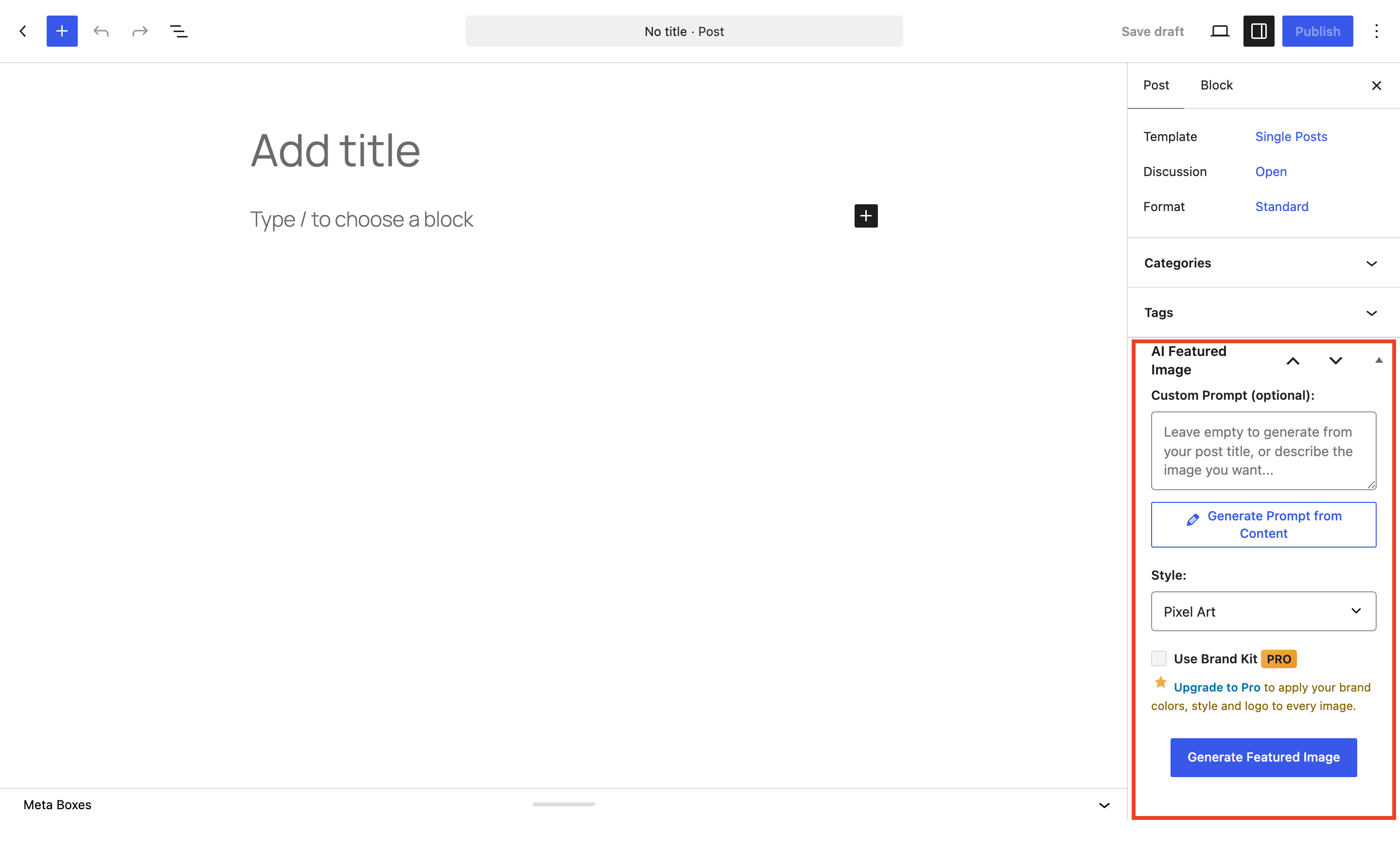
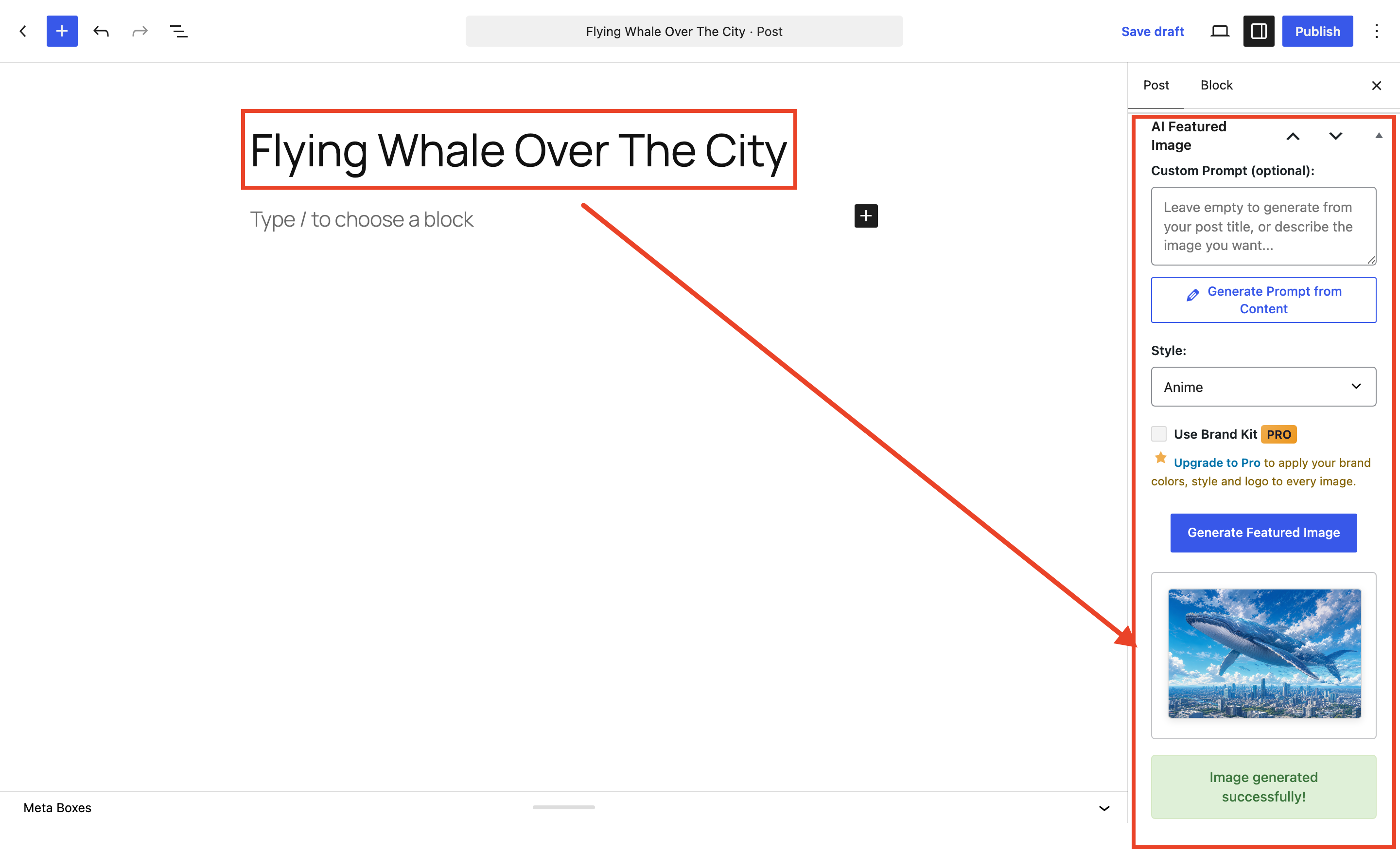
AI Featured Image Generator creates AI-powered featured images right from the WordPress editor. Click “Generate Featured Image” on any post and the plugin builds a unique image from your post title, chosen style, and optional custom prompt, using OpenAI, Stability AI, or Grok/xAI on the free plan, or Google Gemini on Pro.
Every image gets alt text automatically and an SEO-friendly filename based on your post title. Generate one at a time in the editor, in bulk, straight from the Posts list, or inline in your content with the AI Image Generator block. Everything is managed from one settings hub.
Video Walkthrough
Free Features
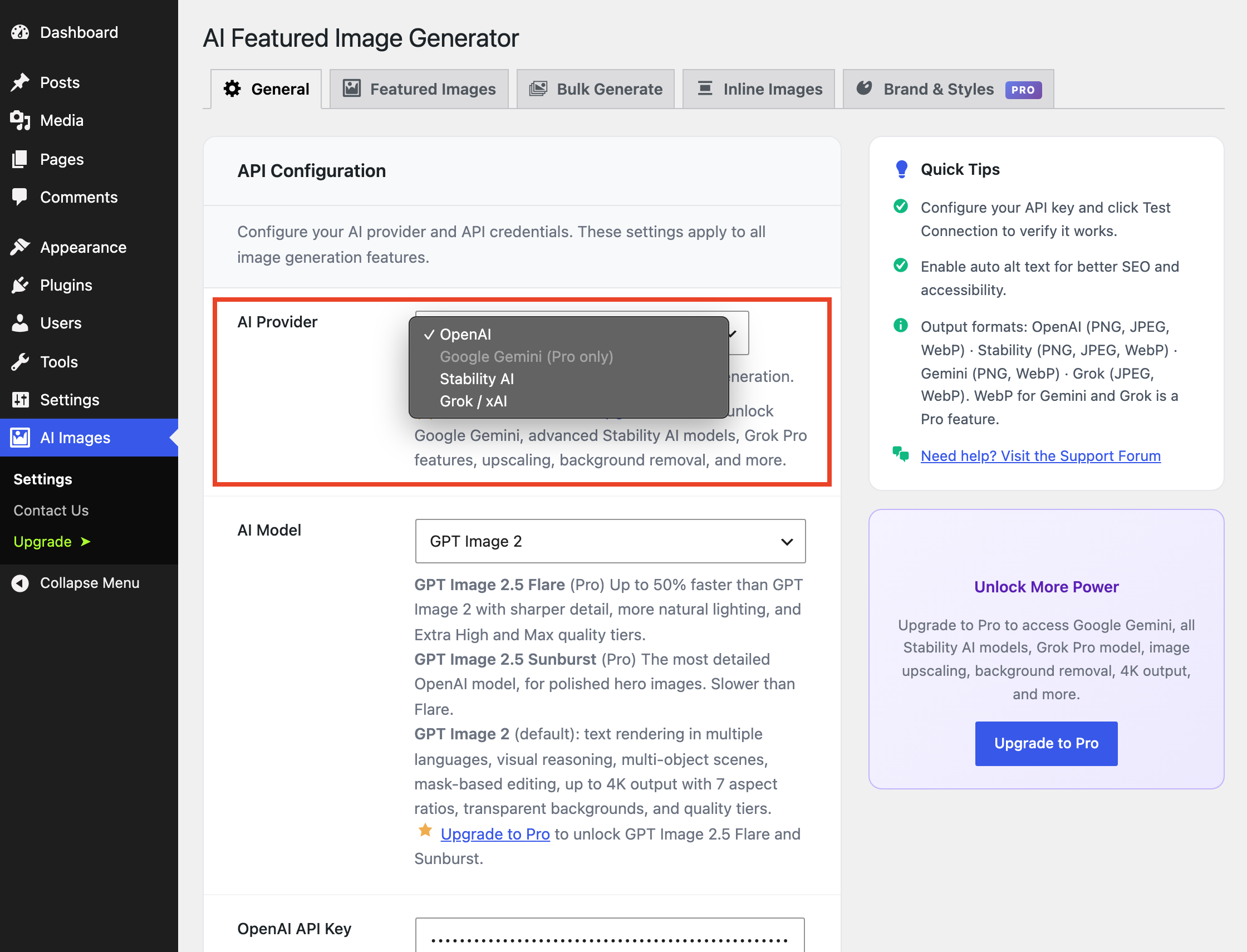
- 3 free AI providers: OpenAI, Stability AI, and Grok/xAI (Google Gemini available on Pro)
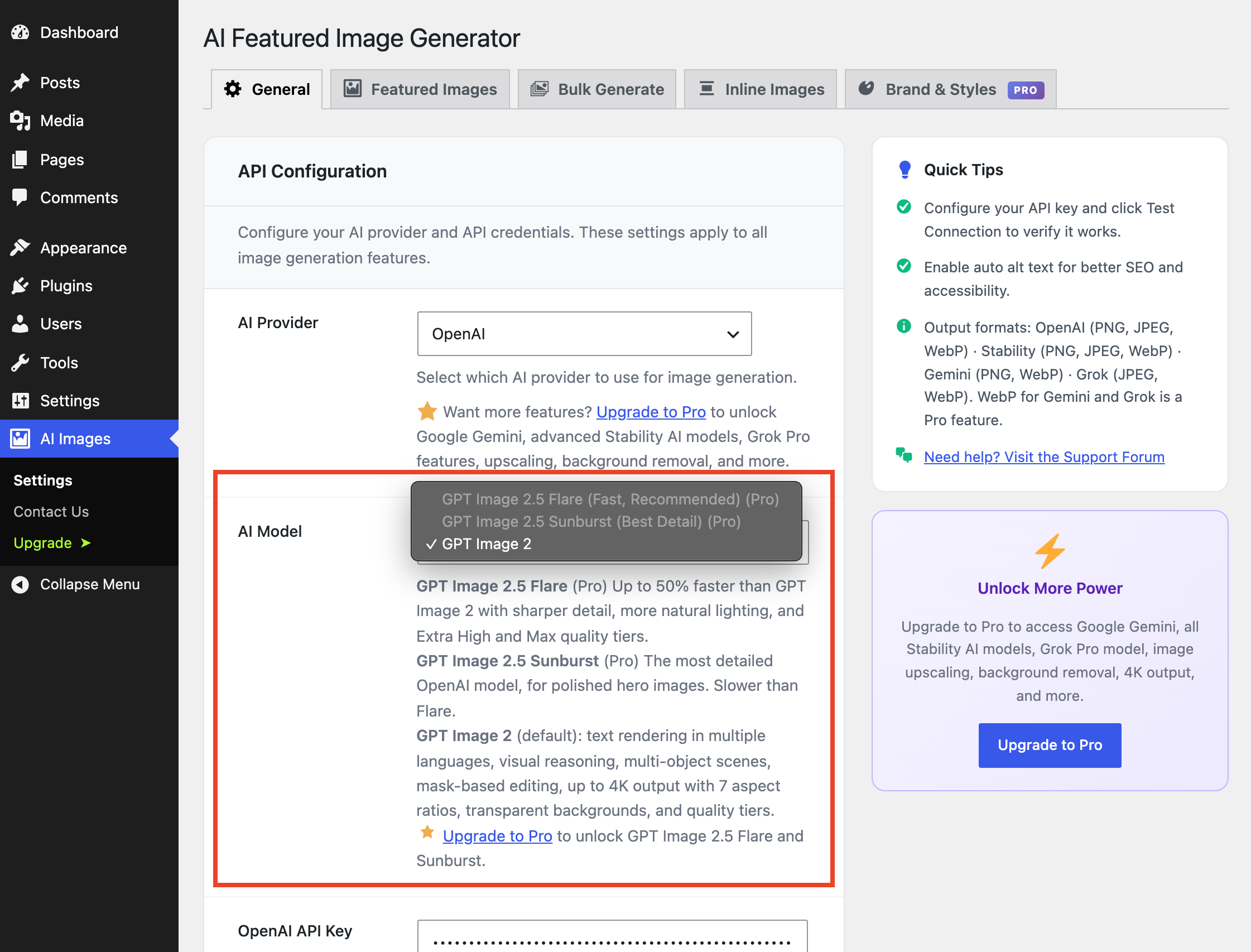
- OpenAI models: GPT Image 2 (default): excels at text rendering in multiple languages, visual reasoning, multi-object scenes, transparent backgrounds, mask-based editing, and up to 4K output
- Stability AI: Stable Image Core with 16 native style presets (Photographic, Cinematic, Anime, Digital Art, Comic Book, Fantasy Art, and more)
- Grok/xAI: Grok Imagine Image: fast and affordable at $0.02 per image
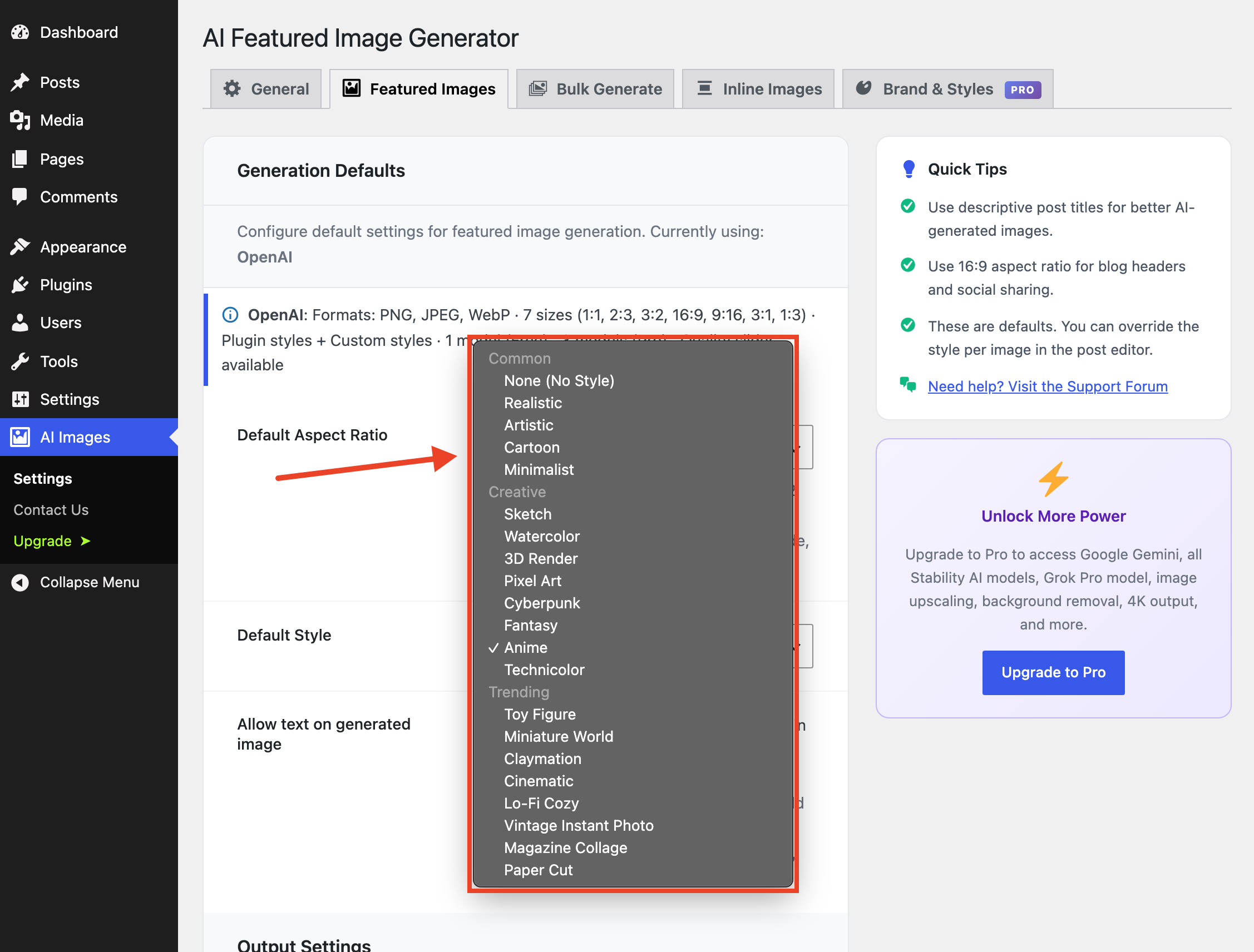
- 21 style presets: Common (None, Realistic, Artistic, Cartoon, Minimalist), Creative (Sketch, Watercolor, 3D Render, Pixel Art, Cyberpunk, Fantasy, Anime, Technicolor), and Trending (Toy Figure, Miniature World, Claymation, Cinematic, Lo-Fi Cozy, Vintage Instant Photo, Magazine Collage, Paper Cut)
- Custom prompts: plus one-click Generate Prompt from Content, which crafts an AI-optimized prompt from your post title and body (OpenAI and Grok free; Gemini on Pro)
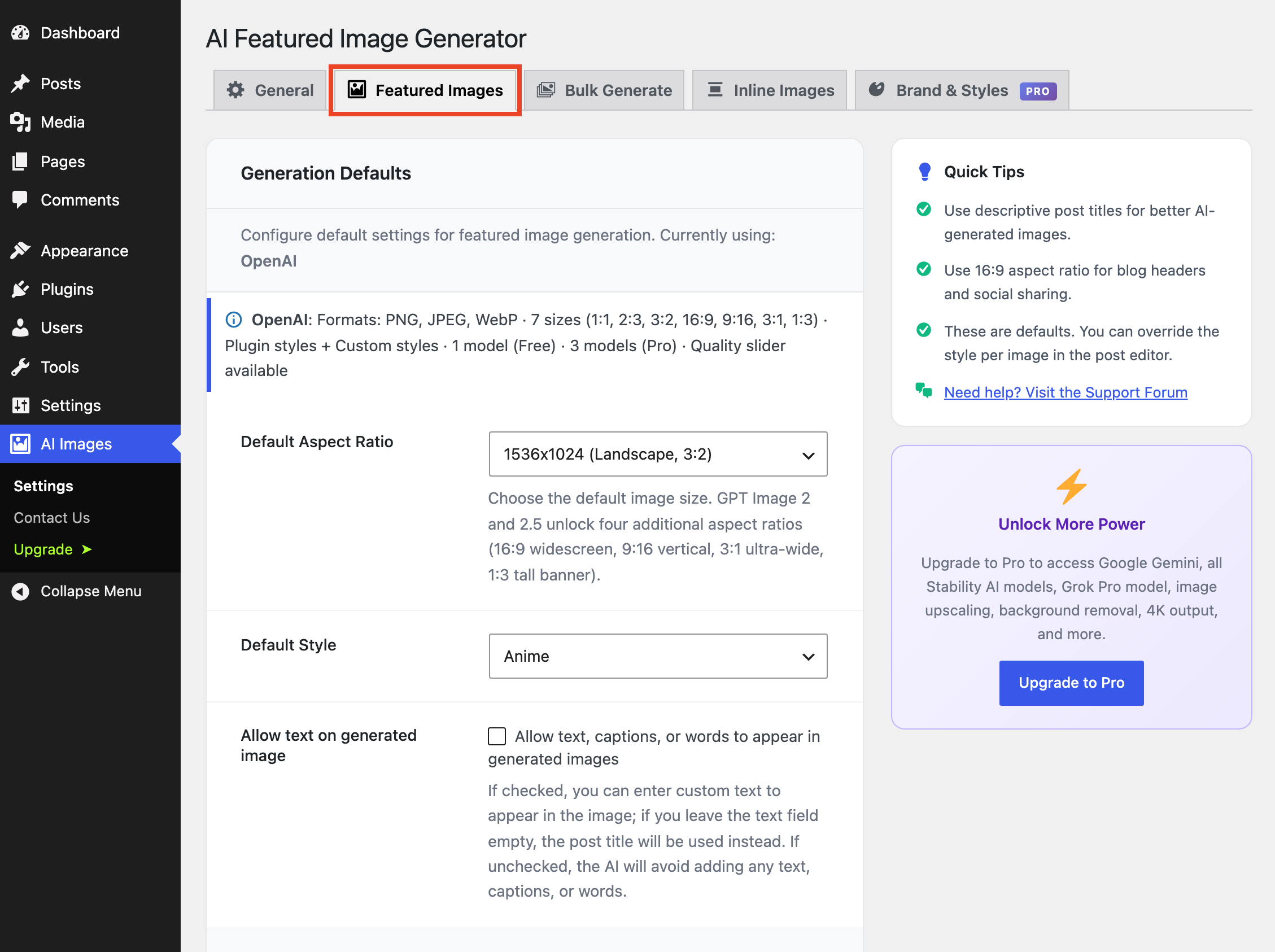
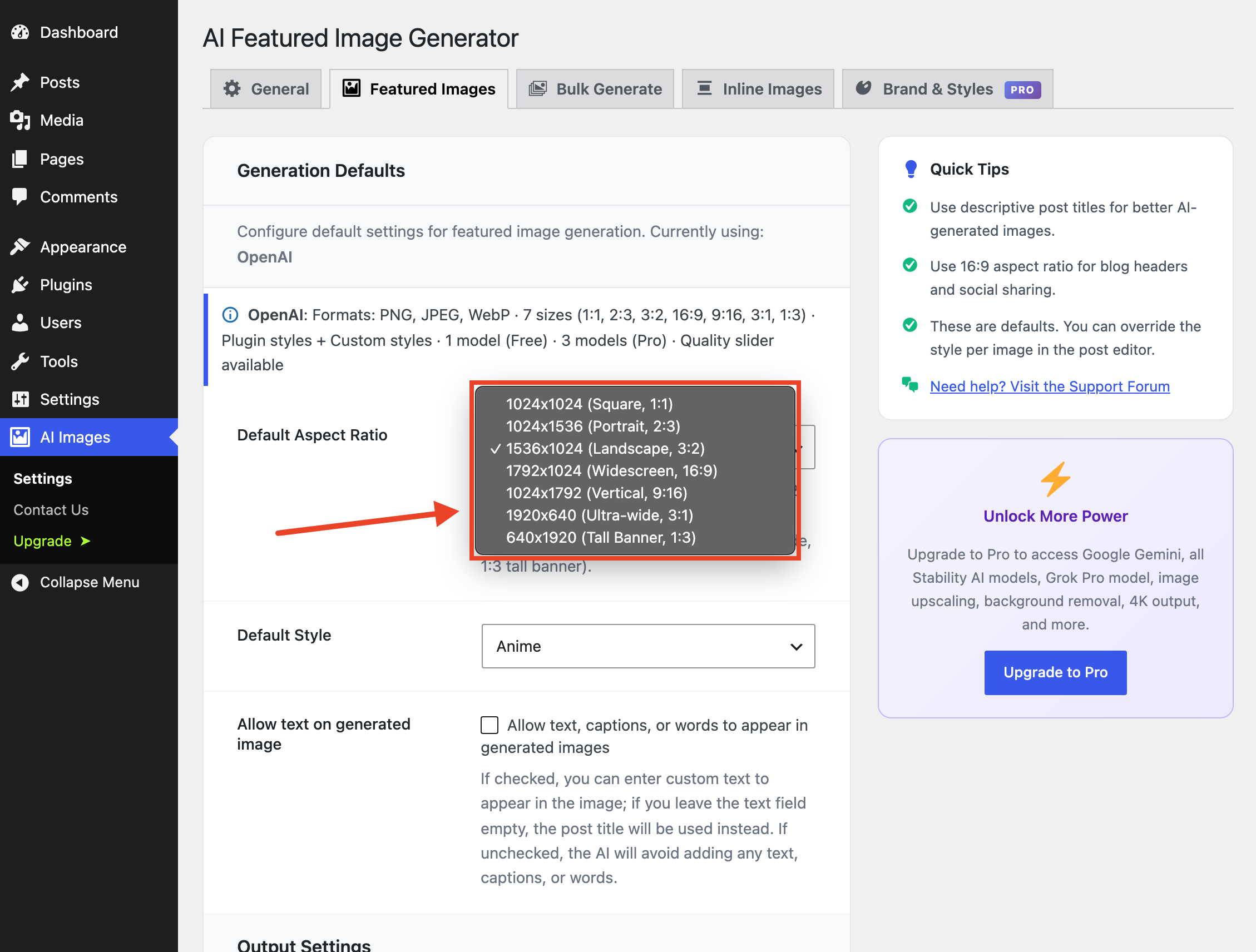
- 7 image sizes with GPT Image 2 and 2.5: square, portrait, landscape, widescreen 16:9, vertical 9:16, ultra-wide 3:1, and tall banner 1:3
- 3 aspect ratios for Stability AI and Grok: 1:1, 16:9, and 9:16
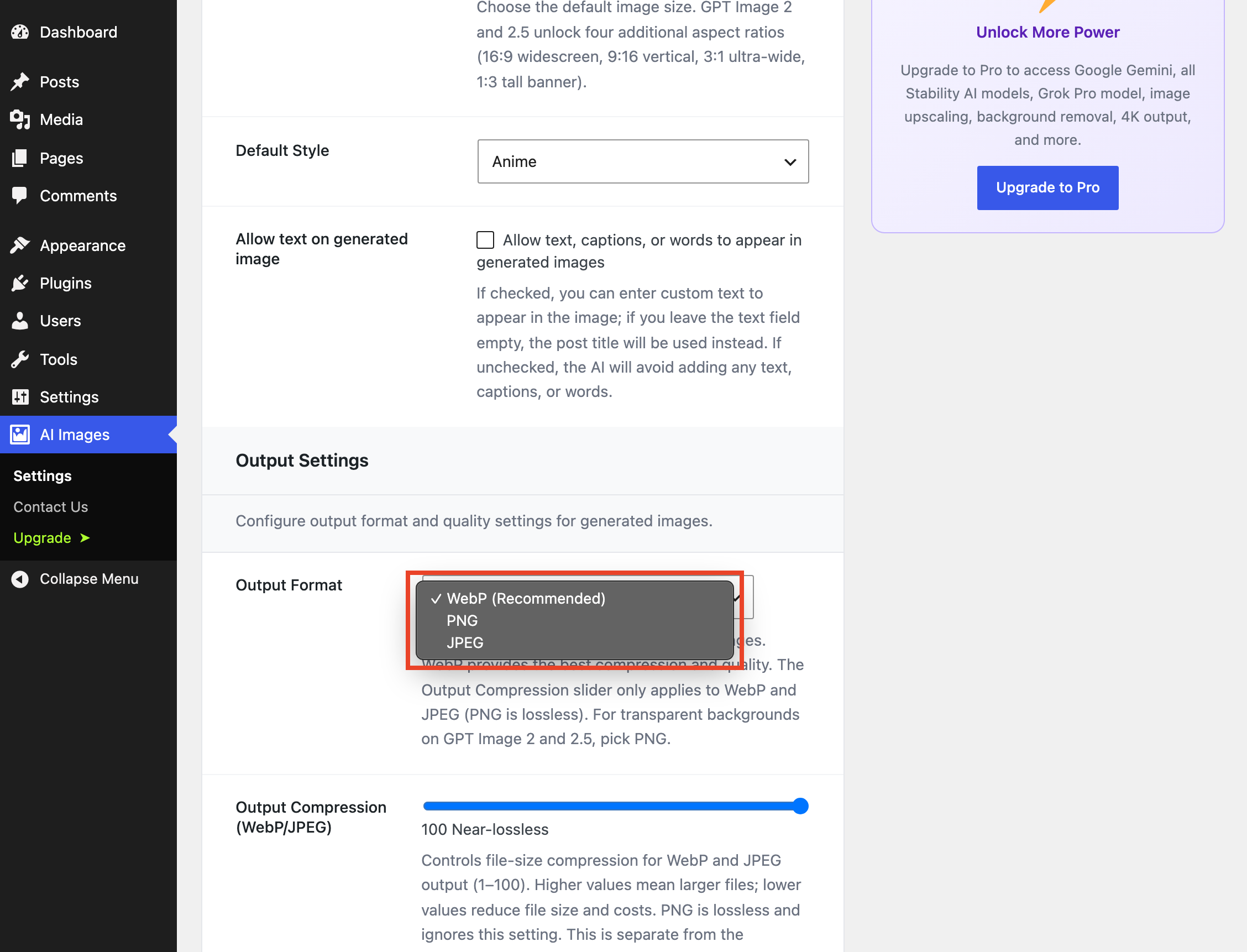
- Output control (OpenAI): WebP/PNG/JPEG format, compression slider (1–100), and Low/Medium/High generation quality (Extra High and Max on GPT Image 2.5, Pro)
- Text control: allow or block text, captions, and words in generated images
- Auto alt text: from the post title, the prompt, or a custom template with
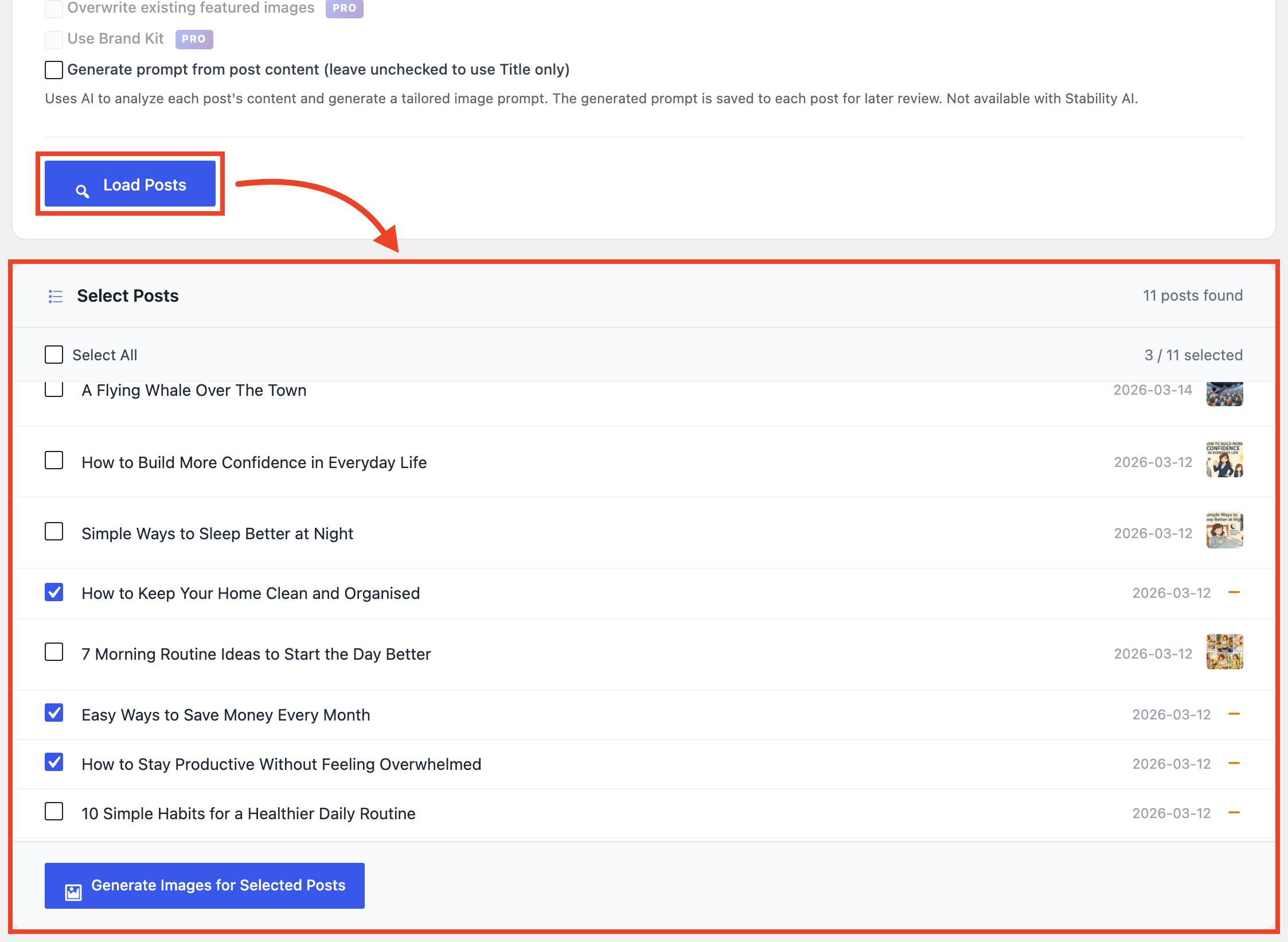
{title},{prompt},{style}, and{site_name}placeholders. with an option to preserve manual edits on regeneration - Bulk Generate: up to 5 posts per batch, 50 images lifetime on the free plan
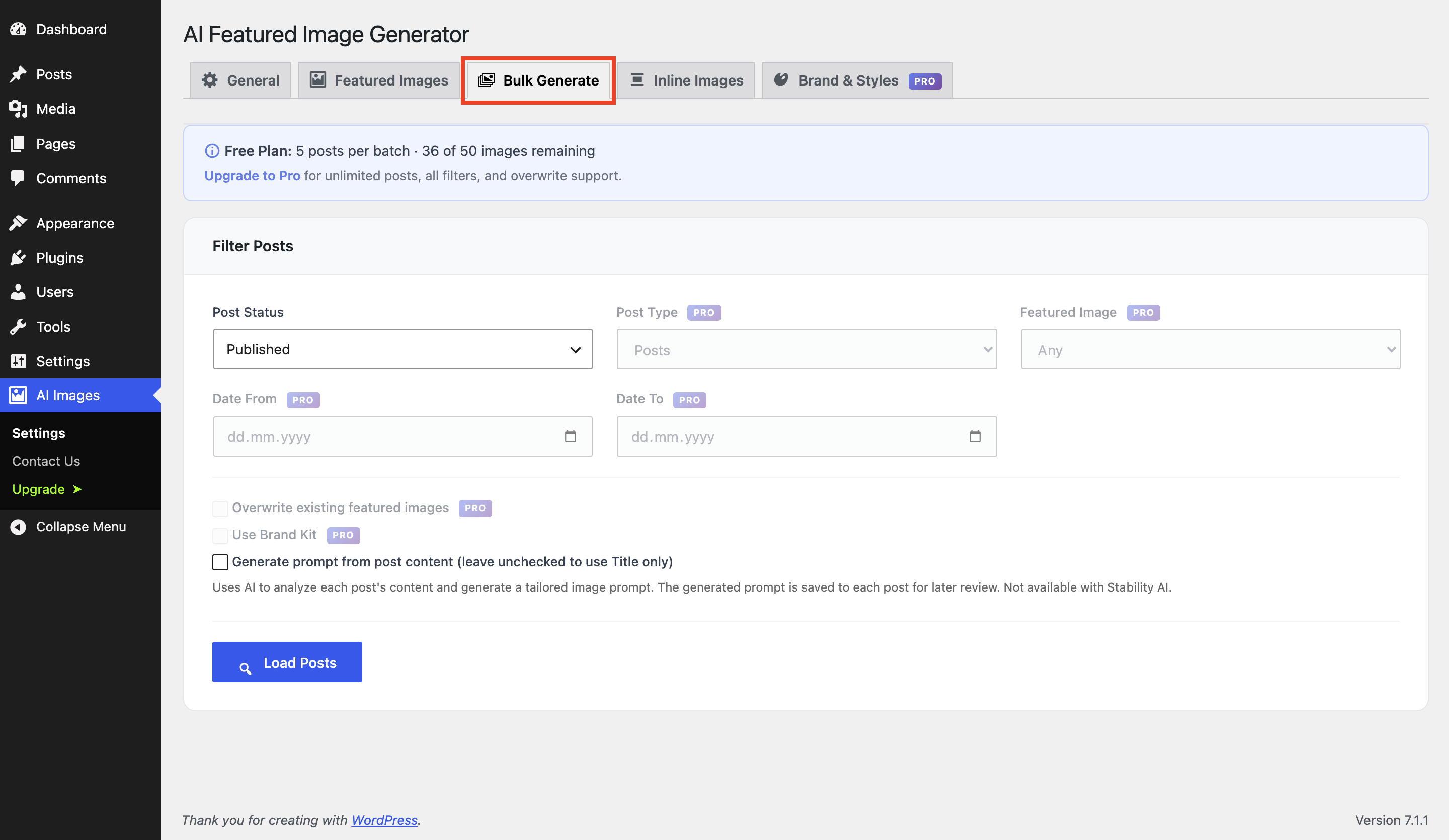
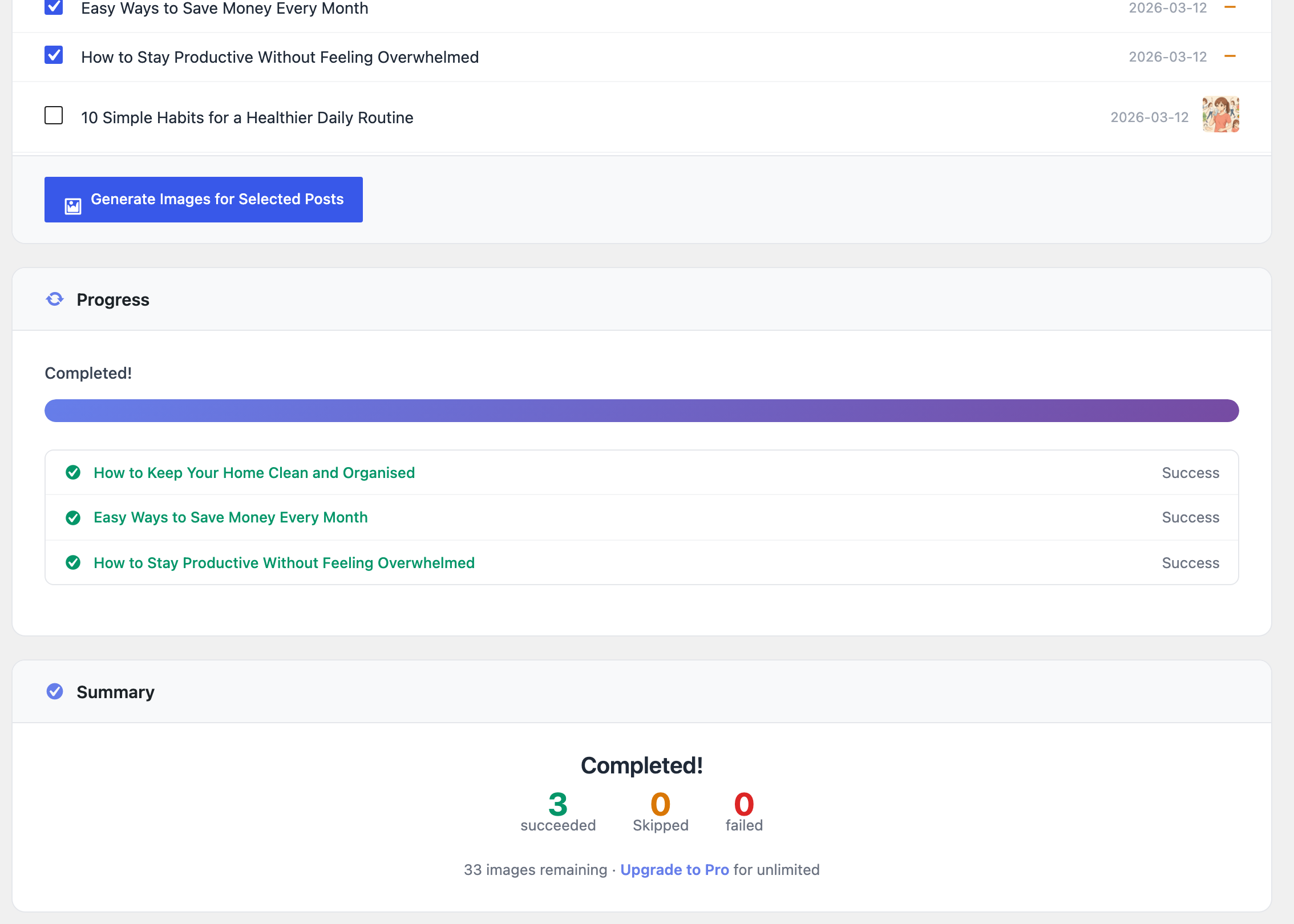
- Generate from Post List: an “AI Featured Image” column on the Posts/Pages list with a one-click Generate/Regenerate link, so there is no need to open the editor, and it doesn’t count against the free bulk limit
- Inline images: the AI Image Generator block adds AI images anywhere in your Gutenberg content, with its own settings tab
- Multisite compatible
Pro Features 🚀
- Google Gemini: Nano Banana 2 (Gemini 3.1 Flash) and Nano Banana Pro (Gemini 3 Pro): up to 4K resolution and 10 aspect ratios
- GPT Image 2.5 (OpenAI): GPT Image 2.5 Flare (fast, recommended) and GPT Image 2.5 Sunburst (best detail), with Extra High and Max generation quality and a one-click “Retry with Sunburst” button in the post editor
- Image upscaling (Stability AI): Conservative (faithful 4x), Creative (AI-enhanced 4K), or Fast (quick 4x), right from the post editor
- Background removal (Stability AI): one click isolates the subject and saves a transparent PNG as your featured image
- Advanced Stability AI models: Stable Image Ultra, SD 3.5 Large / Large Turbo / Medium / Flash, SD 3 Large / Large Turbo / Medium, and SDXL 1.0
- Negative prompts (Stability AI): exclude unwanted elements, e.g. “blurry, watermark, text, low quality”
- Grok Imagine Image 2.0: higher quality at $0.04 per image, plus 2K resolution
- More aspect ratios: 9 for Stability AI, 9 for Grok, 10 for Gemini
- More output formats: PNG/JPEG/WebP for Stability AI, and automatic WebP conversion for Gemini and Grok images
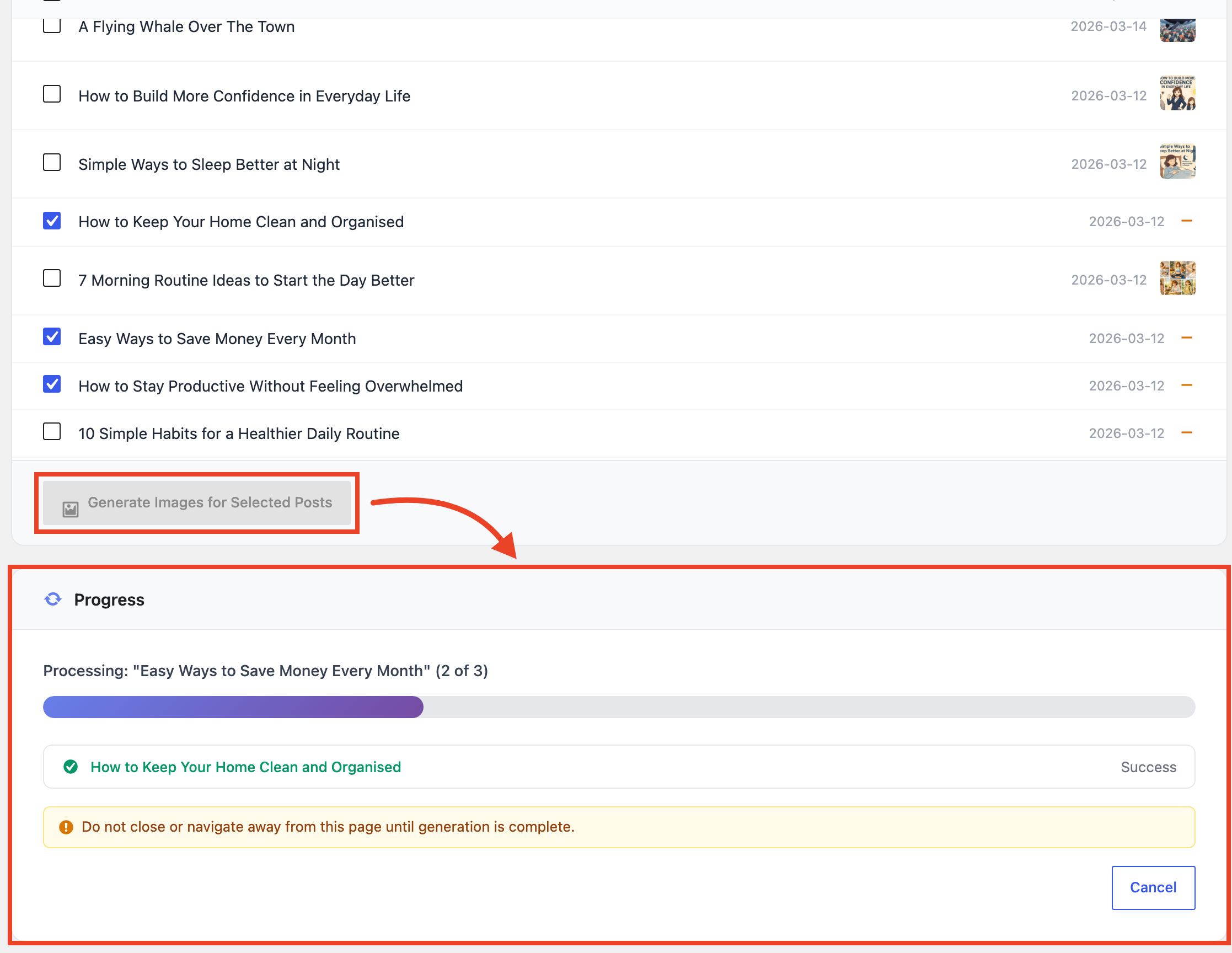
- Unlimited Bulk Generate: hundreds of posts at once with filters for post type, status, date range, and thumbnail status, plus real-time progress
- Custom post types: enable generation for any public post type
- Custom styles: create named styles with your own prompt descriptions, available in every style dropdown
- Brand Kit: save your brand colors, a style description, tone, and avoid-rules, plus an optional reference image (used by Google Gemini) and a logo watermark, applied automatically to every image you generate, with a per-image “Use Brand Kit” toggle to skip it
Want to unlock Google Gemini AI, image upscaling, background removal, unlimited bulk generation and more? Upgrade to Pro here.
Requirements
- WordPress 5.8 or higher
- PHP 7.4 or higher
- An API key for at least one provider:
- OpenAI (free plan)
- Stability AI (free plan)
- Grok/xAI (free plan)
- Google Gemini (Pro only)
External Services
This plugin connects to your chosen AI provider’s API to generate images. For every provider:
- Your post title and content (or your custom prompt, and for Stability AI any negative prompt) are sent to the provider’s API when you generate an image
- Your API key for that provider authenticates each request
- Requests are only sent when you trigger generation: from the post editor, the Posts list, Bulk Generate, or the AI Image Generator block
- “Generate Prompt from Content” sends your post title and body to the provider’s text API: gpt-4o-mini (OpenAI), grok-4.3 (Grok), or Gemini 3.6 Flash (Gemini, Pro)
OpenAI (Free & Pro): image generation and prompt generation.
Terms of Service | Privacy Policy | API Documentation
Stability AI (Free & Pro): image generation; for Pro users, upscaling and background removal also send your existing featured image file to Stability AI for processing.
Terms of Service | Privacy Policy | API Documentation
Grok / xAI (Free & Pro): image generation and prompt generation.
Terms of Service | Privacy Policy | API Documentation
Google Gemini (Pro only): image generation and prompt generation.
Terms of Service | Privacy Policy | API Documentation
Data usage: generated images are stored in your WordPress media library. No personal data is stored by the providers beyond what’s necessary for API processing. You are responsible for ensuring your content complies with the selected provider’s usage policies.
- Upload the
ai-featured-image-generatorfolder to the/wp-content/plugins/directory - Activate the plugin through the ‘Plugins’ menu in WordPress
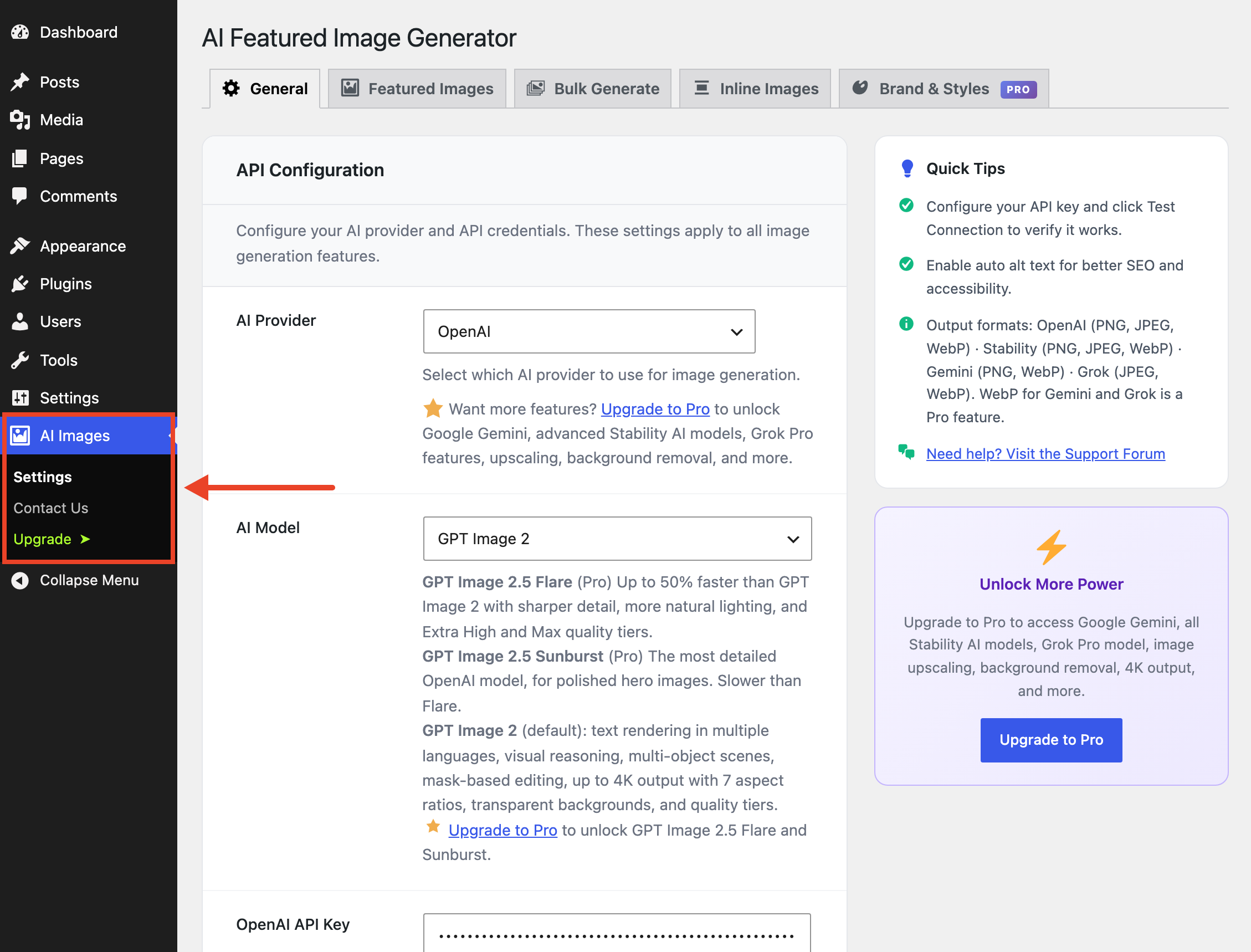
- Go to AI Image in the admin menu to configure your API key and other settings
- The AI Image Generator block is available in the Gutenberg block inserter for adding inline images
Screenshot Gallery
Yes, for at least one provider. All free-plan providers have free tiers or pay-as-you-go pricing: OpenAI, Stability AI, Grok/xAI, or Google Gemini (Pro only).
The plugin is free; you pay your provider per image:
- OpenAI: varies by model and generation quality (Low is the cheapest); see OpenAI pricing
- Stability AI: Stable Image Core is roughly ~$0.003/image; other models vary; see Stability AI pricing
- Grok/xAI: $0.02/image (Grok Imagine Image) or $0.04/image (Grok Imagine Image 2.0)
- Google Gemini (Pro): Gemini 3.1 Flash and 3 Pro vary by resolution
Yes. Select your provider and enter its API key in the plugin settings. The page shows only the options relevant to your selection. Free users can switch between OpenAI, Stability AI, and Grok/xAI; Pro adds Google Gemini.
Only your API plan’s quota with your chosen provider. The plugin generates one image per request.
OpenAI (Free & Pro): GPT Image 2 (default, with strong text rendering and visual reasoning). Pro adds GPT Image 2.5 Flare (up to 50% faster than GPT Image 2 with sharper detail) and GPT Image 2.5 Sunburst (the most detailed), both with Extra High and Max generation quality.
Stability AI: Stable Image Core (free): fast, high quality, best value. Pro adds Stable Image Ultra (best quality), SD 3.5 Large / Large Turbo / Medium / Flash, SD 3 Large / Large Turbo / Medium, and SDXL 1.0 (legacy).
Grok / xAI: Grok Imagine Image (free, $0.02/image) and Grok Imagine Image 2.0 (Pro, $0.04/image).
Google Gemini (Pro only): Gemini 3.1 Flash Image (1K/2K/4K) and Gemini 3 Pro Image (best quality, 1K/2K/4K). Both support 10 aspect ratios.
21 built-in styles that work with all providers: None, Realistic, Artistic, Cartoon, Minimalist, Sketch, Watercolor, 3D Render, Pixel Art, Cyberpunk, Fantasy, Anime, and Technicolor, plus the Trending group: Toy Figure, Miniature World, Claymation, Cinematic, Lo-Fi Cozy, Vintage Instant Photo, Magazine Collage, and Paper Cut.
With Stability AI you also get a Stability Presets group of 16 native API-level presets: Photographic, Cinematic, Anime, Digital Art, Comic Book, Fantasy Art, 3D Model, Analog Film, Enhance, Isometric, Line Art, Low Poly, Neon Punk, Origami, Pixel Art, and Tile Texture.
Pro users can also create unlimited custom styles (see below).
Yes. Go to AI Images Settings Brand & Styles Custom Styles, click “Add Style”, and enter a name plus a prompt description (e.g. “in a dreamy impressionist style”). Custom styles appear in all style dropdowns and work exactly like built-in styles.
One global set of brand rules that keeps every AI image on-brand. Go to AI Images Settings Brand & Styles and save up to 3 brand colors, a style description, a tone, and avoid-rules; optionally add a reference image (used by Google Gemini to match your visual style) and a logo watermark with position, size, opacity, and margin controls. The kit is applied automatically wherever you generate: post editor, Bulk Generate, the Posts list, and the AI Image Generator block. The post editor, Bulk Generate, and the block each have a “Use Brand Kit” checkbox you can uncheck for a one-off image; the Posts list always applies the kit.
- OpenAI: 7 sizes with GPT Image 2 and 2.5: 1024×1024 (1:1), 1024×1536 (portrait), 1536×1024 (landscape), 1792×1024 (16:9), 1024×1792 (9:16), 1920×640 (3:1), and 640×1920 (1:3)
- Stability AI: 1:1, 16:9, and 9:16 free; Pro unlocks all 9 (adds 21:9, 2:3, 3:2, 4:5, 5:4, 9:21)
- Grok: 1:1, 16:9, and 9:16 free; Pro unlocks all 9 (adds 4:3, 3:4, 3:2, 2:3, 2:1, 1:2)
- Gemini (Pro): 10 ratios (1:1, 2:3, 3:2, 3:4, 4:3, 4:5, 5:4, 9:16, 16:9, 21:9): 1K/2K/4K on Gemini 3.1 Flash and 3 Pro
Yes, with a Stability AI API key. Once a featured image is set, a “Stability AI Tools” panel appears in the post editor with three modes: Conservative (faithful 4x), Creative (AI-enhanced 4K), and Fast (quick 4x). Conservative and Creative process asynchronously and may take up to ~3 minutes; the result automatically becomes your new featured image.
Yes, from the same “Stability AI Tools” panel. Click “Remove Background” and Stability AI isolates the subject and saves a transparent PNG as your featured image, which suits product shots and portraits.
Text that tells Stability AI what not to include, e.g. “blurry, watermark, text, low quality”. Set defaults in AI Images Settings Featured Images (and the Inline Images tab). Negative prompts have no effect with OpenAI, Gemini, or Grok.
- OpenAI: WebP (recommended), PNG, or JPEG
- Stability AI: PNG free; Pro adds JPEG and WebP
- Grok: JPEG free; Pro adds WebP (converted after generation)
- Gemini (Pro): PNG default, or WebP (converted after generation)
Because the Gemini and Grok APIs return PNG/JPEG, the plugin converts to WebP using your server’s image library (ImageMagick or GD).
WebP conversion for Gemini and Grok needs a WebP-capable image library on your server (GD with WebP, or ImageMagick with the WebP delegate). If it’s missing, the plugin safely falls back to the provider’s native format and shows a notice with the reason. Generation never fails. Ask your host to enable WebP if needed. OpenAI WebP is unaffected because the API returns it directly.
- OpenAI: Output Compression slider (1–100, default 90) plus a Low/Medium/High generation quality tier (Extra High and Max on GPT Image 2.5, Pro)
- Stability AI: quality is inherent to the model you choose
- Grok: 1K resolution free; Pro can choose 2K
- Gemini (Pro): 1K/2K/4K on 3.1 Flash and 3 Pro
- Inline images (all providers): Automatic Quality Optimization picks quality and resolution based on the image’s display size in your content
Yes. Add the “AI Image Generator” block from the Media category, enter a prompt, and generate images anywhere in your content. The block supports the same providers, styles, and aspect ratios as featured images; configure defaults in the Inline Images settings tab.
Every AI image (featured, inline, or bulk) automatically gets alt text in the media library. Configure it under AI Images Settings General Alt Text: choose the post title (default), the generation prompt, or a custom template with {title}, {prompt}, {style}, and {site_name} placeholders. e.g. {title} - {style} style - {site_name}. By default, manually edited alt text is preserved on regeneration; enable “Overwrite on Regeneration” to always refresh it.
Click “Generate Prompt from Content” in the post editor and AI writes an image prompt from your post title and body. It’s saved to the post and pre-filled in the Custom Prompt field so you can review or edit before generating. The same option exists in Bulk Generate, creating a unique prompt per post.
Text model per provider: gpt-4o-mini (OpenAI), grok-4.3 (Grok), Gemini 3.6 Flash (Gemini, Pro). Stability AI has no text API, so the button shows a notice when it’s the active provider.
Yes. Go to AI Images Settings General Availability, check the post types you want, and save. The generator panel then appears in the editor for those post types. Free users are limited to Posts and Pages.
Changelog
1.9.9
- Gemini models updated (Pro): Nano Banana 2 and Nano Banana Pro now use Google’s stable Gemini 3.1 Flash Image and Gemini 3 Pro Image models. Google is retiring the preview models and Gemini 2.5 Flash Image, so sites using them switch automatically.
- Grok Imagine Image 2.0 (Pro): Replaces Grok Imagine Image Pro, which xAI is retiring. Higher quality at $0.04 per image. Sites using the old model switch automatically.
- Updated prompt models: “Generate Prompt from Content” now uses Grok 4.3 and Gemini 3.6 Flash, replacing retired models.
1.9.8
- GPT Image 2.5 (Pro): Two new OpenAI models, GPT Image 2.5 Flare (fast, recommended) and GPT Image 2.5 Sunburst (best detail), with all 7 GPT Image 2 sizes and transparent backgrounds.
- Extra High and Max quality (Pro): Two new generation quality tiers for GPT Image 2.5.
- Retry with Sunburst (Pro): After generating an image in the post editor, one click makes a new version with GPT Image 2.5 Sunburst using the same prompt and style.
- Trending styles: 8 new free styles in their own Trending group: Toy Figure, Miniature World, Claymation, Cinematic, Lo-Fi Cozy, Vintage Instant Photo, Magazine Collage, and Paper Cut.
- Removed deprecated models: GPT Image 1, GPT Image 1 Mini, and GPT Image 1.5, which OpenAI shuts down on October 23 and December 1, 2026. Sites using them switch to GPT Image 2 automatically.
- Fix: The settings page now updates model-specific options (sizes, background, quality) as soon as you change the AI model.
- Bug fixes and post editor improvements
1.9.7
- Bug fixes
1.9.6
- Bug fixes
1.9.5
- Bug fixes
1.9.4
- Bug fixes
1.9.3
- Bug fixes
1.9.2
- Brand Kit (Pro): Save your brand colors, style description, tone, and avoid-rules once, plus add an optional reference image (used by Google Gemini) and a logo watermark with customizable position, size, opacity, and margin. Automatically applies to featured, bulk, Posts-list, and inline images.
- Per-image opt-out: A “Use Brand Kit” toggle in the post editor, Bulk Generate, and AI Image Generator block for skipping the kit on specific images.
- Layout enhancement
- Other bug fixes, including Gemini debug logging that previously wrote to the PHP error log on every request.
1.8.3
- WebP for Gemini & Grok (Pro): featured and inline images from Gemini and Grok are now converted to lightweight WebP after generation (Imagick or GD). WebP becomes the recommended default for Pro; free users keep the native format
- Consistent output formats: Gemini and Grok get their own Output Format selector on the Featured and Inline Images tabs
- Safe fallback: if a server can’t produce WebP, generation never fails. The image is saved in the provider’s native format and you’re notified with the reason
1.8.2
- Inline Images now free: the AI Image Generator block and its settings tab are available to all users (OpenAI, Stability AI, Grok; Gemini remains Pro)
- Plugin renamed to “AI Featured Image Generator with Output Control”
- Compatibility notice when the official WordPress “AI” plugin is active with image generation enabled
1.8.1
- Generate from Post List: a new “AI Featured Image” column on the Posts/Pages list with a one-click Generate/Regenerate link, so there is no need to open the editor
- Auto-builds the prompt from post title and content, respects all global settings, confirms before overwriting an existing image, and doesn’t count against the free bulk limit
- Per-post 5-second rate limit prevents accidental double-clicks
1.8.0
- New model (OpenAI): GPT Image 2, now the default for new installs: text rendering, visual reasoning, multi-object scenes, up to 4K, transparent backgrounds, quality tiers, moderation control, and 4 additional sizes
- New provider: Stability AI (free): Stable Image Core with 16 native style presets; Pro adds Ultra, SD 3.5/SD 3 variants, SDXL 1.0, negative prompts, output formats, and 9 aspect ratios
- New provider: Grok/xAI (free): Grok Imagine Image at $0.02/image; Pro adds the Pro model, 9 aspect ratios, and 2K resolution
- New Pro tools: image upscaling (Conservative/Creative/Fast) and one-click background removal via Stability AI
- Automatic Quality Optimization for inline images, Stability key validation with credit balance, improved API error messages, and assorted fixes
1.5.4
- Auto Alt Text for all AI-generated images with title/prompt/custom-template sources; free bulk limit raised from 20 to 50 images
1.5.0
- Custom Styles (Pro), Bulk Generate for free users (5 posts/batch, 50 lifetime), unified settings hub with AJAX tabs, API key Test Connection, new models (ChatGPT Image Latest, Gemini 3.1 Flash Preview), and a full admin UI overhaul
1.4.x
- Inline image generation in Gutenberg with a dedicated Inline Images settings tab, PNG output fixes, and WordPress 6.9.1 compatibility
1.3.x
- Google Gemini provider (Pro), custom post types (Pro), gpt-image-1.5 model, redesigned card-based settings UI, top-level admin menu, and Freemius integration
1.2.x
- Output format selection (WebP/PNG/JPEG), image quality control, model selection (GPT Image 1 vs Mini), and Classic Editor compatibility fixes
1.0.0 – 1.1.0
- Initial releases: core featured-image generation, style presets, Pages support, and UI improvements
" width="120" height="120">
Available Versions
| Version | Download | Type |
|---|---|---|
| 1.9.9 | Download | Stable |
| 1.9.8 | Download | Stable |
| 1.9.7 | Download | Stable |
| 1.9.6 | Download | Stable |
| 1.9.5 | Download | Stable |
| 1.9.4 | Download | Stable |
| 1.9.3 | Download | Stable |
| 1.9.2 | Download | Stable |
| 1.9.0 | Download | Stable |
| 1.8.5 | Download | Stable |
| 1.8.4 | Download | Stable |
| 1.8.3 | Download | Stable |
| 1.8.2 | Download | Stable |
| 1.8.1 | Download | Stable |
| 1.8.0 | Download | Stable |
| 1.5.5 | Download | Stable |
| 1.5.4 | Download | Stable |
| 1.5.3 | Download | Stable |
| 1.5.2 | Download | Stable |
| 1.5.1 | Download | Stable |
| 1.5.0 | Download | Stable |
| 1.4.10 | Download | Stable |
| 1.4.9 | Download | Stable |
| 1.4.8 | Download | Stable |
| 1.4.7 | Download | Stable |
| 1.4.6 | Download | Stable |
| 1.4.5 | Download | Stable |
| 1.4.4 | Download | Stable |
| 1.4.3 | Download | Stable |
| 1.4.2 | Download | Stable |
| 1.4.1 | Download | Stable |
| 1.4.0 | Download | Stable |
| 1.3.9 | Download | Stable |
| 1.3.8 | Download | Stable |
| 1.3.7 | Download | Stable |
| 1.3.6 | Download | Stable |
| 1.3.5 | Download | Stable |
| 1.3.4 | Download | Stable |
| 1.3.3 | Download | Stable |
| 1.3.2 | Download | Stable |
| 1.3.0 | Download | Stable |
| 1.2.1 | Download | Stable |
| 1.2.0 | Download | Stable |
| 1.1.0 | Download | Stable |
| 1.0.4 | Download | Stable |
| 1.0.3 | Download | Stable |
| 1.0.2 | Download | Stable |
| 1.0.1 | Download | Stable |
| 1.0.0 | Download | Stable |
| Development | Download | Trunk |
