
AI
Active Installs
50,000+
Last Updated
August 18, 2026
First Released
December 2, 2025
Download History (Last one month)
Contributors
The AI plugin brings AI-powered features directly into your WordPress admin and editing experience.
Requires the WordPress Block Editor. The Classic Editor plugin and other non-Block Editor editing experiences are not supported.
What’s Inside:
This plugin is built on the AI Building Blocks for WordPress initiative, combining the AI Client library and Abilities API into a unified experience. It serves as both a practical tool for content creators and a reference implementation for developers.
Current Features:
- Abilities Explorer – Browse and interact with registered AI abilities from a dedicated admin screen.
- AI Request Logging – Logs AI requests for observability and debugging.
- Alt Text Generation – Generate descriptive alt text for images to improve accessibility.
- Comment Moderation – Automatically moderate comments based on toxicity detection and sentiment analysis.
- Connector Approvals – Require explicit administrator approval before plugins or themes can use AI connectors configured on this site.
- Content Classification – Suggests relevant tags and categories to organize content.
- Content Resizing – Shorten, expand, or rephrase selected block content.
- Content Summarization – Summarizes long-form content into digestible overviews.
- Content Translation – Translates paragraph and heading blocks, and optionally the post title, into a selected language from the post editor.
- Custom Abilities – Gates the plugin’s general-purpose WordPress Abilities behind a single opt-in toggle.
- Dashboard Widgets – AI Status and AI Capabilities widgets, plus framework for registering new ones.
- Editorial Notes – Reviews post content block-by-block and adds Notes with suggestions for Accessibility, Readability, Grammar, and SEO.
- Editorial Updates – Automatically apply editorial notes to content.
- Excerpt Generation – Automatically create concise summaries for your posts.
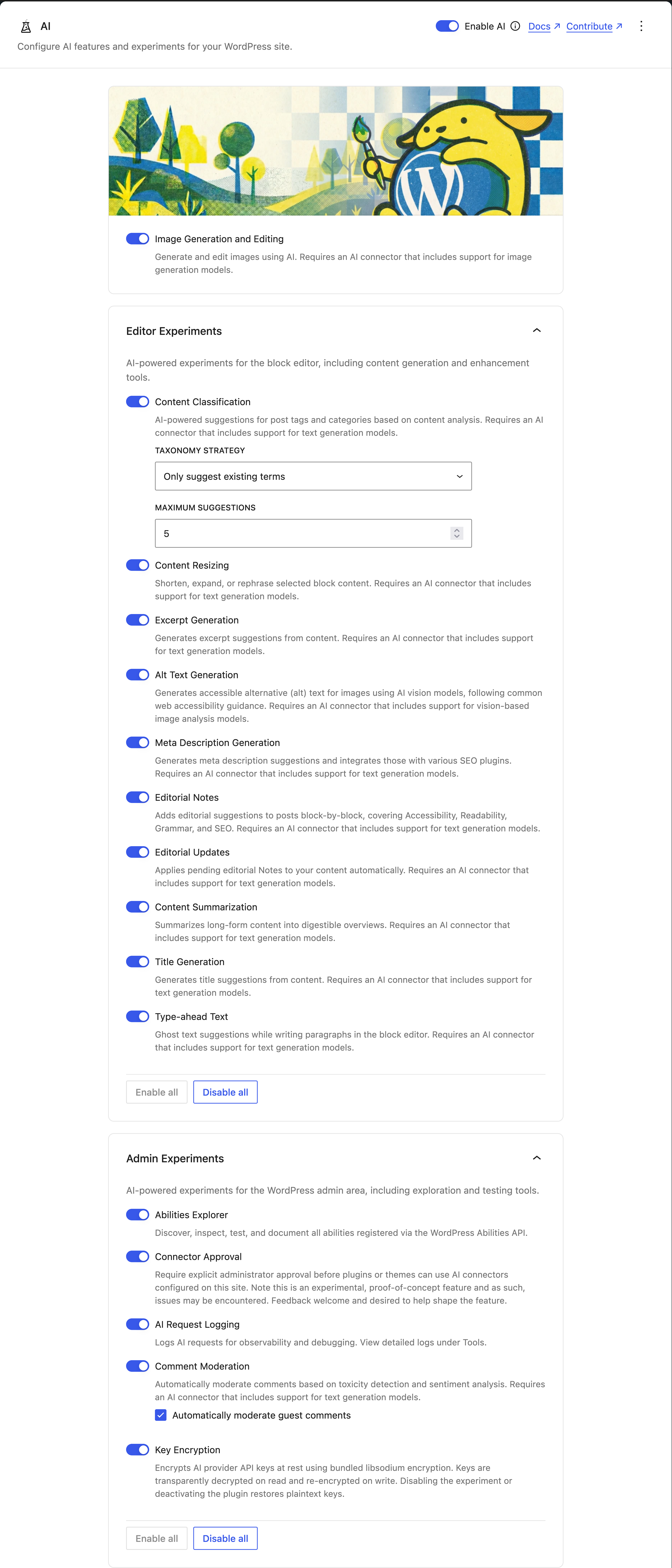
- Experiment Framework – Opt-in system that lets you enable only the AI features you want to use.
- Guidelines – Allows abilities to respect site-wide editorial standards.
- Image Generation and Editing – Create and edit images from post content in the editor, also via the Media Library.
- Key Encryption – Encrypts AI provider API keys at rest using bundled libsodium encryption. Keys are transparently decrypted on read and re-encrypted on write. Disabling the experiment or deactivating the plugin restores plaintext keys.
- Meta Description Generation – Generates meta description suggestions and integrates those with various SEO plugins.
- Multi-Provider Support – Works with AI Connector plugins for providers such as OpenAI, Google, and Anthropic.
- Slug Generation – Suggest SEO-friendly permalink slugs for your posts from the permalink popover or the pre-publish panel, then edit and apply the one you want.
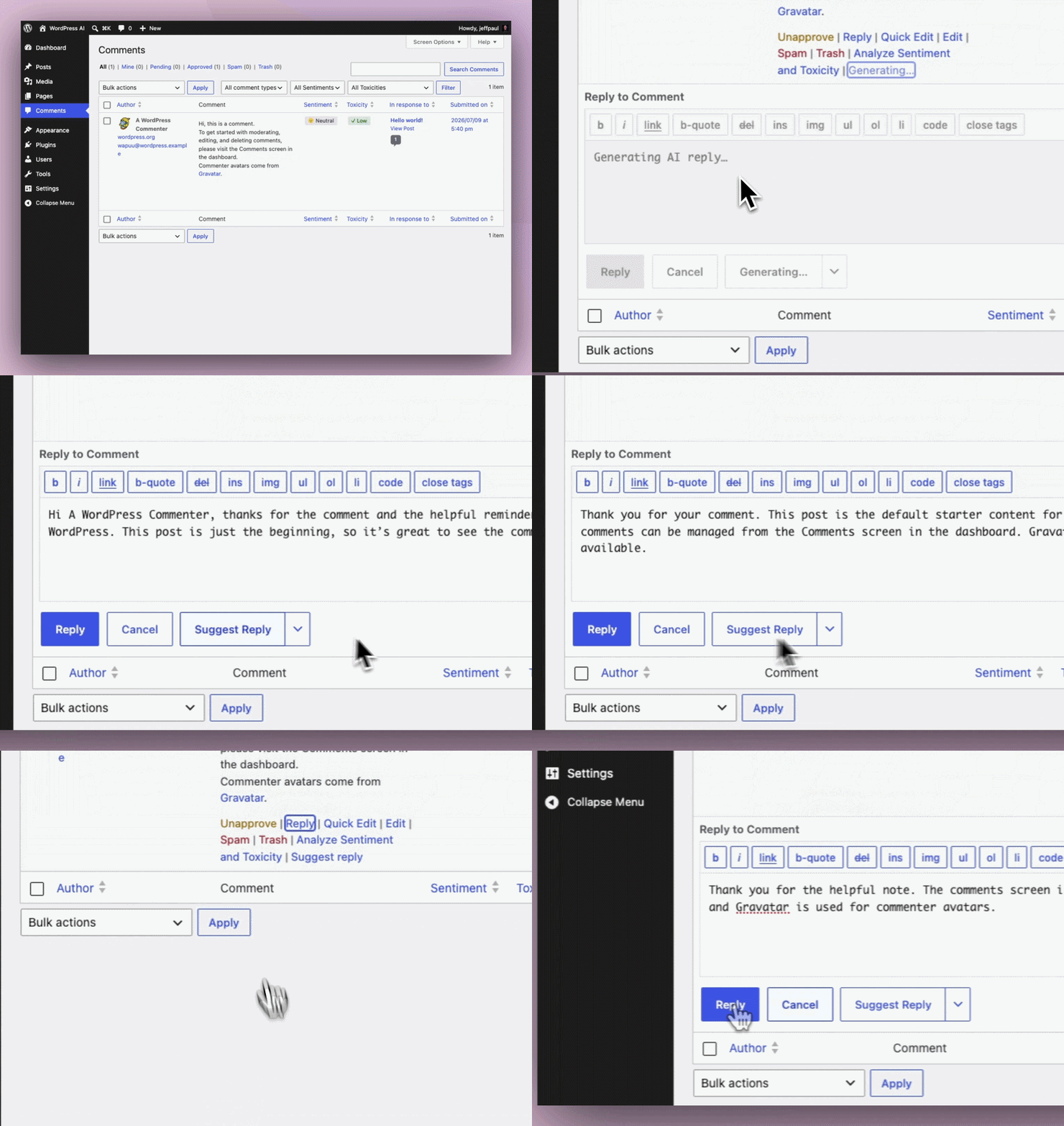
- Suggest Reply – Adds a “Suggest Reply” action to the Comments screen and Activity widget, enabling moderators to quickly generate comment reply suggestions.
- Title Generation – Generate title suggestions for your posts with a single click. Perfect for brainstorming headlines or finding the right tone for your content.
- Type Ahead – Contextual type-ahead assistance for suggestions while typing.
Provider Setup:
The AI plugin does not include provider credentials or provider implementations by itself. To use AI-powered features, install and activate at least one AI Connector plugin, then configure its credentials in Settings -> Connectors. Features may appear unavailable until a connector is installed, authenticated, and capable of the required operation.
Provider connector plugins include Anthropic, Google, OpenAI, and others.
Coming Soon:
We’re actively developing new features to enhance your WordPress workflow:
- AI Playground – Experiment with different AI models and providers.
- Content Assistant – AI-powered writing and editing in Gutenberg.
- Site Agent – Natural language WordPress administration.
- Workflow Automation – AI-driven task automation.
This is an experimental plugin; functionality may change as we gather feedback from the community.
Roadmap:
You can view the active plugin roadmap in a filtered view in the WordPress AI GitHub Project Board.
For Developers
The AI plugin is designed to be studied, extended, and built upon. Whether you’re a plugin developer, agency, or hosting provider, here’s what you can do:
Extend the Plugin:
- Build Custom Experiments – Use the
Abstract_Featurebase class to create your own AI-powered features. - Pre-configure Providers – Hosts and agencies can set up AI Connector plugins so users don’t need their own API keys.
- Abilities Explorer – Test and explore registered AI abilities (available when experiments are enabled).
- Register Custom Abilities – Hook into the Abilities API to add new AI capabilities.
- Override Default Behavior – Use filters to customize prompts, responses, and UI elements.
- Comprehensive Hooks – Filters and actions throughout the codebase for customization.
Developer Tools Coming Soon:
- AI Playground – Experiment with different AI models and prompts.
- MCP (Model Context Protocol) – Integrate and test Model Context Protocol capabilities in WordPress workflows.
- Extended Providers – Support for experimenting with additional or alternate AI providers.
Get Started:
- Read the Contributing Guide for development setup
- Join the conversation in #core-ai on WordPress Slack
- Browse the GitHub repository to see how experiments are built
- Participate in discussions on how best the plugin should iterate.
We welcome contributions! Whether you want to build new experiments, improve existing features, or help with documentation, check out our GitHub repository to get involved.
- Upload the plugin files to the
/wp-content/plugins/aidirectory, or install the plugin through the WordPress plugins screen directly. - Activate the plugin through the ‘Plugins’ screen in WordPress.
- Install and activate at least one AI Connector plugin, then go to
Settings -> Connectorsand configure its credentials. - Go to
Settings -> AIand globally enable functionality and then enable the individual features or experiments you want to test. - Start experimenting with AI features! For the Title Generation experiment, edit a post and click into the title field. You should see a
Generate/Regeneratebutton above the field. Click that button and after the request is complete, title suggestions will be displayed in a modal. Choose the title you like and click theSelectbutton to insert it into the title field.
Screenshot Gallery


This plugin brings AI-powered writing and editing tools directly into WordPress. It’s also a reference implementation for developers who want to build their own AI features.
This is an experimental plugin, so we recommend testing in a staging environment first. Features may change as we gather community feedback. All AI features are opt-in and require manual triggering – nothing happens automatically without your approval.
The plugin can work with provider connector plugins from Anthropic (Claude), Google (Gemini), OpenAI, and others. Install and activate the relevant connector plugin, then configure it in Settings -> Connectors.
Yes, currently you need to provide your own API key for the configured AI Connector plugin, such as OpenAI, Google AI, or Anthropic.
The plugin itself is free, but you’ll need to pay for API usage from your chosen AI provider. Costs vary by provider and usage. Most providers offer free trial credits to get started. There are some local, open source, and free providers (like Ollama) that can be used as well.
Absolutely! The plugin is designed for content creators and site administrators. Once your AI Connectors are configured, you can use the AI functionality directly from the post editor.
No.
The AI plugin currently supports only the Block Editor (aka Gutenberg). The plugin is designed around modern editor APIs, block-based content workflows, and the evolving editing capabilities being developed within WordPress core (including Gutenberg).
The Block Editor has been the default WordPress editing experience since WordPress 5.0 in 2018 and remains the primary focus of active editor development. Concentrating development efforts on the Block Editor enables the project to ship new features, experiments, and integrations more quickly while avoiding the complexity of maintaining parallel implementations across multiple editing experiences.
Although the Classic Editor plugin continues to have a large installed base, the Core AI team has chosen to prioritize innovation and experimentation within the Block Editor ecosystem. At this time there are no plans to add official Classic Editor support.
You can ask questions in the #core-ai channel on WordPress Slack or report issues on the GitHub repository.
Changelog
1.3.0 – 2026-08-18
Added
- New Experiment: Content Translation; translates Paragraph and Heading blocks—and optionally the post title—into a selected language directly from the post editor (#747).
- New Experiment: Slug Generation; suggest SEO-friendly permalinks that can be set as the slug (#897, #932).
- New Experiment: Custom Abilities. Gates the plugin’s custom WordPress Abilities (
ai/get-post-details,ai/get-post-terms,core/read-settings,core/read-users,core/read-content) behind a single opt-in toggle, so enabling it exposes all of them at once via the Abilities API. Note for anyone that is using these Abilities, you’ll need to enable this new experiment first for those to be available (#881). - New Developer Tool: Import/Export functionality for non-sensitive AI settings (#734).
- Cleanup plugin data when the plugin is deleted (#692).
- AI-specific Site Health integration and status tests (#734).
- New filters,
wpai_content_classification_available_terms,wpai_content_classification_min_confidenceandwpai_content_classification_candidate_pool_size, to allow more control over Content Classification (#633). - Prompt template extension points, making it easy for others to filter prompts and prompt builders (#770).
- Brought the embedding code over from the PHP AI Client and load that conditionally so those using the AI plugin can start to take advantage of embedding generation (#892, #946).
- Public
WordPress\AI\log_ai_request()API so MCP servers and ability consumers can record requests in the AI Request Log (#914).
Changed
- Updated all meta keys to use the
wpai_prefix instead of justai_. Note this changes the prefix on theai_generated,ai_generated_summaryandai_notemeta so if you are directly using those, update to using thewpai_names (#867). - Updated preferred models to more recent ones for the three default providers (#913).
- Bump WordPress tested-up-to version 7.1 (#934).
- Improve the relevance of category and tag suggestions produced by the
Content Classification experiment (#633). - Editorial Updates now links to the visual revisions screen when reviewing refined content, falling back to the classic revisions screen when visual revisions are unavailable (#861).
- Reordered setting experiments list; grouped linked experiments and sorted editor experiments alphabetically (#871).
- Improved keyboard focus handling when generating, accepting, or dismissing classification suggestions (#873).
- The Abilities Explorer provider filter dropdown now includes custom providers, and the overview statistics count abilities by origin so custom-provider abilities remain in their Core/Plugins/Theme bucket (#884).
- Set focus to the generated title textarea when generating a title (#901).
- The
core/read-usersability now returns collections ordered by display name, A to Z (#948).
Deprecated
- The
AI_Serviceclass and theget_ai_service()helper introduced in 0.2.1 will be removed in the next major release. Neither is used anywhere in the plugin; experiments and abilities callwp_ai_client_prompt()directly (#905). - Filter
wpai_meta_description_result_temperatureis no longer being used and will be removed in the next release (#913).
Removed
- No longer set custom temperature values on any of our requests (#913).
Fixed
- The AI Request Log REST endpoint now registers its
operationfilter parameter, so it appears in the REST schema and a non-string value returns a 400 instead of causing a fatal error (#758). - Inline reply textarea not receiving focus after generating a suggested reply (#877).
- Meta Description suggestions applied on pages and custom post types were lost on save when Yoast SEO was active (#886).
- Improved accessibility and keyboard usability for the request logs provider/model details (#889).
- Improved keyboard and focus handling for the Suggest Reply tone dropdown (#907).
- Synchronized generating state across the inline and modal excerpt generation buttons (#908).
- Ensure caller detection in the encryption experiment properly matches the calling plugin, not the host plugin (#909).
- Synchronized loading state between the sidebar and block toolbar regenerate summary buttons (#912).
- Preserve inline HTML when resizing content (#915).
- Bulk actions no longer re-run when sorting or paginating the list after the action completes (#928).
- Apply editorial updates to blocks that store editable text in the
valueattribute (#930).
Security
- Ensure any content we render from the LLM or content we send to the LLM is properly sanitized (#950).
- Add proper nonce check prior to bulk alt text and summarization generation (GHSA-hfp9-55vw-ccjc).
- When passing a custom image URL to the Alt Text Generation Ability, ensure that URL is public, that it points to an allowed image type and that the final URL we download matches the initial one we verify (GHSA-v2wx-9j88-4rqq).
1.2.0 – 2026-07-14
Added
- New Experiment: Suggest Reply; gives comment moderators a quick way to generate a reply to a comment through the admin (#724).
- New “Advanced settings” option in Developer Tools to show/hide additional configuration options for features and experiments (#842).
- Bulk “Generate AI Summary” action to the posts and pages list table, enabling summary generation for multiple posts at once (#650).
- New
core/read-contentAbility with secure single-post and query modes (including include and opt-in fields) to enable read-only content access (#739). - New
core/read-usersAbility that retrieves a single user by ID, email, login, or nicename, or a filtered and paginated users collection, with sensitive fields opt-in and permission-gated (#774). - An inline admin notice when Connector Approvals are enabled and no AI connectors are yet approved, prompting admins to approve the AI plugin for use (#830).
- Introduce new
wp_ai_client_default_request_timeoutfilter to make the default request timeout configurable. Use this for the image generation request timeout (#862).
Changed
- Content Summary block detection now checks within nested blocks (#810).
- Move all existing configuration options into a new “Advanced settings” section which is hidden by default (#842).
Fixed
- Focus restoration after AI setting saves (#812).
- Added descriptive alt text to AI Home feature card images for improved screen reader accessibility (#819).
- Prevent Type-Ahead assets from loading on the front end (#820).
- Dismissing a type-ahead suggestion with escape should not trigger a new suggestion request (#840).
- Type-ahead ghost text placement and stale suggestions overlapping empty-block placeholders (#847).
MutationObservercrash when editor iframe body isn’t ready when using Title Generation (#849).- Respect an explicit
show_in_abilitiesvalue on curated settings, and leave the flag to WordPress core once core declares it (#852). - Register initial settings before
core/read-settingssnapshots them (#856).
1.1.0 – 2026-06-30
Added
- New Experiment: Type Ahead; automatically suggests ghost text at the end of paragraphs, can be manually triggered within a paragraph (#151, #776).
- New Experiment: Key Encryption; encrypts AI Connector API keys before storing them in the database (#560).
- Ensure all Features that rely on utilizing content are disabled until minimum content thresholds are met (#581).
- New
core/read-settingsAbility (#691, #806). - New
wpai_has_image_generation_supportfilter that allows 3rd parties to claim support for Image Generation, for example if authenticating without an API key (#748). - New setting to choose if guest comments should be moderated or not, defaulting to
yes(#751). - Explicit save button to developer settings panel, requiring a user to click save before the Provider and Model settings are saved (#761).
- Documentation callouts that the plugin has targeted support for the Block Editor only (#766).
Changed
- Note prompting the user to save after running Editorial Notes (#682).
- Use
__next40pxDefaultSizefor buttons consistently (#702). - Skip Comment Analysis and Moderation when comment has already been flagged as spam/trash (#743).
- Replace developer mode settings CSS with Stack component (#785).
- Use character-based count instead of word-based to determine when features are available to use (#802).
- Use
Noticecomponent to display warnings within experiment modals (#803). - Added success snackbar when saving or resetting developer settings (#807).
Fixed
- Add
wordCountTypeto check for user’s locale and update to count character or words when detecting minimum content length (#581). - Restrict Content Resizing to REST-exposed post types when a post ID is provided (#658).
- Only show Editorial Updates button when pending Notes are linked to current blocks (#682).
- Hide developer settings on stable Features when AI is disabled (#737).
- Improve readability of Ability Explorer schema output by preventing unicode escaping for non‑ASCII characters (#740).
- The “Last 30 Days” summary period in the AI Requests Logs page now uses a fixed 30-day window so the summary cards and logs table cover the same span (#753).
- Developer Tools popover overlapping the WP admin bar (#756).
- Persistence of suggested terms when running the Content Classification experiment (#769).
- Restored term suggestion pills to their original positions if the backend term assignment API fails, resolving stale state race conditions (#772).
- Preserve omitted
runAbility()input so ability schema defaults can apply when abilities are invoked without input (#775). - Ensure scalar input schemas are allowed in the Abilities Explorer validation (#787).
- Standardize the Title Generation button text (#790).
- Scope the Editorial Note generation loading spinner only to the block currently being reviewed (#794).
- Snackbar notifications no longer overlap the settings content; they are pinned to the bottom-left of the content area (#801).
1.0.2 – 2026-06-15
Added
- Manual refresh button to the AI Request Logs table header (#687).
- New
ai_generatedparam on our Image Import Ability to set if the imported image was AI generated or not (GHSA-42mg-ffvx-4xff).
Changed
- Ensure Editorial Notes and Editorial Updates controls stay grouped together in the post editor sidebar (#605).
- Use explicit UTF-8 encoding for generated Meta Description character counts (#655).
- Return a consistent decorative flag from Alt Text Generation results (#659).
- Show an error message immediately in the Image Generation UI when there’s no AI Connector in place that supports image generation (#679).
- Use a neutral icon for disabled Features and Experiments in the AI Status widget (#720).
Fixed
- Abilities Explorer schema validation (#612).
- Alt Text Generation button becomes unresponsive after using Next/Previous in the media modal (#631).
- Add descriptive accessible labels to approval matrix toggle controls (#637).
- Added accessible labels to the Provider and Category filter dropdowns on the Abilities Explorer page (#642).
- Lost focus after generating a Title (#644).
- Lost focus when generating Alt Text in Image block inspector controls (#645).
- Lost focus when toggling the Connector Approval state (#646).
- Lost focus after generating Images (#647).
- Added an accessible label to the ability test payload textarea in the Abilities Explorer (#649).
- Excerpt generation post context payload (#651).
- Clear out the Meta Description suggestion when the modal closes (#653).
- Lost focus after running Content Resizing actions (#663).
- Column reordering and hiding in the AI Request Logs table now persists instead of resetting to the default (#669).
- Summary statistics showing zero for short time periods on non-UTC MySQL servers (#671).
- UI inconsistency on AI Request Logs page (#676).
- Ensure thinking tokens are counted in AI Request Logs (#680).
- Ensure the Ability schemas and outputs are valid JSON Schema for strict REST and MCP consumers (#688).
- Title Generation button disappears after toggling off “Show template” (#694).
- Prevent accidental interactions and stale feedback in the Meta Description Generation modal and improve focus handling (#696).
- Ensure focus isn’t lost after generating an Excerpt inline (#698).
- AI Request Logs: “Copy Log ID” gives no feedback when copied (#700).
- AI Request Logs: main header overlapping table header (#705).
- Allow users to clear an applied Meta Description while preventing whitespace-only descriptions (#706).
- Rename unforwarded
MaskCanvascomponent function toInnerMaskCanvasto avoid duplicate declarations (#713).
Security
- Remove the
metaparam from our Image Import Ability (GHSA-42mg-ffvx-4xff). - Check the current user’s capabilities and the comment type before setting an Editorial Note (GHSA-j7hg-vqpw-f98f).
1.0.1 – 2026-05-27
Added
- New helper functions that are used to determine if we have valid AI Connector credentials (#603).
- New helper methods,
is_globally_enabledandis_individually_enabledto help tell if a feature is enabled individually or if features are globally enabled (#604).
Changed
- Removed the description from the Abilities listing within the Abilities Explorer (#592).
- Filter Guideline queries by the guideline type content (#593).
- Use the new
has_connector_authenticationinstead ofis_connector_configuredto avoid unnecessary API requests (#603).
Removed
- Deprecated
__nextHasNoMarginBottomprop (#609).
Fixed
- Utilize a new
is_connector_configuredfunction to properly determine if a connector is configured, whether via an API key, constant or ENV var (#537). - “Generate Editorial Note” button appearing in the block settings menu during post revisions (#591).
- If the Connector Approvals experiment is turned on, ensure we don’t over-aggressively block functionality in the AI plugin that isn’t actually making requests, like Request Logging (#595).
- Better matching of the originating code when the Connector Approvals experiment is on (#595).
- Focus loss issues when interacting with Purge actions in the Request Logs experiments page (#599).
- Disable the “Purge All” button when no logs are available to purge (#599).
- AI Status feature checklist properly shows if an individual feature is enabled even if globally features are disabled (#604).
- Ensure focus isn’t lost when buttons enter disabled state during Alt Text Generation, Content Classification, Content Summarization, Excerpt Generation, Featured Image Generation, and Title Generation (#608, #611).
- Settings page strings, which are enqueued as script modules, are now localized at runtime (#613).
- Connector Approvals “Dismiss” button failing for pending requests whose key contains a slash (#615).
- Hide empty provider capabilities section in the dashboard widget (#616).
- Playground and test configs now target the latest WordPress release instead of the beta release (#626).
- Connector Approvals notice no longer overlaps the page header on the AI Request Logs screen (#628).
1.0.0 – 2026-05-19
Added
- New Experiment: Request Logging that provides observability for all AI operations (#437).
- New Experiment: Connector Approvals that allows administrators the ability to determine which plugins can access which AI connectors (#467).
- Integrate Alt Text generation into the experimental media editor (#446).
- Sorting and filtering in Comments screen by Toxicity and/or Sentiment (#518).
- Toxicity and Sentiment labelling in admin dashboard for comments (#518).
Changed
- Disable the Summarization button until content reaches a certain length (#492).
- Refined image generation loading state (#512).
- Featured image button now hides when image is already set (#512).
- When no AI provider is configured and a feature is triggered, show actionable guidance directing users to configure an AI Connector (#523).
- Update Meta Description loading state and remove duplicate heading in modal (#527).
- Rename “Review Notes” experiment to “Editorial Notes” and “Refine from Notes” experiment to “Editorial Updates” (#528).
- Keep comments without moderation metadata visible when sorting by Comment Moderation columns (#538).
- Updated plugin banner and icons (#546).
- Show a notice when a user has chosen a provider that no longer exists (#552).
- When no provider is configured, show an error notice instead of an admin notice for alt text generation (#561).
- Standardize error message text (#562).
- Abilities Explorer page heading (#585).
Fixed
- Ensure we properly use the new client-side Abilities API (#482).
- Keep keyboard focus on the Provider select when resetting per-feature developer settings to default (#532).
- Deduplicate provider API requests on the settings page when developer mode is toggled on (#542).
- Update the Playground Preview workflow to use
pluginDatainstead ofpluginZipFile(#548). - Empty space shown for Model field when saved provider no longer exists in developer settings (#552).
- Prevent analyzing newly inserted comments when no provider is configured (#554).
- Ensure the meta description modal doesn’t open if no provider is configured (#558).
- False error for alt text generation on decorative images in media library (#559).
- Show a failed badge when comment analysis fails (#568).
- Correct RTL rendering of directional icons, runtime-set styles, and inline styles in the admin UI (#573).
- Add notice to standalone image generation when there is no provider connected (#575).
- Ensure we show a more specific error message when no valid AI connector is in place and we try to generate a featured image (#576).
- Improve keyboard focus visibility for suggested term actions in content classification (#580).
- User-facing text in several experiments is now fully translatable, and JS-side translations are loaded at runtime (#582).
- Make title generation and content classification UI react to current editor state (#584).
- Ensure global AI enabled options are migrated properly (#586).
Older changelog entries can be found in the CHANGELOG.md file.
" width="120" height="120">
Available Versions
| Version | Download | Type |
|---|---|---|
| 1.3.0 | Download | Stable |
| 1.2.0 | Download | Stable |
| 1.1.0 | Download | Stable |
| 1.0.2 | Download | Stable |
| 1.0.1 | Download | Stable |
| 1.0.0 | Download | Stable |
| 0.9.0 | Download | Stable |
| 0.8.0 | Download | Stable |
| 0.7.0 | Download | Stable |
| 0.6.0 | Download | Stable |
| 0.5.0 | Download | Stable |
| 0.4.1 | Download | Stable |
| 0.4.0 | Download | Stable |
| 0.3.1 | Download | Stable |
| 0.3.0 | Download | Stable |
| 0.2.1 | Download | Stable |
| 0.2.0 | Download | Stable |
| 0.1.1 | Download | Stable |
| Development | Download | Trunk |
