
Advanced Menu Manager Pro – Built for Content-heavy WordPress Sites to Add, Filter, Lock, and Edit Menus Easily
Active Installs
400+
Last Updated
December 18, 2025
First Released
April 15, 2016
Download History (Last one month)
Contributors
Are you looking for an easier way to manage the complex menu navigation of your wordpress website?
Advance Menu Manager for WordPress makes it simpler for website admins to effectively create and manage menu for content-heavy wordpress blogs and websites.
When the site has hundreds of menu items, it becomes complex task to add new item, drag to top etc. This plugin helps you to improve productivity while effectively managing the menus.
Pro Plugin Demo : View Demo
Features:
- You can view, add, edit and manage your pages and posts to make your job easier.
- Easy search option of page/posts specially when you have hundreds of pages/posts.
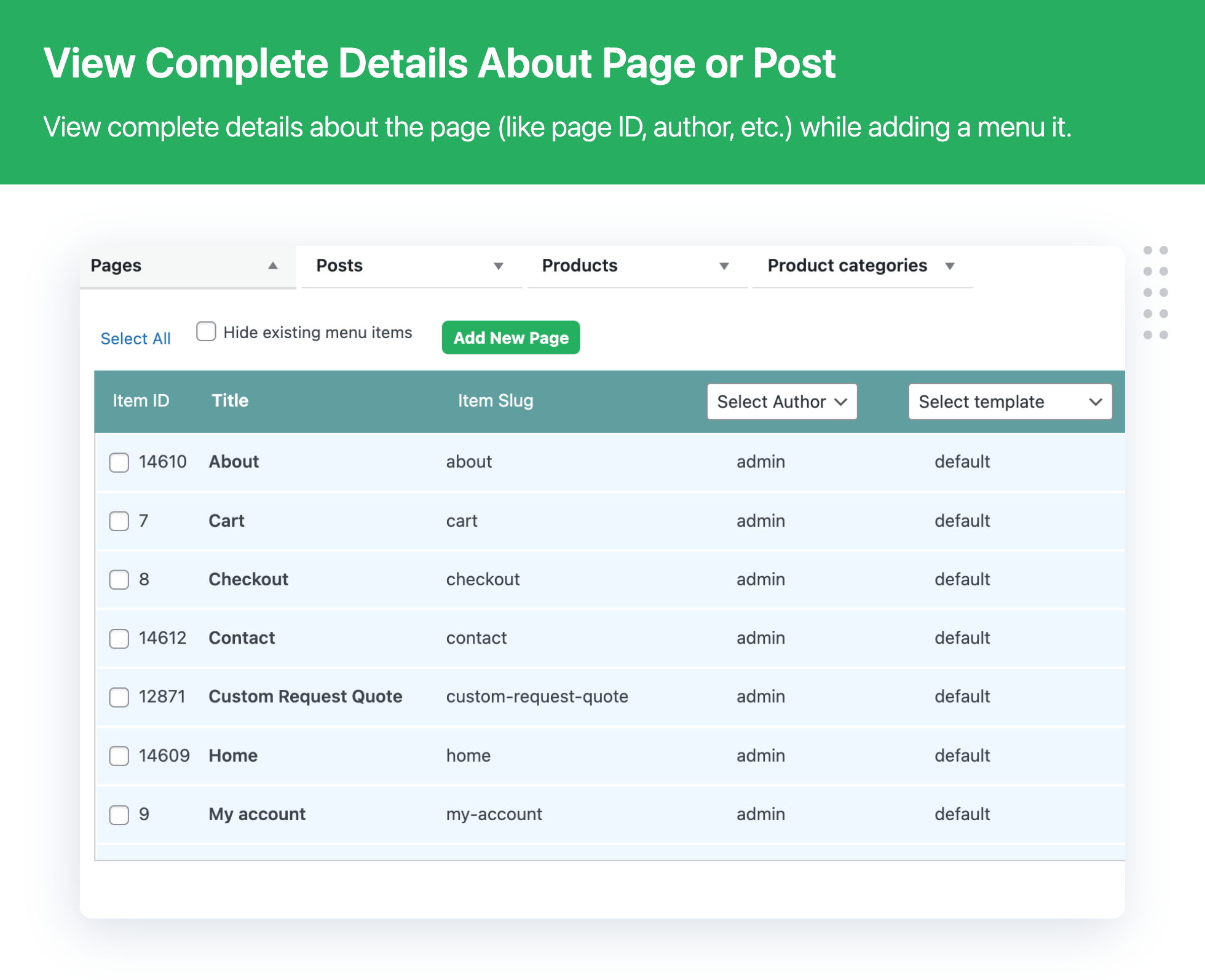
- Detailed view of pages/posts including page id, slug, author name, template names etc.
- Filter pages/posts which are already there in your menu.
Advance Menu Manager Pro version:
Need even more features? upgrade to Advance Menu Manager Pro and get all the features available in Advance Menu Manager’s premium version.
- Track, compare, restore all your changes with Menu Revisions
- The Advance Menu Manager plugin keeps a revision for each change you have made in your menu. Also, it allows you to compare your current menu with a revision in the past. So, in case you made a mistake while editing the menu, you do not need to worry. You can always restore your entire menu back from previously stored revisions
- Put the menu anywhere on your site/blog with short-code
- Use this feature to copy your menu structure. Just copy and paste the code in the page/post where you require. The same menu shall appear in that page/post.
- Menu Lock Functionality
- Using this feature you can lock particular Menu for other users. This feature can be handy when you want to restrict other admin users from editing the main navigation of your site. If you have many admin users on your WordPress site, and you want sure that not everyone can edit the main menu. Only selected users can change the main menu. In that case, you can utilize the Menu Lock Functionality.
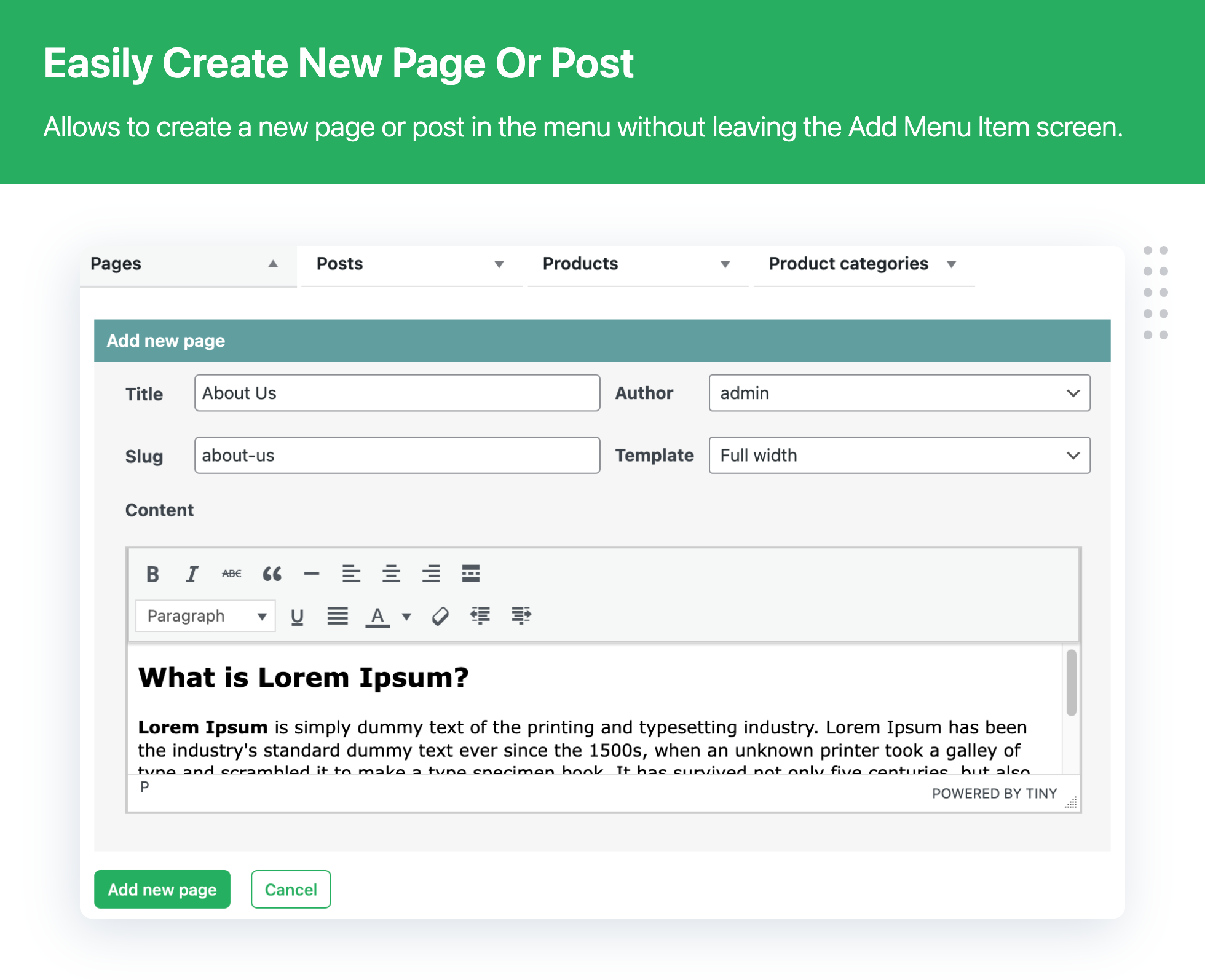
- Create new pages within the menu without leaving your add menu item screen.
- You can edit whole page/post from the menu.
- You can see view page / post attributes
EXPLORE OUR OTHER PLUGINS TO SUPERCHARGE YOUR WEBSITE:
👉 Premium WooCommerce Plugins list
- Flat-rate shipping plugins for WooCommerce
- WooCommerce Extra Fees Plugin
- Hide Shipping Method For WooCommerce
- Product Attachment For WooCommerce
- Blocker – Prevent Fake Orders And Blacklist Fraud Customers
- Category Banner Management for Woocommerce
- Product Finder For WooCommerce
- Mass Pages Posts Creator For WordPress
- Conditional Discount Rules For WooCommerce Checkout
- WooCommerce Checkout For Digital Goods
- Upload
Advance-Menu-Managerto the/wp-content/plugins/directory. - Activate the plugin through the Plugins menu in WordPress.
- Update Menu item using below interface.
Appearance >> advance menu manager
Usage
1) A Custom-built User Interface:
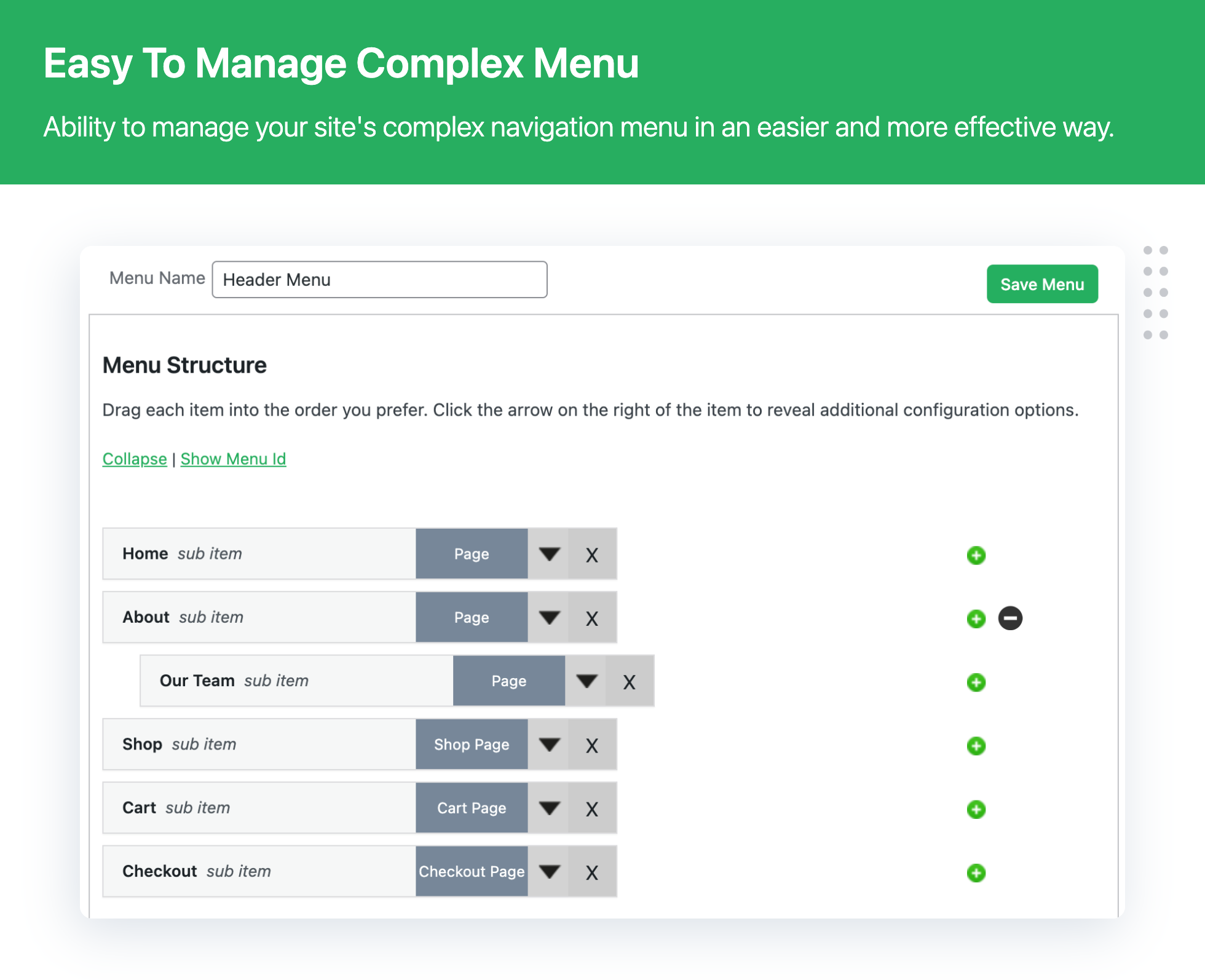
With hundreds of pages in your menu, you need a tailored UI that offers a complete view of menu, the parent pages and their child (sub-items). AMM has that user-interface. Besides offering a complete picture of your menu, the clutter-free UI also allows you to view, add, edit and manage your pages and posts to make your job easier.
2) Add pages/posts parallely:
Besides allowing you to get a comprehensive view of your menu and its sub items, the plugin helps you add menu items and sub-items parallely. This apart, the plugin also helps the user to create and add new pages/posts without going back and forth as is the case with the default WP menu feature.
3) Make no mistake while searching files:
The default search option in WordPress Menu does not offer a detailed look. This increases the chances of selecting a wrong page, leading to task repetition. AMM offers complete view of pages you have searched ensuring you select the right page.
4) See Menu Item ID:
The default WordPress Menu does not provide a quick look into whether a particular menu item is a page or a post. Besides, you also cannot know what the item id is. The AMM id equipped with this functionality to show you complete details in a single user interface to save your time and efforts.
5) Hide existing menu:
The plugin also offers you a functionality to hide existing menu items when you want to add pages/posts to your current menu. This helps you save time and avoid confusion.
6) Manage attributes for a menu item:
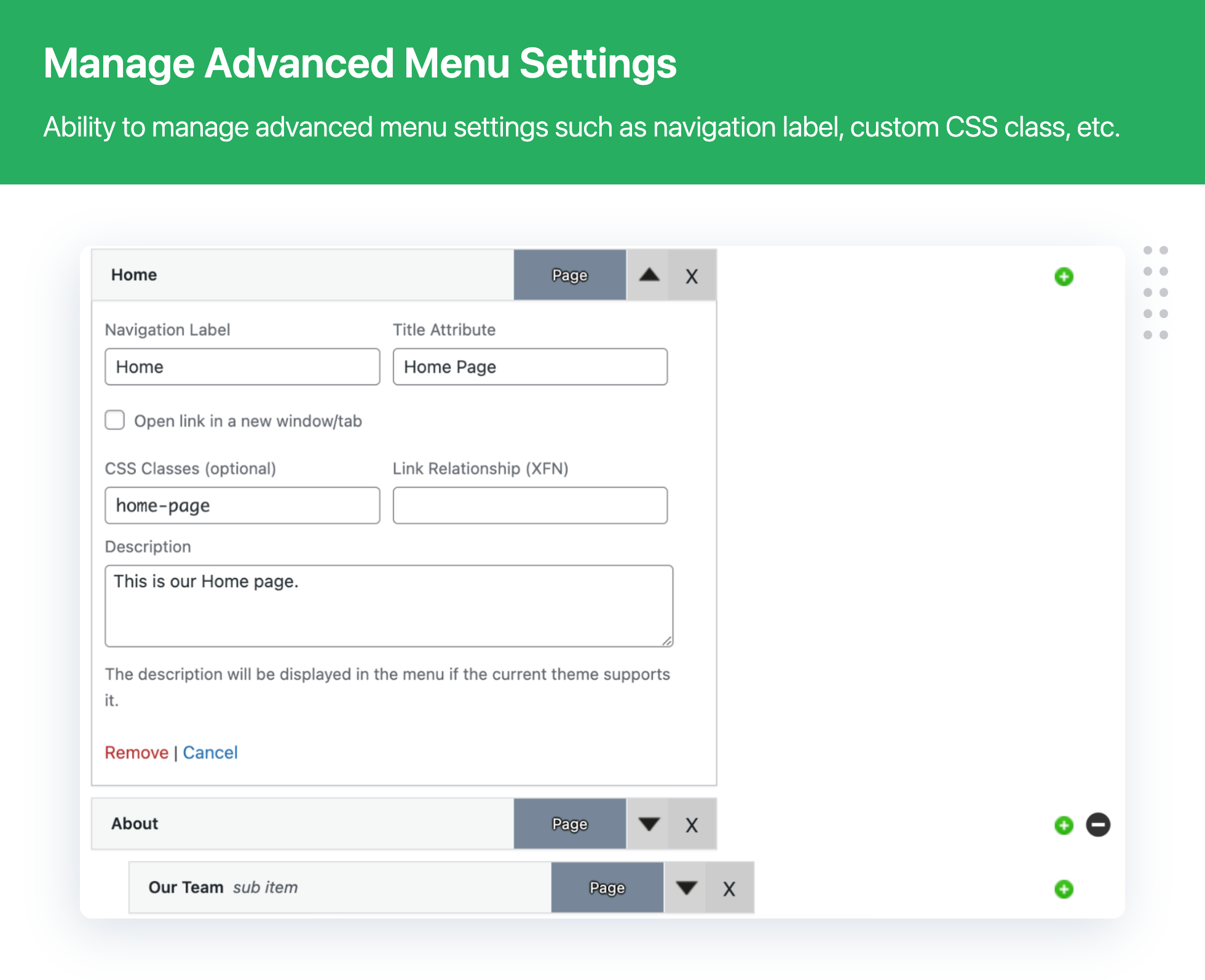
Manage a particular menu item snavigation label, title attribute, CSS classes, Link relationship and description from here.
7) Other features you will love:
-> Manage and delete pages from a single interface, no going to open menu detail content.
-> Add tags to pages/posts and category
-> Insert custom links as per your needs
-> Add a menu item as a child category without going back and forth.
-> Easy to use page/post search functionality so that you know you have selected the correct file.
-> Hide/show a parent item's sub-category.
Screenshot Gallery

ANS: With Advance Menu Manager For WordPress plugin, You can easily manage restaurant menu in the WordPress.
ANS: When the site has hundreds of menu items, it becomes a complex task to add new item, drag to top etc. But Advance Menu Manager For WordPress plugin helps you to improve productivity while managing the menus. You can easily manage menu by expanding and collapse Menu item trees This display shows the number of children a menu item has at a glance. Collapse Will hide a number of child menu items.
ANS: Yes, It is possible, just click on the green plus sign to add a menu item parallely where ever you want.
Changelog
3.1.3 – 18-12-2025
- [Bug Fix] Minor bug fixes related to the tab selection issue during the add menu items
- [Bug Fix] Minor bug fixes related to the plugin footer text
- [Bug Fix] Minor bug fixes related to the plugin string translation
- [Enhancement] Compatible with WordPress 6.9.x
3.1.2 – 31-12-2024
- [Bug Fix] Quick fixes related to the security vulnerability
- [Enhancement] Compatible with WordPress 6.7.x
3.1.1 – 17-09-2024
- [Bug Fix] Minor bug fixes related to plugin activation
3.1.0 – 05-08-2024
- [Enhancement] Plugin UI enhancement
- [Enhancement] Compatible with WordPress 6.6.x
3.0.8 – 25-4-2024
- [Enhancement] UI enhancement
- [Enhancement] Compatible with WordPress 6.5.x
3.0.7 – 02-11-2023
- [Enhancement] Minor bug fixed related to the Cross Site Request Forgery (CSRF) vulnerability
- [Enhancement] Plugin compatibility with PHP 8.2.x
- [Enhancement] Compatible with WordPress 6.3.x
3.0.6 – 22-12-2022
- [Bug Fix] Minor bug fixed related to the Multi level child menu items ordering issue
- [Enhancement] Quick fix related to the Cross Site Scripting (XSS) vulnerability
- [Enhancement] Compatible with WooCommerce 7.9.x
- [Enhancement] Compatible with WordPress 6.2.x
3.0.5 – 22-12-2022
- [Bug Fix] Category search issue
- [Bug Fix] Category assign issue on new post from menu popup
- [Bug Fix] Category item per page issue
- [Enhancement] UI enhancement
- [Bug Fix] Compatible with PHPCS and PHP8.
- [Bug Fix] Compatible with WordPress 6.1
- [Bug Fix] Compatible with WooCommerce 7.2.x
3.0.4 – 02-08-2022
- Enhancement – User notice message – On menu change display note to re-select the navigation menu from full site editing to reflection on front
- Enhancement – Admin alert message before deleting the menu item
- UI enhancement
- Update – Compatible with WordPress 6.0.x
- Update – Compatible with WooCommerce 6.7.x
3.0.3 – 02-05-2022
- Fixed – Minor bug fixed
- Update – Compatible with WordPress 6.0.x
- Update – Compatible with WooCommerce 6.5.x
3.0.2 – 02-05-2022
- Security enhancement
- UI enhancement
- Update – Compatible with WordPress 5.9.x
- Update – Compatible with WooCommerce 6.4.x
3.0.1 – 4-1-2022
- New – Duplicate menu
- New – Search menu item in category
- Compatible with WordPress 5.8.2
3.0 – 20-08-2021
- Minor bug fixing
- Security Enhancement
- Compatibility with loco translate
- UI enhancement
- Compatible with WordPress 5.8
- Compatible with WooCommerce 5.6.0
2.9.6 – 02-06-2021
- Compatible with WordPress 5.7.x
- Compatible with WooCommerce 5.3.x
2.9.5 – 17-03-2021
- Fixed – Save menu button not displaying
- Compatible with WordPress 5.7.x
- Compatible with WooCommerce 5.1.x
2.9.4 – 17-12-2020
- Minor bug fixed
2.9.3 – 25-11-2020
- Minor bug fixed
2.9.2 – 20-11-2020
- Maintanence Release
2.9.1 – 22-09-2020
- Compatible with WordPress 5.5.x
- Compatible with WooCommerce 4.5.x
- Fixed – Continue asking for a review block
2.9 – 03-09-2020
- Compatible with WordPress 5.5.x
- Compatible with WooCommerce 4.1.x
- Fixed – Unable to delete menu item
- Fixed – Select all pages link not working
- Fixed – Show items per page on pagination is limited up to 200
2.8 – 04-06-2020
- Compatible with WordPress Version 5.4.x
2.7 – 19-11-2019
- Compatible with WordPress Version 5.3.x and WooCommerce version 3.8.x
- Checkbox not checked issue has been fixed.
2.6 – 28-05-2019
- Compatible with WordPress Version 5.2.x and WooCommerce version 3.6.x
- Minor bug fixing
2.5 – 19-04-2019
- Fatal error on plugin activation has been fixed.
2.4 – 17-04-2019
- Default appearance affect the plugin css issue fixed.
- Name of the root file has been changed to small latter.
2.3 – 04-04-2019
- Failed to open stream: issue fixed.
2.2 – 26-03-2019
- Product listing page Published, draft,trash menu hiding issue fixed.
2.1 – 26-03-2019
- Minor bug fixing
2.0 – 18-02-2019
- Major bug fixing.
- Compatible with WordPress Version 5.0.3
1.9.1 – 07-06-2018
- Minor bug fix.
- Compatible with WordPress Version 4.9.6
1.9 – 28-05-2018
- Minor bug fix.
- Compatible with WordPress Version 4.9.6
1.8 – 24-05-2018
- Minor bug fix.
- Compatible with WordPress Version 4.9.6
1.7 – 31-01-2018
- Added Newslater Form.
1.6 – 05-07-2017
- Product Menu add issue fix.
- Compatible with WordPress Version 4.8
1.5 – 05-05-2017
- Minor bug fix.
- Design Issue resolve.
1.4 – 23-03-2017
- Minor bug fix
1.3 – 28-12-2016
- Compatible with WordPress Version 4.7
1.2 – 9-11-2016
- New – Admin Interface changes
1.1 – 29-08-2016
- Check WordPress and WooCommerce compatibility
1.0.1 – 14.07.2016
- New – Subscription form added
- Fixes – Minor bug solved
1.0
- This is the first version of the plugin.
" width="120" height="120">
Available Versions
| Version | Download | Type |
|---|---|---|
| 3.1.3 | Download | Stable |
| 3.1.2 | Download | Stable |
| 3.1.1 | Download | Stable |
| 3.1.0 | Download | Stable |
| 3.0.8 | Download | Stable |
| 3.0.7 | Download | Stable |
| 3.0.6 | Download | Stable |
| 3.0.5 | Download | Stable |
| 3.0.4 | Download | Stable |
| 3.0.3 | Download | Stable |
| 3.0.2 | Download | Stable |
| 3.0.1 | Download | Stable |
| 3.0 | Download | Stable |
| 2.9.6 | Download | Stable |
| 2.9.5 | Download | Stable |
| 2.9.4 | Download | Stable |
| 2.9.3 | Download | Stable |
| 2.9.2 | Download | Stable |
| 2.9.1 | Download | Stable |
| 2.9 | Download | Stable |
| 2.8 | Download | Stable |
| 2.7 | Download | Stable |
| 2.6 | Download | Stable |
| 2.5 | Download | Stable |
| 2.4 | Download | Stable |
| 2.3 | Download | Stable |
| 2.2 | Download | Stable |
| 2.1 | Download | Stable |
| 2.0 | Download | Stable |
| 1.9.1 | Download | Stable |
| 1.9 | Download | Stable |
| 1.8 | Download | Stable |
| 1.7 | Download | Stable |
| 1.6 | Download | Stable |
| 1.5 | Download | Stable |
| 1.4 | Download | Stable |
| 1.3 | Download | Stable |
| 1.2 | Download | Stable |
| 1.1 | Download | Stable |
| 1.0.3 | Download | Stable |
| Development | Download | Trunk |
