
Admin Menu Editor
Active Installs
300,000+
Last Updated
August 19, 2026
First Released
December 13, 2009
Download History (Last one month)
Contributors
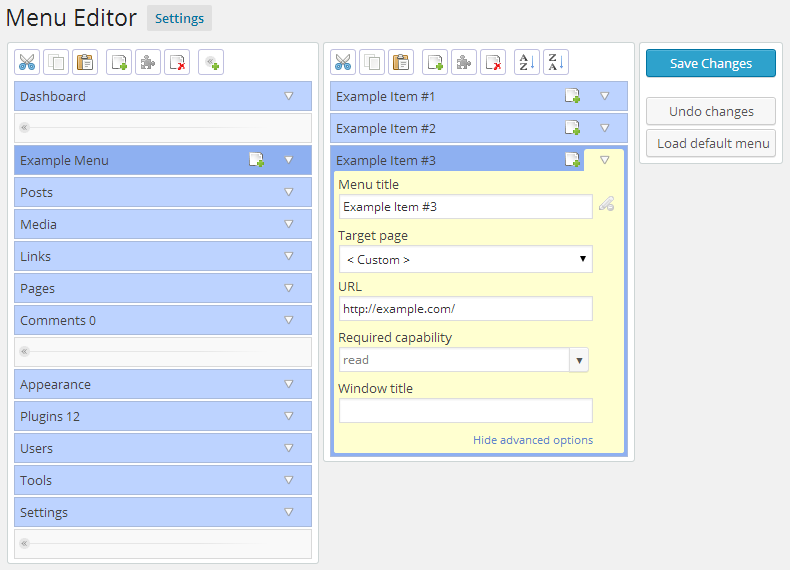
Admin Menu Editor lets you manually edit the Dashboard menu. You can reorder the menus, show/hide specific items, change permissions, and more.
Features
- Change menu titles, URLs, icons, CSS classes and so on.
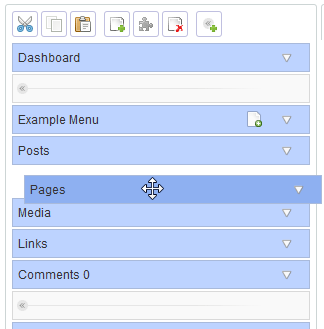
- Organize menu items via drag & drop.
- Change menu permissions by setting the required capability or role.
- Move a menu item to a different submenu.
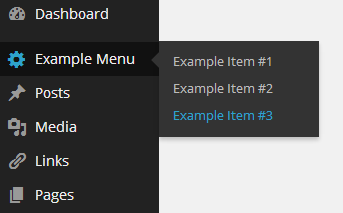
- Create custom menus that point to any part of the Dashboard or an external URL.
- Hide/show any menu or menu item. A hidden menu is invisible to all users, including administrators.
The Pro version lets you set per-role menu permissions, hide a menu from everyone except a specific user, export your admin menu, drag items between menu levels, make menus open in a new window and more. Try online demo.
Additional Features
Despite the name, this plugin is not limited to just editing the admin menu. You can also:
- Create login redirects and logout redirects.
- Allow/deny access to specific posts based on user roles.
- Hide plugins on the Plugins -> Installed Plugins page from other users.
- Edit the display name, description, and other plugin details shown on the Plugins -> Installed Plugins page (e.g. for white-labelling).
Shortcodes
The plugin provides a few utility shortcodes. These are mainly intended to help with creating login/logout redirects, but you can also use them in posts and pages.
[ame-wp-admin]– URL of the WordPress dashboard (with a trailing slash).[ame-home-url]– Site URL. Usually, this is the same as the URL in the “Site Address” field in Settings -> General.[ame-user-info field="..."]– Information about the logged-in user. Parameters:field– The part of user profile to display. Supported fields include:ID,user_login,display_name,locale,user_nicename,user_url, and so on.placeholder– Optional. Text that will be shown if the visitor is not logged in.encoding– Optional. How to encode or escape the output. This is useful if you want to use the shortcode in your own HTML or JS code. Supported values:auto(default),html,attr,js,none.
Notes
- If you delete any of the default menus they will reappear after saving. This is by design. To get rid of a menu for good, either hide it or change it’s access permissions.
- In the free version, it’s not possible to give a role access to a menu item that it couldn’t see before. You can only restrict menu access further.
- In case of emergency, you can reset the menu configuration back to the default by going to http://example.com/wp-admin/?reset_admin_menu=1 (replace example.com with your site URL). You must be logged in as an Administrator to do this.
Normal installation
- Download the admin-menu-editor.zip file to your computer.
- Unzip the file.
- Upload the
admin-menu-editordirectory to your/wp-content/plugins/directory. - Activate the plugin through the ‘Plugins’ menu in WordPress.
That’s it. You can access the the menu editor by going to Settings -> Menu Editor. The plugin will automatically load your current menu configuration the first time you run it.
WP MultiSite installation
If you have WordPress set up in Multisite (“Network”) mode, you can also install Admin Menu Editor as a global plugin. This will enable you to edit the Dashboard menu for all sites and users at once.
- Download the admin-menu-editor.zip file to your computer.
- Unzip the file.
- Create a new directory named
mu-pluginsin your site’swp-contentdirectory (unless it already exists). - Upload the
admin-menu-editordirectory to/wp-content/mu-plugins/. - Move
admin-menu-editor-mu.phpfromadmin-menu-editor/includesto/wp-content/mu-plugins/.
Plugins installed in the mu-plugins directory are treated as “always on”, so you don’t need to explicitly activate the menu editor. Just go to Settings -> Menu Editor and start customizing your admin menu 🙂
Notes
* Instead of installing Admin Menu Editor in mu-plugins, you can also install it normally and then activate it globally via “Network Activate”. However, this will make the plugin visible to normal users when it is inactive (e.g. during upgrades).
* When Admin Menu Editor is installed in mu-plugins or activated via “Network Activate”, only the “super admin” user can access the menu editor page. Other users will see the customized Dashboard menu, but be unable to edit it.
No FAQ provided.
Changelog
1.15.2
- Fixed a conflict with Flatsome 3.20.8 where Flatsome UX Builder would get stuck on the “Loading UX Builder” screen if the “Content Permissions” module was enabled.
- Fixed a number of PHP 8.5 deprecation notices about SplObjectStorage.
- Fixed a minor conflict with Elementor that made the allow/deny icons in the “Content Permissions” panel blue.
- Fixed some minor button layout issues.
- Tested with WP 7.1-RC3 and WP 7.2-alpha.
1.15.1
- Added improved SVG menu icon support. It was already possible to use SVG icons for admin menu items, but you had to manually encode them in the format that WordPress expects. Now the icon selector has a new “SVG” tab, and you can just paste the SVG code in the text box and click “Apply”.
- Fixed a number of layout issues and visual bugs in WordPress 7.0.
- Fixed several PHP deprecation notices about “Using null as an array offset is deprecated, use an empty string instead”.
- Tested with WP 7.0-RC4 and WP 7.1-alpha.
1.15
- Increased the minimum required PHP version to 7.4.
- Increased the minimum required WordPress version to 5.9.
- Fixed the “admin_menu_editor-menu_url_blacklist” filter being called too early, before most other plugins have been loaded. Now other plugins should be able to actually use this filter to modify the menu blacklist.
- Fixed some users showing as “missing” in the “Redirects” tab when the site has more than 50 users.
- Added a workaround for a bug in ActivityPub 7.8.5 that could cause a PHP fatal error by returning an invalid value from the “user_has_cap” filter.
- Fixed a PHP notice about enqueueing a style before registering the “menu-editor-base-style” dependency.
- Fixed a PHP compatibility issue where using PHP versions older than 8.1 could lead to errors like “Fatal error: Uncaught Error: Cannot unpack Traversable with string keys”.
- Fixed conflicts with “WooCommerce Product Options” and “WooCommerce Quantity Manager” where menu items that link to setup wizards would become visible when AME is active.
- Fixed a PHP 8.5 deprecation notice: “Using null as an array offset is deprecated, use an empty string instead”.
- Fixed a PHP 8.5 deprecation notice: “Non-canonical cast (boolean) is deprecated, use the (bool) cast instead”.
- Removed the special URL parameter that let admins manually reset the admin menu configuration.
- Tested with WP 6.9.1 abd 7.0-alpha.
1.14.1
- Fixed the position of the dropdown button for the “Extra capability” field. Now the button should be vertically aligned with the field.
- Fixed a dropdown potentially extending outside its parent dialog/popup when one of the items is very long.
- Fixed a PHP warning “fgetcsv(): escape must be character” in PHP versions older than 7.4.
- Fixed improper sanitization of the “placeholder” attribute for the “ame-user-info” shortcode.
1.14
- Increased the minimum required PHP version from 5.6 to 7.1.
- Added an “About” tab to the “Content Permissions (AME)” meta box. The tab clarifies where the box came from and how to disable it if necessary.
- Fixed a PHP 8.4 deprecation notice “fgetcsv(): the $escape parameter must be provided as its default value will change”.
- Fixed multiple instances of PHP 8.4 deprecation notices like “Implicitly marking parameter $foo as nullable is deprecated, the explicit nullable type must be used instead”.
- Fixed a conflict with the “Bricks” theme/site builder that could cause the fatal error “Uncaught TypeError: Illegal offset type in isset or empty”.
- Fixed a conflict with “FunnelKit Funnel Builder” where “WooFunnels” would permanently stay highlighted green as a “new” menu because its “Upgrade to Pro” submenu item could not be correctly marked as seen.
- Fixed a similar but unrelated issue with “Forminator Forms” where the “Forminator” menu would always be highlighted as new.
- Fixed a bug where AME could unexpectedly hide the top-level “Profile” menu from non-admin users in some configurations.
- Fixed long menu titles wrapping to the next line and inconsistent field label spacing in the menu editor.
1.13.1
- Fixed a minor conflict with “Advanced Flat Rate Shipping For WooCommerce” that caused several of its submenu items that are supposed to be hidden to become visible.
- Fixed a potential “access denied” error caused by misidentification of the current menu item when the current URL represents a hidden menu item that’s no longer part of the admin menu.
- Added a new filter: “admin_menu_editor-menu_url_blacklist”. Other plugins that create hidden menu items can use this filter to prevent those hidden items from showing up when Admin Menu Editor is activated. The filter receives an associative array. The array keys are relative admin menu URLs and the values can be either
true(always hide the menu item) or “submenu” (hide only if it’s a submenu item).
1.13
- Added a way to control access to specific posts and pages. The new “Content Permissions” box in the post editor lets you choose which roles will be able to see a post. It also has an “Advanced” tab where you can enable or disable individual permissions like read/edit/delete for each role. Finally, you can control what happens when someone who doesn’t have permission tries to view a post: you can replace the post content with something else, show a custom error, simulate a “404 Not Found” error, or redirect the user to a custom URL.
- Added the “CSS classes” field to submenu items. Previously, only top level menus had this field.
- Added an “Optimize menu configuration size” option to the “Settings” tab. It makes the plugin store the admin menu configuration in a more space-efficient format, which should reduce the size of the “ws_menu_editor” database entry. This option is enabled by default. Previously, this was controlled by the option “Compress menu configuration data that’s stored in the database”, but now the “Compress…” option only applies to actual compression.
- Added a filter than can be used to turn off admin menu customizations. This can be useful if, for example, you want a a certain user to see the default admin menu. Basic code example:
add_filter('admin_menu_editor-disable_customizations-admin_menu_structure', '__return_true'); - Made the top bar in the “Plugins” tab (the part that has the “Save Changes” button) stick to the top while scrolling. This way the save button is accessible without needing to scroll back to the top.
- Fixed a potential crash when the Zlib extension is enabled but the gzuncompress() function is disabled.
- Fixed default redirects not being saved due to a bug in the “delete settings associated with missing roles” feature.
- Fixed a minor conflict with Elementor that caused the hidden menu items “Elementor -> Connect” and “Elementor -> Note Proxy” to become visible.
- Fixed a minor conflict with Post SMTP that caused the hidden menu items “Dashboard -> Welcome” and “Dashboard -> Credits” to become visible.
- Tested with WP 6.8 and WP 6.9-alpha.
- Increased minimum required WP version to 5.4.
1.12.4
- Fixed a bug introduced in version 1.12.3 that could cause the “Redirects” tab to be blank in some configurations. The bug also triggered this JS error: “settings.redirects.map is not a function”.
- Fixed a WooCommerce conflict where two “Subscriptions” menu items would appear when AME was active.
- Tested with WP 6.6-RC3 and WP 6.7-alpha.
1.12.3
- Improved menu drag & drop. You can now drag top level menu items to the active submenu. You can also move submenu items to the top level by dragging them to the bottom of the top level menu list (you can move them to a different position after that).
- Added an option to automatically delete settings associated with missing roles and users. This only applies to certain settings, such as login redirects. “Missing” means that the role or user doesn’t exist on the current site, which usually happens when it has been deleted. In Multisite, it can also happen if different subsites have different roles. By default, this option is enabled on regular sites and disabled in Multisite.
- Fixed a WooCommerce conflict where two “Orders” menu items would appear when AME was active.
- Fixed rare PHP warning “Undefined array key “parent” in … menu-editor-core.php”.
- Fixed a potential crash if the global
$menuvariable is not a native array but is still array-like. - Improved compatibility with old versions of UiPress.
- Tested with WP 6.6-beta2.
1.12.2
- Fixed the “Media” menu always being highlighted as “new” when the “Enable Media Replace” plugin is active.
- Fixed PHP warning “Attempt to read property “cap_key” on null” that could potentially be triggered if a metadata update happened for a non-existent user or the user couldn’t be retrieved.
- Fixed a conflict with UIPress where the admin menu settings were not being applied.
- Updated the MailPoet compatibility fix to also work with MailPoet 4.49.1.
- Other minor bug fixes.
- Tested with WP 6.6-alpha.
1.12.1
- Made menu editor toolbars “sticky”. They will now stay below the admin bar when scrolling down, which can be useful when editing very long menus.
- Restored the “custom item” indicator for the “Modern” editor color scheme. Previously, it was not visible in the menu editor when using that color scheme.
- Fixed a missing nonce check when hiding the “Upgrade to Pro” panel.
- Migrated to Lodash 4.
- Tested with WP 6.5-alpha.
1.12
- Added a search box for menu icons.
- Added more Dashicons. Now the icon dropdown should include all currently existing Dashicons.
- Fixed a visual bug where the icon would become unreasonably narrow when no icon was selected.
- Tested with WP 6.3.2 and 6.4-beta4.
1.11.2
- Fixed a conflict that prevented users from changing the menu icon of the Wordfence plugin (and possibly some other plugins that use similar CSS).
- Fixed a crash if the plugin encounters a supposed “menu item” that has the wrong data type, like a boolean. This was likely caused by a bug in an unidentified plugin or theme that modified the menu list incorrectly.
- Fixed plugin visibility restrictions not being applied when editing plugin files via AJAX.
- Tested with WP 6.3.1 and WP 6.4-alpha.
1.11.1
- Fixed a minor plugin conflict with “WPFunnels” and “Email Marketing Automation – Mail Mint” that caused hidden menu items created by those plugins to become visible when AME was activated.
- Fixed a conflict with the “Fortress” plugin that could reportedly cause an infinite loop.
- Fixed a conflict with “Da Reactions” 4.0.3 that triggered PHP warnings like “Warning: Array to string conversion in …/includes/menu-item.php on line 54”.
- Fixed a potential fatal error when removing the number that represents pending updates/comments/etc from a menu title.
- Fixed a minor conflict with Essential Grid 3.0.17 that caused tooltips in AME dialogs to appear underneath the dialogs.
- Fixed a few jQuery deprecation warnings in the knockout-sortable library.
- Switched TypeScript to strict mode.
1.11
- Fixed a minor conflict with the WPForms plugin where the hidden menu item “Dashboard -> Welcome to WPForms” became visible when Admin Menu Editor was installed.
- Fixed a conflict with Toolset Types 3.4.7 that prevented redirect settings from being saved.
- Fixed a PHP warning triggered when a menu item didn’t have a URL or a required capability.
- Fixed a plugin visibility bug where, if none of the user’s roles had custom access settings for a specific plugin or in general, AME would immediately deny access instead of also checking user capabilities. This could theoretically happen if all the user’s roles were new or if the user didn’t have any roles (they might still have access due to directly granted capabilities).
- Prevent a potential fatal error if JSON-encoded module settings stored in the database have been corrupted and can’t be decoded.
- Added some missing
.mapfiles that could cause 404 errors for users looking at the developer console. - Lots of internal reorganization that likely won’t have any visible effects in this version.
- Tested up to WP 6.2.
1.10.4
- Fixed a layout bug in the menu editor where the submenu column did not increase its height to align with the currently selected top level menu.
- Tested up to WP 6.1.
1.10.3
- Increased the minimum required PHP version to 5.6.
- Fixed a number of deprecation warnings related to PHP 8.
- Fixed a conflict with “Anti-Spam by CleanTalk” that could potentially cause a fatal error.
- Fixed a conflict with “Admin Theme – Musik” where the menu order settings in the other plugin would override the menu order configured in AME.
- Fixed missing padding in the “edit plugin details” panel (in the “Plugins” tab). Also updated the button layout to match the changed button layout of the “Quick Edit” panel introduced in WP 6.0.
- Fixed a visual issue where some form fields might briefly show up and then disappear if the settings page stylesheet(s) took a while to load.
- Removed dependency on the “icon16” CSS class.
1.10.2
- Added additional validation in escaping in multiple places.
- Fixed a number of issues related to the WordPress coding standard and the WordPress-VIP-Go coding standard.
- Fixed visual misalignment of menu property fields and accompanying dropdown buttons.
- Fixed inconsistent spacing aroud some radio buttons on the settings page.
- Introduced a limit to how many unique menu URLs can be remembered by the “highlight new menu items” feature. Previously, when this feature was enabled, the plugin would record each “seen” menu item, which could cause the associated database entry to grow endlessly. Now the plugin will remember up to 700 items per user.
- Tested with WordPress 6.0 (release candidate) and 6.1-alpha.
1.10.1
- Fixed the
[ame-user-info]shortcode not working in login redirects. It would always output “(No user)” instead of the actual user data. - Fixed a warning caused by a conflict with plugins and themes that call the “login_redirect” filter with only 1 parameter instead of the expected 3.
- Probably fixed a bug where menu items that use fully qualified URLs would lose their custom settings when the site URL changed (such as when migrating the site to a different domain).
- Fixed a minor conflict with the plugin “Google Analytics for WordPress by MonsterInsights” where the “Getting Started” menu item that is usually hidden would become visible when AME was activated.
- Fixed an edge case where the plugin would incorrectly show an “is this option enabled for everyone” checkbox in an indeterminate state when it was actually enabled for all roles but was not explicitly enabled (or disabled) for individual users.
- Fixed a bug where AME did not prefer submenu items when detecting the current menu item based on the current URL.
- Switched from
jQuery.toJSON()toJSON.stringify(). The old jQuery JSON plugin appears to be unmaintained, and all modern browsers have supportedJSON.stringify()for a long time. - Other minor fixes.
- Tested up to WP 6.0-beta1.
1.10
- Added a “Redirects” feature. You can create login redirects, logout redirects, and registration redirects. You can configure redirects for specific roles and users. You can also set up a default redirect that will apply to everyone who doesn’t have a specific setting. Redirect URLs can contain shortcodes, but not all shortcodes will work in this context.
- Added a few utility shortcodes:
[ame-wp-admin],[ame-home-url],[ame-user-info field="..."]. These are mainly intended to be used to create dynamic redirects, but they will also work in posts and pages. - Slightly improved the appearance of settings page tabs on small screens and in narrow browser windows.
- Fixed a minor conflict where several hidden menu items created by “WP Grid Builder” would unexpectedly show up when AME is active.
- Fixed a conflict with “LoftLoader Pro”, “WS Form”, and probably a few other plugins that create new admin menu items that link to the theme customizer. Previously, it was impossible to hide or edit those menu items.
- Fixed a few jQuery deprecation warnings.
- Fixed an “Undefined array key” warning that could appear if another plugin created a user role that did not have a “capabilities” key.
- Fixed a minor BuddyBoss Platform compatibility issue where the menu editor would show a “BuddyBoss -> BuddyBoss” menu item that was not present in the actual admin menu. The item is created by BuddyBoss Platform, but it is apparently intended to be hidden.
- Refactored the menu editor and added limited support for editing three level menus. While the free version doesn’t have the ability to actually render nested items in the admin menu, it should at least load a menu configuration that includes more than two levels without crashing. This will probably only matter if someone edits the settings in the database or copies a menu configuration from the Pro version.
1.9.10
- Fixed a bug where the plugin could incorrectly identify a separator as the current menu item.
- Fixed submenu box not expanding to align with the selected parent item.
- Fixed a PHP 5 compatibility issue where the “Prevent bbPress from resetting role capabilities” would trigger notices and not work correctly. This bug did not affect newer PHP versions such as PHP 7.
- Fixed a couple of icon and separator rendering bugs where the hover marker – that is, the colored vertical bar that appears next to the currently hovered menu item, introduced in WP 5.7 – could either show up in the wrong place or show up when it’s not supposed to.
- Fixed a jQuery Migrate warning about isFunction() being deprecated.
1.9.9
- Fixed a conflict with the “PRO Theme” plugin where “PRO Theme” would expand the wrong top level admin menu if the current submenu item had been moved from one parent menu to another.
- Fixed PHP notice “Undefined offset: 0 in /wp-includes/capabilities.php on line 70” (various line numbers).
- Fixed a conflict with “Stripe For WooCommerce” 3.2.12 where the “Stripe Gateway” menu had a wrong URL because a hidden menu item was not removed.
- Fixed a browser warning about the “ws_nmh_pending_seen_urls” cookie not using the SameSite attribute.
- Fixed a conflict with WooFunnels where changing the WooFunnels menu icon would result in both of the icons – the original one and the new one – showing up at the same time. The new icon was also misaligned.
- Minor visual changes.
- Tested with WordPress 5.7 and 5.8-alpha.
1.9.8
- Added a “bbPress override” option that prevents bbPress from resetting all changes that are made to dynamic bbPress roles. Enabling this option allows you to edit bbPress roles with any role editing plugin.
- Fixed a conflict that caused some hidden Simple Calendars menu items to show up when Admin Menu Editor was activated.
- Fixed a bug where menu items that had special characters like “&” and “/” in the slug could stop working if they were moved to a different submenu or to the top level.
- Fixed a bug where changing the menu icon to an external image (like a URL pointing to a PNG file) could result in the old and the new icon being displayed at once, either side by side or one below the other. This only affected menu items that had an icon set in CSS by using a
::beforepseudo-element. - Fixed many jQuery deprecation warnings.
- Fixed a bug where some menu settings would not loaded from the database when another plugin triggered a filter that caused the menu configuration to be loaded before AME loaded its modules.
- Fixed bug that could cause an obscure conflict with plugins that change the admin URL, like “WP Hide & Security Enhancer”. When a user tried to open “Dashboard -> Home”, the plugin could incorrectly apply the permisssions of a another menu item to the “Home” item. If the other menu item was configured to be inaccessible, the user would get an error message when logging in (they were still successfully logged in).
- Improved error reporting in situations where the plugin can’t parse menu data.
1.9.7
- Fixed a conflict with Elementor 3.0.0-beta that caused the “Theme Builder” menu item to have the wrong URL.
- Minor performance optimization.
1.9.6
- Added an option to disable WPML support.
- Fixed a minor WP 5.5 compatibility issue where some of the boxes shown on the menu settings page were displayed incorrectly.
- Fixed a bug where hidden plugins were still visible under “Dashboard -> Updates” and were included in the number of updates shown in the admin menu, Toolbar and other places.
- Fixed a conflict with WP Job Manager where activating Admin Menu Editor made the hidden “Dashboard -> Setup” menu visible.
- Fixed a browser warning about cookies using “SameSite: None”.
- Fixed a conflict with plugins that use a different, incompatible version of the jquery-cookie library. For example: Participants Database Field Group Tabs.
- Tested with WP 5.5-RC1 and 5.6-alpha.
1.9.5
- Fixed a conflict with Media Ace, Snax and “What’s Your Reaction?” plugins where activating Admin Menu Editor would cause a number of previously hidden menu items become visible.
- Tested up to WP 5.4.
1.9.4
- Fixed another warning about get_magic_quotes_gpc() being deprecated in PHP 7.4. This instance was missed in the previous patch.
- Added a workaround for an issue with MailPoet 3 where some menu settings didn’t work on MailPoet’s admin pages.
- Added a workaround for an issue with Extended Widget Options where the “getting started” page that’s added by that plugin showed up in the menu editor even though it was supposed to be hidden.
- Reduced the amount of space used by plugin visibility settings. This change will take effect the next time you save the settings.
- Extended the “compress menu configuration data” feature to use ZLIB compression in addition to menu data restructuring. This greatly decreases the amount of data stored in the database, but increases decompression overhead.
1.9.3
- Fixed a warning about get_magic_quotes_gpc() being deprecated in PHP 7.4.
- Fixed a conflict with plugins that use the “all_plugins” filter incorrectly.
1.9.2
- Updated the appearance of the settings page to match the admin CSS changes introduced in WordPress 5.3.
- Fixed inconsistent dialog title bar colours that could occur when another plugin loaded the default WP dialog styles.
- Fixed a bug where certain top level menus could stay permanently highlighted because some of their submenus were hidden via CSS/JS and unclickable.
- When there’s an error loading the menu configuration (e.g. because it’s in an incompatible format), the plugin will now display an admin notice instead of letting through an uncaught exception.
- Removed the link to Visual Admin Customizer from the plugin settings page.
- Tested up to WP 5.3.
1.9.1
- Fixed a minor conflict with Toolset Types.
- Fixed a conflict with the MailPoet plugin where it was not possible to change the plugin’s menu icon.
- Fixed a bug where the plugin could misidentify certain core menus that have different URLs for different roles.
- Fixed a bug where the plugin could generate incorrect URLs for submenu items where the parent menu URL contained HTML entities like “&”.
- Fixed an issue where certain vulnerability scanners showed a warning about one of the plugin files because it used the eval() function. This particular instance of eval() was not a security flaw, but it has been now been removed to prevent false positives.
- Fixed a bug where the plugin could show an incorrect error message when a menu item was hidden due to there being another hidden menu item with the same URL.
- Fixed a minor issue with field alignment in menu properties.
- The “Site Health” menu will no longer be highlighted as new because it’s part of WordPress core.
1.9
- Added an option to automatically hide new plugins. It was already possible, but previously this option was tied to the “show all plugins” checkbox. Now there is a separate “New plugins” checkbox.
- Fixed a bug where trying to change the icon of the Jetpack menu caused a JavaScript error that prevented the icon selector from being displayed.
- Tested up to WP 5.2.
1.8.8
- Added the ability to edit more plugin details like author name, site URL and version number. Note that this feature only changes how plugins are displayed. It doesn’t actually modify plugin files.
- Fixed a PHP deprecation notice: “strpos(): Non-string needles will be interpreted as strings in the future”. Hopefully this time it’s been fixed for good.
- Fixed a couple of HTML validation errors.
- Fixed an inefficiency where the plugin would reinitialise the media frame every time the user tried to select an image from the media library.
- Added a partial workaround for situations where menu icons that were more than 32 pixels wide would be displayed incorrectly.
- Tested up to WP 5.1.1.
1.8.7
- Fixed a bug introcuded in 1.8.6 that caused a PHP warning “strpos(): Empty needle”.
1.8.6
- Fixed a PHP warning being thrown when the WPMU_PLUGIN_DIR constant is not a valid path or the full path cannot be determined.
- Fixed a rare PHP warning “parameter 1 to be array, null given in menu-editor-core.php on line 4254” that was most likely caused by an unidentified plugin conflict.
- Fixed a rare warning about a class being redefined.
- Updated a number of internal dependencies.
- Tested with WP 5.0.
1.8.5
- Fixed a bug where very long submenus wouldn’t be scrollable if the current item was one that was moved to the current submenu from a different top level menu.
- Fixed an obscure bug where clicking on an item in the current submenu could cause the entire submenu to “jump” up or down.
- Fixed AME not highlighting the correct menu item when there was a space in any of the query parameter values.
- Fixed another bug where the plugin didn’t highlight the correct item if it was the first item in a submenu and also a custom item.
1.8.4
- Added a “Documentation” link below the plugin description. For people concerned about the recent GDPR legislation, the documentation now includes a page explaining how the plugin processes personal data. Short version: It usually doesn’t.
- Tested with WP 4.9.6.
1.8.3
- Added a couple of tutorial links to the settings page.
- Fixed a potential crash that was caused by a bug in the “WP Editor” plugin version 1.2.6.3.
- Fixed some obsolete callback syntax that was still using “&$this”.
- Changed the order of some menu settings and added separators between groups of settings.
- Removed the “Screen Options” panel from AME tabs that didn’t need it like “Plugins”.
- Tested with WP 4.9.5.
1.8.2
- Fixed the PHP warning “count(): Parameter must be an array or an object that implements Countable in menu-editor-core.php”.
- Fixed a bug that could cause some network admin menus to be highlighted in green as if they were new.
- Fixed a conflict with WP Courseware 4.1.2 where activating AME would cause many extra menu items to show up unexpectedly.
- Fixed a conflict with Ultra WordPress Admin 7.4 that made it impossible to hide plugins.
- Replaced the “this is a new item” icon with a different one.
- Tested with WP 4.9.4.
1.8.1
- Added a workaround for a buggy “defer_parsing_of_js” code snippet that some users have added to their functions.php. This snippet produces invalid HTML code, which used to break the menu editor.
- Fixed a PHP warning that appeared when using this plugin together with WooCommerce or YITH WooCommerce Gift Cards and running PHP 7.1.
- Minor performance improvements.
- Tested with WP 4.8.3 and 4.9.
1.8
- You can edit plugin names and descriptions through the “Plugins” tab. This only changes how plugins are displayed on the “Plugins” page. It doesn’t affect plugin files on disk.
- Added an option to highlight new menu items. This feature is off by default. You can enable it in the “Settings” tab.
- Added an option to compress menu data that the plugin stores in the database.
- Added a compatibility workaround for the Divi Training plugin. The hidden menu items that it adds to the “Dashboard” menu should no longer show up when you activate AME.
- Added a workaround that improves compatibility with plugins that set their menu icons using CSS.
- Fixed an old bug where sorting menu items would put all separators at the top. Now they’ll stay near their preceding menu item.
- Fixed incorrect shadows on custom screen options links.
- Fixed a couple of UI layout issues that were caused by bugs in other plugins.
- Fixed a rare issue where hiding the admin bar would leave behind empty space.
- When you use the “A-Z” button to sort top level menus, it also sorts submenu items. To avoid compatibility issues, the first item of each submenu stays in its original position.
- Automatically reset plugin access if the only allowed user no longer exists. This should cut down on the number of users who accidentally lock themselves out by setting “Who can access the plugin” to “Only the current user” and then later deleting that user account.
- Minor performance optimizations.
" width="120" height="120">
Available Versions
| Version | Download | Type |
|---|---|---|
| 1.15.2 | Download | Stable |
| 1.15.1 | Download | Stable |
| 1.15 | Download | Stable |
| 1.14.1 | Download | Stable |
| 1.14 | Download | Stable |
| 1.13.1 | Download | Stable |
| 1.13 | Download | Stable |
| 1.12.4 | Download | Stable |
| 1.12.3 | Download | Stable |
| 1.12.2 | Download | Stable |
| 1.12.1 | Download | Stable |
| 1.12 | Download | Stable |
| 1.11.2 | Download | Stable |
| 1.11.1 | Download | Stable |
| 1.11 | Download | Stable |
| 1.10.4 | Download | Stable |
| 1.10.3 | Download | Stable |
| 1.10.2 | Download | Stable |
| 1.10.1 | Download | Stable |
| 1.10 | Download | Stable |
| 1.9.10 | Download | Stable |
| 1.9.9 | Download | Stable |
| 1.9.8 | Download | Stable |
| 1.9.7 | Download | Stable |
| 1.9.6 | Download | Stable |
| 1.9.5 | Download | Stable |
| 1.9.4 | Download | Stable |
| 1.9.3 | Download | Stable |
| 1.9.2 | Download | Stable |
| 1.9.1 | Download | Stable |
| 1.9 | Download | Stable |
| 1.8.8 | Download | Stable |
| 1.8.7 | Download | Stable |
| 1.8.6 | Download | Stable |
| 1.8.5 | Download | Stable |
| 1.8.4 | Download | Stable |
| 1.8.3 | Download | Stable |
| 1.8.2 | Download | Stable |
| 1.8.1 | Download | Stable |
| 1.8 | Download | Stable |
| 1.7.3 | Download | Stable |
| 1.7.2 | Download | Stable |
| 1.7.1 | Download | Stable |
| 1.7 | Download | Stable |
| 1.6.2 | Download | Stable |
| 1.6.1 | Download | Stable |
| 1.6 | Download | Stable |
| 1.5 | Download | Stable |
| 1.4.5 | Download | Stable |
| 1.4.4 | Download | Stable |
| 1.4.3 | Download | Stable |
| 1.4.2 | Download | Stable |
| 1.4.1 | Download | Stable |
| 1.4 | Download | Stable |
| 1.3.2 | Download | Stable |
| 1.3.1 | Download | Stable |
| 1.3 | Download | Stable |
| 1.2.2 | Download | Stable |
| 1.2.1 | Download | Stable |
| 1.2 | Download | Stable |
| 1.1.13 | Download | Stable |
| 1.1.12 | Download | Stable |
| 1.1.11 | Download | Stable |
| 1.1.10 | Download | Stable |
| 1.1.9 | Download | Stable |
| 1.1.8 | Download | Stable |
| 1.1.7 | Download | Stable |
| 1.1.6.1 | Download | Stable |
| 1.1.6 | Download | Stable |
| 1.1.5 | Download | Stable |
| 1.1.4 | Download | Stable |
| 1.1.3 | Download | Stable |
| 1.1.2 | Download | Stable |
| 1.1.1 | Download | Stable |
| 1.1 | Download | Stable |
| 1.0.1 | Download | Stable |
| 1.0 | Download | Stable |
| 0.2 | Download | Stable |
| 0.1.6 | Download | Stable |
| 0.1.5 | Download | Stable |
| Development | Download | Trunk |
